
TV Guide Design- Code needed (1 Viewer)

Anff

Portal Member
April 26, 2008
19
1
Home Country
England England
Heya, I'm relativly new to MP and after fine tuning some of the settings and getting the right Codecs installed and plugins to suit my (or more specificly- the wife's) needs.

With the TV Guide, I'm currently using the XML written by nFox HERE that shows 6Channels at a time when viewing the TV Guide.

If I may, I'd like to ask if anyone has an XML (or can write one-I'm rather lame at programming) that will fit what I'm looking for.

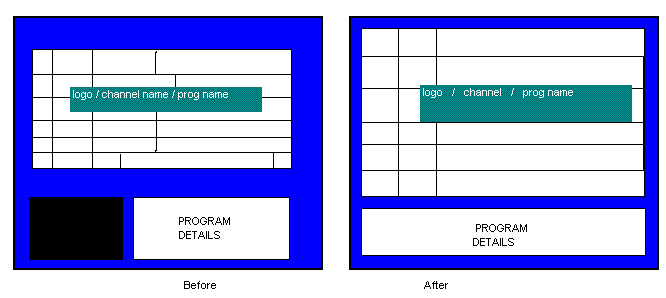
What I'd like to do with the Guide is have 8 lines at a rather large font (In a manner similar to the MyRadioGuide.XML supplied by Doodles HERE .
and get rid of the TV Thumbnail in the corner (leaving more room for the Guide and Program info which should remove some of the need for text scrolling) I'd still like to keep the active channel's Audio running though)
I've attached a small .GIF with the idea I'm trying to get across (in a before/after- I don't have Photoshop on this Laptop so MS Paint will have to do :oops: )

I'm hoping this will make the guide much more clearer to view from a distance and will also (due to the lack of a TV thumbnail) improve system performance a little bit.
I know that some of the skins claim to be rather simple but if they have the TV Screen already removed then it'd be very useful.

Thanks alot for reading, I hope someone can help me out.
Anff
 

Attachments

  • MPGuideLayout.GIF
    MPGuideLayout.GIF
    6.8 KB

Anff

Portal Member
April 26, 2008
19
1
Home Country
England England
Sorted

It's OK- I managed to fiddle with the existing XML.

Once I get it all tested in RealWorld conditions- I'll put it up here for anyone to use.

:)
 

Anff

Portal Member
April 26, 2008
19
1
Home Country
England England
As promised- here's my customised TV Guide.

I'm afraid I don't have any screenshots at the moment, however it's not far off my original design.

Now I'm going to try and replicate the effect in MyRadioGuide :)
 

Anff

Portal Member
April 26, 2008
19
1
Home Country
England England
Hmmm,

nothing to download....
Your right- I tried to download there and it just opened a blank window :confused:

Here's the code- you can copy/paste to a new file if that's any help.

Code:
<window>
	<id>600</id>
	<defaultcontrol>2</defaultcontrol>
	<allowoverlay>no</allowoverlay>
<controls>
	<control>
		<description>BG</description>
		<type>image</type>
		<id>1</id>
		<posX>0</posX>
		<posY>0</posY>
		<width>720</width>
		<height>576</height>
		<texture>background.png</texture>
	</control>
	<control>
		<type>image</type>
		<id>1</id>
		<posX>60</posX>
		<posY>20</posY>
		<texture>television_logo.png</texture>
	</control>
<!-- font changed from 13 to 16 -->
	<control>
		<description>Date</description>
  		<type>label</type>
  		<id>1</id>
  		<posX>520</posX>
  		<posY>68</posY>
  		<label>#date</label>
  		<align>left</align>
  		<font>font16</font>
  		<textcolor>ffa9d0f7</textcolor>
  	</control>
<!-- This time is the current time, font changed from 13 to 16-->
 	<control>
  		<description>Time</description>
  		<type>label</type>
  		<id>1</id>
  		<posX>430</posX>
  		<posY>68</posY>
  		<label>#time</label>
  		<align>left</align>
  		<font>font16</font>
  		<textcolor>ffa9d0f7</textcolor>
	</control>
	<control>
		<description>Guide Text Label</description>
		<type>label</type>
		<id>1</id>
		<posX>250</posX>
		<posY>65</posY>
		<label>4</label>
		<font>font16</font>
		<align>right</align>
		<textcolor>FFFFFFFF</textcolor>
	</control>
<!-- This is the main Panel for the EPG. height from 265 to 340 -->
	<control>
		<description>TVGUIDE Panel</description>
		<type>image</type>
		<id>2</id>
		<posX>60</posX>
		<posY>90</posY>
		<width>605</width>
		<height>340</height>
		<colordiffuse>60ffffff</colordiffuse>
		<texture>-</texture>
	</control>

	<!-- Timeheader background must be dedfined before Timeheader label template -->
	<!-- b/c Timeheader is on the background and will be rendered first -->
	<control>
		<description>time header background image template</description>
		<type>image</type>
		<id>90</id>
		<posX>186</posX>
		<posY>90</posY>
		<width>115</width>
		<height>28</height>
		<texture>button_small_settings_nofocus.png</texture>
	</control>
	<control>
		<description>time header label template</description>
		<type>label</type>
		<id>40</id>
		<posX>186</posX>
		<posY>90</posY>
		<font>font13</font>
		<textcolor>FFB2D4F5</textcolor>
	</control>
	<control>
		<description>day spin control</description>
		<type>spincontrol</type>
		<id>6</id>
		<posX>60</posX>
		<posY>92</posY>
		<showrange>no</showrange>
		<orientation>horizontal</orientation>
		<align>center</align>
		<reverse>yes</reverse>
		<onleft>6</onleft>
		<onright>8</onright>
		<textureUp>arrow_round_right_nofocus.png</textureUp>
		<textureDown>arrow_round_left_nofocus.png</textureDown>
		<textureUpFocus>arrow_round_right_focus.png</textureUpFocus>
		<textureDownFocus>arrow_round_left_focus.png</textureDownFocus>
	</control>
	<control>
		<description>time interval spin control</description>
		<type>spincontrol</type>
		<id>8</id>
		<posX>165</posX>
		<posY>100</posY>
		<showrange>no</showrange>
		<orientation>vertical</orientation>
		<align>center</align>
		<reverse>yes</reverse>
		<textureUp>arrow_round_up_nofocus.png</textureUp>
		<textureDown>arrow_round_down_nofocus.png</textureDown>
		<textureUpFocus>arrow_round_up_focus.png</textureUpFocus>
		<textureDownFocus>arrow_round_down_focus.png</textureDownFocus>
		<onleft>6</onleft>
		<onright>8</onright>
	</control>
	<!-- EXPERIMENT: width from 124 to 120, height from 34 to 40-->
	<control>
		<description>Channel template</description>
		<type>image</type>
		<id>20</id>
		<posX>62</posX>
		<posY>125</posY>
		<width>124</width>
		<height>40</height>
	</control>
<!-- image size from 32x32 to 38x38 -->
	<control>
		<description>Channel image template</description>
		<type>image</type>
		<id>7</id>
		<posX>0</posX>
		<posY>0</posY>
		<width>38</width>
		<height>38</height>
		<keepaspectratio>yes</keepaspectratio>
		<centered>no</centered>
		<zoom>yes</zoom>
		<texture>defaultVideoBig.png</texture>
	</control>
<!-- channel label is channels name. posx from 35 to 40, width from 65 to 60, font from 13 to 16 -->
	<control>
		<description>channel Label template</description>
		<type>label</type>
		<id>18</id>
		<posX>40</posX>
		<posY>5</posY>
		<width>60</width>
		<height>15</height>
		<font>font16</font>
		<textcolor>FFFFFFFF</textcolor>
	</control>

<!-- changed posx from 250 to 200, posy 358 to 420 and width from 200 to 350, also font from 16 to 20 -->
	<control>
		<description>Current program title</description>
		<type>fadelabel</type>
		<id>13</id>
		<posX>200</posX>
		<posY>420</posY>
		<width>350</width>
		<align>left</align>
		<label>#TV.Guide.Title</label>
		<font>font20</font>
		<textcolor>FFFFFFFF</textcolor>
	</control>
<!-- removed to experiement with the "unknown" mark next to prog title, changed posx from 460 to 560 and posy from 358 to 420
	<control>
      <description>Current program sub-title</description>
      <type>fadelabel</type>
      <id>13</id>
      <posX>560</posX>
      <posY>420</posY>
      <width>200</width>
      <align>left</align>
      <label>#TV.Guide.EpisodeName</label>
      <font>font25</font>
      <textcolor>FFFFFFFF</textcolor>
   </control> -->
<!-- posx from 250 to 50 AND posy from 530 to 420 (originaly to 358). font from 16 to 25 -->
	<control>
		<description>Current program time</description>
		<type>label</type>
		<id>14</id>
		<posX>50</posX>
		<posY>420</posY>
		<label>#TV.Guide.Time</label>
		<align>left</align>
		<font>font25</font>
		<textcolor>FFB2D4F5</textcolor>
	</control>
	<!-- at this point, have removed 'Control' referance for Genre as I never use it 
	<control>
		<description>Current program genre</description>
		<type>label</type>
		<id>27</id>
		<posX>470</posX>
		<posY>530</posY>
		<label>#TV.Guide.Genre</label>
		<align>left</align>
		<font>font16</font>
		<textcolor>FFB2D4F5</textcolor> 
	</control> -->
	<!-- Extended text for prog info. posX from 250 to 32, posy from 390 to 440, width from 400 to 458, height from 131 to 155 -->
	<control>
		<description>Description1</description>
		<type>textboxscrollup</type>
		<id>15</id>
		<posX>35</posX>
		<posY>440</posY>
		<width>658</width>
		<height>155</height>
<seperator>----------------------------------------------------------------------------------------------</seperator>
<!-- font from 13 to 16 -->
		<label>#TV.Guide.Description</label>
		<font>font16</font>
		<textcolor>FFFFFFFF</textcolor>
	</control>
<!--	<control>
		<description>template for program genre light area</description>
		<type>label</type>
		<id>23</id>
		<label>-</label>
		<font>font10</font>
		<textcolor>FF101010</textcolor>
	</control>	-->
	<control>
		<description>template for program title light area</description>
		<type>label</type>
		<id>24</id>
		<visible>no</visible>
		<label>-</label>
		<font>font13</font>
		<textcolor>FF101010</textcolor>
	</control>
	<control>
		<description>vertical timeline</description>
		<type>image</type>
		<id>25</id>
		<posX>30</posX>
		<posY>125</posY>
		<height>203</height>
		<colordiffuse>c0ffffff</colordiffuse>
		<texture>tvguide_slider.png</texture>
	</control>
	<control>
		<description>template for program title darkarea </description>
		<type>label</type>
		<visible>no</visible>
		<id>26</id>
		<label>-</label>
		<font>font13</font>
		<textcolor>FFFFFFFF</textcolor>
	</control>
<!--	<control>
		<description>template for genre  dark area</description>
		<type>label</type>
		<visible>no</visible>
		<id>30</id>
		<label>-</label>
		<font>font13</font>
		<textcolor>FFFFFFFF</textcolor>
	</control> -->
<!--	These two elemnts refer to the TV Background at the bottom corner of the TVGuide screen.
	<control>
		<description>TV background</description>
		<type>image</type>
		<id>98</id>
		<posX>32</posX>
		<posY>366</posY>
		<width>208</width>
		<height>176</height>
		<colordiffuse>60ffffff</colordiffuse>
		<texture>previewbackground.png</texture>
	</control>
	<control>
		<description>TV preview window</description>
		<type>videowindow</type>
		<id>99</id>
		<posX>32</posX>
		<posY>366</posY>
		<width>208</width>
		<height>176</height>
		<action>18</action>
		<textureFocus>video_window_focus.png</textureFocus>
	</control> -->
	<control>
		<description>Horizontal scrollbar</description>
		<type>hscrollbar</type>
		<id>28</id>
		<posX>61</posX>
		<posY>327</posY>
		<width>599</width>
		<height>20</height>
		<visible>yes</visible>
	</control>
	<control>
		<description>Vertical scrollbar</description>
		<type>vscrollbar</type>
		<id>29</id>
		<posX>659</posX>
		<posY>124</posY>
		<width>20</width>
		<height>203</height>
		<visible>yes</visible>
	</control>
	<control>
		<description>record pin</description>
		<type>image</type>
		<id>31</id>
		<posX>440</posX>
		<posY>530</posY>
		<texture>tvguide_record_button.png</texture>
		<visible>no</visible>
	</control>
</controls>
</window>

It's still got my development notes in there too (for those who can't read XML, it's the writing between the <!-- and --> ) so you can see the main changes I've made.

Once I've finished playing with settings, I'll remove all the notes and parts I never use (such as Genre items)
 

Freak

Portal Member
May 28, 2007
31
0
48
Home Country
Hi,

I'm trying to do something similar, and am also in need of help...

I have looked at Skins like "Replicant" compared to the default "Blue" skin.
And in the Replicant "mytvguide.xml" it just shows the channels you have listed.....
With others such as Blue, It ends up repeating channels so i have channels repeated list cycle.

Does anyone know which part of the XML relates to this, I have tried looking at both,
but so far can't find the relevant bit... Any help would be appreciated.
I would like to have it more like replicant, which just shows each channel once..
 

Users who are viewing this thread

Top Bottom