Two issues: Blue screen of Death and No TV Signal (1 Viewer)

Donald J. Michaud

Portal Pro
September 14, 2015
75
4
61
Home Country
United States of America United States of America
I have MP1 loaded. I can preview my channels using the TV-Server Configuration mode, but when I go into MP1 itself, I get "No TV Signal". About 50/50 of the time, I get that "blue screen of death" stating that I have a "Page fault" issue and then my computer reboots. The message is longer, but I cannot read it; it is flashed too fast. I do have logging active. So, if there is a particular log file you want to review, tell me what file, and I will send it.

Also, while I am in MP1, I select TV. When TV is up, the "TV On" button is disabled. When I try to activate the button to watch TV, it flashes as if I am activating it but will not stay on. Occasionally, I get a pop-up to select my TV server, which is already active and connected.
 

Donald J. Michaud

Portal Pro
September 14, 2015
75
4
61
Home Country
United States of America United States of America
Here is a the last batch of error logs that happened during the last two blue screen events. If you need more, I can send you more. Thanks. djm
 

mm1352000

Retired Team Member
  • Premium Supporter
  • September 1, 2008
    21,544
    8,236
    Home Country
    New Zealand New Zealand
    Hello again Donald

    About BSODs...
    In our previous conversations you mentioned your extensive experience in the IT industry, so you probably know BSODs are typically caused by hardware or driver problems. I also previously indicated there are known BSOD issues with certain versions of the driver for the HVR-2250 tuner that you're using.

    Have you tried testing your hardware stability (memtest86 etc.)?
    Have you tried the older tuner driver in the thread I previously linked?


    About "No TV Signal" messages...
    The log files you provided don't show this problem, so the only advice I can offer is to check your channel configuration (ie. the frequency override thing) is correct.


    About the "TV On" button...
    You haven't provided MediaPortal log files, so it's also difficult to help you with this. The only advice I can offer is to ensure MediaPortal knows which channel you're trying to view (...because MP can't start TV without a channel selection). To be specific: try selecting a channel (ie. click channels -> select channel) rather than using the "TV On" button.


    If the advice above doesn't help then please post fresh log files using the Watchdog tool.
    http://wiki.team-mediaportal.com/1_MEDIAPORTAL_1/16_Support/3_Forums/2_Log_Files

    Option 2 (or 1) for problems that you can reproduce in a MediaPortal session; otherwise option 3.
     

    Donald J. Michaud

    Portal Pro
    September 14, 2015
    75
    4
    61
    Home Country
    United States of America United States of America
    Sorry for the delay in getting back to you. Here is the list of logs as of today. I just tried to use MP1 and the results are the same. I did not experience the "Page Fault" error message and its forced reboot.

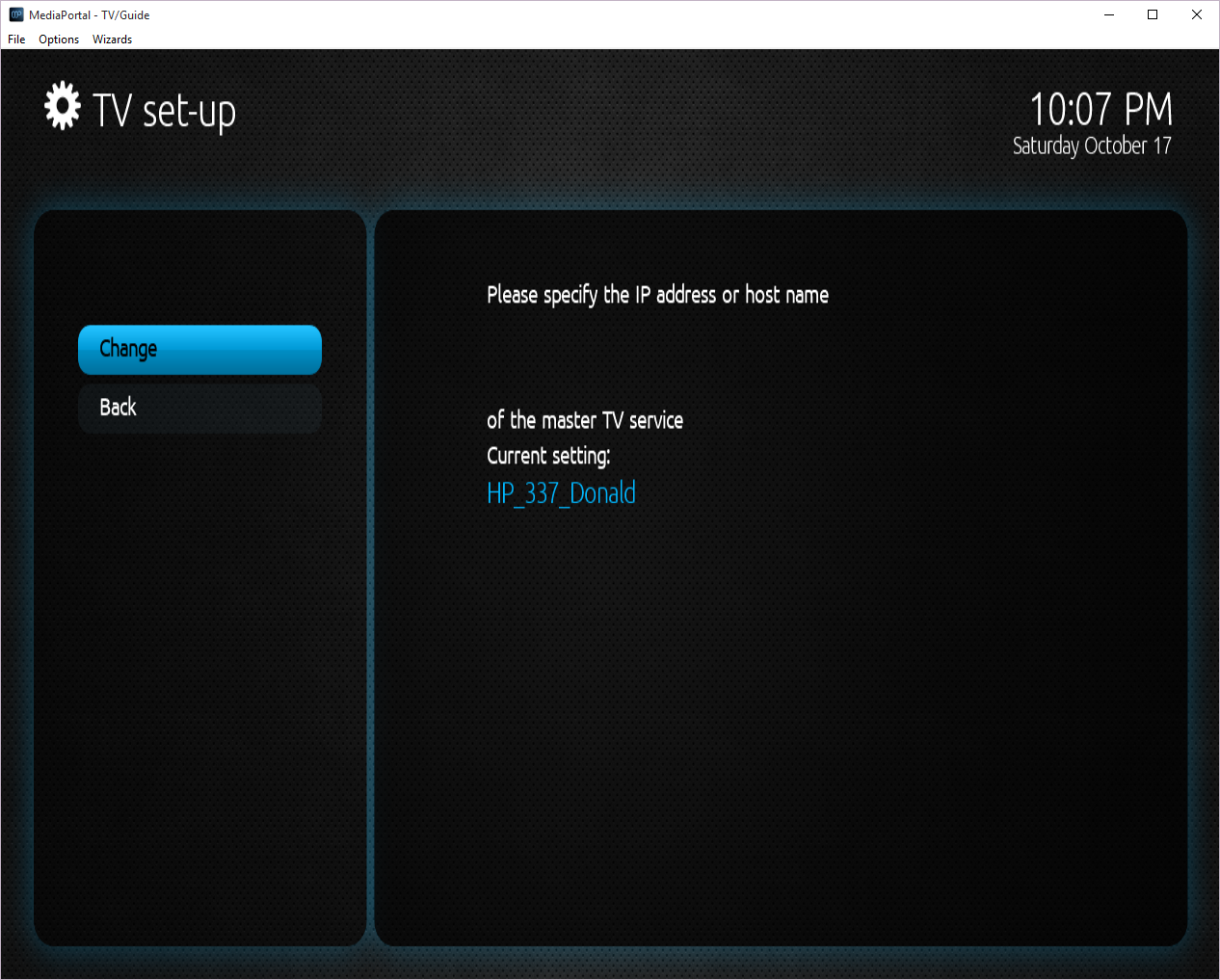
    Again, I can preview channels no problem in the TV-Config tool, but not in MP1. Attached are the logs and a screen shot about the server.[DOUBLEPOST=1445134969][/DOUBLEPOST]Also...
    a. Here is the Watch Dog File that was requested.
    b. My Hauppauge WinTV-HVR-2250 tuner card is running Driver 7.9.1.33006 (dated 01/06/2015).
    c. I did not run any hardware test like those noted (memtest). I do not know of any specific for this problem. If you have any preferred tests you do want me to run, please note them and I will perform them.
    djm
     

    Attachments

    • MP Server Issue.png
      MP Server Issue.png
      831.4 KB
    Last edited:

    mm1352000

    Retired Team Member
  • Premium Supporter
  • September 1, 2008
    21,544
    8,236
    Home Country
    New Zealand New Zealand
    Thank you for the log files Donald (y)
    I can see the problem. One of the important configuration files appears to have been corrupted (probably in connection with one of the BSODs you've been experiencing).
    To solve the problem, simply delete c:\ProgramData\Team MediaPortal\MediaPortal\gentle.config. :)
     

    mm1352000

    Retired Team Member
  • Premium Supporter
  • September 1, 2008
    21,544
    8,236
    Home Country
    New Zealand New Zealand
    Oh, one more thing. The log files show that you're trying to click the "TV on" button, but MediaPortal has no idea which channel you want to view. You need to click "channels" and select a channel to start viewing.
     

    Donald J. Michaud

    Portal Pro
    September 14, 2015
    75
    4
    61
    Home Country
    United States of America United States of America
    I deleted the gentle.config file like you requested. I rebooted my PC. I loaded MP1 and it still does the same thing. The "TV ON" is not active, and I cannot select any channels for viewing.
    I went into the MP Configuration app to make sure that The TV open turns on upon start-up and it is active. (see below).
    upload_2015-10-18_9-28-9.png

    Now, when I go to save the setting in MP Configuration, I get an error message:
    upload_2015-10-18_9-29-33.png

    Now what do I do? I hope I do not need to uninstall and re-install... This was very painful to get it to this point... Please advise...[DOUBLEPOST=1445175129][/DOUBLEPOST]Is MP2 less problematic? Should I be looking at re-building everything in MP2?
     

    Donald J. Michaud

    Portal Pro
    September 14, 2015
    75
    4
    61
    Home Country
    United States of America United States of America
    Anyone have any advice? Looking to figure out what to do. djm
     

    mm1352000

    Retired Team Member
  • Premium Supporter
  • September 1, 2008
    21,544
    8,236
    Home Country
    New Zealand New Zealand
    Sorry! Somehow I missed your update! :oops:

    This is bizarre. MediaPortal should have recreated that config file automatically for you. :confused:
    To fix, please copy c:\ProgramData\Team MediaPortal\MediaPortal TV Server\gentle.config to c:\ProgramData\Team MediaPortal\MediaPortal\gentle.config.

    The "TV ON" is not active, and I cannot select any channels for viewing.
    As per my previous post: you may need to click "channels" and select a channel to start viewing.

    I know you have enabled the "turn on TV" option, so normally you'd expect TV to be shown automatically. However, that option can't work:
    1. Until the gentle.config file error is fixed.
    2. Unless MediaPortal knows which channel you were previously watching.

    I hope I do not need to uninstall and re-install.
    You do not need to uninstall and reinstall. Please don't attempt that.
     

    Users who are viewing this thread

    Top Bottom