
Unsuccessfully scanning channels on both Analog and Digital tuners (1 Viewer)

DugieHowsa

Portal Member
February 26, 2008
27
1
Home Country
United States of America United States of America
MediaPortal & TV Server Version: 1.0.0.0 RC2
Windows Version: Windows XP Home SP2
CPU Type: Intel Core2Duo
HDD: 250GB
Memory: 1GB
Video Card: GeForce 8500GT
1. TV Card: Vista View
1. TV Card Type: Saber DNA-1n1-I


I am attempting to do an initial install of the TV Server. I have been unsuccessfully scanning channels on both analog and digital tuners. The analog scan does not appear to do anything, and the config utility appears to hang. The Digital scan goes through the paces, but does not find any acceptable signals.

I live in a fairly dence metropolitan area. And although I would not expect to get every channel, I would expect to get atleast one channel from the over the air antenna on the ATSC tuner.

I'm also not sure why the NTSC tuner is not picking up anything off of the cable.

Thanks in advance for your feedback.
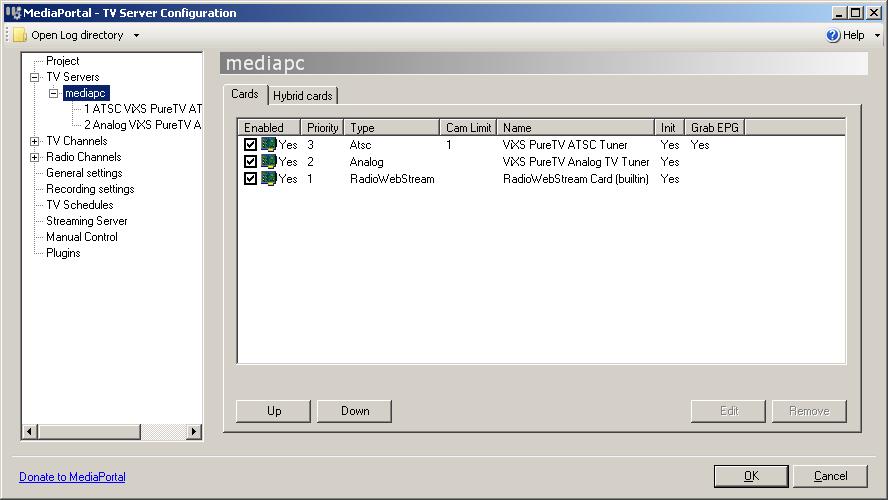
 

Attachments

  • tvserver-4.JPG
    tvserver-4.JPG
    55.5 KB

DugieHowsa

Portal Member
February 26, 2008
27
1
Home Country
United States of America United States of America
Upgraded to XP SP3.
Did another fresh uninstall and re-install of RC2.
Applied all Windows Update Patches.
Running Windows Media Player 11
Re-applied dvb tuner patch.
.Net Framework versions 2.0, 3.0 & 3.5
Visual C++ 2005 SP1 Redistributable
DirectX 9.0c (4.09.0000.0904)
Windows firewall service is stopped.
Running newest version of VistaView drivers: VistaView SaberDA-1N1-I V6.210012

Attaching log files after trying to scan NTSC and ATSC tuners again.

Noticing that the Netherlands is mentioned in the log. Not sure why this is, as I have set the locations on both tuners to the United States. Is there another menu from which this setting can be modified? Does an XML file need to be modified?

Any thoughts as to why I cannot scan for channels on either tuner?
 

infinite.loop

Retired Team Member
  • Premium Supporter
  • December 26, 2004
    16,154
    4,133
    127.0.0.1
    Home Country
    Austria Austria
    99% of our team members are located in europe.
    so providing support for these issues is a "problem", because we develop "blind".

    Asidie is the only team member we have who is able to receive NTSC/ATSC/NA-SAT.
    i would suggest that you send him a pm, maybe he can help you out.
    as far as i know, "everything" works nicely for him. :)
     

    damjan123

    New Member
    May 31, 2008
    4
    0
    Home Country
    Slovenia Slovenia
    I have the same problem using
    win xp sp 2
    fresh install of Mp RC2 + tv server
    liveview flyvideo2000 tv card

    When try to scan for channels my tv-server config stops responding. Can clik on any item in the menu but the image stays the same. The tv-server does't find any channels. I have tried to add them manualy and do a preiview but the message i get is: Preiview failed UnknownError.

    I did aply this week patch but with no luck.

    Any idea what could be wrong?
     

    ced007

    Portal Pro
    July 7, 2008
    247
    17
    Haute-Savoie
    Home Country
    France France
    Hello,
    Not sure it can help you but I had a similar problem with XP SP3, MP RC2 and another TV card (FloppyDTV S2), I was not able to scan channels with MP while it was working with the FloppyDTV software.
    The only solution that works was to use Vista instead of XP, then everything worked smoothly.
    Here is my thread:
    https://forum.team-mediaportal.com/get-support-90/floppydtvs2-no-signal-42646/
    Ced
     

    damjan123

    New Member
    May 31, 2008
    4
    0
    Home Country
    Slovenia Slovenia
    MP RC2 without tv server solution

    :DHello all

    First of all thx ced007 for suggdestion. I have tried to install mp2 with vista but unfortenatly it didn't work for me. After that i did reinstall XP and try again. I spend a lot of time with my comp.

    After all i did it.

    I don't know if this also apply for mp with tv server but it is my next step.

    First i discoverd that my Flyvideo is not supported by MP so i got this old winfast 2000xp analog tv card witch is supported.
    - I did clean xp install
    - installed xp sp3
    1 problem - install mp without tv server, nothing changed i still got the same error as before. I could't add a tv card under Mediaportal configuration / tv section. The problem was "no tv card detected".
    1 solution - The DeviceId in CaptureCardDefinitions.xml was different that it should be (you can find how to on forum) so I copy the correct one in the CaptureCardDefinitions.xml.

    2 problem - I tried to edit the TV tunner so i could scan for channels but the error was no graph avalible for this device. It took me long time to solve this. It means that MP couldnt initialize you're card.
    2 solution - You have to manualy edit you're CaptureCardDefinitions.xml. And install some 3rd party soft. I tried to make it work in graphedit software but i couldnt. There was no real instructions and no how to's about this. But i read a few forums and find out one that had a working solution. Here it is:

    IN my case i got a software encoder card and need to have MPEG encoder software (filters) installed. I did that with installing InterVideo WinDVR3.

    Instead of puting names of MPEG encoder, etc you simply use %....% in few lines in CaptureCardDefinitions.xml

    Here is my original CaptureCardDefinitions.xml :

    <capturecard commercialname="WinFast TV2000 XP" capturename="WinFast TV2000 XP WDM Video Capture" devid="ven_109e&amp;dev_036e&amp;subsys_6606107d&amp;rev_11">
    <capabilities tv="true" radio="false" mpeg2="true" mce="false" sw="false" bda="false"></capabilities>
    <tv>
    <interface cat="mux" video="" audio="" mpeg2="0"></interface>
    <filters>
    <filter cat="tvtuner" name="WinFast TV2000 XP WDM TVTuner" checkdevice="true"></filter>
    <filter cat="tvaudio" name="WinFast TV2000 XP WDM TVAudio" checkdevice="true"></filter>
    <filter cat="crossbar" name="WinFast TV2000 XP WDM Crossbar" checkdevice="true"></filter>
    <filter cat="capture" name="WinFast TV2000 XP WDM Video Capture" checkdevice="true"></filter>
    <filter cat="audcapture" name="%soundcard%" checkdevice="true"></filter>
    <filter cat="videncoder" name="LeadTek MPEG Video Encoder" checkdevice="false"></filter>
    <filter cat="audencoder" name="LeadTek Audio Encoder" checkdevice="false"></filter>
    <filter cat="mux" name="Leadtek MPEG Muxer" checkdevice="false"></filter>
    </filters>
    <connections>
    <connection sourcefilter="tvtuner" sourcepin="0" sinkfilter="crossbar" sinkpin="%tvtuner%"></connection>
    <connection sourcefilter="tvtuner" sourcepin="1" sinkfilter="tvaudio" sinkpin="0"></connection>
    <connection sourcefilter="tvaudio" sourcepin="0" sinkfilter="crossbar" sinkpin="%audiotuner%"></connection>
    <connection sourcefilter="crossbar" sourcepin="0" sinkfilter="capture" sinkpin="0"></connection>
    <connection sourcefilter="capture" sourcepin="0" sinkfilter="videncoder" sinkpin="0"></connection>
    <connection sourcefilter="audcapture" sourcepin="0" sinkfilter="audencoder" sinkpin="0"></connection>
    <connection sourcefilter="videncoder" sourcepin="0" sinkfilter="mux" sinkpin="0"></connection>
    <connection sourcefilter="audencoder" sourcepin="0" sinkfilter="mux" sinkpin="1"></connection>
    </connections>
    </tv>
    </capturecard>

    and working version CaptureCardDefinitions.xml

    <capturecard commercialname="WinFast TV2000 XP" capturename="WinFast TV2000 XP WDM Video Capture" devid="ven_109e&amp;dev_036e&amp;subsys_6609107d&amp;rev_11">
    <capabilities tv="true" radio="false" mpeg2="true" mce="false" sw="false" bda="false"></capabilities>
    <tv>
    <interface cat="mux" video="" audio="" mpeg2="0"></interface>
    <filters>
    <filter cat="tvtuner" name="WinFast TV2000 XP WDM TVTuner" checkdevice="true"></filter>
    <filter cat="tvaudio" name="WinFast TV2000 XP WDM TVAudio" checkdevice="true"></filter>
    <filter cat="crossbar" name="WinFast TV2000 XP WDM Crossbar" checkdevice="true"></filter>
    <filter cat="capture" name="WinFast TV2000 XP WDM Video Capture" checkdevice="true"></filter>
    <filter cat="audcapture" name="%soundcard%" checkdevice="true"></filter>
    <filter cat="videncoder" name="%videoencoder%" checkdevice="false"></filter>
    <filter cat="audencoder" name="%audioencoder%" checkdevice="false"></filter>
    <filter cat="mux" name="%mpegmux%" checkdevice="false"></filter>
    </filters>
    <connections>
    <connection sourcefilter="tvtuner" sourcepin="0" sinkfilter="crossbar" sinkpin="%tvtuner%"></connection>
    <connection sourcefilter="tvtuner" sourcepin="1" sinkfilter="tvaudio" sinkpin="0"></connection>
    <connection sourcefilter="tvaudio" sourcepin="0" sinkfilter="crossbar" sinkpin="%audiotuner%"></connection>
    <connection sourcefilter="crossbar" sourcepin="1" sinkfilter="capture" sinkpin="0"></connection>
    <connection sourcefilter="capture" sourcepin="0" sinkfilter="videncoder" sinkpin="0"></connection>
    <connection sourcefilter="audcapture" sourcepin="0" sinkfilter="audencoder" sinkpin="0"></connection>
    <connection sourcefilter="videncoder" sourcepin="0" sinkfilter="mux" sinkpin="0"></connection>
    <connection sourcefilter="audencoder" sourcepin="0" sinkfilter="mux" sinkpin="1"></connection>
    </connections>
    </tv>
    </capturecard>

    3 problem - After changing .xml config file and installing InterVideo WinDVR3 i could scan for channels. I did my first successfull chanel scan and i had a voice but there was no video. Just a black box.

    3 solution - After more reading on forums i decidet that i should try PowerCinemaCM5_trial.exe witch also has some MPEG video and audio encoders. I did install that and run MP. I didn't get the picture but what happend was tha i couldnt shut down audio from my tv tunner !!! I uninstall application did a restart of XP. I run the MP again just to see if i can get the audio or is that also coruppted but now i also got the picture.

    new problem - I was happy that i can finaly see my TV but now i got 2 second delay from audio to video and the MP crashes after 10 min of watching tv.

    Maybe i will find some solution for that in comming week. I hope this helps someone. If you need some additional info drop me an email.

    regards Damjan
     

    Ruhar Insane

    Portal Member
    August 27, 2007
    9
    0
    Home Country
    United States of America United States of America
    Sorry if this is an obvious question but here goes...

    Could anyone tell me where the CaptureCardDefinitions.xml file is located for TV Server 1.0 RC4?

    Thanks
     

    damjan123

    New Member
    May 31, 2008
    4
    0
    Home Country
    Slovenia Slovenia
    Easyest way is to serch for IT. I gave up on MP. Too many things to do for you're self and finaly it doesnt work as it should.

    I'm thinking of buying some simular software.

    br
    Damjan :confused:
     

    Ruhar Insane

    Portal Member
    August 27, 2007
    9
    0
    Home Country
    United States of America United States of America
    I have tried searching for it and have come up with nothing. I was curios if it had been moved to the SQL server or a different file name.

    I like MediaPortal because of the possibilities of tv server and pushing to other pcs.
     

    Users who are viewing this thread

    Top Bottom