
v1.2.0 Client Can Not View Live TV from v1.2.0 Server (2 Viewers)

solas989

MP Donator
  • Premium Supporter
  • January 17, 2009
    95
    9
    Ohio
    Home Country
    United States of America United States of America
    See my profile for TV Server details (recently upgraded to 1.2.0 - so its not 1.1.3 anymore :)

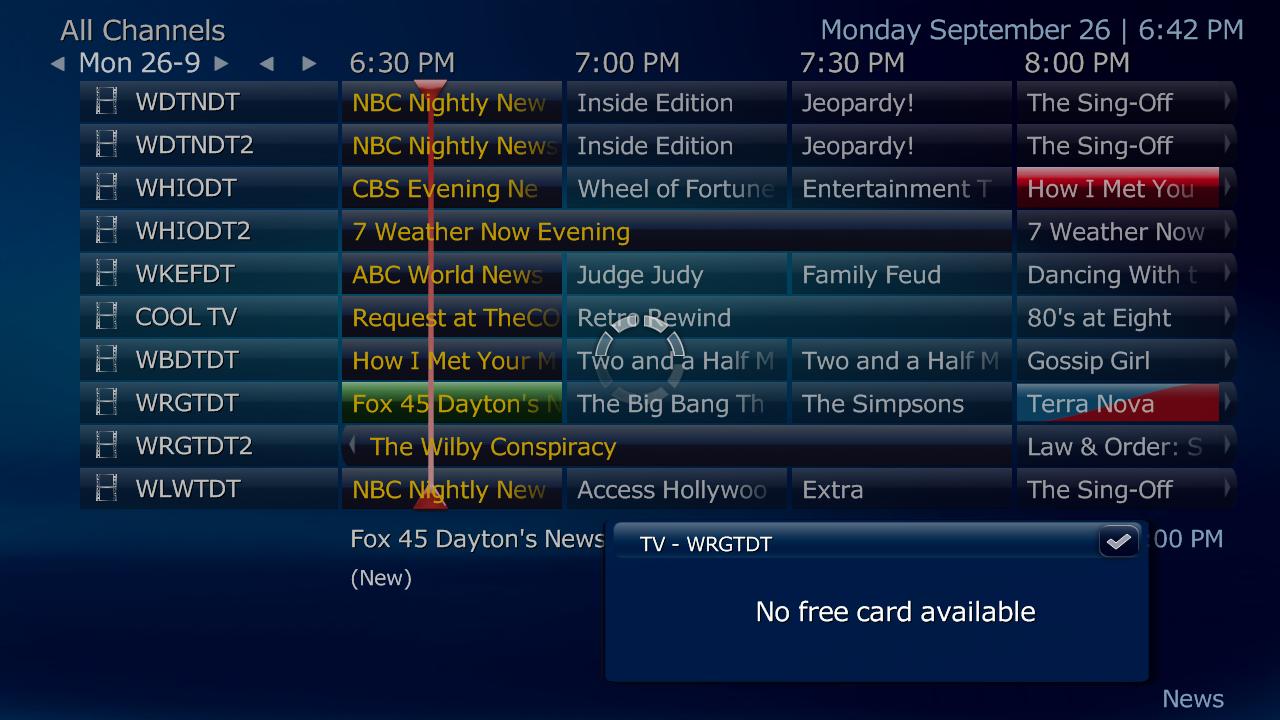
    I have a HP DV1435DX laptop with the client 1.2.0 installed (upgraded from 1.1.3) as well. When I try to view live TV from the TV Guide; on the first attempt it just returns me back to the TV Guide. When I click on a channel again (second time) it gives me an error "No Free Card Available" --> Then all the recordings are gone too, so I cant watch any recordings.

    If I restart MP on the client (laptop) I can view the recordings again but I can not view Live TV (issue at hand :)

    All my channels are Free OTA ATSC and marked so in the TV Server (green icons) and they all play correctly on the TV Server, and record correctly too.

    Attached are my client and server logs. I set the client to DEBUG and I think the server was set to INFO.

    Recording play just fine from the TV Server as well.

    Laptop Setup (hey it was free, cant complain about that)
    Core2Duo 6500
    HDMI --> LCD (audio and video via Intel Mobile 4500 chipset) at 1280X720 (issues at native resolution at this time)
    4GB RAM
    VISTA 64Bit
    Client Only
    Connected via Ethernet (ie not wireless)

    What could I have setup wrong? I dont know if it worked in 1.1.3 or not...I dont think I ever tried.

    Let me know if I need to gather anything else!

    Thank you so much!
     

    mm1352000

    Retired Team Member
  • Premium Supporter
  • September 1, 2008
    21,544
    8,236
    Home Country
    New Zealand New Zealand
    Hi solas989

    Please use the watchdog with option 1 to reproduce the problem and grab your complete set of client logs. We need more than just MediaPortal.log and Configuration.log to be able to track this one down...

    0. Close MP.
    1. Find the "debug mode" link in the "Team MediaPortal" folder in your start menu and start it.
    2. Select option 1 "report a bug...".
    3. Click proceed.
    4. Reproduce the problem.
    5. Close MP - this will trigger the watchdog to create a zip file with all the info we need on your desktop.
    6. Post the zip file here.

    Cheers!
    mm
    :)
     

    solas989

    MP Donator
  • Premium Supporter
  • January 17, 2009
    95
    9
    Ohio
    Home Country
    United States of America United States of America
    I have attached the requested Watchdog MP logs.

    Again, if there is anything else I need to do please let me know. I will attach these logs for all other issues I may encounter.

    Process:
    Start MP
    Navigate: TV --> Recorded TV --> Play Recorded TV for a few seconds (Futurama) --> Stop
    ESC back to TV Main Screen --> Choose TV Guid --> Choose TV Channel (WRGT)
    Nothing happens --> No errors --> Just goes back to TV Guide
    Choose the same TV Channel (WRGT) --> Get message No Free Card Available (see attached screen shot)
    Navigate back to Recorded TV --> No options to play.

    Thank you

    Solas
     

    Attachments

    • NoFreeCardAvailable.jpg
      NoFreeCardAvailable.jpg
      121.1 KB

    mm1352000

    Retired Team Member
  • Premium Supporter
  • September 1, 2008
    21,544
    8,236
    Home Country
    New Zealand New Zealand
    Hi again Solas

    It looks like there is a *serious* problem. The symptom is this:

    2011-09-25 19:56:24.485800 [Info.][MPMain(1)]: TVHome.ViewChannelAndCheck(): View channel=WRGTDT

    2011-09-25 19:56:24.846800 [Debug][MPMain(1)]: CiMenu: PrepareCiMenu

    2011-09-25 19:56:26.347800 [Info.][MPMain(1)]: succeeded:confused:ucceeded TvControl.VirtualCard

    2011-09-25 19:56:26.356800 [Info.][MPMain(1)]: tvhome:startplay

    2011-09-25 19:56:26.364800 [Info.][MPMain(1)]: tvhome:file:

    2011-09-25 19:56:26.371800 [Info.][MPMain(1)]: tvhome:startplay channel=null

    Basically you attempt to tune a channel. TV Server comes back and says "okay I've tuned it so you can start watching", but when MediaPortal attempts to check what channel the tuner is tuned to TV Server says that the tuner isn't tuned to any channel at all.

    It has been quite tricky to work out what is going on since the times in the logs from the laptop and the server don't exactly match. I know this is a pain, but would it be possible to get you to:
    - adjust the time on your laptop to match the TV Server PC *exactly* (to the second if possible)
    - delete your TV Server logs (open TV Server configuration, click "open log directory" in the top left hand corner, delete all the files you find there)
    - reproduce the problem on the laptop using the watchdog
    - post the zip file from the watchdog and the full set of files from the TV Server log directory

    Also, *anything* you can tell me about this problem may be important...
    - how often does it occur?
    - is it only with specific channels?
    - etc.

    In particular, if there is a specific set of steps and circumstances that will lead to this problem occurring then I want to know about it.

    Best regards,
    mm
     

    solas989

    MP Donator
  • Premium Supporter
  • January 17, 2009
    95
    9
    Ohio
    Home Country
    United States of America United States of America
    It is easier for me to do what you requested than debug them so it is not problem to sync times and get a new set of logs.

    It happens 100% of the time on all channels. Well I tried 4 channels, but I will try them all when I get home from work as well as getting the necessary logs.

    Thank you for the time thus far taken.

    Solas
     

    solas989

    MP Donator
  • Premium Supporter
  • January 17, 2009
    95
    9
    Ohio
    Home Country
    United States of America United States of America
    Here are my logs. Same process as above but with using channel ABC. Both the debug and server logs are attached.

    Let me know if i need to do anything else.

    Thanks!!!

    Solas
     

    Attachments

    • TVServer.zip
      6.7 KB

    mm1352000

    Retired Team Member
  • Premium Supporter
  • September 1, 2008
    21,544
    8,236
    Home Country
    New Zealand New Zealand
    Hi again Solas

    *Thank you* for taking the time to do that - the logs are great. :D

    So based on what I see, I think there may be two different things happening here. First, the availability from the laptop issue, but also something strange and possibly completely unrelated going on in TV Server. The second thing is the thing that I spotted in your previous logs, but both are equally concerning.

    On the first topic: in this set of MediaPortal client logs I see...

    [COLLAPSE]2011-09-29 20:54:51.469800 [Info.][MPMain(1)]: OnMessage exception:confused:ystem.Net.Sockets.SocketException: The requested name is valid, but no data of the requested type was found


    Server stack trace:

    at System.Net.Dns.GetAddrInfo(String name)

    at System.Net.Dns.InternalGetHostByName(String hostName, Boolean includeIPv6)

    at System.Net.Dns.GetHostAddresses(String hostNameOrAddress)

    at System.Runtime.Remoting.Channels.RemoteConnection..ctor(SocketCache socketCache, String machineAndPort)

    at System.Runtime.Remoting.Channels.SocketCache.GetSocket(String machinePortAndSid, Boolean openNew)

    at System.Runtime.Remoting.Channels.Tcp.TcpClientTransportSink.SendRequestWithRetry(IMessage msg, ITransportHeaders requestHeaders, Stream requestStream)

    at System.Runtime.Remoting.Channels.Tcp.TcpClientTransportSink.ProcessMessage(IMessage msg, ITransportHeaders requestHeaders, Stream requestStream, ITransportHeaders& responseHeaders, Stream& responseStream)

    at System.Runtime.Remoting.Channels.BinaryClientFormatterSink.SyncProcessMessage(IMessage msg)


    Exception rethrown at [0]:

    at System.Runtime.Remoting.Proxies.RealProxy.HandleReturnMessage(IMessage reqMsg, IMessage retMsg)

    at System.Runtime.Remoting.Proxies.RealProxy.PrivateInvoke(MessageData& msgData, Int32 type)

    at TvControl.IController.DeleteInvalidRecordings()

    at TvPlugin.TvRecorded.OnPageLoad()

    at MediaPortal.GUI.Library.GUIWindow.OnMessage(GUIMessage message)[/COLLAPSE]

    My first instinct based on the "DNS" and "remoting" phrases is that there is some kind of networking issue - maybe DNS related. I note that you're using "192.168.1.75" as the address of the TV Server. I assume that this is the static IP address for the TV Server.

    Have you tried using the TV Server hostname?
    Also, have you checked whether disabling firewalls on the server and laptop make any difference?
    Have you also disabled the IPv6 network protocol in the network adapter properties? (IPv6 can sometimes cause trouble)

    Regarding the second error: it is like your TV Server is constantly trying to tune "WHIODT" for some reason, but it never gets past figuring out which tuners are available. Are you able to examine/query your TV Server database directly? I'm just wondering whether there is a "rogue" schedule in there somewhere that is causing this. Checking the database directly would be the best way to determine whether this is the case, otherwise you could check the schedules section in TV Server configuration for schedules on that channel...

    I'm at work at the moment so I can't spend any further time examining the logs now, but I will of course attempt to do so over the weekend.

    Best regards,
    mm
     

    solas989

    MP Donator
  • Premium Supporter
  • January 17, 2009
    95
    9
    Ohio
    Home Country
    United States of America United States of America
    I have disabled IPV6 on the server - I dont think I have disabled it on the laptop - I have done little to configure it. I will disable IPV6 on the laptop as well because I have no use for it.

    Yes, the ip listed is my static ip of my server. The laptop is a dynamic ip obtained for the router at startup (the laptop is turned off ever night for the time being while testing is going on). I will put in the host name and try that this weekend.

    The only firewalls used are Windows Firewall - and I would imagine there would be other issues if the firewall was improperly setup. However, I will disable both for future testing to eliminate that as a suspect.

    I did notice yesterday after testing and shutting down the laptop, that on my tv server under manual control, it had my laptop as still tuning a channel - I did not catch with channel before I deleted it because I didnt want to interfere with recordings and my laptop was off, that and I was tired and not thinking all the way.

    I can query the MySql database directly - I will return the results of the schedule table this weekend too. In the TV server, there is one schedule with a line through it - maybe that is what you are looking for? It worked afaik bc it recorded. I recently deleted all my schedules (tv service off - delete in table - tv service on) and setup my schedules again, under 1.2.0 (all before working with the laptop)

    Thanks for all your help thus far

    Solas
     

    solas989

    MP Donator
  • Premium Supporter
  • January 17, 2009
    95
    9
    Ohio
    Home Country
    United States of America United States of America
    Thank you so much for all your help!!! It now works

    Apparently I had somehow enabled IPV6 on the TV Server and had disabled it on the laptop (maye with SP1 install, idk). That is one of the first things I usually disable since there is no need for it yet for 99% of the time. Once I disabled IPV6 on the server, it all worked well.

    All that for a moronic step - oh I really appreciate the time you spent to help me!!!

    Solas

    Issue Resoloved
     

    mm1352000

    Retired Team Member
  • Premium Supporter
  • September 1, 2008
    21,544
    8,236
    Home Country
    New Zealand New Zealand
    Excellent! :)

    Did you also manage to work out why TV Server seems to be constantly trying to tune "WHIODT"?
     

    Users who are viewing this thread

    Top Bottom