Vista Hardware Acceleration not working? (1 Viewer)

krusty2die4

Portal Member
April 6, 2008
31
0
Home Country
Germany Germany
very funny. presents a custom graph with powerDVD codec/ffdshow audio dec as a remotegraph from powerdvd-player...har har.
and congrats to ffdshow. now you´ve got a crappy software decoder on your system that nether supports dxva nor multi-cpu. i´m bored. next time use google before you ask for help.
 

Paranoid Delusion

Moderation Manager
  • Premium Supporter
  • June 13, 2005
    13,052
    2,978
    Cheshire
    Home Country
    United Kingdom United Kingdom
    Just read on the avsforum about this

    The latest Nvidia drivers (169.25) have a bug that requires a very simple fix - in the Nvidia settings, you simply go into Enhancements and adjust the Edge Enhancement from 0% to 1% and click Apply. Completely fixed the problem, even fixed my streaming problem...all my stuff plays perfect under Vista Media Center now.

    Might this also apply to MP and current driver, don't think you will break anything :)
     

    krusty2die4

    Portal Member
    April 6, 2008
    31
    0
    Home Country
    Germany Germany
    PowerDVD doesn´t show a graph, because it does not use directshow.

    View attachment 24241

    Ugh !! or do you mean the actual player :)

    Of course I was talking about PowerDVD Player because that was the threadstarter´s problem- he didn´t see a graph when running PwrDVD-Player. Why not? Because uses only own source filters and codecs, not DS...:rolleyes:
     

    Jeditrav

    Portal Pro
    May 17, 2007
    319
    20
    Home Country
    New Zealand New Zealand
    PowerDVD doesn´t show a graph, because it does not use directshow.

    View attachment 24241

    Ugh !! or do you mean the actual player :)

    Of course I was talking about PowerDVD Player because that was the threadstarter´s problem- he didn´t see a graph when running PwrDVD-Player. Why not? Because uses only own source filters and codecs, not DS...:rolleyes:


    Umm, no - I'm not interested in using PowerDVD as an external player, if that was the problem I'd be at the PowerrDVD forums; read original post, HW acceleration is working with standalone player, it's when using the PowerDVD codec from within MediaPortal that I am having troubles getting HW acceleration to work...:rolleyes:
     

    krusty2die4

    Portal Member
    April 6, 2008
    31
    0
    Home Country
    Germany Germany
    read original post

    original post edited today :rolleyes:

    P.S - I've also tried with PowerDVD8 codec. same problem. And when I try GraphEdit, I 'connect to remote graph', select the 'remote filter graph', click OK, and nothing happens, no graph.

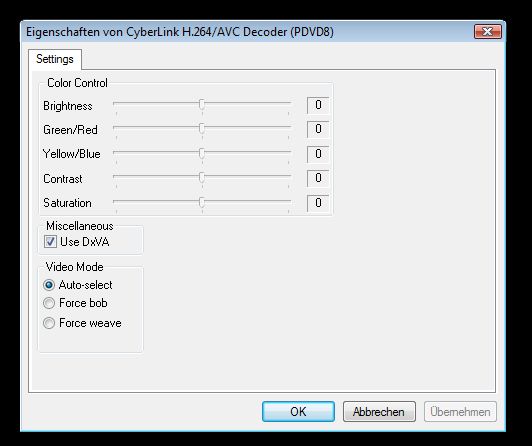
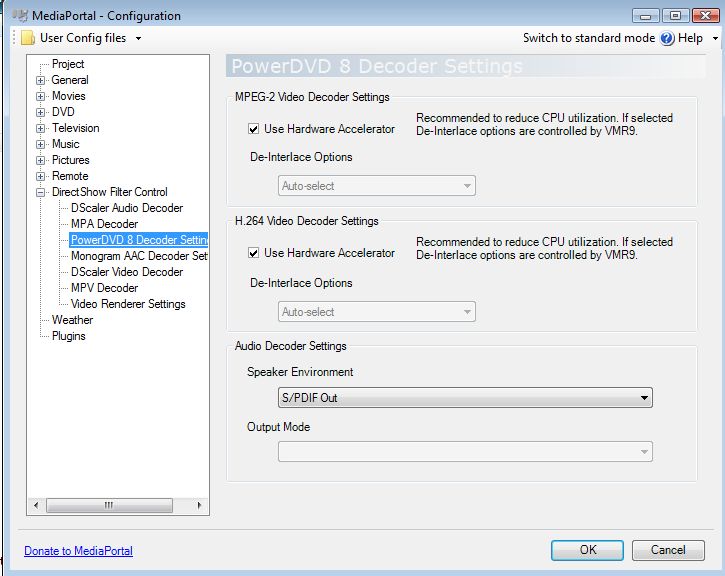
    Anyhow, as i said, DXVA itself is working on Vista- but definitely not with ffdshow or CoreAVC or any other renderer than EVR. Therefore Vista and PowerDVD Codec. In PowerDVD H.264 Codec, you have to enable dxva manually, not only in MP Config/PwrDVD8 Settings (look at snap 1+2)

    You might take a look at my today opened support- Thread. There I posted Filtergraphs for working DXVA 2.0 (with proof :) )

    https://forum.team-mediaportal.com/...s-drops-50-all-frames-interlaced-stuff-43627/

    It also works fine with progressive stuff from MP, just the interlaced h.24 ones cause droped frames (stutter) because the MP graph seems to have issues with EVR...just have a look
     

    Attachments

    • snap1.jpg
      snap1.jpg
      25.1 KB
    • snap2.jpg
      snap2.jpg
      60.8 KB

    Jeditrav

    Portal Pro
    May 17, 2007
    319
    20
    Home Country
    New Zealand New Zealand
    read original post

    original post edited today :rolleyes:

    P.S - I've also tried with PowerDVD8 codec. same problem. And when I try GraphEdit, I 'connect to remote graph', select the 'remote filter graph', click OK, and nothing happens, no graph.

    Anyhow, as i said, DXVA itself is working on Vista- but definitely not with ffdshow or CoreAVC or any other renderer than EVR. Therefore Vista and PowerDVD Codec. In PowerDVD H.264 Codec, you have to enable dxva manually, not only in MP Config/PwrDVD8 Settings (look at snap 1+2)

    You might take a look at my today opened support- Thread. There I posted Filtergraphs for working DXVA 2.0 (with proof :) )

    https://forum.team-mediaportal.com/...s-drops-50-all-frames-interlaced-stuff-43627/

    It also works fine with progressive stuff from MP, just the interlaced h.24 ones cause droped frames (stutter) because the MP graph seems to have issues with EVR...just have a look

    Original post was edited for clarity, no need for further misunderstanding.

    I was having troubles with progressive channels and interlaced channels; both dropping lots of frames, jerky, poorly detailed images.

    Your thread looks most interesting, will be following closely; currently reinstalling Vista so will look closer into this later:D
     

    Users who are viewing this thread

    Top Bottom