
Volume button on MCE remote don't work (1 Viewer)

Kent Hansen

New Member
January 2, 2012
2
0
Home Country
Denmark Denmark
MediaPortal Version 1.2.2:

Hi folks

I have a bit of a problem with my Genuine RC6 Microsoft remote after i have upgraded til MP 1.2.2

All the buttons on the remote works perfectly except for the volume up/down. When i click the volume up button nothing happens but when i click the volume down button it comes up with the actions menu according to the "section" i'm in. ( See picture)

udklip1.jpg


Is there anybody who can help me ??

Regards
Kent
 

ianc

MP Donator
  • Premium Supporter
  • December 29, 2007
    132
    1
    wicklow
    Home Country
    Ireland Ireland
    Do you have more information?
    Were the volume buttons previously programmed to control your tv?
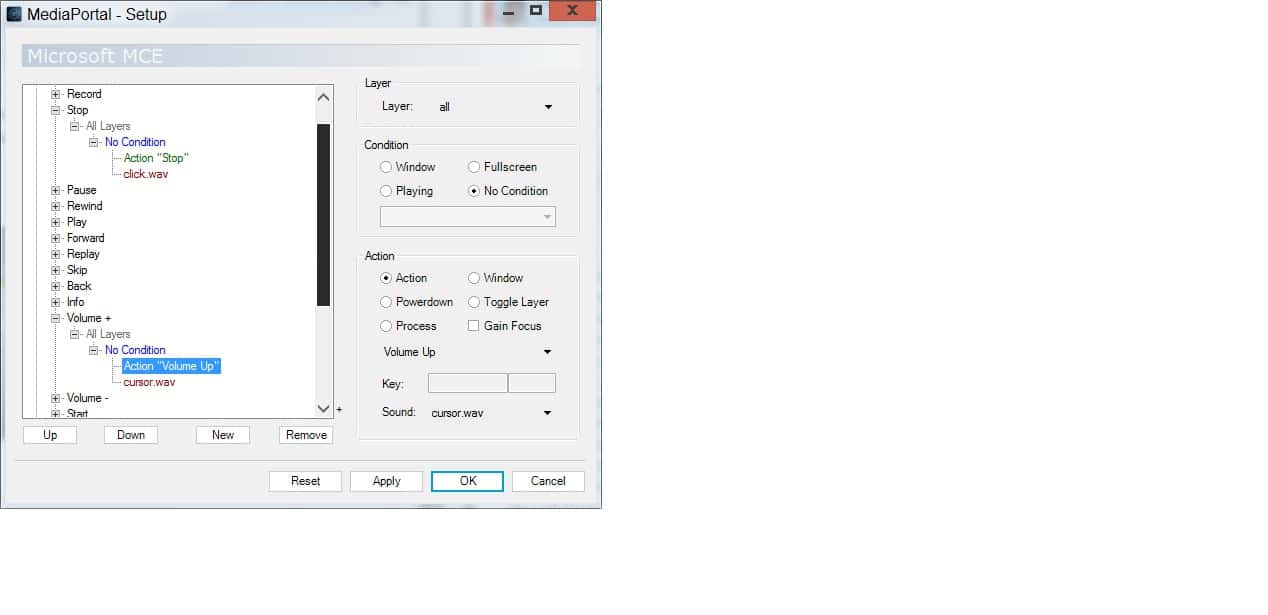
    Is there any strange mapping in MP Configuration->Remote->Microsoft MCE->Mappings
    It should look like the attached jpeg
     

    Attachments

    • setup.jpg
      setup.jpg
      85.8 KB

    Kent Hansen

    New Member
    January 2, 2012
    2
    0
    Home Country
    Denmark Denmark
    No the the remote has never been used or programmed to other functions than MP

    And the mapping seems to be ok ( see picture )

    udklip2c.th.jpg
    [/URL] Uploaded with ImageShack.us[/IMG]
     

    ianc

    MP Donator
  • Premium Supporter
  • December 29, 2007
    132
    1
    wicklow
    Home Country
    Ireland Ireland
    Kent,
    I presume "Use Microsoft Remote" is ticked in the Remote section of MP Config.
    I don't think I can help further but I suggest you capture and upload the logs so someone can further diagnose.

    Regards

    Ian
     

    elliottmc

    Retired Team Member
  • Premium Supporter
  • August 7, 2005
    14,927
    6,061
    Cardiff, UK
    Home Country
    United Kingdom United Kingdom
    I have three systems with 1.2.2 and genuine MCE remotes. All are working perfectly. There is certainly no 'general' problem.

    Of course, the remotes and their receivers are all different.

    If you want help fixing this, you will have to follow bug reporting guidelines and provide logs.

    Mark
     

    msalam

    Portal Member
    April 16, 2008
    4
    0
    Home Country
    Canada Canada
    i am not suggesting there is a "general" issue. It worked before the update and not after. Simply saw the thread and was trying to participate in the dialogue of pursuing a resolution.
     

    billie

    New Member
    February 13, 2012
    1
    0
    50
    Home Country
    United States of America United States of America
    i am having the exact same problem...

    i am using Hauppauge PVR- kit

    it worked fine before i upgraded
     

    Badger.66

    MP Donator
  • Premium Supporter
  • April 5, 2011
    3
    0
    Home Country
    United Kingdom United Kingdom
    I too am suffering with the exact same issue.

    I have remapped the Volume buttons to other actions but they result remains the same.
    Volume up button gives no change.
    Volume down button the action menu with the Aspect ratio pops up. (regardless of what I've ,mapped it to!)

    Changing Skins makes no difference

    I have 3 Keyboard drivers for Microsoft eHome
    and the
    microsoft eHome drivers for the
    HID and the USB

    as a rough and ready solution I have remapped the Channel Changing Buttons to be volume changing and this works

    I have checked the Microsoft MCE.xml
    -<button code="16" name="Volume +"> <action sound="back.wav" cmdproperty="103" command="ACTION" conproperty="-1" condition="*" layer="0"/> </button> -<button code="17" name="Volume -"> <action sound="back.wav" cmdproperty="102" command="ACTION" conproperty="-1" condition="*" layer="0"/> </button> -<button code="13" name="Start"> <action sound="click.wav" cmdproperty="115" command="ACTION" conproperty="-1" condition="*" layer="0" focus="True"/> </button> -<button code="18" name="Channel Up"> <action sound="cursor.wav" cmdproperty="103" command="ACTION" conproperty="-1" condition="*" layer="0"/> <action sound="cursor.wav" cmdproperty="9979" command="ACTION" conproperty="7701" condition="WINDOW" layer="0"/> <action sound="cursor.wav" cmdproperty="9979" command="ACTION" conproperty="7700" condition="WINDOW" layer="0"/> <action sound="cursor.wav" cmdproperty="31" command="ACTION" conproperty="2007" condition="WINDOW" layer="0"/> <action sound="cursor.wav" cmdproperty="95" command="ACTION" conproperty="1" condition="WINDOW" layer="0"/> <action sound="cursor.wav" cmdproperty="95" command="ACTION" conproperty="602" condition="WINDOW" layer="0"/> <action sound="cursor.wav" cmdproperty="95" command="ACTION" conproperty="3003" condition="WINDOW" layer="0"/> </button> -<button code="19" name="Channel Down"> <action sound="cursor.wav" cmdproperty="102" command="ACTION" conproperty="-1" condition="*" layer="0" focus="True"/> <action sound="cursor.wav" cmdproperty="9980" command="ACTION" conproperty="7701" condition="WINDOW" layer="0"/> <action sound="cursor.wav" cmdproperty="9980" command="ACTION" conproperty="7700" condition="WINDOW" layer="0"/> <action sound="cursor.wav" cmdproperty="30" command="ACTION" conproperty="2007" condition="WINDOW" layer="0"/> <action sound="cursor.wav" cmdproperty="94" command="ACTION" conproperty="1" condition="WINDOW" layer="0"/> <action sound="cursor.wav" cmdproperty="94" command="ACTION" conproperty="602" condition="WINDOW" layer="0"/> <action sound="cursor.wav" cmdproperty="94" command="ACTION" conproperty="3003" condition="WINDOW" layer="0"/> </button>


    Mine looks as below.

    I personally believe that the reciever is interpretting the signal for Volume up or down as something else.

    I have recently been trying a Harmony remote and have the software for that installed.

    Does this sound like something to do with that?

    Thanks in advance.
     

    Users who are viewing this thread

    Top Bottom