Denmark
MediaPortal Version: 1.1 beta
MediaPortal Skin: blue3 wide
Windows Version: Windows 7 Ultimate x64
CPU Type: Intel(R) Core(TM)2 Duo CPU E6750 @ 2.66GHz
HDD: SAMSUNG HD501LJ 500GB
Memory: 4GB
Motherboard: Asus P5k SE
Video Card: ASUS EAH2400
Video Card Driver: latest
Sound Card: HDA XPLOSION 7.1 DTS CONNECT
Sound Card AC3:
Sound Card Driver: latest
1. TV Card: Hauppauge HVR1300
1. TV Card Type: analog, DVB-T
1. TV Card Driver:
2. TV Card:
2. TV Card Type:
2. TV Card Driver:
3. TV Card:
3. TV Card Type:
3. TV Card Driver:
4. TV Card:
4. TV Card Type:
4. TV Card Driver:
MPEG2 Video Codec: microsoft dtv-dvd
MPEG2 Audio Codec: ffdshow - latest
h.264 Video Codec: microsoft dtv-dvd
Satelite/CableTV Provider:
HTPC Case:
Cooling:
Power Supply:
Remote: MCE
TV:
TV - HTPC Connection:
Hi.
I have got a problem getting my htpc to turn volume up and down inside MP. My setup is a little special because i have got a HDA XPLOSION 7.1 DTS CONNECT wich is capable of hardware encoding dts or ac3 on the fly.
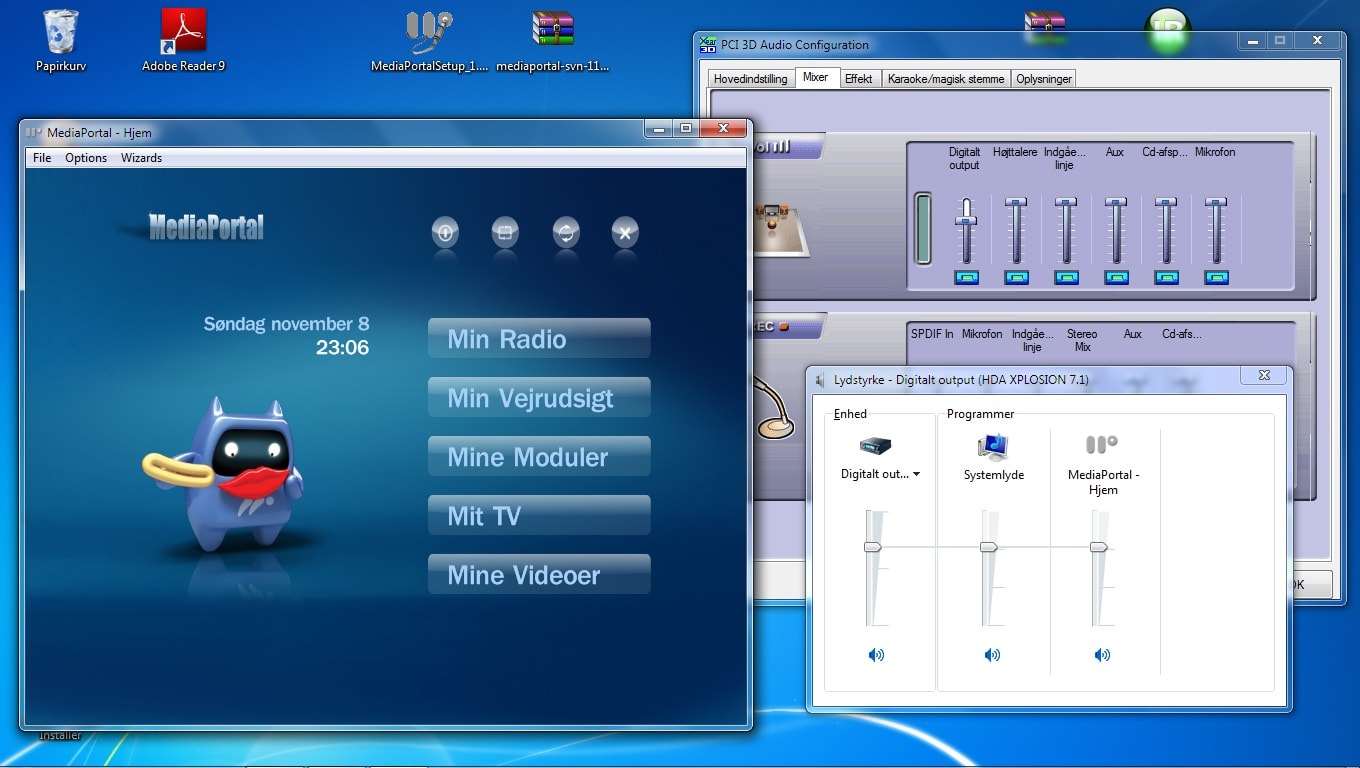
1 If I choose wave in mediaportal configuration nothing happens when i push vol + -. The only thing that happens is that I can see is that the slider in the win7 mixer for MP is moving up and down (see attached picture)
2 If I choose Master volume nothing happens at all when I push vol + -.
But I would very much like MP to control the digital output (see attached picture) becuse if I turn volume up and down manually on the "digitalt output" slider (see attached picture) it is working perfect. But should that one not be the master volume???
Is there a way to to get Mediaportal to control that particular volume slider? (wich should be the master volume I think)
PS. This has nothing to do with passthru. My soundcard is behaving like a regular analog soundcard. The only difference is that it is hardware encoding the sound to dts or ac3
MediaPortal Skin: blue3 wide
Windows Version: Windows 7 Ultimate x64
CPU Type: Intel(R) Core(TM)2 Duo CPU E6750 @ 2.66GHz
HDD: SAMSUNG HD501LJ 500GB
Memory: 4GB
Motherboard: Asus P5k SE
Video Card: ASUS EAH2400
Video Card Driver: latest
Sound Card: HDA XPLOSION 7.1 DTS CONNECT
Sound Card AC3:
Sound Card Driver: latest
1. TV Card: Hauppauge HVR1300
1. TV Card Type: analog, DVB-T
1. TV Card Driver:
2. TV Card:
2. TV Card Type:
2. TV Card Driver:
3. TV Card:
3. TV Card Type:
3. TV Card Driver:
4. TV Card:
4. TV Card Type:
4. TV Card Driver:
MPEG2 Video Codec: microsoft dtv-dvd
MPEG2 Audio Codec: ffdshow - latest
h.264 Video Codec: microsoft dtv-dvd
Satelite/CableTV Provider:
HTPC Case:
Cooling:
Power Supply:
Remote: MCE
TV:
TV - HTPC Connection:
Hi.
I have got a problem getting my htpc to turn volume up and down inside MP. My setup is a little special because i have got a HDA XPLOSION 7.1 DTS CONNECT wich is capable of hardware encoding dts or ac3 on the fly.
1 If I choose wave in mediaportal configuration nothing happens when i push vol + -. The only thing that happens is that I can see is that the slider in the win7 mixer for MP is moving up and down (see attached picture)
2 If I choose Master volume nothing happens at all when I push vol + -.
But I would very much like MP to control the digital output (see attached picture) becuse if I turn volume up and down manually on the "digitalt output" slider (see attached picture) it is working perfect. But should that one not be the master volume???
Is there a way to to get Mediaportal to control that particular volume slider? (wich should be the master volume I think)
PS. This has nothing to do with passthru. My soundcard is behaving like a regular analog soundcard. The only difference is that it is hardware encoding the sound to dts or ac3