Will not grab info for a few movies. (1 Viewer)

MeHoo

Portal Member
October 16, 2008
15
0
Home Country
United States of America United States of America
Ver: 0.7.5.681

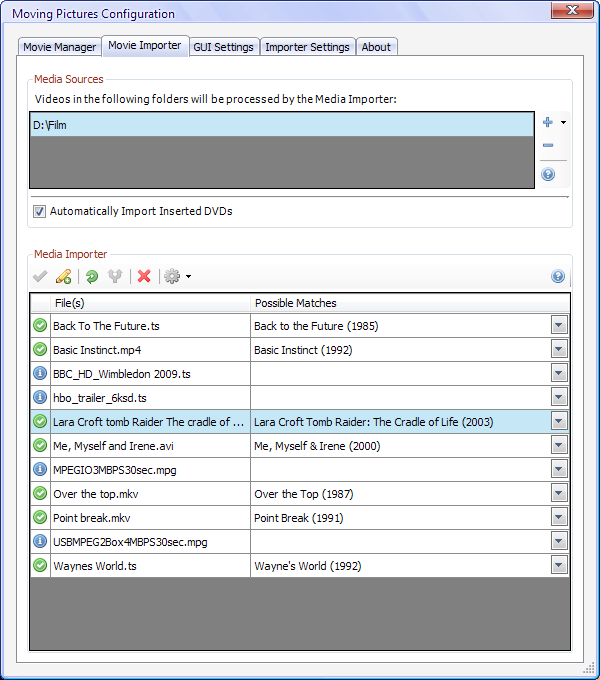
This has converted my entire catalog of some 683 movies successfully, but a few just hang up the GUI which is preventing me from even trying to use this. Those movies are:

Basic Instinct
Me, Myself and Irene
Over the top
Point break
Lara Croft tomb Raider: The cradle of life
Waynes world

These are all .mkv's in a single folder on a drive mapped to Z:\. It just sits there at "retrieveing details" and i've left it run overnight with no success. As i said this has gotten every single one of my movies aside from these and its annoying. It finds them in possible matches. I don't get why it hangs when trying to download their info.

Covert art data source is set to:

myvideos
Local data
themoviedb.org
impawards.com
moviemeter.nl

And the backdrop info sources are:

Local data
themoviedb.org

Movie detail sources:

imdb.com -6/29/2009
themoviedb.org -2/12/2009
moviemeter.nl
ofdb.de
allocine.fr

any help is appreciated. This is annoying and it doesn't make any sense.
 

surfermc

Portal Pro
May 7, 2006
369
17
Dorset
Home Country
England England
A couple of questions.
1. You say "It finds them in possible matches." Have you accepted the match?
2. Do other films work for the same directory?
 

MeHoo

Portal Member
October 16, 2008
15
0
Home Country
United States of America United States of America
All of the movies are in the same directory. Most of the others are also mkvs

yes I accept them.
 

Furetto

Moderator - Dutch Forums
April 11, 2005
664
61
52
Brussels
Home Country
Belgium Belgium
I've had problems with Basic Instinct myself. Similar symptoms as what you describe. In the end I added the cover manually and suddenly the problem was solved. The backdrop is still wrong though. I never looked further into it.
 

drealit

Portal Pro
March 15, 2008
190
17
Yep I have issues with Wayne's World. Finds the title, seems to pull down the info, but never gets to that point of finalizing it and adding it into the database (never passes the phase/icon with the green circle without a check mark).
 

pilehave

Community Skin Designer
  • Premium Supporter
  • April 2, 2008
    2,566
    521
    Hornslet
    Home Country
    Denmark Denmark
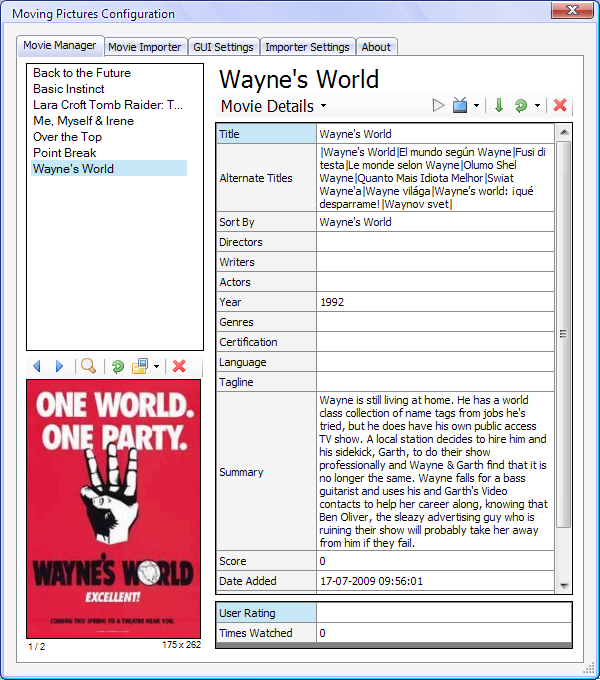
    Works for me...

    As you can see I have no problems with the mentioned movies when doing a quick test on same version of Moving Pictures. So, the grabber or the source of the grabber is not to blame.

    Maybe mediaInfo hangs because of bad files or something?
     

    Attachments

    • dump1.png
      dump1.png
      46.5 KB
    • dump2.png
      dump2.png
      142.9 KB

    drealit

    Portal Pro
    March 15, 2008
    190
    17
    Well the weird part is that it never had any issues grabbing in the past only recently. I have worked around it though by adding my own artwork (I love moviegoods.com) and then manually importing into the database then forcing it to update the information online. It pulls the data fine then... so I really don't know what's to blame here but manually importing then forcing an info update seems to work around it. Thankfully it only happened for 1 movie out of my 600 or so... that's livable.
     

    masta blasta

    Portal Member
    March 14, 2007
    25
    3
    hi

    The best way (for me) to grab the correct movieinfos is:

    1. make a folder for each movie, search on The Internet Movie Database (IMDb) the tt number for your movie
    2. create a text file that is in the tt...... number from IMDB for this Film (example: tt0468569 --> The dark knigth)
    3. set the option in moving pictures: search for info files

    then you have no problems to grab the correct movie infos

    best regards
    masta blasta

    P.S. sorry for my bad english
     

    jackflack

    MP Donator
  • Premium Supporter
  • June 15, 2008
    39
    2
    Alabama
    Home Country
    United States of America United States of America
    I have found two things that have cured 99% of my movie import problems.

    1. Have the folder name be correct. Example: (Indiana Jones II and the Temple of Doom) Holds and waits for approval. If I remove the " II " and use (Indiana Jones and the Temple of Doom) It will auto approve. It is simple things such as that, that can throw a scan off. It still finds the movie, but that's how fickle it can be.

    2. You can also name the file title the same. (refined-marley-720p.mkv) may not get its Marley and Me. So I rename a file to something like this (Marley.and.Me.720p.refined.mkv) This helps with about the last 5% of the movies that don't scan properly. Anything in the title in front of the movie name can throw it off.

    -jack
     

    Users who are viewing this thread

    Top Bottom