
Windows 7 Aero Peek issue (1 Viewer)

ChrisOfCatford

MP Donator
  • Premium Supporter
  • August 2, 2006
    210
    6
    London UK
    Home Country
    United Kingdom United Kingdom
    MediaPortal Version:1.1.0 RC1
    Windows Version: 7

    Hello,

    I just jumped from vista to Windows 7 and RC1. Only took a few hours to do a fresh install and get TV up and running. Vista took a week!!!! :D

    I love some of the new features of MP, especially the OSD in TV.

    I have an issue that I am sure can be fixed: How do I stop MP minimising with the rest of the open program windows when using Aero Peek?

    Always on top does not seem to help. I turned Aero Peek off but it still does it with mouse over of the window preview.

    Maybe it is a windows setting or maybe a MP one.

    I am sure that this is simple, but I can't seem to figure it out.

    If no-one can help me, my children will end up killing me (cBeebies rules) so this request is a mercy mission!

    Thanks in advance,
    Chris
     

    riksmith

    Portal Pro
    April 18, 2009
    1,856
    322
    Home Country
    Netherlands Netherlands
    MediaPortal Version:1.1.0 RC1
    Windows Version: 7

    Hello,

    I just jumped from vista to Windows 7 and RC1. Only took a few hours to do a fresh install and get TV up and running. Vista took a week!!!! :D

    I love some of the new features of MP, especially the OSD in TV.

    I have an issue that I am sure can be fixed: How do I stop MP minimising with the rest of the open program windows when using Aero Peek?

    Always on top does not seem to help. I turned Aero Peek off but it still does it with mouse over of the window preview.

    Maybe it is a windows setting or maybe a MP one.

    I am sure that this is simple, but I can't seem to figure it out.

    If no-one can help me, my children will end up killing me (cBeebies rules) so this request is a mercy mission!

    Thanks in advance,
    Chris

    Can you state the exact steps you follow? I am not having any problems with Aero Peek.
     

    ChrisOfCatford

    MP Donator
  • Premium Supporter
  • August 2, 2006
    210
    6
    London UK
    Home Country
    United Kingdom United Kingdom
    Sure.

    Forgot to mention dual screen. MP on monitor 1 (HDMI/DVI) Taskbar on monitor 2 (VGA).

    With TV/Video/Home screen/Any MP screen displayed on 1, open more than one, say Firefox windows.

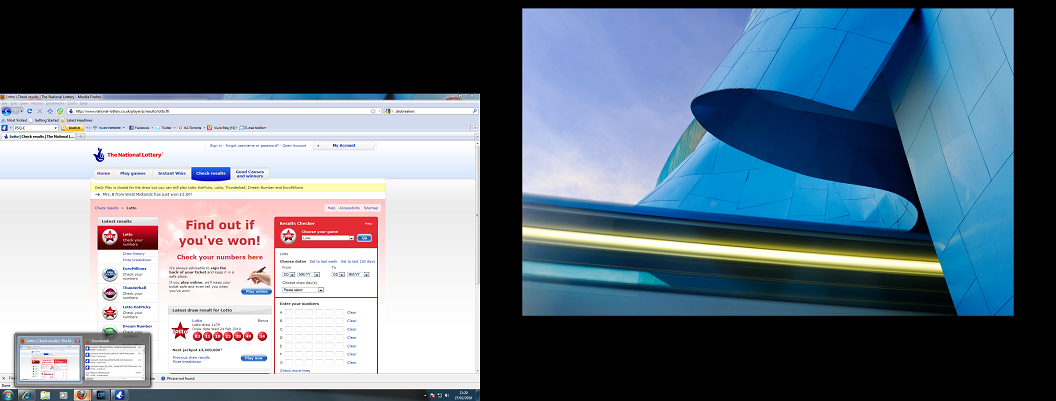
    Mouse over the Firefox icon, you get 2 previews. Mouse over either, MP disappears (along with all programs except their outline) then re-appears after either selecting a window by clicking it, or stopping mousing over the preview.

    I suppose there must be a way of excluding a program from the hiding process, but MP does not as yet?

    Chris
     

    riksmith

    Portal Pro
    April 18, 2009
    1,856
    322
    Home Country
    Netherlands Netherlands
    Forgot to mention dual screen. MP on monitor 1 (HDMI/DVI) Taskbar on monitor 2 (VGA).Chris

    Aha, that could of course be vital info. I only have one screen here so i cannot test that. With one screen it works as it should. Perhaps somebody else can test this.
     

    ChrisOfCatford

    MP Donator
  • Premium Supporter
  • August 2, 2006
    210
    6
    London UK
    Home Country
    United Kingdom United Kingdom
    Thanks riksmith,

    I have attached a screenshot showing what happens, sadly I didn't win....

    It shows screen 1 empty with the background only while I mouse over the preview in screen 2.

    Chris
     

    Attachments

    • mpgone.png
      mpgone.png
      441 KB

    Users who are viewing this thread

    Top Bottom