
Workaround for: Player not detecting .m4v files correctly --> "Unable to Play" (1 Viewer)

Andrew H

MP Donator
  • Premium Supporter
  • September 8, 2007
    574
    42
    Alabama
    Home Country
    United States of America United States of America
    MediaPortal Version: 1.2.1.0
    MediaPortal Skin: StreamedMP
    Windows Version: Win 7 32-bit Premium
    CPU Type: AMD 435 unlocked & OC'd to 14.5 x 240 = 3.48 GHz
    HDD: Kingston 64GB SSD System + 4 (WD20EARS) 2-TB for files
    Memory: G.SKILL 4GB (2 x 2GB) 240-Pin DDR3 SDRAM DDR3 1600 (PC3 12800)
    Motherboard: GIGABYTE GA-MA785GMT-UD2H AM3 AMD 785G HDMI Micro ATX
    Video Card: Gigabyte HD4550 512MB DDR3
    Video Card Driver: CCC 11.5
    Sound Card: On-board RealTek 889A
    Sound Card AC3: SPDIF via ATi HDMI Audio & HD4550
    Sound Card Driver: ATI HDMI & MicroSoft for optical SPDIF
    1. TV Card: ATi HDTV-Wonder
    1. TV Card Type: ATSC/NTSC + A/V
    1. TV Card Driver: Win-7 located/installed
    2. TV Card: AVerMedia A188C (open) White Box
    2. TV Card Type: ATSC (dual tuner on PCI-e X1)
    2. TV Card Driver: Win7 located/installed
    3. TV Card: Hauppauge HVR-1600 (includes Remote Control)
    3. TV Card Type: ATSC (dual tuner on PCI-e X1)
    3. TV Card Driver: Win-7 located/installed (IR.exe from Hauppauge)
    4. TV Card: ATi 650 Combo USB
    4. TV Card Type: ATSC/NTSC + A/V
    4. TV Card Driver: Win7 located/installed
    MPEG2 Video Codec: PDVD10, DTV M$, MPC-VideoDec & PureVideo
    MPEG2 Audio Codec: SPDIF via SPDIFer (an AC3Filter product)
    h.264 Video Codec: MPCVideoDec
    Satelite/CableTV Provider:
    HTPC Case: Antec P180 Mini
    Cooling: Scythe 92mm "KATANA3"
    Power Supply: Antec EarthWatts Green 500W
    Remote: Hauppauge 45-key
    TV: Epson PowerLite Home Cinema 8350
    TV - HTPC Connection: HDMI 1920x1080

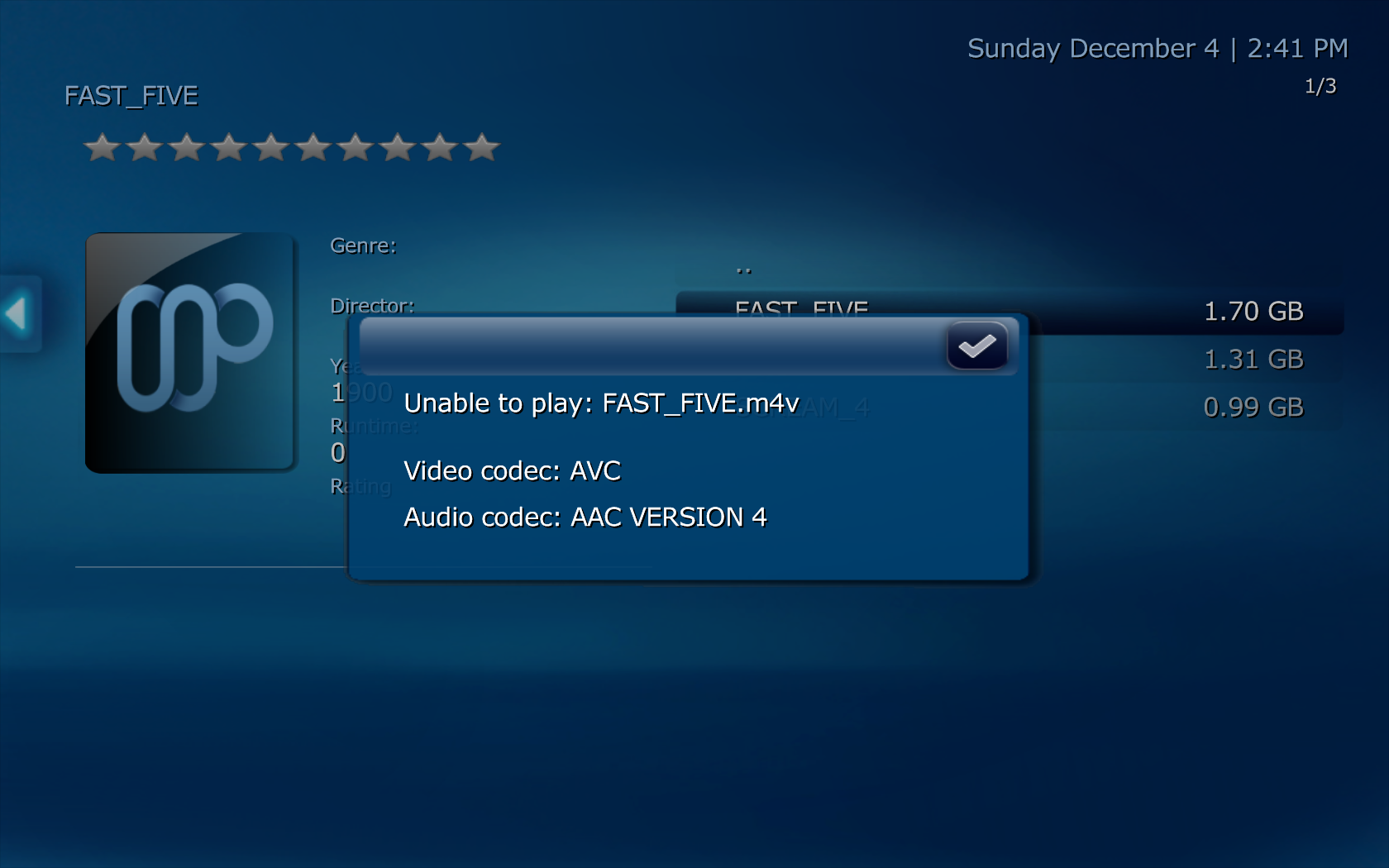
    I'm passing this on to those who may be finding some file containers will not play in the internal MP player. As I was installing MP 1.2.1 onto a new system I found I couldn't play some of my .m4v containers (created from HandBrake using the Universal Apple settings). Looking in the log I saw that MP would install the MPEG-2 codec and try to play the file -- I'd get sound but no picture! Other times it would give me a popup about being unable to play AVC video...

    Let me be clear because I've intertwined two different systems. I'd seen this "unable to play" popup on my Win XP system. On the Win 7 system I get audio without video. In each case the log shows the internal player is trying to use the MPEG-2 codec and NOT the .264 codec I'd selected under the Video codec tab. This may be a bug!

    In each case I can select the MPC - Video Decoder as the MPEG-2 (regardless of the .264 codec) and .m4v files play just grand!

    I wasn't sure where to pass this along. I think it's a bug but wanted to share my finding ASAP! And, if there's another interpretation to what I'm saying, please reply so we can figure what's really going on!
     

    Attachments

    • 14-41-36.png
      14-41-36.png
      464.3 KB

    mm1352000

    Retired Team Member
  • Premium Supporter
  • September 1, 2008
    21,544
    8,236
    Home Country
    New Zealand New Zealand
    Hi Andrew

    Let me be clear because I've intertwined two different systems. I'd seen this "unable to play" popup on my Win XP system.
    According to the logs your codec preferences for that system are:

    <section name="movieplayer">

    ...
    <entry name="audiorenderer">Default DirectSound Device</entry>

    <entry name="mpeg2audiocodec">AC3Filter</entry>

    <entry name="mpeg2videocodec">MPC - Video decoder</entry>

    <entry name="h264videocodec">ATI MPEG Video Decoder</entry>

    <entry name="aacaudiocodec">MPC - MPA Decoder Filter</entry>

    </section>

    As far as I'm aware the ATI MPEG video decoder doesn't support h.264/AVC. When you try to play an AVC video with that configuration MP seems to try to use the MPC video codec. That would suggest that the ATI codec couldn't connect and MP ended up trying to use the codec with the highest merit that can connect to the splitter pin. Unexpected things may happen when the codecs that you choose are not able to handle the media format.

    In the earlier XP logs I see attempts to use "CyberLink Video/SP Decoder (PDVD9)":

    [COLLAPSE]2011-12-04 14:41:32.781250 [Info.][MPMain(1)]: MediaInfoWrapper.MediaInfoWrapper: DLL Version : MediaInfoLib - v0.7.36BETA

    2011-12-04 14:41:32.781250 [Info.][MPMain(1)]: MediaInfoWrapper.MediaInfoWrapper: Inspecting media : \\Ssd-x3-htpc\s\mkv from Danny\Nov2011\m4v\FAST_FIVE.m4v
    2011-12-04 14:41:32.781250 [Info.][MPMain(1)]: MediaInfoWrapper.MediaInfoWrapper: Parse speed : 0.3

    2011-12-04 14:41:32.781250 [Info.][MPMain(1)]: MediaInfoWrapper.MediaInfoWrapper: FrameRate : 23.976

    2011-12-04 14:41:32.781250 [Info.][MPMain(1)]: MediaInfoWrapper.MediaInfoWrapper: Width : 720

    2011-12-04 14:41:32.781250 [Info.][MPMain(1)]: MediaInfoWrapper.MediaInfoWrapper: Height : 368

    2011-12-04 14:41:32.781250 [Info.][MPMain(1)]: MediaInfoWrapper.MediaInfoWrapper: AspectRatio : widescreen

    2011-12-04 14:41:32.781250 [Info.][MPMain(1)]: MediaInfoWrapper.MediaInfoWrapper: VideoCodec : AVC [ "avc.png" ]

    2011-12-04 14:41:32.781250 [Info.][MPMain(1)]: MediaInfoWrapper.MediaInfoWrapper: Scan type : progressive

    2011-12-04 14:41:32.781250 [Info.][MPMain(1)]: MediaInfoWrapper.MediaInfoWrapper: IsInterlaced : False

    2011-12-04 14:41:32.781250 [Info.][MPMain(1)]: MediaInfoWrapper.MediaInfoWrapper: VideoResolution : SD

    2011-12-04 14:41:32.781250 [Info.][MPMain(1)]: MediaInfoWrapper.MediaInfoWrapper: VideoDuration : 7829596

    2011-12-04 14:41:32.781250 [Info.][MPMain(1)]: MediaInfoWrapper.MediaInfoWrapper: AudioRate : 48000

    2011-12-04 14:41:32.781250 [Info.][MPMain(1)]: MediaInfoWrapper.MediaInfoWrapper: AudioChannels : 6 [ "5.1.png" ]

    2011-12-04 14:41:32.781250 [Info.][MPMain(1)]: MediaInfoWrapper.MediaInfoWrapper: AudioCodec : AAC VERSION 4 [ "aac version 4.png" ]

    2011-12-04 14:41:32.781250 [Info.][MPMain(1)]: MediaInfoWrapper.MediaInfoWrapper: HasAudio : True

    2011-12-04 14:41:32.781250 [Info.][MPMain(1)]: MediaInfoWrapper.MediaInfoWrapper: HasVideo : True

    2011-12-04 14:41:32.781250 [Info.][MPMain(1)]: MediaInfoWrapper.MediaInfoWrapper: HasSubtitles : True

    2011-12-04 14:41:32.781250 [Info.][MPMain(1)]: MediaInfoWrapper.MediaInfoWrapper: NumSubtitles : 1

    2011-12-04 14:41:32.781250 [Info.][MPMain(1)]: RefreshRateChanger.AdaptRefreshRate: 'auto refreshrate changer' disabled

    2011-12-04 14:41:32.781250 [Info.][MPMain(1)]: g_Player.Play(\\Ssd-x3-htpc\s\mkv from Danny\Nov2011\m4v\FAST_FIVE.m4v Video)

    2011-12-04 14:41:32.781250 [Info.][MPMain(1)]: VideoPlayer:play \\Ssd-x3-htpc\s\mkv from Danny\Nov2011\m4v\FAST_FIVE.m4v

    2011-12-04 14:41:32.796875 [Info.][MPMain(1)]: VideoPlayerVMR9: Enabling DX9 exclusive mode

    2011-12-04 14:41:32.796875 [Info.][MPMain(1)]: fonts.SetDevice()

    2011-12-04 14:41:32.921875 [Info.][MPMain(1)]: VMR9: added Video Mixing Renderer 9 to graph

    2011-12-04 14:41:33.125000 [Info.][MPMain(1)]: Added filter: CyberLink Video/SP Decoder (PDVD9) to graph

    2011-12-04 14:41:33.125000 [Info.][MPMain(1)]: Added filter: AC3Filter to graph

    2011-12-04 14:41:33.125000 [Info.][MPMain(1)]: DirectShowUtils: First try to insert new audio renderer Default DirectSound Device

    2011-12-04 14:41:33.125000 [Info.][MPMain(1)]: DirectShowUtils: Found audio renderer

    2011-12-04 14:41:33.234375 [Info.][MPMain(1)]: VMR9: Pixel Adaptive capable

    2011-12-04 14:41:33.234375 [Info.][MPMain(1)]: VMR9: BOB Vertical Stretch capable

    2011-12-04 14:41:33.234375 [Info.][MPMain(1)]: VMR9: setting pixel adaptive succeeded

    2011-12-04 14:41:33.281250 [Info.][MPMain(1)]: VideoPlayerVMR7: AudioLanguage CultureInfo en

    2011-12-04 14:41:33.281250 [Info.][MPMain(1)]: VideoPlayerVMR7: CultureInfo Selected active audio track language: English (0)

    2011-12-04 14:41:33.281250 [Info.][MPMain(1)]: VideoPlayer: Unable to play with reason - Cannot allocate memory because no size has been set.[/COLLAPSE]

    I have absolutely no idea what the failure at the end there means but a quick google suggests that it could be codec or splitter related. This would be one of those situations where I'd just suggest try a different codec - maybe the DivX one that you have installed already. If you're willing to try installing other codecs then try the LAV ones. There is a package in the MP Extensions Installer which makes it really easy.

    On the Win 7 system I get audio without video. In each case the log shows the internal player is trying to use the MPEG-2 codec and NOT the .264 codec I'd selected under the Video codec tab.

    Hmmm, again it looks like MP is indeed trying the MPC codec even though your configuration is:

    <entry name="audiorenderer">Default DirectSound Device</entry>

    <entry name="mpeg2audiocodec">MPC - MPA Decoder Filter</entry>

    <entry name="mpeg2videocodec">CyberLink Video Decoder (PDVD10)</entry>

    <entry name="h264videocodec">Microsoft DTV-DVD Video Decoder</entry>

    <entry name="aacaudiocodec">MONOGRAM AAC Decoder</entry>

    </section>

    In each case I can select the MPC - Video Decoder as the MPEG-2 (regardless of the .264 codec) and .m4v files play just grand!
    Have you used GraphStudio/GraphEdit to confirm which codec is really being used?

    mm
     

    Andrew H

    MP Donator
  • Premium Supporter
  • September 8, 2007
    574
    42
    Alabama
    Home Country
    United States of America United States of America
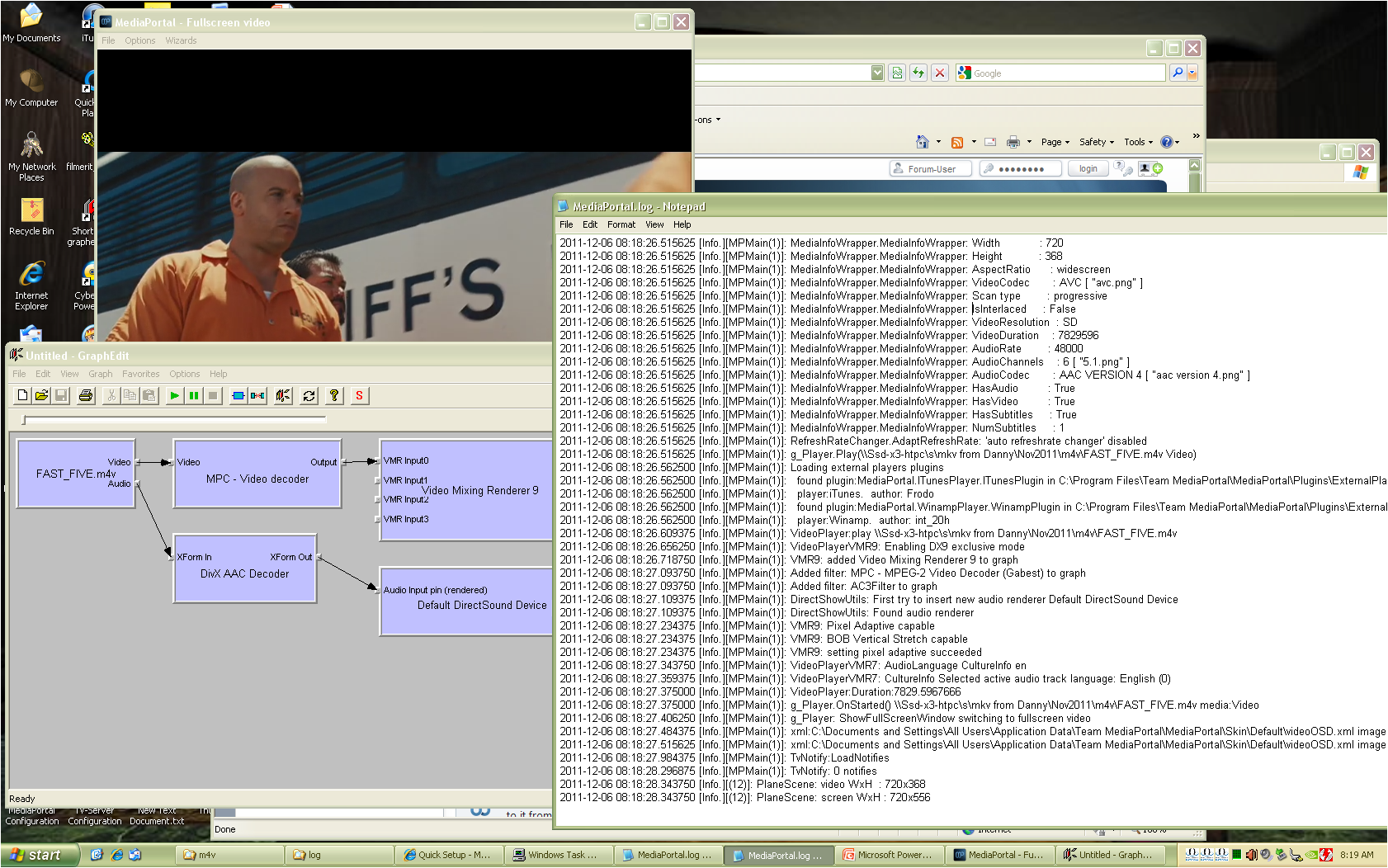
    THANKS for the reply! I hope we can figure what's happening for the community more so than for me... First off the ATi filter... I was using it to illustrate that the .264 filter filter won't even be selected, whether or not it's a reasonable choice. To follow up on your observations I repeated this test using the DivX selection. But first off I updated my XP system from 1.2.0 to 1.2.1 for consistancy.

    I selected the DivX .264 and the Gabest MPEG-2 and ran the test. As the log shows it loaded Gabest MPEG-2 but ended up playing using the MPC (see image) which it never even logged it was adding to the graph much less the DivX .264 filter. I found this interesting as it meant that whether it popped up the "Unable to Play" or not was somewhat dependent on the MPEG-2 selection (and not the .264) for my system.

    I then picked up on your point about the PDVD9 codec and selected it and the DivX. Repeated the test and this time it popped up "Unable to Play" although the log would show it was disconnecting the MPC Video Dec pins before it became unplayable - or am I not understanding the line:

    2011-12-06 08:33:48.250000 [Info.][MPMain(1)]: PlaylistPlayer: *** unable to play - \\Ssd-x3-htpc\s\mkv from Danny\Nov2011\m4v\FAST_FIVE.m4v - skipping track!​

    Thought I'd help you debug this one... Since my Win 7 system acts similar I thought we'd focus on just one (system) for now and it's the XP system I'm writing this from. At this point I've been leaning toward not using the LAV thinking it'd be just one more variable to contend with although I am interested to try them -- I read they're quite versatile.
     

    Attachments

    • XP MP 121 MPC not MPEG-2 or DivX.png
      XP MP 121 MPC not MPEG-2 or DivX.png
      521.3 KB

    Owlsroost

    Retired Team Member
  • Premium Supporter
  • October 28, 2008
    5,539
    5,038
    Cambridge
    Home Country
    United Kingdom United Kingdom
    Andrew - which splitter/source filter is in use in the graph above ?

    My own experience is that some splitters can be quite picky about what they'll connect to on their output pins (e.g. Haali seems not to like some video decoders on my system, although it can be manually forced to connect to them in GraphStudio - but not automatically in MP....)

    Tony
     

    Andrew H

    MP Donator
  • Premium Supporter
  • September 8, 2007
    574
    42
    Alabama
    Home Country
    United States of America United States of America
    Seems I'm running Haali Media Splitter Ver 1.10.120.15 which may very well be old. The forums and installation material doesn't talk about the splitters much if at all... I just know that .264-based containers wouldn't play without one! I may try dabbling in LAV after all since you guys are endorsing it. Any suggestions?
     

    Owlsroost

    Retired Team Member
  • Premium Supporter
  • October 28, 2008
    5,539
    5,038
    Cambridge
    Home Country
    United Kingdom United Kingdom
    Uninstall Haali then install LAV is the simplest option - Haali is a bit invasive, so having both installed is probably a recipe for trouble :)

    Tony
     

    Andrew H

    MP Donator
  • Premium Supporter
  • September 8, 2007
    574
    42
    Alabama
    Home Country
    United States of America United States of America
    I appreciate the help/suggestions on troubleshooting this! I tested your suggestion by uninstalling Haali and installing LAV. That's all I did and when I played a .m4v file it choked giving me the popup "Unable to Play"... Looking at the log it's still loading the MPEG-2 codec (PDVD9) and not the .264 codec (DivX) I'd selected. Do you think there's a bug in how it isn't picking the .264 codec?

    Any other suggestions?

    UPDATE: I repeated this test using the DEBUG mode to open MP (logs attached). Although it seemed to act the same (popup for .m4v container), I followed up by playing a couple of .mkv files I had and they played fine. I took a quick peek at the mediaportal.log and it seems to add/use the MPC_Video codec to the graph sometimes, the DivX codec sometimes eventhough I have DivX selected. Odd, eh?
     

    Paranoid Delusion

    Moderation Manager
  • Premium Supporter
  • June 13, 2005
    13,052
    2,978
    Cheshire
    Home Country
    United Kingdom United Kingdom
    What happens if you put the file into mkv format using mkvmerge, does it play correctly everytime, if it does, then it suggests the file header is corrupt some how.
     

    Andrew H

    MP Donator
  • Premium Supporter
  • September 8, 2007
    574
    42
    Alabama
    Home Country
    United States of America United States of America
    I sensed you're thinking this one file is unique and since I don't have mkvmerge I tried playing a series of different .m4v files - they all responded without playing and yeilding the "Unable to Play" popup. Then I played a couple of .mkv files. Logs attached.

    Now, if you think using mkvmerge would yeild different results I could grab a copy and try the test. In the meantime I've started converting one (using HandBrake) and will update you when it's finished.

    UPDATE: I tested the new .mkv and it plays. Whether this is a function of running it through HandBrake, changing containers, or what I can't say so I included the MediaInfo on the two files as well.
     

    Attachments

    • m4v.txt
      3.8 KB
    • mkv.txt
      3.9 KB

    Users who are viewing this thread

    Top Bottom