
 United States of America
At least I think it did. Oh, I could really use a hand here.
MediaPortal Version: 1.2.2.0
MediaPortal Skin: Default
Windows Version: XP SP3
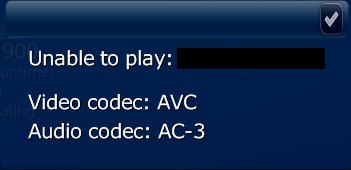
I'm almost positive all codecs are still good because yesterday the installation was fine, and played all/any video. Today, after a WinXP update, it doesn't and trying to play video results in this error box:
I can play the same videos I used to, or any/all vids using VLC and the like. So I'm 100% sure it's NOT the files, and pretty sure it's not the codecs.
I've read a few posts talking about making sure all the Microsoft Visual C++ 2010 Redistributable Package (x86) are up to date. I vaguely remember the update being about that.
Here's what I've done:
1. Panicked, freaked out and then lay for quite awhile in the fetal position.
2. Verified vid files are not the issue.
3. Tried to uninstall the latest WinXP update, but can't be certain I got the right one.
4. Found this thread, this one.
5. Verified that dshowhelper.dll is located in MediaPortal installation directory
6. Uninstalled ALL C++ packages using Revo, and dnlded & installed again.
7. Uninstalled MP using Revo, and reinstalled that.
8. Because of #7, now I don't have any of my !@#*& plugins anymore, so all plugins are deactivated (except MP-TV Series).
Any help is appreciated.
MediaPortal Version: 1.2.2.0
MediaPortal Skin: Default
Windows Version: XP SP3
I'm almost positive all codecs are still good because yesterday the installation was fine, and played all/any video. Today, after a WinXP update, it doesn't and trying to play video results in this error box:
I can play the same videos I used to, or any/all vids using VLC and the like. So I'm 100% sure it's NOT the files, and pretty sure it's not the codecs.
I've read a few posts talking about making sure all the Microsoft Visual C++ 2010 Redistributable Package (x86) are up to date. I vaguely remember the update being about that.
Here's what I've done:
1. Panicked, freaked out and then lay for quite awhile in the fetal position.
2. Verified vid files are not the issue.
3. Tried to uninstall the latest WinXP update, but can't be certain I got the right one.
4. Found this thread, this one.
5. Verified that dshowhelper.dll is located in MediaPortal installation directory
6. Uninstalled ALL C++ packages using Revo, and dnlded & installed again.
7. Uninstalled MP using Revo, and reinstalled that.
8. Because of #7, now I don't have any of my !@#*& plugins anymore, so all plugins are deactivated (except MP-TV Series).
Any help is appreciated.
