I have a similar issue. I did change to TV server with RC1 though. But now when TV is not in fullscreen the sound stutters and the picture tears, menus seem slower as well. Using the same codecs/settings as 0.2.3. I've changed back to 0.2.3 and everything is fine again. Perhaps it's the forced timeshifting with the TV Server version? Might try without TV Server but for now I'll be staying on the old version.

You are using an out of date browser. It may not display this or other websites correctly.
You should upgrade or use an alternative browser.
You should upgrade or use an alternative browser.
1.0 RC1 GUI not smooth (1 Viewer)
- Thread starter Muffinman
- Start date
- Thread starter
- #12
I uninstalled tv server/client and the problem persists. But when i play a video file and switch from fullscreen to when video is played in a small window bottom left the playback stutters. When switching back to fullscreen mode playback is smooth again. It seems things are slowed down when menus are visible.
 Germany
Same issue here,
in my case it doesn´t seem to be as bad when watching Videos from the My Videos section. In My TV it is realy bad when i switch from Fullscreen-Tv to epg or home (generally when having tv in little window). I attached a screenshot where I marked the point when switching from fullscreen to epg. It appears for me to occur in Mediaportal @ Fullscreen and windowed mode. Switching back to 0.2.3.0 svn 18062 resolved it.
Sys:
CPU : XP-M @ 2000 Mhz
Graphic: Radeon 9600Pro 128Mb
Ram: 512 @ 401 Mhz
Tv: Club3D Zap-Tv 1101
OS: XP Prof. SP3
Firewall is off
Edit: By the way I´m using Mysql and fresh install of XP, drivers etc...
in my case it doesn´t seem to be as bad when watching Videos from the My Videos section. In My TV it is realy bad when i switch from Fullscreen-Tv to epg or home (generally when having tv in little window). I attached a screenshot where I marked the point when switching from fullscreen to epg. It appears for me to occur in Mediaportal @ Fullscreen and windowed mode. Switching back to 0.2.3.0 svn 18062 resolved it.
Sys:
CPU : XP-M @ 2000 Mhz
Graphic: Radeon 9600Pro 128Mb
Ram: 512 @ 401 Mhz
Tv: Club3D Zap-Tv 1101
OS: XP Prof. SP3
Firewall is off
Edit: By the way I´m using Mysql and fresh install of XP, drivers etc...
Attachments
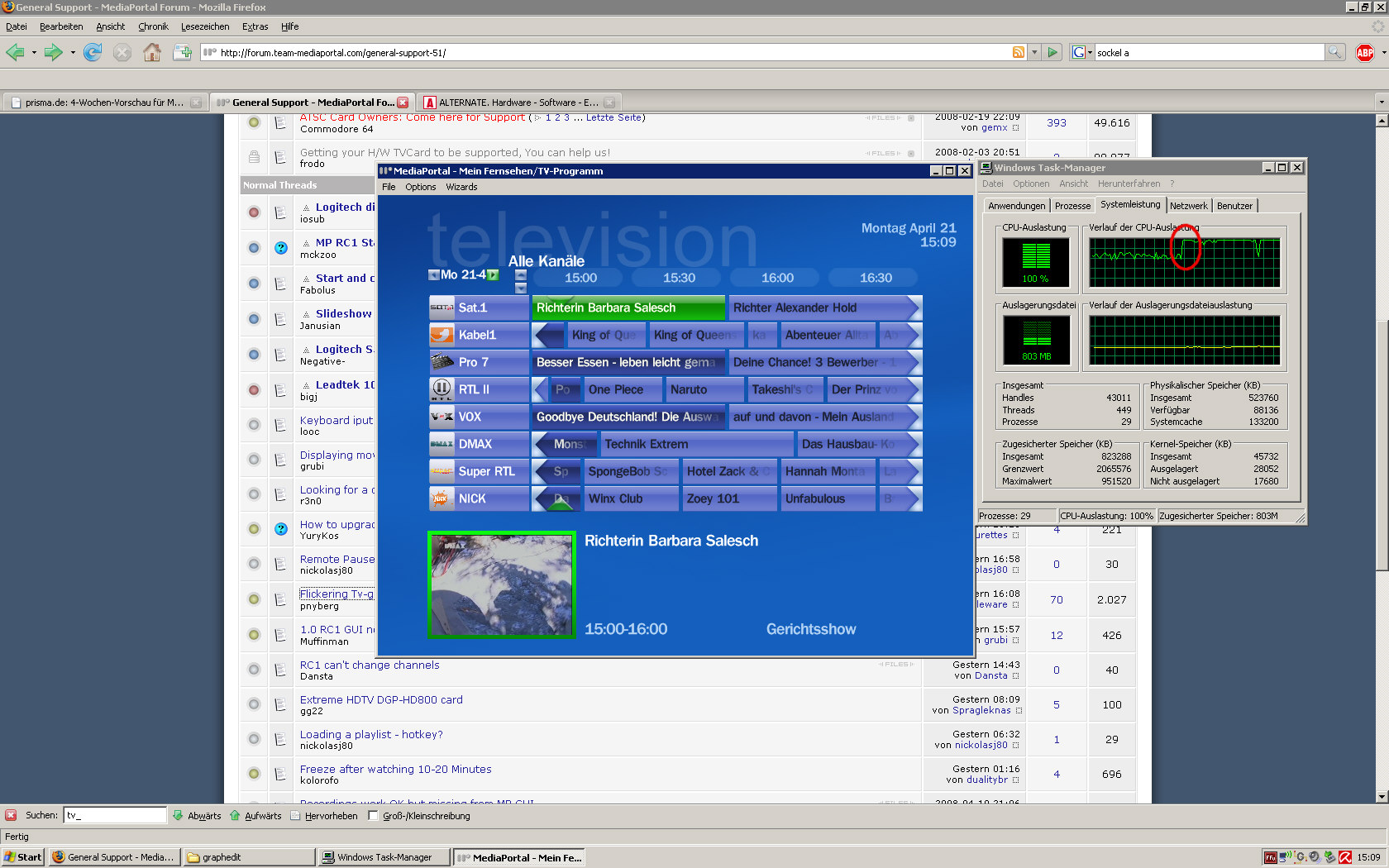

Just adding a "me too".
Mine is a fresh install for testing before I put it on the main HTPC. The menus do seem a little slower, but the biggest difference is when watching TV in a window and the menus are visible, everything stutters to a crawl and eventually stops. Fullscreen runs without a hitch. I've only tried it in TV, havent tried any videos or music yet.
The computer is the 2nd one in my signature below. It runs fine with 0.2.3...
Mine is a fresh install for testing before I put it on the main HTPC. The menus do seem a little slower, but the biggest difference is when watching TV in a window and the menus are visible, everything stutters to a crawl and eventually stops. Fullscreen runs without a hitch. I've only tried it in TV, havent tried any videos or music yet.
The computer is the 2nd one in my signature below. It runs fine with 0.2.3...

I've just moved up to RC1 and was experiencing this on my main client/server machine.
That new fontEngine.dll seems to have cleared it up. I was getting about 55% CPU usage, (split over two cores) before, now down to about 35%.
That new fontEngine.dll seems to have cleared it up. I was getting about 55% CPU usage, (split over two cores) before, now down to about 35%.

Users who are viewing this thread
Online now: 2 (members: 0, guests: 2)