
 United States of America
I did not click Stop... I let the entire movie end and let MP1 close out everything and show the Movie selection screenTested with the new build (reinstalled). Watched a movie, got to the end, clicked stop (which was successful).

I did not click Stop... I let the entire movie end and let MP1 close out everything and show the Movie selection screenTested with the new build (reinstalled). Watched a movie, got to the end, clicked stop (which was successful).

Tested with the new build (reinstalled). Watched a movie, got to the end, clicked stop (which was successful). Then same problem.
I then went to the watchdog and clicked "proceed" - and it noted "waiting for exit." When I exited, watchdog closed to, no logs created. I'll try it again next time for new logs.
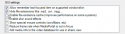

I think it's because MP is running in background, you need to kill it or restart your pc and start watchdog (ofc MP shouldn't auto start with your computer)
But it's strange message in log is clear, MP is running but maybe hidden
So I will do like this :
1- Start/restart your PC (be sure MP is not setup to start on windows start)
2- Start Watchdog (first option / stock plugins)
3- Do what you want.
4- Grab log
thanks for the screenshot.