- November 21, 2006
- 456
- 18
- Home Country
-
 Germany
MediaPortal Version: 1.0.2.
MediaPortal Skin: Dark Essentials
Windows Version: XP SP3
CPU Type: Athlon 330 ( 2x1.6 GhZ)
HDD: samsung 320 GB, 2.5"
Memory: 1x2048MB ultra low-profile
Motherboard: POV ION 330-1
Video Card: ION, geforce 9400
Video Card Driver: newest incl. physx + cuda
Sound Card: onboard Realtek ALC889
Sound Card AC3:
Sound Card Driver:
1. TV Card: Technisat USB HD2 w. inbuilt CI+Alphacrypt light+Sky Pay TV
1. TV Card Type: DVB-S/S2
1. TV Card Driver: newest
2. TV Card:
2. TV Card Type:
2. TV Card Driver:
3. TV Card:
3. TV Card Type:
3. TV Card Driver:
4. TV Card:
4. TV Card Type:
4. TV Card Driver:
MPEG2 Video Codec: Cyberlink PDVD 9(SAF unlocked)
MPEG2 Audio Codec: ffdshow
h.264 Video Codec: MP-C for video, Cyberlink 9 for HDTV (SAF unlocked)
renderer vmr9
Satelite/CableTV Provider: Astra 19.2° E
HTPC Case: Coolermaster TC-100
Cooling: passive
Power Supply: 60 W, external PSU + internal dc/dc converter
Remote: MCE Hauppauge Remote V2
TV: LG37LY95
TV - HTPC Connection: HDMI
more information, pictures etc here
Hello at all,
I know several threads about the 1080i issue.
Thing is that I can receive a 1080i station ( ANIXE HD) with 50fps without stuttering, dropped frames or jitter with the above mentioned configuration. Checked that in Fullscreen mode by pressing ALT+1.
When I switch to a 1080i station from SKY (SKY Cinema HD, Sky Sport HD or Sky Discovery HD) then I got 40-41 fps averagely.
Does anybody have a several configuration and got it working at 50fps?
Then your configuration/settings would be most appreciated.
No options are:
- switching to Win7 and / or MP 1.1. beta + svn until 1.1. RC isn't published
- overclocking
Just for info :720 p stations, playback of bluray and 1080p mkv's are no problem with SAF unlocked installed.
second issue
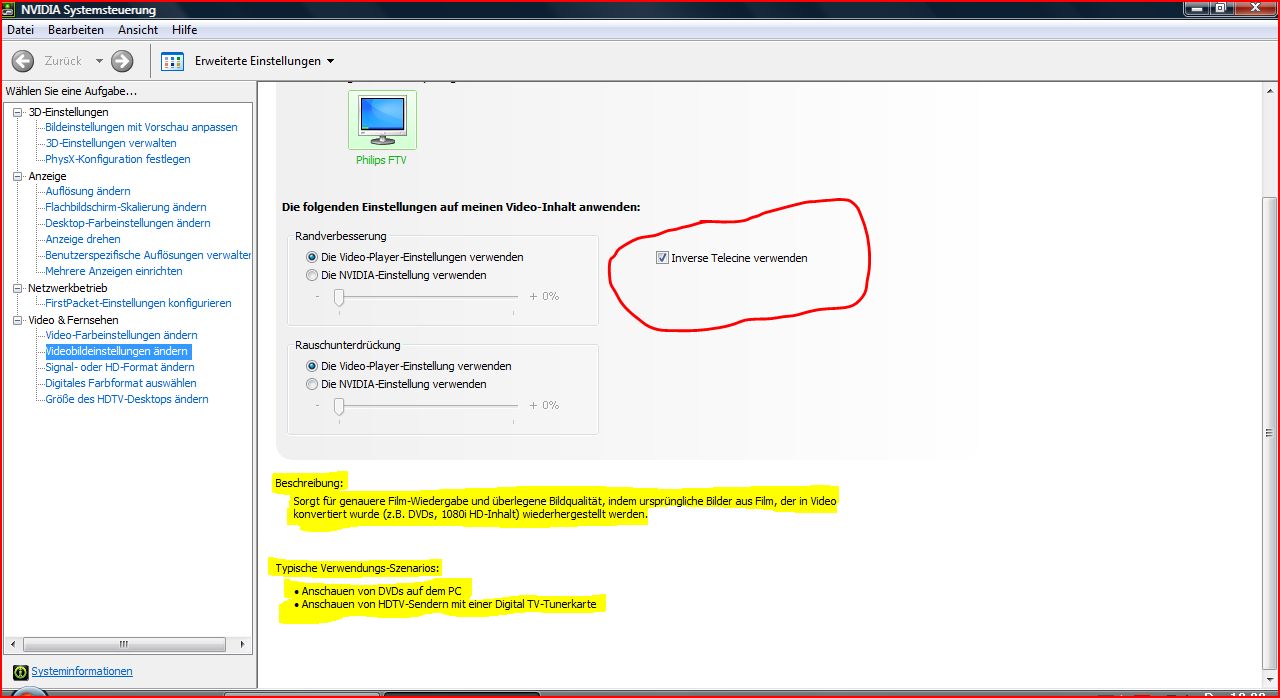
HDTV is okay but not excellent like in ATI's CCC options where you can choose vector adaptive deinterlacing for a sharp and crisp picture, but deinterlacing options in nvidia settings are poor or not very helpful.
If I peek to nvidia settings in video section there are no settings which are comprehensible at a first glance. (see attached picture, my settings in this section)
Does anybody have more information(explanation) regarding this settings and what to choose there what is adequate to vector adaptive deinterlacing in ATI's CCC ?
Thank you for helping me out.
ieb
MediaPortal Skin: Dark Essentials
Windows Version: XP SP3
CPU Type: Athlon 330 ( 2x1.6 GhZ)
HDD: samsung 320 GB, 2.5"
Memory: 1x2048MB ultra low-profile
Motherboard: POV ION 330-1
Video Card: ION, geforce 9400
Video Card Driver: newest incl. physx + cuda
Sound Card: onboard Realtek ALC889
Sound Card AC3:
Sound Card Driver:
1. TV Card: Technisat USB HD2 w. inbuilt CI+Alphacrypt light+Sky Pay TV
1. TV Card Type: DVB-S/S2
1. TV Card Driver: newest
2. TV Card:
2. TV Card Type:
2. TV Card Driver:
3. TV Card:
3. TV Card Type:
3. TV Card Driver:
4. TV Card:
4. TV Card Type:
4. TV Card Driver:
MPEG2 Video Codec: Cyberlink PDVD 9(SAF unlocked)
MPEG2 Audio Codec: ffdshow
h.264 Video Codec: MP-C for video, Cyberlink 9 for HDTV (SAF unlocked)
renderer vmr9
Satelite/CableTV Provider: Astra 19.2° E
HTPC Case: Coolermaster TC-100
Cooling: passive
Power Supply: 60 W, external PSU + internal dc/dc converter
Remote: MCE Hauppauge Remote V2
TV: LG37LY95
TV - HTPC Connection: HDMI
more information, pictures etc here
Hello at all,
I know several threads about the 1080i issue.
Thing is that I can receive a 1080i station ( ANIXE HD) with 50fps without stuttering, dropped frames or jitter with the above mentioned configuration. Checked that in Fullscreen mode by pressing ALT+1.
When I switch to a 1080i station from SKY (SKY Cinema HD, Sky Sport HD or Sky Discovery HD) then I got 40-41 fps averagely.
Does anybody have a several configuration and got it working at 50fps?
Then your configuration/settings would be most appreciated.
No options are:
- switching to Win7 and / or MP 1.1. beta + svn until 1.1. RC isn't published
- overclocking
Just for info :720 p stations, playback of bluray and 1080p mkv's are no problem with SAF unlocked installed.
second issue
HDTV is okay but not excellent like in ATI's CCC options where you can choose vector adaptive deinterlacing for a sharp and crisp picture, but deinterlacing options in nvidia settings are poor or not very helpful.
If I peek to nvidia settings in video section there are no settings which are comprehensible at a first glance. (see attached picture, my settings in this section)
Does anybody have more information(explanation) regarding this settings and what to choose there what is adequate to vector adaptive deinterlacing in ATI's CCC ?
Thank you for helping me out.
ieb