

Hi Vanessa,
thanks again for your wonderful work!
There are some minor errors in the "recording" screen (I hope it's okay if I use your screenshots, Ralph!):
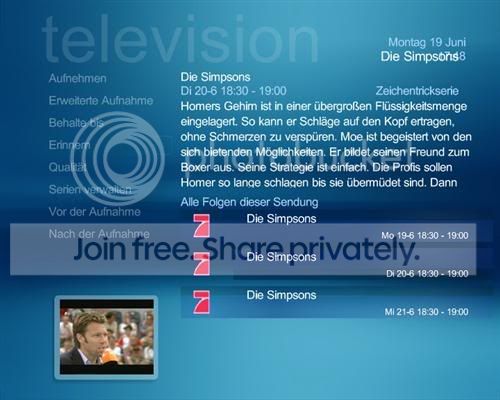
The clock in the upper right corner of this screen is overlapping with the program name ("Die Simpsons"), and the channel icons (the red "7" appearing three times on this screenshot) seem to bee "squeezed" a bit - they are wider in original as you can see here (seventh channel from above):
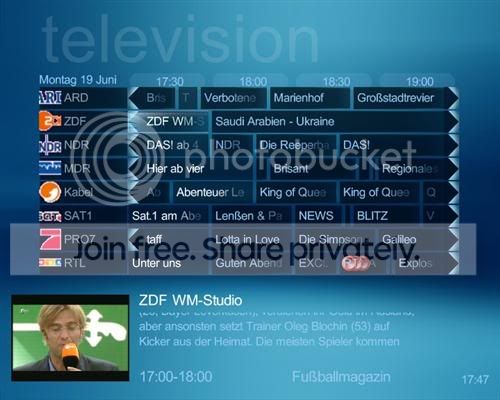
And there are some minor issues on this EPG screen as well.
The three "recording" icons, the big red dots in the lowest line which indicate that this show will be recorded, are a little bit too much - you cannot read the show title...
The "time slots" to the right of the date ("17:30", "18:00" and so on) have these nice "round boxes" around them, but the EPG is overlapping them a bit. The whole EPG area should be moved some pixels down. I hope you all can understand what I mean.
The small TV preview window in the lower left corner looks totally different in booth screens: size, placement and background are different. Would be great if this window looked exactly the same on ALL screens, wouldn't it? 8)
And finally, you cannot really see which shows are running at the moment. They have a slightly different background color and the text is brighter, but the difference is a bit too small in my opinion.
Keep up the great work!
- Waltz
thanks again for your wonderful work!
There are some minor errors in the "recording" screen (I hope it's okay if I use your screenshots, Ralph!):
The clock in the upper right corner of this screen is overlapping with the program name ("Die Simpsons"), and the channel icons (the red "7" appearing three times on this screenshot) seem to bee "squeezed" a bit - they are wider in original as you can see here (seventh channel from above):
And there are some minor issues on this EPG screen as well.
The three "recording" icons, the big red dots in the lowest line which indicate that this show will be recorded, are a little bit too much - you cannot read the show title...
The "time slots" to the right of the date ("17:30", "18:00" and so on) have these nice "round boxes" around them, but the EPG is overlapping them a bit. The whole EPG area should be moved some pixels down. I hope you all can understand what I mean.
The small TV preview window in the lower left corner looks totally different in booth screens: size, placement and background are different. Would be great if this window looked exactly the same on ALL screens, wouldn't it? 8)
And finally, you cannot really see which shows are running at the moment. They have a slightly different background color and the text is brighter, but the difference is a bit too small in my opinion.
Keep up the great work!
- Waltz


