
You are using an out of date browser. It may not display this or other websites correctly.
You should upgrade or use an alternative browser.
You should upgrade or use an alternative browser.
Aeon Wide (1366x768) (2 Viewers)
- Thread starter Psycho Reptile
- Start date
Format localPlaytime
In your screenshot it looks like you're showing the <Episode.localPlaytime> information gathered by the mediainfo.dll. You could use the following formatting rule to format the localPlaytime to a more readable format.
2508000 would show as 0:41.48
* display the current runtime in minutes and seconds in the episode screen
In your screenshot it looks like you're showing the <Episode.localPlaytime> information gathered by the mediainfo.dll. You could use the following formatting rule to format the localPlaytime to a more readable format.
Code:
Eval(Floor(<Episode.localPlaytime>/3600000)):Eval((Floor(<Episode.localPlaytime>/60000)-(Floor(<Episode.localPlaytime>/3600000)*60))).Eval(Round((<Episode.localPlaytime>-(Floor(<Episode.localPlaytime>/60000)*60000))/1000))2508000 would show as 0:41.48

- June 30, 2008
- 102
- 1
Alright, haven't seen this problem posted yet.
I downloaded mattsk88's version of tvseries, but the genre and airdate show up as "#tv.series.genre" "#tv.series.airdate"
I have tried reinstalling his .xml, but no dice. anyone help me out? thanks.
Few weeks ago I had the same problem, but I was still using an old version of the TVSeries plugin. If you are not using version 2 of the plugin, you should first install the latest version
THANK YOU!

In your screenshot it looks like you're showing the <Episode.localPlaytime> information gathered by the mediainfo.dll. You could use the following formatting rule to format the localPlaytime to a more readable format.
Code:Eval(Floor(<Episode.localPlaytime>/3600000)):Eval((Floor(<Episode.localPlaytime>/60000)-(Floor(<Episode.localPlaytime>/3600000)*60))).Eval(Round((<Episode.localPlaytime>-(Floor(<Episode.localPlaytime>/60000)*60000))/1000))
2508000 would show as 0:41.48
I will try it when I'm at home, thanks.
- June 25, 2008
- 34
- 5
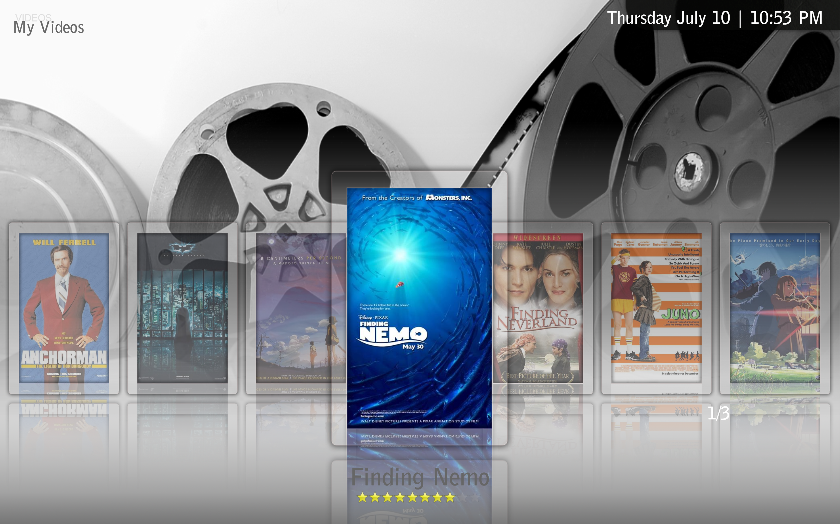
The control that shows the number of pages 1/3.. is called a spinner. You control it with <spinXXXX> tags.
To keep the item in focus a certain distance from the edges i know you can use <scrollOffset> for listcontrol and thumbnailpanel but i don't know if it will work on the filmstrip as well.
To keep the item in focus a certain distance from the edges i know you can use <scrollOffset> for listcontrol and thumbnailpanel but i don't know if it will work on the filmstrip as well.
God I love this skin!
Some issues I have however:
* In basichome.xml, if you go to the top buttons (like shutdown and such) the background picture and menu buttons disappear and I can't navigate back
* When going back from for example Series to the Basic Home, my music button is on top of 2 other buttons (if i scroll left or right, it's fixed)
* The cover art shown on basic home when playing music is placed wrong
* Has someone been looking into the My Films Plugin?
PS: I made my own basichome with that aeon menu generator thingie
Some issues I have however:
* In basichome.xml, if you go to the top buttons (like shutdown and such) the background picture and menu buttons disappear and I can't navigate back
* When going back from for example Series to the Basic Home, my music button is on top of 2 other buttons (if i scroll left or right, it's fixed)
* The cover art shown on basic home when playing music is placed wrong
* Has someone been looking into the My Films Plugin?
PS: I made my own basichome with that aeon menu generator thingie

- April 21, 2007
- 925
- 80
- Home Country
-
 Norway
I'm in the modding spirit as well and was wondering if it's possible to have the background thumbnails scroll left and right but keep focus on the center image as shown in this picture?
No, its a limitation of the filmstrip view itself in MP. Ive wanted/asked for a fix for this since I started using MP 2 years ago..
* When going back from for example Series to the Basic Home, my music button is on top of 2 other buttons (if i scroll left or right, it's fixed)
It's been around since first port of this skin.. It appears when you exit [your default menu item] and go back to basic home.. Ie if you have movies as your default icon in basichome, whenever you exit movies the menu will get screwed like that. If you exit any other menu item(other then your default one) to basic home you will not see this. No idea what to do about it tho..
- June 25, 2008
- 34
- 5
Darre, Sambal, thanks!
I should have known it was a spinner..and a MP limitation thanks for the info!!!
I should have known it was a spinner..and a MP limitation
thanks for the info!!!Here is an updated tvseries xml to create the layout as shown below.
The attached formatting rules should be imported in MP-TV-Series Configuration. Without these rules some information will not be shown. You can easily alter these rules through the MP-TVSeries configuration to customize the information shown on screen without having to modify the xml files. If more information is needed about using these rules please let me know.

The attached formatting rules should be imported in MP-TV-Series Configuration. Without these rules some information will not be shown. You can easily alter these rules through the MP-TVSeries configuration to customize the information shown on screen without having to modify the xml files. If more information is needed about using these rules please let me know.
Attachments
Users who are viewing this thread
Online now: 3 (members: 0, guests: 3)