Aeon Wide (1366x768) (2 Viewers)

armandp

Retired Team Member
  • Premium Supporter
  • April 6, 2008
    987
    623
    Zoetermeer
    Home Country
    Netherlands Netherlands
    I'm currently developing an alternative (or possible rewrite) to the My Trailers plugin. The skin file is very basic (using the facade common elements from the video skins) but as I use Aeon Wide myself on my HTPC i had to create this second skin file for personal use ;) The plugin is functional for the most part but doesn't supply movie details yet (it DOES supply title, covers, release date and all the trailers clips).

    The plugin and Aeon Wide specific skin file can be downloaded here.
     

    tamago_quin

    Portal Member
    June 25, 2008
    34
    5
    Ok, so the screenshots were "fake", the pictures matched "accidentially" with the content ;)

    fforde is developing a new movies plugin which will support backdrops (search the forum for "moving pictures" or "tv series sister plugin") so this will be a first step.
    I just wondered if it is already somehow possible with this great skin.


    Mirk's fix works quite well as darre pointed out. I've implemented this into my Aeon Skin and love it.


    ThaClown

    I tried fading in the IMDB info but could never really find a good way to do it. It seems the filmstrip control doesn't lose focus and that makes the fade difficult. I could get the imdb info to pop up by pushing the up arrow on the remote or keyboard though. It does make it a little less hassle some to get to the IMDB info but I dunno great it could be in the long run.


    And while I'm here I'd like to ask a question. Is filmstrip view Image only? I would like to use Text rather than the Images I'm currently using because It would be much easier to control.
     

    Attachments

    • Untitled-1.png
      Untitled-1.png
      391.8 KB

    ThaClown

    Moderator - Dutch Forums
    May 28, 2006
    807
    26
    Den Bosch
    Home Country
    Netherlands Netherlands
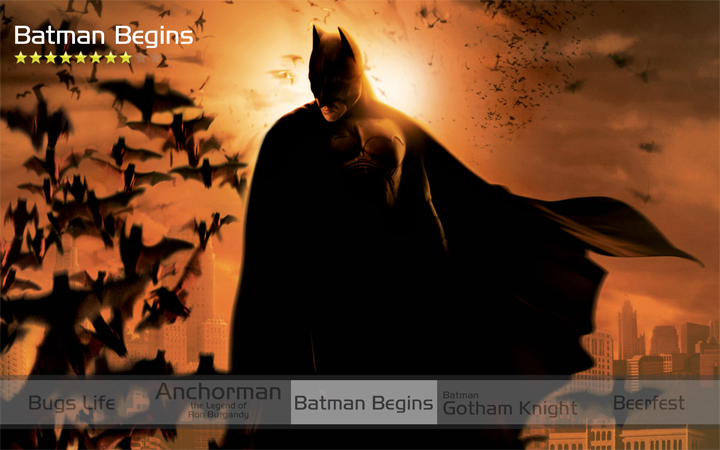
    Whow your last screen is that from My Movies ot My Films? and is that filmstrip view with movie fanart?
    Could you post what you need to get it like that?
     

    tamago_quin

    Portal Member
    June 25, 2008
    34
    5
    Whow your last screen is that from My Movies ot My Films? and is that filmstrip view with movie fanart?
    Could you post what you need to get it like that?


    Please Backup your original files before you replace yours. Mine aren't cleaned up and only really work in filmstrip mode. Other views will probably display incorrectly.


    After replacing these two xml files create a folder in your Aeon folder like so:

    C:\Program Files\Team MediaPortal\MediaPortal\skin\Aeon Wide\Media\Fanart\Video

    In the Video Folder add your Png Files for the backgrounds. Use IMDB name as the file Name. i.e. Batman Begins -> Batman Begins.png

    It won't look identical to mine but you can see how it works. The Boxarts I'm using are custom jpg's made to look like text.

    I hope this helps a little bit.

    quin
     

    Attachments

    • common.facade.video.xml
      30.7 KB
    • myvideoTitle.xml
      30.6 KB

    ThaClown

    Moderator - Dutch Forums
    May 28, 2006
    807
    26
    Den Bosch
    Home Country
    Netherlands Netherlands
    Thanks! what exactly do you mean with made to look like text? Did you add a title for every fanart?

    And what is displayed if there is no fan art for the movie?
     

    tamago_quin

    Portal Member
    June 25, 2008
    34
    5
    The filmstrip will be a picture of the boxart not the Title. I created my own jpeg for those.

    If no fanart is found it displays your default background

    I made a typo in my last post. My Boxarts for the filmstrip are custom jpg's, not the fanart. sorry for the confusion :(
     

    Psycho Reptile

    Retired Team Member
  • Premium Supporter
  • April 19, 2006
    1,316
    787
    Cambridge, England
    Home Country
    United Kingdom United Kingdom
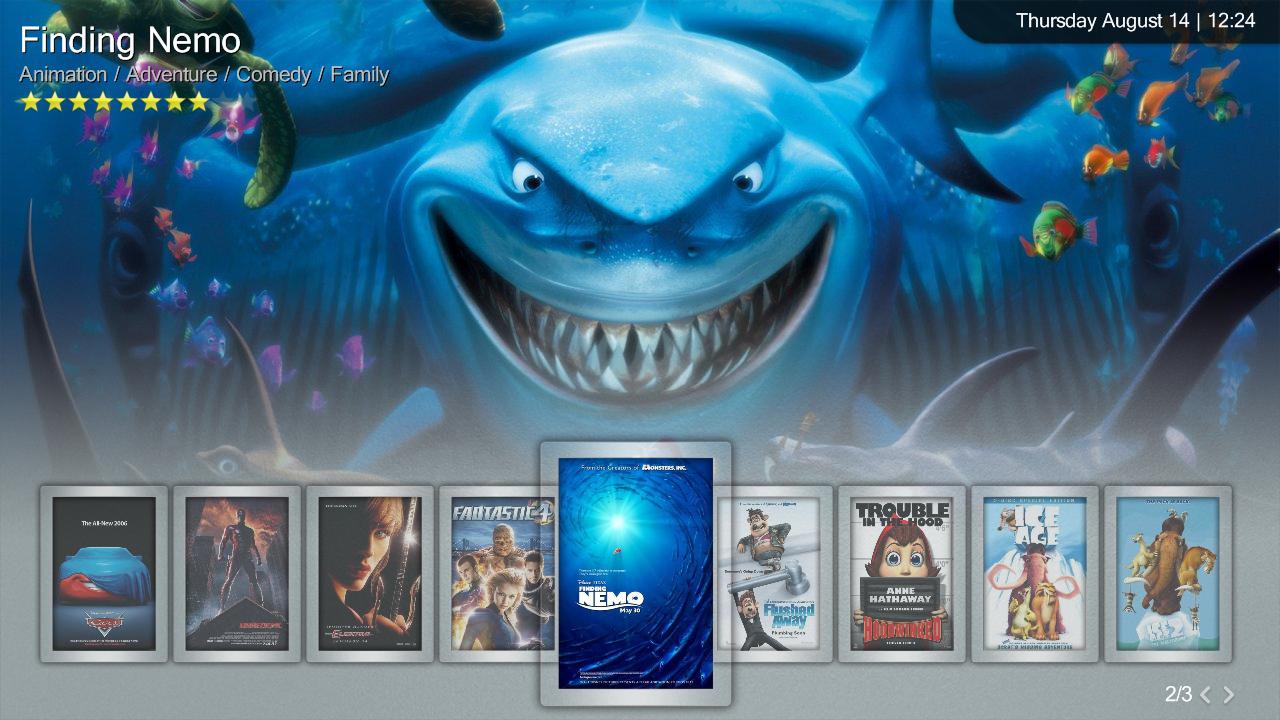
    Doh, just beat me to it, here's a screenie of a similar filmstrip I'm using (working on):

    It uses "fanart" in the same folder as the backdrops - so long as the movie name is the same as the MP db title ;)
     

    Attachments

    • Aeon WIP Filmstrip.jpg
      Aeon WIP Filmstrip.jpg
      129.6 KB

    Darre

    Portal Pro
    April 21, 2007
    925
    80
    Home Country
    Norway Norway
    Doh, just beat me to it, here's a screenie of a similar filmstrip I'm using (working on):

    It uses "fanart" in the same folder as the backdrops - so long as the movie name is the same as the MP db title ;)

    And this should work in shares as well right?

    It looks AWESOME :)
     

    Users who are viewing this thread

    Top Bottom