AMC Updater v0.8.0 Now Available! (2 Viewers)

OrionHall

Portal Pro
September 13, 2007
198
31
London
Home Country
United Kingdom United Kingdom
Hi All,

New version 0.8.3 is now available - I've put it in the first post in this thread to make it easy for newbies to find! This corrects an annoying GUI bug I found (Option to use folder.jpg 'sticks' once you use it, then makes it hard to go back to 'Full Path' or 'Relative Path' options). It also changes the error handling for the import process which may have been causing Biship's problem.

If you're on 0.8.1 or 0.8.2 I recommend you use this updated version.

Thanks,

Orion.
 

nmt1978

Portal Pro
October 14, 2008
95
1
hi

i have a question

i store my movie folder (as well as my ant database) in an external harddrive, so that i can use it both at my office and my home.

in my office, this harddriver is mapped to H:\ when plugged into my laptop and when updating the database using AMC updater, the source field in ant database shows the location H:\......., okay.

When i bring it back home, it is mapped to G:\ when plugged into my PC. I run the AMC updater, it seems to update every movies details again. it takes time. I just want that AMC only update the source field (change H:\ to G:\ every entry). How can i do that?
 

OrionHall

Portal Pro
September 13, 2007
198
31
London
Home Country
United Kingdom United Kingdom
hi

i have a question

i store my movie folder (as well as my ant database) in an external harddrive, so that i can use it both at my office and my home.

in my office, this harddriver is mapped to H:\ when plugged into my laptop and when updating the database using AMC updater, the source field in ant database shows the location H:\......., okay.

When i bring it back home, it is mapped to G:\ when plugged into my PC. I run the AMC updater, it seems to update every movies details again. it takes time. I just want that AMC only update the source field (change H:\ to G:\ every entry). How can i do that?

Hi,

AMCUpdater really isn't designed for that kind of thing. As I see it you have three options:

1. Run AMCUpdater with only 'Source' selected for import, and all Internet related options turned off. That way the scan will be much quicker, and it will update all entries to point to the new driver letter.

2. Quicker would be to use Notepad or similar and do a find/replace to replace 'G:\' with 'H:'.

3. And better still - change your drive letter mappings so your portable hard drive has the same letter in both locations! I would think this is the easiest options.

Cheers,

Orion.
 

z3us

Portal Pro
December 4, 2007
1,047
123
46
Home Country
Spain Spain
you can open your xml catalog using windows notepad and replace all g: by h:
But I think the best way could be changing the letter that your home pc assigns your external harddrive to h:
 

carmenm

Portal Pro
April 15, 2008
258
4
Home Country
France France
Finally had the chance to test 0.8.2. Works perfectly. Finding folder.jpg and downloading as folder.jpg and grouping work as expected. So thamk you
I have 2 questions:
- When you update an already existing item, do you update the folder.jpg?
- Seeing how dealing with posters works well, i was wondering could you add a fanart feature. MyFilms allows it but cant download them. So maybe yould download them, save them as "title" something in the movie dir and save it as a field in the xml so that you know which are already set. Then it would work with MyFilms and even with MovingPictures!
What do you think?
 

nmt1978

Portal Pro
October 14, 2008
95
1
Finally had the chance to test 0.8.2. Works perfectly. Finding folder.jpg and downloading as folder.jpg and grouping work as expected. So thamk you
I have 2 questions:
- When you update an already existing item, do you update the folder.jpg?
- Seeing how dealing with posters works well, i was wondering could you add a fanart feature. MyFilms allows it but cant download them. So maybe yould download them, save them as "title" something in the movie dir and save it as a field in the xml so that you know which are already set. Then it would work with MyFilms and even with MovingPictures!
What do you think?

In addition, is there any change for AMC updater to choose the website which they take the cover-art? the quality of image from imdb is not good. some site such as MovieGoods.com - movie posters, photos and other movie memorabilia providing big quality posters
 

OrionHall

Portal Pro
September 13, 2007
198
31
London
Home Country
United Kingdom United Kingdom
Finally had the chance to test 0.8.2. Works perfectly. Finding folder.jpg and downloading as folder.jpg and grouping work as expected. So thamk you

Hi Carmenm,

Glad it's working for you!

I have 2 questions:
- When you update an already existing item, do you update the folder.jpg?
Yes. If you import movies then the logic will use any existing folder.jpg, and download one if there is not one there already. If you run a manual update, then the program will attempt to download new images. If you don't want that to happen, then un-tick the 'Picture' option on the Database Fields tab. Or run an update with parameters to say 'where Picture Not Exists' or similar.

- Seeing how dealing with posters works well, i was wondering could you add a fanart feature. MyFilms allows it but cant download them. So maybe yould download them, save them as "title" something in the movie dir and save it as a field in the xml so that you know which are already set. Then it would work with MyFilms and even with MovingPictures!
What do you think?

This isn't really what my app is designed for - Ant Movie Catalog does not support fan art, for example. MyFilms does however, and I believe Zebons is working on updating the grabber to grab fan art too....

https://forum.team-mediaportal.com/my-films-164/anyway-automatically-find-fanart-46965/

Cheers,

Orion.
 

carmenm

Portal Pro
April 15, 2008
258
4
Home Country
France France
I have 2 questions:
- When you update an already existing item, do you update the folder.jpg?
Yes. If you import movies then the logic will use any existing folder.jpg, and download one if there is not one there already. If you run a manual update, then the program will attempt to download new images. If you don't want that to happen, then un-tick the 'Picture' option on the Database Fields tab. Or run an update with parameters to say 'where Picture Not Exists' or similar.
No i just wanted to be sure ;)

- Seeing how dealing with posters works well, i was wondering could you add a fanart feature. MyFilms allows it but cant download them. So maybe yould download them, save them as "title" something in the movie dir and save it as a field in the xml so that you know which are already set. Then it would work with MyFilms and even with MovingPictures!
What do you think?

This isn't really what my app is designed for - Ant Movie Catalog does not support fan art, for example. MyFilms does however, and I believe Zebons is working on updating the grabber to grab fan art too....

https://forum.team-mediaportal.com/my-films-164/anyway-automatically-find-fanart-46965/
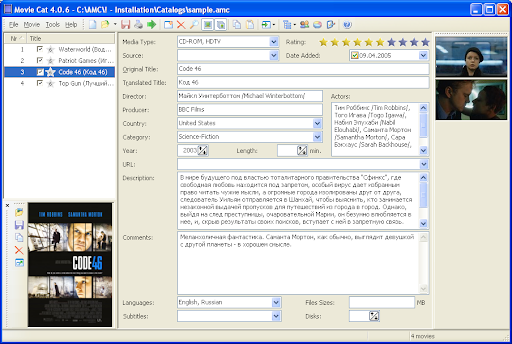
In fact AMC does support it, or MovieCat does i should say! It s a mod, a very powerful mod of AMC which allow to have screenies in addition of the poster. just like that
mcwithnewgui.PNG

After watching at the xml i can see that MovieCat stores the screenies like this
SnapCount="1" Snap1="MyFilms_36.Quai.des.Orf%c3%a8vres [1659285060].jpg"

So i think it would be a great addition to AMCUpdater :p. And it wouldn't interfer with MYFilms. In fact if MyFilms stores the fanarts in the movies dir, then it would be even perfect because AMCUpdater would see it and update the field.

I know it s not really a part of AMC but for people like me, it s a great addition to store the fanart in the XML because we can use the fanart on a website showing our AMC database.

But i understand if you dnt want to add it. :D

EDIT: i have a question. If i use a MovieGoods grabber for grabbing posters, will they be saved as folder.jpg?

EDIT 2: I am trying just to update Pictures by looking at folder.jpg because AMC broke everything. I find that i have to choose a grabber for a manual update but i dont need one! Do you see a solution?
Also if i do an import, it doesnt mark any movie as "needing an update" even if the picture is not set. Is it normal?
 

OrionHall

Portal Pro
September 13, 2007
198
31
London
Home Country
United Kingdom United Kingdom
In fact AMC does support it, or MovieCat does i should say! It s a mod, a very powerful mod of AMC which allow to have screenies in addition of the poster. just like that
mcwithnewgui.PNG

After watching at the xml i can see that MovieCat stores the screenies like this
SnapCount="1" Snap1="MyFilms_36.Quai.des.Orf%c3%a8vres [1659285060].jpg"

So i think it would be a great addition to AMCUpdater :p. And it wouldn't interfer with MYFilms. In fact if MyFilms stores the fanarts in the movies dir, then it would be even perfect because AMCUpdater would see it and update the field.

I know it s not really a part of AMC but for people like me, it s a great addition to store the fanart in the XML because we can use the fanart on a website showing our AMC database.

But i understand if you dnt want to add it. :D
Hi carmenm,

Sorry again, but so far we've stuck to the rule of not modifying the Ant XML database beyond the fields provided by Ant. This is just to maintain compatibility with Ant. I'd never heard of MovieCat, but don't see how I can support it in the updater without breaking that golden rule!

On the bright side, I believe Zebons and Titoftit are modifying the Internet grabber component to support fan art. When this is done I'll be able to get the updater to use fanart images and store them where-ever needed. But the images downloaded won't be referenced by the Ant database.

EDIT: i have a question. If i use a MovieGoods grabber for grabbing posters, will they be saved as folder.jpg?
Not sure what you mean here with a MovieGoods grabber? My AMCUpdater will use the same logic regardless of what Internet Parser script is used. If the script supports cover images, then AMCupdater will use them.

EDIT 2: I am trying just to update Pictures by looking at folder.jpg because AMC broke everything. I find that i have to choose a grabber for a manual update but i dont need one! Do you see a solution?

The AMCUpdater interface does require an Internet Parser file for all updates. This is sort of a bug, because the logic of 'is an Internet lookup needed' is a bit fiddly, so it was easier just to make it mandatory. This may be fixed at some point! Just select any Internet parser file, and if your configuration options (Database Fields tab) does not require an Internet lookup then it won't be used.

Also if i do an import, it doesnt mark any movie as "needing an update" even if the picture is not set. Is it normal?
Sorry again - no idea what you mean by marking movies as needing an update! Can you clarify?

Cheers,

Orion.
 

Users who are viewing this thread

Top Bottom