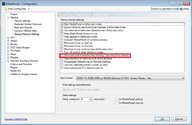
I have just been trying this on my MP 1.33 system. I presume that you are using the startup setting marked in red below:
With that setting enabled, I displayed the EPG and then pressed the EXIT button on my remote control to display the exit pop-up and then exit the client. On restarting the client, the EPG was displayed as the first panel. So that sequence of actions is supported and ought to work.
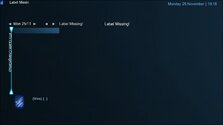
Your screen shot shows a vestigial EPG. It looks as though all of the information that the MP client obtains from TV Server is missing, which suggests that TV Server is not running. Look at the services listed in Windows "Task Manager" to see if TV Server is present and shown as "Started".
I would suggest that you deselect the Show last active module... setting and see what happens when you start the client. You may find that the MP "Home" panel displays normally, but with a pop-up after a few seconds saying that TV Server could not be contacted . Or it might all work correctly.
Sorry for not getting back sooner C.S. ....and thanks for the input!
Should've said that.....the screen I posted previously .....is the 1st screen I was getting....and selecting 'back' or 'homepage' then takes me to a usable screen. Nothing apearing to be wrong with TV server at that point.
Should also add that...I'm controlling with a Mouse .... and not a remote!
I've just given it another go (after using PureVisionHD) and its working at the moment
you are right.. I spotted why it's not working. For what ever reason, the 3x recently added / watched for TV series, etc was killing it.. I've removed it for now and it's started working again. I'll have to dig a little deeper as to why it's happened all of a sudden.
you are right.. I spotted why it's not working. For what ever reason, the 3x recently added / watched for TV series, etc was...
Hi Guys... Long time fan. using MP for over 20 years.
Currently running MediaPortal x64 v1.38.3.0 on Win11 with all recent windows...
maybe setting loglevel to debug might pinpoint the difference between normal and stuck?
Preferable with as much disabled as possible
also try to see if anything is happening during stuck for the mediaportal process(resource monitor, disk activity, cpu usage, anything)
maybe other programs competing for resouces?
maybe setting loglevel to debug might pinpoint the difference between normal and stuck?
Preferable with as much disabled as...
Since over a year my MP sometimes stucks while showing the welcome screen. It started once a week now it happens every second time...
Sorry, I didn't get email notifications on these latest replies. I just came here to report I solved the problem after adjusting power settings for "Intel Graphics". I set it to Maximum Performance. I tried many other things so it could be a combination of them, but this was the last thing I did and I haven't had the problem return...
Sorry, I didn't get email notifications on these latest replies. I just came here to report I solved the problem after adjusting...
I'm running MP1 as a client only on this:
https://www.amazon.com/dp/B0DZX5DWS5?ref_=pe_123509780_1038749300_t_fed_asin_title&th=1...
 United Kingdom



 . Or it might all work correctly.