
You are using an out of date browser. It may not display this or other websites correctly.
You should upgrade or use an alternative browser.
You should upgrade or use an alternative browser.
Automatically updating AMC database when new files are added... (4 Viewers)
- Thread starter OrionHall
- Start date

Unable to import .mkv files?
I am storing all of my HD-DVD and Blu-Ray video files in MKV containers. AMCupdater does not appear to be able to import this file format. Can the program be updated to include MKV files?
Thanks for developing a very helpful utility.
Edit: Question answered. I had missed the "options" command which allows for the setting of the valid file types.
I am storing all of my HD-DVD and Blu-Ray video files in MKV containers. AMCupdater does not appear to be able to import this file format. Can the program be updated to include MKV files?
Thanks for developing a very helpful utility.
Edit: Question answered. I had missed the "options" command which allows for the setting of the valid file types.
- Thread starter
- #43
AMCUpdate v0.5 Now Available!
Hello All,
It's been a while, but I've finally found time to have another look at the AMCUpdater project.
I think I've now fixed most of the outstanding bugs that I know about. I found a few subtle ones whilst working on it too. The best/worst was one I came across at the last minute, just as I thought it was finished... Schindler's List came up. It's the first time I've come across a multi-part file with a quote in the filename. Single files with quotes have worked fine since the first version, but the code I used involved an xpath query using the filename as a parameter. That really doesn't work with quotes in the title. So I re-wrote a fair bit of the code to use the unique movie ID where possible. That wasn't fun!
The other area which needed a lot of attention was the 'purge missing database entries' option. I found it didn't work quite as planned if the Ant database contains links to files in various locations. For example - it might have links to the movie collection such as '\\server\movies\blah.avi', as well as DVDs referenced as 'd:\VIDEO_TS\VIDEO_TS.IFO', and home videos as '\\server\videos\homeblah.avi'. If you were scanning a folder at '\\server\movies' and it found files such as '\\server\movies\filename.avi' then it would be fine, but an entry like 'd:\filename.avi' would be removed. I figure that logic isn't exactly logical.
The new code will ensure that if the XML file lists '\\server\movies\filename.avi' and you scan '\\server\movies' (or enter '\\server\movies\' as an override path) then they will either match as expected, or the database entry will be removed if the file isn't there. Other database entries which aren't referencing '\\server\movies\' will be ignored to account for offline media. So 'd:\blah.avi' or '\\OtherServer\OtherShare\blah.avi' won't be touched.
Hopefully you'll find this a stable release! As usual, please do let me know if you find any bugs, and include as much detail as possible if (or when) you do so. I haven't had many feature requests lately so I reckon this is ready to become a (probably final) v1.0, assuming I've got the last of the bugs!
Oh, and Happy New Year to the wonderful MediaPortal team, and everyone here!
Cheers,
OrionHall.
p.s. v0.5 is available at SourceForge as usual - here's the direct link : http://sourceforge.net/project/showfiles.php?group_id=205435
Hello All,
It's been a while, but I've finally found time to have another look at the AMCUpdater project.
I think I've now fixed most of the outstanding bugs that I know about. I found a few subtle ones whilst working on it too. The best/worst was one I came across at the last minute, just as I thought it was finished... Schindler's List came up. It's the first time I've come across a multi-part file with a quote in the filename. Single files with quotes have worked fine since the first version, but the code I used involved an xpath query using the filename as a parameter. That really doesn't work with quotes in the title. So I re-wrote a fair bit of the code to use the unique movie ID where possible. That wasn't fun!
The other area which needed a lot of attention was the 'purge missing database entries' option. I found it didn't work quite as planned if the Ant database contains links to files in various locations. For example - it might have links to the movie collection such as '\\server\movies\blah.avi', as well as DVDs referenced as 'd:\VIDEO_TS\VIDEO_TS.IFO', and home videos as '\\server\videos\homeblah.avi'. If you were scanning a folder at '\\server\movies' and it found files such as '\\server\movies\filename.avi' then it would be fine, but an entry like 'd:\filename.avi' would be removed. I figure that logic isn't exactly logical.
The new code will ensure that if the XML file lists '\\server\movies\filename.avi' and you scan '\\server\movies' (or enter '\\server\movies\' as an override path) then they will either match as expected, or the database entry will be removed if the file isn't there. Other database entries which aren't referencing '\\server\movies\' will be ignored to account for offline media. So 'd:\blah.avi' or '\\OtherServer\OtherShare\blah.avi' won't be touched.
Hopefully you'll find this a stable release! As usual, please do let me know if you find any bugs, and include as much detail as possible if (or when) you do so. I haven't had many feature requests lately so I reckon this is ready to become a (probably final) v1.0, assuming I've got the last of the bugs!
Oh, and Happy New Year to the wonderful MediaPortal team, and everyone here!
Cheers,
OrionHall.
p.s. v0.5 is available at SourceForge as usual - here's the direct link : http://sourceforge.net/project/showfiles.php?group_id=205435
Edit: Question answered. I had missed the "options" command which allows for the setting of the valid file types.
I was just about to ask the same question .. plugin is amazing! Thanks
I've been trying all night to get this working and I'm at my wits end. The program crashes for me on exit and nothing happens when I try to analyse a file. I downloaded the Mediainfo application which works like a charm, so I'm not sure if it's the mediainfo.dll. I scan my movie folder and everything seems to go well, but nothing is added to the .xml file. Below is the end of the log.
28-01-2008 23:52:02 - Orphaned File : You Me and Dupree CD2.avi
28-01-2008 23:52:02 - Processing Complete - Found 280 Missing Entries.
28-01-2008 23:52:02 - Starting XML update process.
28-01-2008 23:52:02 - - FilePath : xxxxxxxxxxxxxxxxxx\Ant Movie Catalog.xml
28-01-2008 23:52:02 - - MoviePath : \\xxxxx\Movies\
28-01-2008 23:52:02 - - OverridePath :
28-01-2008 23:52:02 - - OverwriteFlag : False
28-01-2008 23:52:02 - - BackupFlag : False
28-01-2008 23:52:02 - - MediaType : PC
28-01-2008 23:52:02 - - SourceField : Source
28-01-2008 23:52:02 - - PurgeMissing : False
28-01-2008 23:52:02 - Starting file analysis and import - 280 orphaned files found.
28-01-2008 23:52:02 - Analysing multi-part files
28-01-2008 23:52:02 - File Import Complete - 0 files loaded.
28-01-2008 23:52:02 - Multi-Part Files Merged : 0 into 0
28-01-2008 23:52:02 - Writing changes to XML file
28-01-2008 23:52:02 - XML update process complete.
28-01-2008 23:52:02 - Orphaned File : You Me and Dupree CD2.avi
28-01-2008 23:52:02 - Processing Complete - Found 280 Missing Entries.
28-01-2008 23:52:02 - Starting XML update process.
28-01-2008 23:52:02 - - FilePath : xxxxxxxxxxxxxxxxxx\Ant Movie Catalog.xml
28-01-2008 23:52:02 - - MoviePath : \\xxxxx\Movies\
28-01-2008 23:52:02 - - OverridePath :
28-01-2008 23:52:02 - - OverwriteFlag : False
28-01-2008 23:52:02 - - BackupFlag : False
28-01-2008 23:52:02 - - MediaType : PC
28-01-2008 23:52:02 - - SourceField : Source
28-01-2008 23:52:02 - - PurgeMissing : False
28-01-2008 23:52:02 - Starting file analysis and import - 280 orphaned files found.
28-01-2008 23:52:02 - Analysing multi-part files
28-01-2008 23:52:02 - File Import Complete - 0 files loaded.
28-01-2008 23:52:02 - Multi-Part Files Merged : 0 into 0
28-01-2008 23:52:02 - Writing changes to XML file
28-01-2008 23:52:02 - XML update process complete.
- Thread starter
- #47
I've been trying all night to get this working and I'm at my wits end. The program crashes for me on exit and nothing happens when I try to analyse a file. I downloaded the Mediainfo application which works like a charm, so I'm not sure if it's the mediainfo.dll. I scan my movie folder and everything seems to go well, but nothing is added to the .xml file. Below is the end of the log.
Hi JayRoe,
Can you also please confirm if the file analysis on the 'Tests' tab of the application works? That tab uses the exact same code which gets used when updating the xml file so it would be interesting to find out. Also please confirm that the copy of my project you downloaded includes mediainfo.dll version 0.7.5.2 - if you've installed a different version from mediainfo.sourceforge.net then it may not work properly.
Oh, and if it crashes on exit then that's definitely a bad sign! Is there a meaningful error message when it crashes?
Cheers,
OrionHall.
OrionHall, it's the analysis tool within the tests tab, which doesn't work for me. Nothing happens when I click analyse and I've tried with several files which all work with the MediaInfo application (0.7.5.7). I've also tried copying the MediaInfo.dll from the MediaInfo application directory to the AMC Updater directory, but still nothing.
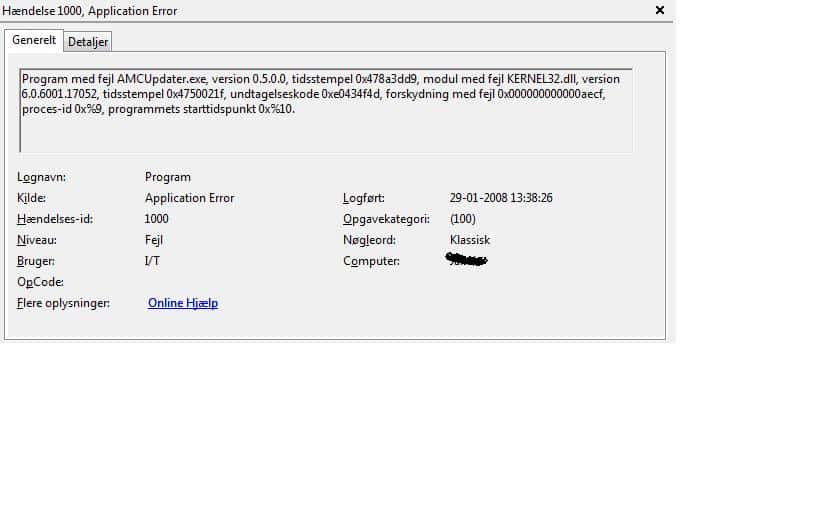
I'm using Vista x64, which I think might be the cause of the problem. I've attached a picture of the log which I hope, despite being in danish, is of some help.
I'm using Vista x64, which I think might be the cause of the problem. I've attached a picture of the log which I hope, despite being in danish, is of some help.
Attachments
- Thread starter
- #49
OrionHall, it's the analysis tool within the tests tab, which doesn't work for me. Nothing happens when I click analyse and I've tried with several files which all work with the MediaInfo application (0.7.5.7). I've also tried copying the MediaInfo.dll from the MediaInfo application directory to the AMC Updater directory, but still nothing.
I'm using Vista x64, which I think might be the cause of the problem. I've attached a picture of the log which I hope, despite being in danish, is of some help.
Ahh - Sorry Sir - I've never tried this on Vista 32, let alone Vista 64! :sorry:
So if even the simple test bit doesn't work then it must be to do with the link to mediainfo.dll working differently. I keep meaning to install Vista64 to test it, having given up on XP64, but there's never enough time. So for the time being this app is only aimed at XP32 users.
Cheers,
OrionHall.
- Thread starter
- #50
OrionHall, it's the analysis tool within the tests tab, which doesn't work for me. Nothing happens when I click analyse and I've tried with several files which all work with the MediaInfo application (0.7.5.7). I've also tried copying the MediaInfo.dll from the MediaInfo application directory to the AMC Updater directory, but still nothing.
I'm using Vista x64, which I think might be the cause of the problem. I've attached a picture of the log which I hope, despite being in danish, is of some help.
Hi again,
I was bored - and off sick - so I've reinstalled my main PC with Vista 64! Not bad so far - much easier than XP64 was, I think. And I've recompiled my AMCUpdater to suit the 64bit OS. This is the exact same code as before so hopefully there won't be any new bugs - I've given it a quick test but that's all so far.
Do let me know if this works for you.
Cheers,
OrionHall
Users who are viewing this thread
Online now: 5 (members: 0, guests: 5)