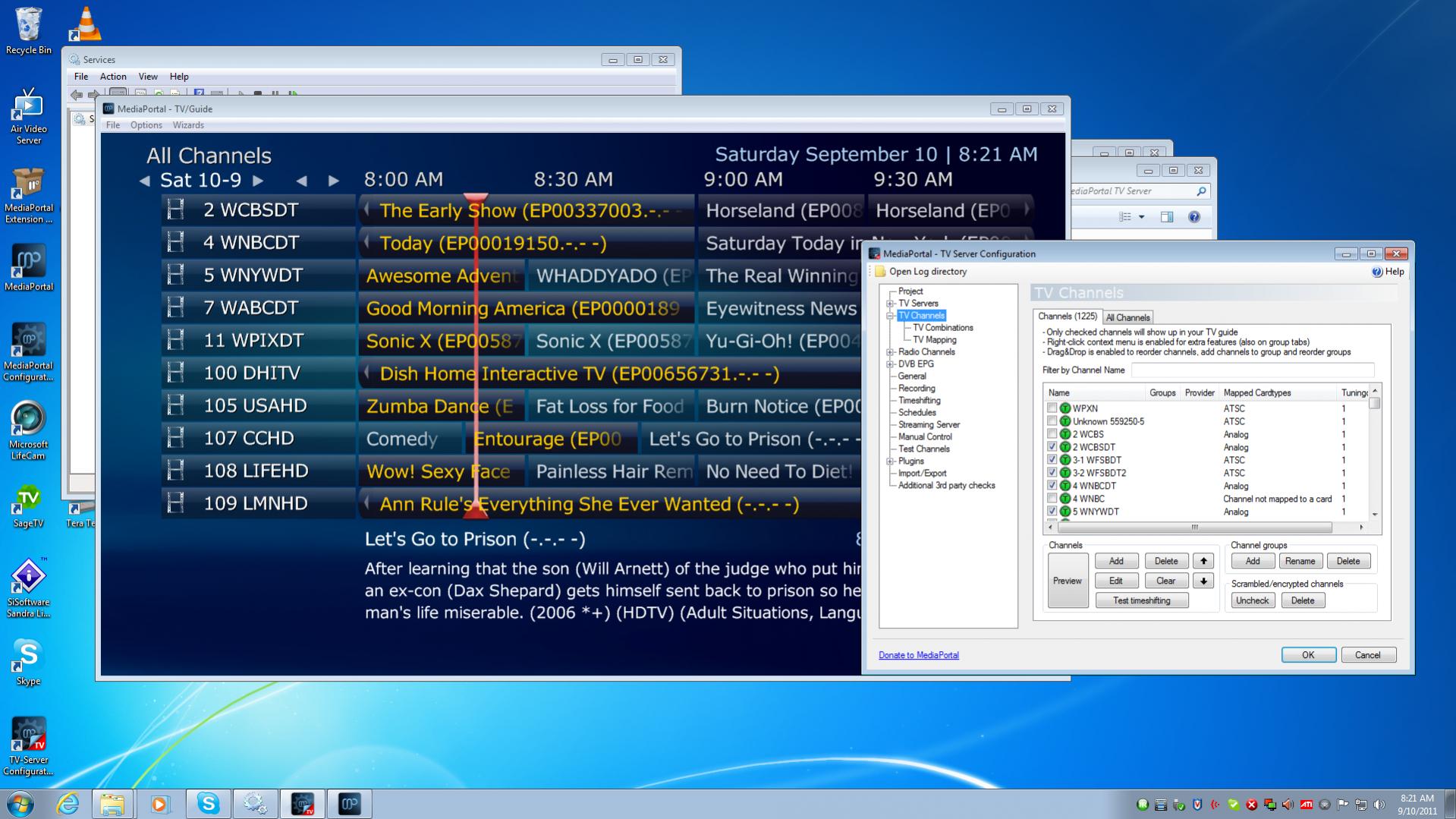
Best approach to map channels (1 Viewer)

spachti

Portal Pro
July 27, 2005
374
100
Bible Belt
Home Country
United States of America United States of America
It's getting really interesting around election times here. I still remember when, years back, ABC nationwide had a documentary on about Gores " Inconvenient Truth". The local ABC franchise owner refused to air it, we had a blank screen for 90 minutes. It would have been politically too radically was the excuse. The same franchise holder didn't have any problems airing the Kerry smear "documentary" on FOX.
Btw, i'm talking about Georgia in the good ole US of A, not the one in the former USSR.
We call that FREEDOM.
But that's off topic.
 

madas

Portal Pro
November 5, 2007
66
1
Yes, the US system is quite interesting. I'm originally from the UK which is much more like NZ. There is one channel in the UK that is setup like the US and thats ITV...each area has a local version of the channel.

I renamed my channels to just the callsign and now i have EPG data...the weirder thing is that now SD has actually renamed them from the callsign to

MAJOR-MINOR CALLSIGN

i.e.

8-1 WTNH

So it looks like thats all you have to do and then SD will do the work for you. That leads me to my next question. The channels are no longer in numeric order, how do I fix this?

also, in my guide if i type say 200 it takes me to channel 562...any ideas?
 

mm1352000

Retired Team Member
  • Premium Supporter
  • September 1, 2008
    21,544
    8,236
    Home Country
    New Zealand New Zealand
    I renamed my channels to just the callsign and now i have EPG data...the weirder thing is that now SD has actually renamed them from the callsign to

    MAJOR-MINOR CALLSIGN

    i.e.

    8-1 WTNH

    So it looks like thats all you have to do and then SD will do the work for you.
    Excellent, thanks for testing, and it is good to hear that it works. :D

    That leads me to my next question. The channels are no longer in numeric order, how do I fix this?
    You can reorder the channels in the channel group(s). Go to a channel group tab in the TV Channels section select channels on the right hand side, then use the arrow buttons [in the user interface] to reorder the list.

    also, in my guide if i type say 200 it takes me to channel 562...any ideas?
    Try unticking "select channel by index" in the TV section of MediaPortal configuration. Wiki info -->here<--.
     

    ijourneaux

    Portal Pro
    June 28, 2011
    86
    6
    Home Country
    United States of America United States of America
    Just to make sure I didn't do it wrong the first time, earlier today, I renamed the channels to number callsign. That did not work. I will try just using the callsign to see if it works.

    I also noticed that the channels were out of order so I will try that as well.

    I still have a problem with IRSS.

    I have uploaded my logs incase for IRSS and TVServer

    Take Care
     

    madas

    Portal Pro
    November 5, 2007
    66
    1
    OK I think i spoke to soon. I have EPG data for only a couple of days in the channels from the HDHR. It looks like now they have been renamed that schedulesdirect is unable to load any new EPG data for them. I checked "force EPG Update on next service restart" and i restarted the service. An hour later still nothing for these channels.

    when I check the database i see the externalID populated correctly

    '20373.11-1.schedulesdirect.org'

    Any ideas how to debug this?

    how can i check this externalID will provide data?
     

    mm1352000

    Retired Team Member
  • Premium Supporter
  • September 1, 2008
    21,544
    8,236
    Home Country
    New Zealand New Zealand
    OK I think i spoke to soon.
    *Sigh*... :(

    when I check the database i see the externalID populated correctly
    According to what I saw in the code, externalID matching is the first thing that is done...

    1. MP channel external ID (not editable, used for EPG mappings behind the scenes) matches SD channel XMLTV ID.
    The SD XMLTV ID is assembed as follows:
    Quote:
    if (IsLocalBroadcast && tvStation.BroadcastChannelNumber > 0 && !tvStation.IsDigitalTerrestrial)
    {
    // Local analog [cable???] channels.
    xmlId += "." + tvStation.BroadcastChannelNumber.ToString() + XMLTVID;
    }
    else
    {
    // ATSC or cable (QAM) channels
    xmlId += "." + tvStationMap.ChannelString + XMLTVID;
    }
    Presumably this is mostly to filter out channels that are already mapped correctly when you attempt a remap.

    Any ideas how to debug this?
    The only thing I can suggest at this point is checking the SD log file. Please post the TV Server logs...

    how can i check this externalID will provide data?
    No idea further than checking the logs.

    mm
     

    madas

    Portal Pro
    November 5, 2007
    66
    1
    OK. I keep getting a little further!

    It looks like the EPG is working but there is a gap of about 10 days with no data. I changed the "Last minute changes" to 72 hours for now and that seems to be populating the gap. Not sure if there is an easier way.

    RE: Channel orders

    I've attached a screenshot. I've ordered the channels as suggested but they don't follow this order in MP. Any ideas?

    I have to say, the stability of MP is excellent. Coming from Sage i found that it used to crash daily (especially with the colossus), no crashes yet in MP.
     

    Attachments

    • Guide.jpg
      Guide.jpg
      271.5 KB

    mm1352000

    Retired Team Member
  • Premium Supporter
  • September 1, 2008
    21,544
    8,236
    Home Country
    New Zealand New Zealand
    RE: Channel orders

    I've attached a screenshot. I've ordered the channels as suggested but they don't follow this order in MP. Any ideas?
    You're reordering the wrong list. Either reorder in the "all channels" channel group (the "all channels" tab in that same section), or create a new custom channel group ("add" button in the set of "channel groups" buttons) that only includes the channels that you want.

    These are quite fundamental concepts in MP that you need to understand. The channel sets that you see in MP are subsets (we call them "channel groups") of the full set of channels (that is shown in the list that you see in the "channels" tab). The "channels" tab itself is used to:
    1. Create channel groups.
    2. Create, edit and delete channels and tuning details manually.
    3. Add channels to groups.
    4. Make channels "invisible" in MP (by unticking them).

    The other tabs are channel group tabs, which represent what you actually see in MP. Use those tabs with the arrow and other buttons (or even drag and drop) to put the channels in the order you want to see them in MP.
    mm
     

    madas

    Portal Pro
    November 5, 2007
    66
    1
    Ah...my mistake. Works great now. I appreciate all your help on this!
     

    ijourneaux

    Portal Pro
    June 28, 2011
    86
    6
    Home Country
    United States of America United States of America
    MM

    In the other thread, it seems like we have figure out why I wasn't able to get IRSS to reliabily change channels on the cable box but that is for the other thread.

    Now I am back to trying to map my channels. If I understand the dicussion you had with Madas, it appears tha the matching of channels is only done on the call sign (in my case, in the US, usualy 4 letters WSAW or WSAWDT). So if I rename the channels from the HDHomeRun to the correct callsign, it will automatically map them to the correct guide information from SchedulesDirect. Correct? That is only 15 channels or so.
    Now for the 2 other Analog tuners, I get about 75 additional channesl but this time they only have numbers (2-99). Is the only way to get those associate with the correct guide information to rename them to the callsign? I though there was an option in the Schedules Direct plugin to associate the channels by number only?
     

    Users who are viewing this thread

    Top Bottom