Blu-Ray / HD DVD plugin for Arcsoft player (135 Viewers)

Imokles

MP Donator
  • Premium Supporter
  • April 27, 2009
    115
    14
    Home Country
    Germany Germany
    Sure that this is related to the patched DLL? I've no problems with Live TV and I also can't imagine how the changes could affect TV. But if you post some logs, I maybe can see whats going on ;)

    Switched back to the modified DLL, TV error is back. Logs attached. But as I said - if it's not something obvious, I'll wait for the "official" release.
    :D
     

    GhoSe

    Portal Pro
    December 17, 2007
    334
    47
    Berlin
    Home Country
    Germany Germany
    2009-06-03 18:02:42.004000 [Info.][MPMain]: g_Player.Play(rtsp://coruscant/stream7.0 TV)
    2009-06-03 18:02:42.004000 [Info.][MPMain]: RefreshRateChanger.AdaptRefreshRate: 'auto refreshrate changer' disabled
    2009-06-03 18:02:42.008000 [Info.][MPMain]: start process C:\Program Files\CyberLink\PowerDVD9\PDVDLaunchPolicy.exe "rtsp://coruscant/stream7.0"

    The bold line looks a bit crazy. Whats going on there with PowerDVD9 just after MP tries to play the live tv stream?!
     

    Imokles

    MP Donator
  • Premium Supporter
  • April 27, 2009
    115
    14
    Home Country
    Germany Germany
    Good question.

    • I have TMT2 and PowerDVD9 installed.
    • Windows Autoplay is disabled
    • In the Arcsoft plugin settings I configured the path to the Arcsoft MCE plugin. No powerdvd here.

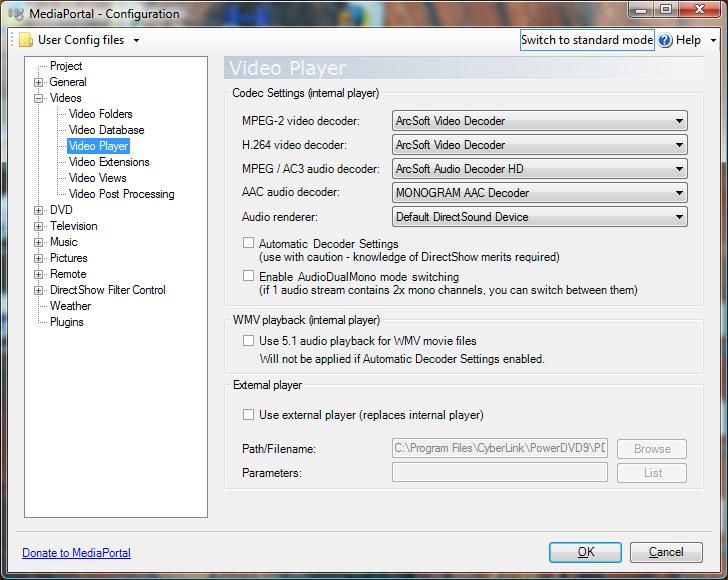
    In the "Video Settings", "PDVDLaunchPolicy.exe" is configured as the external player, but the "Use external player" box is unticked, so MP should ignore this setting altogether. And what does video settings have to do with this :confused:

    EDIT: Attached screenshot of video settings.
     

    Attachments

    • Unbenannt.jpg
      Unbenannt.jpg
      73.3 KB

    GhoSe

    Portal Pro
    December 17, 2007
    334
    47
    Berlin
    Home Country
    Germany Germany
    Hm generally this all should have nothing to do with TV...
    Do you get the same line in the logs when you are using the original dll?
     

    Imokles

    MP Donator
  • Premium Supporter
  • April 27, 2009
    115
    14
    Home Country
    Germany Germany
    No, the message is not there. I attached a log for reference.
     

    GhoSe

    Portal Pro
    December 17, 2007
    334
    47
    Berlin
    Home Country
    Germany Germany
    Hm very odd. Don't really know whats going on there, but I would try to take out the path to this PDVDLaunchPolicy.exe in the Video Settings. It seems that he tries to launch this instead of the inbuild TsReaderPlayer, even if I don't know why ;)
    That's the only idea I have atm, otherwise you really have to wait for the official release, sorry.
     

    Imokles

    MP Donator
  • Premium Supporter
  • April 27, 2009
    115
    14
    Home Country
    Germany Germany
    Yes, I already tried this out in the meantime and was about to post the results when you replied. Guess what... this did the trick! Everything is back to normal.

    :D a lot for your time and help!
     

    timbow

    New Member
    August 9, 2008
    1
    1
    Tested with "Casino Royale". Unfortunately, I own only one Blu-ray Disk.
    Thanks for your help :) Logs added!

    Unfortunately I have no clue why the code that I'm using for parsing the Blu-ray content is failing (its not my code :p). Does anyone else have the same disk?

    2009-05-12 17:06:25.725731 [ERROR][MPMain]: ArcsoftPlayerPlugin: SetRefreshRate - failed to get refresh rate from disk!
    2009-05-12 17:06:25.726731 [ERROR][MPMain]: ArcsoftPlayerPlugin: SetRefreshRate - exception System.IndexOutOfRangeException: Der Index war außerhalb des Arraybereichs.
    bei BDInfo.TSStreamFile.Scan(List`1 playlists, Boolean isFullScan)
    bei WindowPlugins.ArcsoftPlayer.ArcsoftPlayerPlugin.SetRefreshRate()

    Hi, I checked the code, and it reads the ts stream on the disc, derives the FPS from that, and instatiates a variable in a class (can't remember which one). This can only work if the software can read the stream, and this can only happen on unencrypted Blu-Ra, or if AnyDVD is running. The disc must have the correct Blu-Ray file structure as well. run AnyDVD and the autp refresh rate change feature works just fine.

    Also, the code does not, as far as I can see, deal with HDDVD (not a complaint, an observation in case someone else wants to moan about that:D)
     

    tourettes

    Retired Team Member
  • Premium Supporter
  • January 7, 2005
    17,301
    4,800
    Hi, I checked the code, and it reads the ts stream on the disc, derives the FPS from that, and instatiates a variable in a class (can't remember which one). This can only work if the software can read the stream, and this can only happen on unencrypted Blu-Ra, or if AnyDVD is running. The disc must have the correct Blu-Ray file structure as well. run AnyDVD and the autp refresh rate change feature works just fine.

    Also, the code does not, as far as I can see, deal with HDDVD (not a complaint, an observation in case someone else wants to moan about that:D)

    Both true, thanks for clearing up this.
     

    CPergler

    Portal Member
    June 16, 2009
    17
    0
    Home Country
    Austria Austria
    Dont know if anybody has come across this:

    Tried TMT MCE Plugin today. Everything works fine for me exept one thing: When I insert a blueray disc, the TNT MCE plugin comes up (after a few seconds showing a black screen) with an error message, tellelling me that the program "failed tu utilize video overlay in the graphics card" and that I should probably do a driver update... Well, I use a Radeon HD4350 with Catalyst 9.6 drivers (latest available) so that cant really be the cause.

    When I click on OK to close the error message, the MCE plugin obviously works. But the thing is that I have to get the mouse to klick on OK, because it wont work with the remote... :-/

    Any suggestions?
     

    Users who are viewing this thread

    Top Bottom