Blu-Ray / HD DVD plugin for Arcsoft player (8 Viewers)

woddog

Portal Pro
November 28, 2007
117
5
Townsville, QLD
Home Country
e39mofo, I didn't have to remap at all. I just installed the beta 7 version and I'm using the OEM MCE V2 remote. All the necessary buttons work ff, rr, chapters skip. info button works etc. just the "green" button problem remains.

 

e39mofo

Portal Member
December 22, 2008
7
0
Home Country
Canada Canada
e39mofo, I didn't have to remap at all. I just installed the beta 7 version and I'm using the OEM MCE V2 remote. All the necessary buttons work ff, rr, chapters skip. info button works etc. just the "green" button problem remains.

:sorry: what I meant was, how do you go back in MediaPortal without using a keyboard? I'm trying to figure out how to come back into mediaportal using the MCE Remote only.
 

woddog

Portal Pro
November 28, 2007
117
5
Townsville, QLD
Home Country
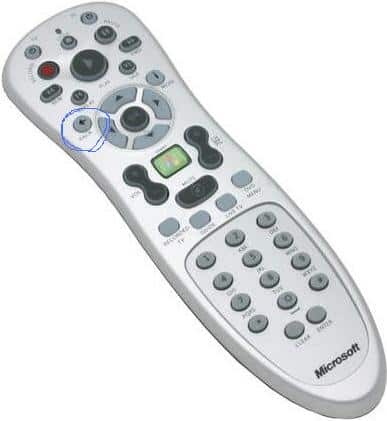
I use the "back" button on the remote as shown in the picture.

You have to make sure that your remote is setup/ticked in MediaPortal first tho for this to work.
 

Attachments

  • Untitled.jpg
    Untitled.jpg
    18.7 KB

tourettes

Retired Team Member
  • Premium Supporter
  • January 7, 2005
    17,301
    4,800
    Hi tourettes,
    I have a little problem with your plug-in. To go back in MediaPortal I have to press ESC (mapped it to the remote control), but to go back in uMCEDVDPlayer I have to press BACKSPACE. Is it possible to have a common key?

    Unfortunately there is nothing I can do. uMCDDVDPlayer ia not my code so I cannot change it's behavior. Sorry.

    refresh rate also doesn't change to 24Hz although I ticked it off in the setup

    Please upload MediaPortal.log, maybe it shows aomething interesting.
     

    musa

    Portal Member
    May 29, 2008
    31
    0
    Hi tourettes,
    I have a little problem with your plug-in. To go back in MediaPortal I have to press ESC (mapped it to the remote control), but to go back in uMCEDVDPlayer I have to press BACKSPACE. Is it possible to have a common key?


    refresh rate also doesn't change to 24Hz although I ticked it off in the setup
    Have you tried to use this plugin called Keyboard Input Plugin?

    MEDIAPORTAL - free media center - KeyboardInputPlugin

    I'm using a MCE remote clone, so this is the best plugin I can find that can map button presses to key presses. Almost all the necessary buttons are mapped according to what I want. Pressing back or close brings me back to mediaportal everytime.


    Has anyone figured out how to mount ISO's using MediaPortal? I know with MCE, you can download an plug-in to incorp DeamonTools and you can mount them, I was wondering if anyone has done so with MP?

    Mediaportal has supported daemontools for a long time already. It's in the mediaportal configuration setup. I can't remember the exact steps though. The daemon tools settings should be in the General tab in mediaportal configuration.
     

    TechLife

    MP Donator
  • Premium Supporter
  • August 19, 2008
    91
    4
    Denver, CO
    Home Country
    United States of America United States of America
    Hey tourettes-

    Thanks for all your work & persistence on this plug-in!

    I read through the entire thread twice before posting so if I missed something & this has been covered I apologize in advance...

    OK so say I load MP, play a BD and exit, I return to MP just fine. Now, if I exit MP anytime after this, TMT opens automatically after exit. I then exit TMT and MP automatically opens again. Lather, rinse, repeat. This cycle continues until I intentionally crash MP.

    Vista Home Prem 32bit, MP101

    Not a big deal, but it is a bit annoying at times >.<

    Thanks in advance and keep up the great work!!
     

    demomanTNA

    Portal Member
    August 8, 2007
    27
    1
    46
    Home Country
    United States of America United States of America
    Just wanted to make a quick post saying thanks to everyone for the hard work put into this plugin. I got this working perfectly on my system.

    Again, thanks!
     

    kjd01

    MP Donator
  • Premium Supporter
  • April 24, 2009
    159
    19
    First great plugin. I would like to know if anybody else has experienced the following problems I have. I am running version 1.0.1.

    1. When I install Beta 7 it creates a blank spot on the menu where the plugin should be and the Top bar with the Close and Reset Buttons has vanished. They still work though if you can guess where you cursor is. When I install Beta 6 the problem goes away. I have tried with the MPI and with the dll manually and the problem occurs either way.
    2. Auto Play of Blu-Ray works fine if the TV is stopped and I am at the Home Screen. If the TV is playing even at the Home Screen, when the Auto Play function happens it minimises MP and attempts to start the Arcsoft software but then goes straight back to MP, but the TV is stopped. A couple of times the Arcsoft software was actually playing the movie in the background.
    3. If I load a Blu-Ray ISO under My Videos the auto play function in MP just opens the folders not directs it to run under Arcsoft. (I suspect this one is a MP problem not a plugin problem)

    Thanks
     

    GhoSe

    Portal Pro
    December 17, 2007
    334
    47
    Berlin
    Home Country
    Germany Germany
    3. If I load a Blu-Ray ISO under My Videos the auto play function in MP just opens the folders not directs it to run under Arcsoft. (I suspect this one is a MP problem not a plugin problem)

    I don't know why, but this is really related to MP. It's no real bug because someone has explicit deactivated the autoplay before mounting the image... To be honest I don't understand why, but I will try to find out ;)
     

    jameson_uk

    Retired Team Member
  • Premium Supporter
  • January 27, 2005
    7,257
    2,533
    Birmingham
    Home Country
    United Kingdom United Kingdom
    This looks exactly the job :) great

    One thing which would be the icing on the cake is the ability to change the speaker settings when launching TMT. I currently close MP, set refresh rate to 24Hz and then use this to set the speaker settings to 7.1. I then have to do the revsere to put things back to normal

    If I could have the ability to either run a command and set the speaker settings myself before TMT runs and after it finishes that would be great. If the functionality could be built into the plugin that would be amazing.

    A complete solution just like the automatic refresh rate that detects HD audio and sets to 7.1 and then back to 2.0 afterwards so I could play some files encoded with multi-channel FLAC would be even better :D
     

    Users who are viewing this thread

    Top Bottom