Bug in the Scheduler or is it me? (1 Viewer)

son_t

Portal Pro
February 3, 2009
102
0
Home Country
United Kingdom United Kingdom
This has happened to me twice now, and I suspect it is a bug in the Scheduler...

I've been recording the WC, and set recordings via the EPG. I put the MP PC into standby, and leave the timer to wake the PC up to record. All works well for afternoon and evening matches.

For one reason or another, I've missed some of the matches, so I decide to schedule a timer to record the repeat on BBC HD shown in the early morning (00:05 or 01:10, etc). I put the MP PC into standby as usual, but nothing is recorded (or shows up in the recordings) when I look at it the next day... (No diskspace consumed also, each HD recording takes about 11-15Gb.)

What is going on? I use WinOFF to turn off the PC timed for about 5 mins after the timer end time.


MediaPortal Version: 1.0.2.0
MediaPortal Skin: Streamed-MP
Windows Version: Windows XP + SP3
CPU Type: Pentium 4 3.2GHz
HDD: Seagate Pipeline HD 320GB
Memory: PC2-4200 DDR2 3GB
Motherboard: Abit AA8-3rd Eye
Video Card: HiS ATI 2600 Pro
Video Card Driver:
Sound Card: Realtek High Definition Audio
Sound Card AC3: S/PDIF + 2ch Stereo
Sound Card Driver: 5.10.0.5591
1. TV Card: Pinnacle 7010iX
1. TV Card Type: Dual Analogue + DVB-T + DVB-S
1. TV Card Driver: 1.0.4.1
2. TV Card:
2. TV Card Type:
2. TV Card Driver:
3. TV Card:
3. TV Card Type:
3. TV Card Driver:
4. TV Card:
4. TV Card Type:
4. TV Card Driver:
MPEG2 Video Codec: ffdshow
MPEG2 Audio Codec: MPA Decoder
h.264 Video Codec: PowerDVD9
Satelite/CableTV Provider: Freesat 28E
HTPC Case: Antec Veris Fusion Remote Max
Cooling: Fans
Power Supply: 400W
Remote: Antec Veris RM200
TV: Samsung LE37R88BDX
TV - HTPC Connection: (PC) DVI to HDMI (LCDTV)
 

jameson_uk

Retired Team Member
  • Premium Supporter
  • January 27, 2005
    7,257
    2,533
    Birmingham
    Home Country
    United Kingdom United Kingdom
    no idea about WinOff but if you want the PC to wake to record then you need to use PowerScheduler plugin on both client and tvserver
     

    son_t

    Portal Pro
    February 3, 2009
    102
    0
    Home Country
    United Kingdom United Kingdom
    Power Scheduler is used in TV Server. My MP PC is both server and client. Power Scheduler is not enabled in Media Portal (client).

    As I say it works for the afternoon and evening games (PC being in standby before match starts, which wakes up to record) but not the timer scheduled for the match in the early morning of the next day! (I am not up in the early hours to see what the PC does.)

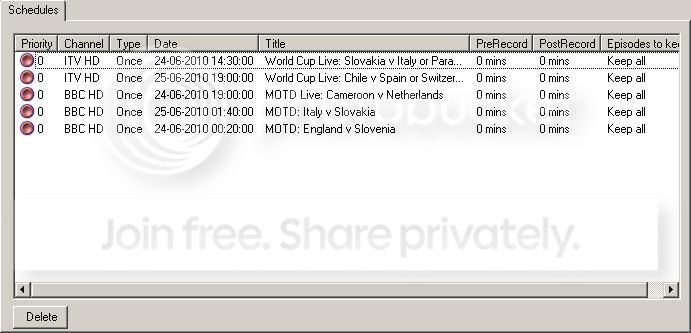
    This is what my schedules look like:
    Schedules.jpg

    The England repeat match never recorded... (I shutdown the PC by putting it in standby like all the other successful recordings.)
     

    son_t

    Portal Pro
    February 3, 2009
    102
    0
    Home Country
    United Kingdom United Kingdom
    Good news: I've had a timer scheduled for after midnight record successfully! Bad news: the PC was on...

    I will have to test to see if leaving the PC in standby is affecting the after midnight timers with a few experiments...
     

    son_t

    Portal Pro
    February 3, 2009
    102
    0
    Home Country
    United Kingdom United Kingdom
    Two tests - neither worked. One timer (scheduled from EPG) for after midnight each time. Put PC into standby (suspend).

    First test, in real time, nothing recorded. Second test, during day. Set time to near midnight, set a timer for just after midnight, put PC into standby. PC wakes up, recording does not start.

    Where is the bug? Surely some else has experienced this - or does everyone's timers for after midnight using Power Scheduler work?
     

    MLH01

    MP Donator
  • Premium Supporter
  • March 11, 2009
    157
    23
    Gold Coast
    Home Country
    Australia Australia
    Power Scheduler is used in TV Server. My MP PC is both server and client. Power Scheduler is not enabled in Media Portal (client).
    Correct me if I'm wrong, but I thought you needed PowerScheduler to be enabled in both TV Server config and MP config, with similar settings (both have to have the same shutdown type and time to shutdown) when running single seat - in which case you shouldn't need WinOFF.

    MLH01.
     

    RobNorthcott

    MP Donator
  • Premium Supporter
  • October 9, 2007
    540
    102
    Dartmoor, England
    Home Country
    United Kingdom United Kingdom
    That's true - even with single-seat you need to enable the PowerScheduler plugin in both TVServer and MediaPortal. You won't need any other utilities to turn the PC on or off.

    Rob
     

    son_t

    Portal Pro
    February 3, 2009
    102
    0
    Home Country
    United Kingdom United Kingdom
    Thanks for taking an interest and replying!

    Even though I've set up and use MP for quite a while now I've never used it to record or watch TV on a regular basis. Hence, I've not known what facilities are available, so discovering that I could schedule a timer to record, and getting it to wake the PC up when put into standby, I did so and used WinOFF to turn the PC off (not knowing that Powerscheduler could also do this.

    Well, having discovered the non-recording bug (is it a bug?), I don't think letting Powerscheduler shutdown the PC would have been reliable enough to trust.

    Well, I've upgraded my MP to the latest 1.1 RC6 now, so will perform further test with timer recordings after midnight to see if this bug is still present, if not for everyone else then just for me.

    All I know is that the PC turns on and records OK with timers for during the day but not for ones after midnight. Checking the settingg Powerscheduler is only enabled in TV Server and not MP (client).

    That's true - even with single-seat you need to enable the PowerScheduler plugin in both TVServer and MediaPortal. You won't need any other utilities to turn the PC on or off.

    Rob

    I don't see why as MP does not need to be running for A timer to record - or is everyone saying that it does?
     

    RobNorthcott

    MP Donator
  • Premium Supporter
  • October 9, 2007
    540
    102
    Dartmoor, England
    Home Country
    United Kingdom United Kingdom
    That's true - even with single-seat you need to enable the PowerScheduler plugin in both TVServer and MediaPortal. You won't need any other utilities to turn the PC on or off.

    Rob

    I don't see why as MP does not need to be running for A timer to record - or is everyone saying that it does?
    MP doesn't have to be running, but if you leave it running (even on the main menu) without PowerScheduler enabled in the client it will not shut down. Not going to cause the problem you had directly (the PC would never shut down, so the recording should work), but AFAIK the timer to wake up the computer is set by PowerScheduler as it shuts down the PC, so if something else shut it down the wake-up timer would not be set. Not sure about what WinOFF does - perhaps that was handling the wake-up as well... but with PowerScheduler you shouldn't need anything else to do that.

    As for reliability, I've found it very reliable in the last few releases of MP - haven't had a failed recording for ages (certainly not since version 1.0)

    Rob

    EDIT: It certainly used to be the case (although I haven't tested it for ages) that you had to leave PowerScheduler to shut down the computer for the wake-up timer to work. If you shut down any other way (even through the MP menu) it will not work. I don't know if this has changed, but I've just got into the habit of leaving MP on the main menu and letting it shut itself down (set to 5 minutes, so not wasting too much power).
     

    MLH01

    MP Donator
  • Premium Supporter
  • March 11, 2009
    157
    23
    Gold Coast
    Home Country
    Australia Australia
    As for reliability, I've found it very reliable in the last few releases of MP - haven't had a failed recording for ages (certainly not since version 1.0)

    Rob

    EDIT: It certainly used to be the case (although I haven't tested it for ages) that you had to leave PowerScheduler to shut down the computer for the wake-up timer to work. If you shut down any other way (even through the MP menu) it will not work. I don't know if this has changed, but I've just got into the habit of leaving MP on the main menu and letting it shut itself down (set to 5 minutes, so not wasting too much power).

    Same here. PowerScheduler has been rock solid for the last few releases. I also let MP shut the system down automatically.

    My guess is that by using WinOFF, PowerScheduler is not able to set the next 'wake up' time properly. There could be conflicts between WinOFF and PowerScheduler that cause the PC to either wake and not record, or just not wake at the correct time. So make sure you disable WinOFF while testing, with both TV Server and Client PowerScheduler active.

    MLH01.
     

    Users who are viewing this thread

    Top Bottom