Bug in the Scheduler or is it me? (2 Viewers)

son_t

Portal Pro
February 3, 2009
102
0
Home Country
United Kingdom United Kingdom
My guess is that by using WinOFF, PowerScheduler is not able to set the next 'wake up' time properly. There could be conflicts between WinOFF and PowerScheduler that cause the PC to either wake and not record, or just not wake at the correct time. So make sure you disable WinOFF while testing, with both TV Server and Client PowerScheduler active.

MLH01.
I think you might be on the right track here, if that's how Powerscheduler works... Will test using MP to shutdown the PC.
Cheers!

EDIT: How do you configure MP or get MP to shutdown your PC into suspend/standby mode and leave itself running? Or don't you and just leave the PC idle and let it go into standby mode itself?
 

son_t

Portal Pro
February 3, 2009
102
0
Home Country
United Kingdom United Kingdom
MP doesn't have to be running, but if you leave it running (even on the main menu) without PowerScheduler enabled in the client it will not shut down.

The latest MP (1.1 RC6) does not have the Powerscheduler plug-in in the MP Client, but does for the TV Server, so I suspect Powerscheduler does not need to be running in MP client for it to work (I would assume it is running in TV Server in the background anyway..?)

EDIT: It certainly used to be the case (although I haven't tested it for ages) that you had to leave PowerScheduler to shut down the computer for the wake-up timer to work. If you shut down any other way (even through the MP menu) it will not work. I don't know if this has changed, but I've just got into the habit of leaving MP on the main menu and letting it shut itself down (set to 5 minutes, so not wasting too much power).
I suspect this is the case as my reply to MLH01. Will Powerscheduler work if it is MP that puts the PC into standby, I wonder, and how do you configure MP to suspend rather than shut down?

EDIT: In any case, if I prove that it is WinOFF that is causing Powerscheduler not to record (by letting Powerscheduler to shutdown the PC), then surely this is a bug in Powerscheduler? Surely, it should work whatever program shuts down the machine, as long as its last timer executes fully in Powerscheduler?
 

Paranoid Delusion

Moderation Manager
  • Premium Supporter
  • June 13, 2005
    13,052
    2,978
    Cheshire
    Home Country
    United Kingdom United Kingdom
    The latest MP (1.1 RC6) does not have the Powerscheduler plug-in in the MP Client,

    Oh yes it does, not activated on mine because I use FTR.

    sshot-8.jpg

    The second question is just set everything to suspend (not in windows of course, that should be disabled).
     

    son_t

    Portal Pro
    February 3, 2009
    102
    0
    Home Country
    United Kingdom United Kingdom
    The latest MP (1.1 RC6) does not have the Powerscheduler plug-in in the MP Client,

    Oh yes it does, not activated on mine because I use FTR.
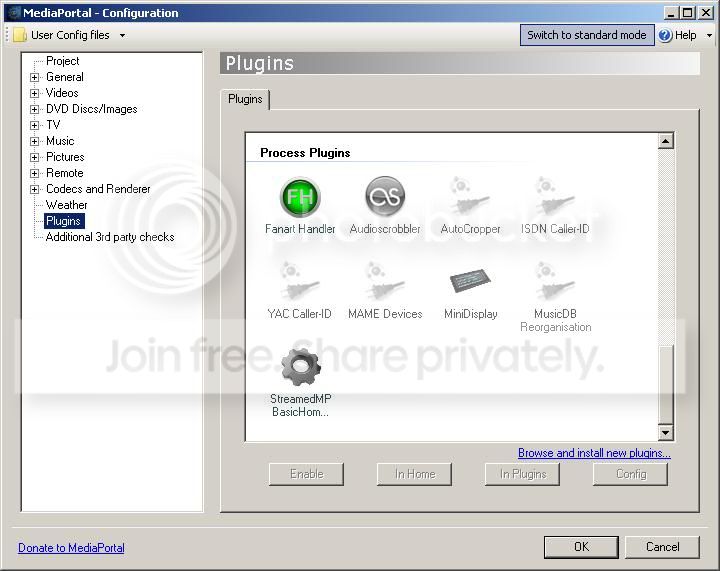
    I've just double check. It isn't there!

    EDIT: Here's my screenie:
    processplugs.jpg


    EDIT2: I've configured Power Scheduler in TV Server to shutdown (suspend) if the PC is idle for 2 mins. I've left the PC idle for over 2 mins and it has not shutdown. I've done this with MP client running and not running, and still no shutdown. Is it because the plug-in is missing in MP client that the PC is not shutting down? What about the Power Scheduler running as part of TV Server - why isn't that shutting the machine down?
     

    MLH01

    MP Donator
  • Premium Supporter
  • March 11, 2009
    157
    23
    Gold Coast
    Home Country
    Australia Australia
    The latest MP (1.1 RC6) does not have the Powerscheduler plug-in in the MP Client,

    Oh yes it does, not activated on mine because I use FTR.
    I've just double check. It isn't there!

    EDIT: Here's my screenie:
    processplugs.jpg


    EDIT2: I've configured Power Scheduler in TV Server to shutdown (suspend) if the PC is idle for 2 mins. I've left the PC idle for over 2 mins and it has not shutdown. I've done this with MP client running and not running, and still no shutdown. Is it because the plug-in is missing in MP client that the PC is not shutting down? What about the Power Scheduler running as part of TV Server - why isn't that shutting the machine down?

    PowerScheduler should be in there. Check to see if the PowerScheduler client plugin is in the Process Plugin folder (something like ...\Program Files\Team MediaPortal\MediaPortal\plugins\process). There should be a file 'PowerSchedulerClientPlugin.dll' present.

    MLH01.
     

    son_t

    Portal Pro
    February 3, 2009
    102
    0
    Home Country
    United Kingdom United Kingdom
    Well I downloaded the RC6 from this MediaPortal site, and installed it, and it isn't there as I have not touched the files by going in to plug-ins folders and moving them about!

    Anyway, this missing plug-in might be having an effect on Power Scheduler as now it fails to wake up the PC from standby to record. Now I've taken a step back in working why Power Scheduler is failing to activate early morning timers!

    Re: WinOFF

    Having thought about it, now I don' think WinOFF is the cause! WinOFF is/was just used to shutdown the machine, so Power Scheduler should not be confused, as it is like if I manually powered the PC off after a timer has finished.

    Also, from a Power Scheduler point of view, with the two experiments I performed, the Power Scheduler and MP and the PC was started from a 'clean slate'. PC was booted from cold, no timers were set/present in PS, and WinOFF was not used. I then set a timer for early morning (beyond midnight), forwarded the PC time to 23:55, put it into standby and watched to see what happens. The PC woke up, but the timer did not activate. Why not? (At no point was WinOFF in use!)

    Not sure what to do now. I think I won't waste any more time, and look into other recording schedulers just like everyone else who want to regularly record using their HTPC...


    First, maybe I ought to solve why PS is missing from this 1.1.0 RC6 install by removing all presence of MP and re-installing to see if PS is in the MP client - could it possibly that this plug-in is missing from the RC6 install package?! (How do I save my channels, etc, so that I do not need to do a channel scan.)
     

    Paranoid Delusion

    Moderation Manager
  • Premium Supporter
  • June 13, 2005
    13,052
    2,978
    Cheshire
    Home Country
    United Kingdom United Kingdom
    Just use the normal uninstall, it shows 3 options, use the default, so when you reinstall, all your TV info will still be there.
     

    son_t

    Portal Pro
    February 3, 2009
    102
    0
    Home Country
    United Kingdom United Kingdom
    Good news and bad...

    Good news: so un-installing and re-installing MP 1.1 RC6 has brought back Power Scheduler in the client. (I guess the reason why PS was AWOL, was because I let the RC6 install do the un-installing of the previous version of MP (1.0.2), and as I remember, the un-installation wasn't that successful - it ran into problems and froze a few times!)

    Bad news: MP crashed causing Windows to crash while I was using it (watching an episode in TV Series)! This is the first ever time it has done this, so I must lay the problem at the door of 1.1 RC6. The two differences to the previous install were: (a) power scheduler was enabled in the client, and (b) I had enabled Minidisplay plug-in for my Antec iMON display.

    Bad or Good news: Minidisplay works for the first time ever with my Antec iMon display!! This is good if it is not the plug-in that is causing MP and PC to crash, but pretty bad if it is! I hope it is Powerscheduler (or bad configuration files) rather than Minidisplay, as I would probably not use it and use 4TR instead.
     

    Users who are viewing this thread

    Top Bottom