[Bug] MovingPictures 1.3 and 1.2.3 retrieves wrong Covers (1 Viewer)

FreakyJ

Retired Team Member
  • Premium Supporter
  • July 25, 2010
    4,004
    1,427
    Home Country
    Germany Germany
    Hello Everybody,

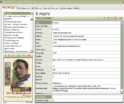
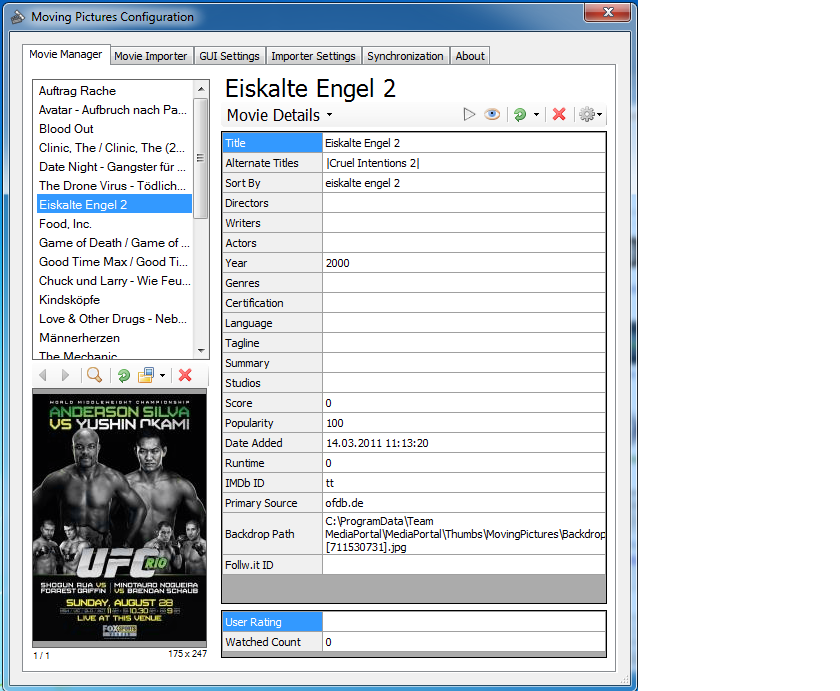
    I'm trying now for days, but MovingPictures sometimes retrieves the false Cover... but if it is the false one it is always the same oO I really don't know the reason.. also in the logs I couldn't find a hint oO It seems an issue with themoviedb.com but I'm not sure... in the false Cover:
    http://cf2.imgobject.com/t/p/original/bVoxxClCVJfUWfaxm5cZP6v3crh.jpg

    It is always the same (Import2 - movingpictures.log):
    06-Jan-2012 23:29:44 Info [ FileBasedResource]: Added resized cover art for "Eiskalte Engel 2" from: http://cf2.imgobject.com/t/p/original/bVoxxClCVJfUWfaxm5cZP6v3crh.jpg
    the import before (Import 1 - movingpictures.old - Kopie.log):
    06-Jan-2012 23:10:28 Info [ FileBasedResource]: Added resized cover art for "Avatar - Aufbruch nach Pandora" from: http://cf2.imgobject.com/t/p/original/bVoxxClCVJfUWfaxm5cZP6v3crh.jpg

    Any ideas?! oO
     

    Attachments

    • MovingPictures wrong CoverArt.png
      MovingPictures wrong CoverArt.png
      152.4 KB

    FreakyJ

    Retired Team Member
  • Premium Supporter
  • July 25, 2010
    4,004
    1,427
    Home Country
    Germany Germany
    AW: [Bug] MovingPictures 1.3 and 1.2.3 retrieves wrong Covers

    thanks, with the new scraper it seems to be much better :)
     

    argd

    Portal Member
    August 17, 2010
    90
    1
    Home Country
    Russian Federation Russian Federation
    Hello there!
    The same problem here: ads (kinopoisk (russian) instead of covers for some movies.
    The most annoying thing is, I could remove wrong covers, but they get back again. Is there any setting to get rid of ANY covers for particular movie?

    And... if it is a scraper's issue, all the scrapers are affected: I put IMDB and another movieDB on the top of the list, and disabled kinopoisk (russian) - that helped to get rid of unwanted ads, but it doesn't help for some other items where there is no english title at all, but still I get wrong cover...

    I do believe, a setting of "never try to get a picture for this item" would help a lot to resolve those situation.
     

    FreakyJ

    Retired Team Member
  • Premium Supporter
  • July 25, 2010
    4,004
    1,427
    Home Country
    Germany Germany
    yeah really don't know what's wrong >_>
    I thought the API is wrong, but the API works fine... must inside the mpvingpictures code...
     

    RoChess

    Extension Developer
  • Premium Supporter
  • March 10, 2006
    4,434
    1,897
    The problem is inside the scraper-script used to get the details for the movie. If it stores a wrong/invalid IMDb tt-ID or other reference then when it is time to get the artwork and the same scraper-script can not find anything (or doesn't even contain a cover/backdrop node), an attempt is made with other scraper-scripts for that specific node (cover or backdrop). However this is where you get these weird results if the IMDb tt-ID or other ID is invalid for that lookup.

    Famous example on IMDb.com scraper cover-node, is that if your other scraper-script inserts "tt" into the database, you end up with the following cover:

    iabkkWMDfUsred8BWTPtfxgDNdo.jpg


    The UFC one is another invalid one, that I can't remember right now, but clearly you have a misbehaving scraper-script. So check to see if there is an update available and otherwise let the scraper-script developer know so they can fix it.
     

    argd

    Portal Member
    August 17, 2010
    90
    1
    Home Country
    Russian Federation Russian Federation
    let the scraper-script developer know so they can fix it.
    RoChess, thanks for your posting, i'm ROFL with that 'tt' example ;-)
    But.. I don't think it's a good option to address an issue to scraper-script author only, because:
    - it's an open-source contribution: I appreciate someone made this work, but no one has to care about issue(s);
    - simply, I have no idea, who is one to be bothered.
    In my example, those issues were there since I installed the MP first time - hm... two years ago? I installed the MovingPictures plugin, read some additional threads to set-up the russian titles scrapers, faced the issue (I didn't have any movie with Leslie Nielsen and/or Austin Powers, but ALL the movies were getting their posters , and it was impossible to stop that) - so I removed the MovingPictures at that point.
    Now, it's still the same.
    So, I suppose, scraper-script authors aware about the issue, but cannot get rid of that.

    On the other hand, the MovingPictures developers could simply give an option i mentioned above. Anyway, I'm pretty sure those old animations would never appear on any Movies DB. So, no reason to try again and again...

    ====

    UPD
    so, there are several issues in fact, but I suppose an option might fix all of them:
    if I get wrong cover/title or if let's say I don't like movie description - I could edit it, no prb. But It would be great to have an option to "FREEZE" the result, to never ever get any update for an item.
     

    RoChess

    Extension Developer
  • Premium Supporter
  • March 10, 2006
    4,434
    1,897
    If you look at the scraper-script, it shows an author in there.

    The Russian one that I find is: http://code.google.com/p/moving-pic...es/DataProviders/ScraperScripts/Kinopoisk.xml

    Which has <author> tag on LRFalk01 and others. I happen to know LRFalk will start a scraper-script, but then expects somebody with local language knowledge to take over (I do the same). That seems to be the problem right now, finding a Russian MediaPortal user with a little programming knowledge (scraper-scripts are not 'that' hard actually) that will take up the task to fix issues.

    Last update was Dec 30th 2011, so it could very well be that things have changed at the Kinopoisk site to break the scraper, or the artwork node bug was never fixed before.

    I've helped on quite a few scraper-scripts as well, but any non-English one was only doable with a lot of help from somebody who spoke the language and could test the script on their system with the same language configured as the scraper.

    And it can end up in a big job if the movie info site constantly makes changes. I'm behind the IMDb+ scraper-script system (it has plugin to adjust options and auto-update) and I would love to add Russian language support to it, but that will only work if there is a Russian movie site that accepts an IMDb tt-ID as input to give the Russian version back.

    Swedish example for Avatar (tt0499549): http://www.nyheter24.se/filmtipset/imdb/tt0499549

    So I've got English, Dutch, French, German, Icelandic, Italian, Portuguese, Spanish, and Swedish languages covered but don't know a Russian movie info site I can use to also add support for that one.

    Help me find one and I'll have you covered :)

    Otherwise hopefully somebody from Russia will come forward to take over the task of managing the Kinpoisk scraper. In the meantime I will get a hold of LRFalk01 and see if he is willing to look into it, as it might be an easy fix.
     

    argd

    Portal Member
    August 17, 2010
    90
    1
    Home Country
    Russian Federation Russian Federation
    Hello again RoChess,
    sure, I will try to step in to find out a website using that.
    back to russian titles scraper - there is a thread https://forum.team-mediaportal.com/threads/scraper-request-www-kinopoisk-ru-ru.54802/ , but they refer there to another topic, where scraper's author publishes updates: https://forum.team-mediaportal.com/threads/russian-kinopoisk-ru.93004/
    The thing is, scraper's developer doesn't use MovingPictures, so it's for MP db itself, originally.

    Anyway... it's not only about the "kinopoisk" outdated scraper. Please have a look:

    mp3.png

    There is no any word in English nor in file title, not in the description downloaded from the "kinopoisk". But actually, there was - because for unclear reason English title was mentioned here as an alternate one - I have removed it. But that didn't help. It is not just a random picture here - actually, a movie of "On the Waterfront" was given the same title in Russian, like this old animation. But not a vice versa. There is no alternate title like "On the Waterfront" for this animation, just because it is not a literal translation.
    For sure, those 3 covers were not downloaded from the kinopoisk_ru - because, there is another cover on the kinopoisk_ru for that "wrong" title.
    Here is the list of my settings for covers:
    mp4.png

    So, somehow, the MovingPictures remember that wrong title, even when it is removed, and use it to download wrong covers - not from the russian website, but from the IMDB etc.
     

    RoChess

    Extension Developer
  • Premium Supporter
  • March 10, 2006
    4,434
    1,897
    It goes in order, for the "Cover node" you have the Russian scraper listed way down, so it is almost never used. So you need to disable scraper-sources you do not use, or adjust the order to put the ones you prefer at the top.

    You should simply disable *ALL* scraper-scripts on the cover node except that Russian one, then you will never have any issues. I've pretty much done the same even for an English setup with themoviedb at the top and my own IMDb+ right below it, and every other scraper is disabled/deleted. The imdb.com website has theater style posters, which are nice, but I prefer the DVD/BR covers that TMdB usually offers.
     

    Users who are viewing this thread

    Top Bottom