Calling all MP New Zealanders (Both of you!!) (17 Viewers)

Bleazle

Portal Pro
July 14, 2007
1,122
257
Pukekohe
Home Country
New Zealand New Zealand
@Tommy - cheers - hopefully all of this will help someone else out too!

..
1. Run a video or recorded TV file which DOES NOT PLAY in MP in Graphedit. What is the list of items/codecs it brings up both for video and sound, and does it play in graphedit?.

I'll definately do that next time it turns to cr@p and post the results.

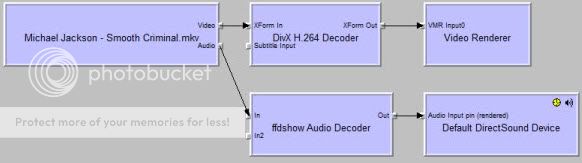
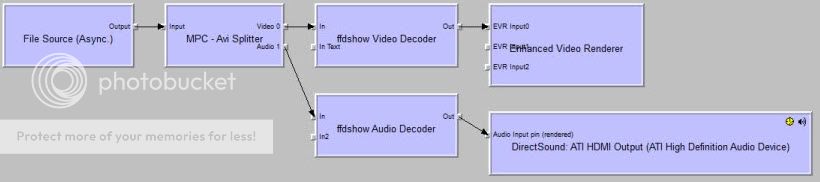
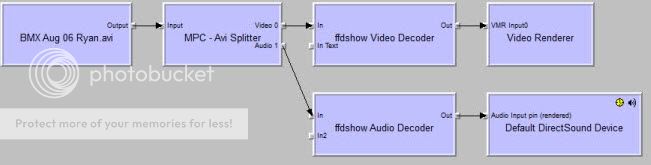
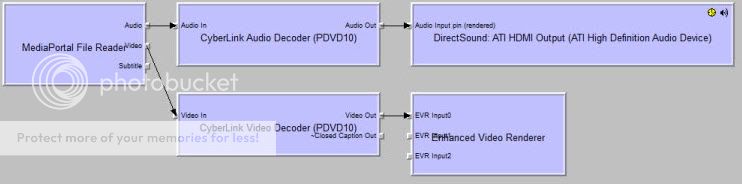
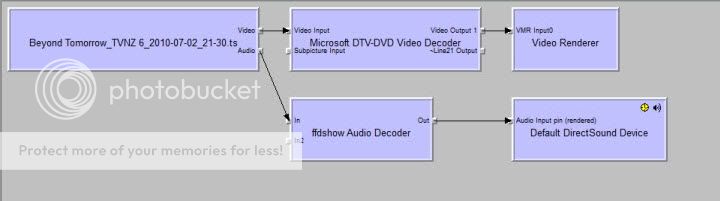
The following screenshots are how things look now (ie. MediaPortal is playing video files at the moment). The first shot is when the file is played in MP, the second is when the same file is rendered directly in Graphedit - shouldn't the same codecs be used in both cases?:
File type: MKV:
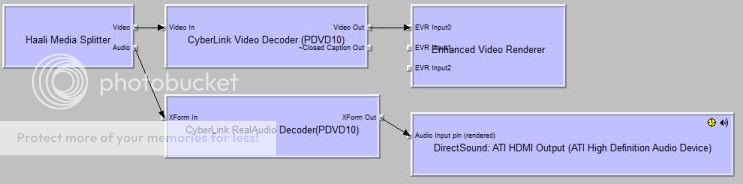
smoothMP.jpg


smooth2.jpg

AVI:
ryanMP.jpg


ryan2.jpg

Recorded TV:
recordedtvMP.jpg


recordedtv2.jpg

MP4:
mxMP.jpg


mx2.jpg

Before all this started happening I had chosen Power DVD S/P Codec (I think - it's dissapeared thanks to Sharkys app) to take care of the sound because the Power DVD (no "S/P") codec was giving a crackling sound - that sound is back now :mad: and now Power DVD doesn't work, which sux because that's what I use to play DVDs (not MediaPortal) so I'm not feeling the love for Sharky too much at the moment and I'll definately be reinstalling Power DVD...

Do any of the screenshots point to something obvious?

My system really shouldn't be a mess because this is all I've installed (to do with anything "graphic"):
2xNova S tuner cards
Graphics card
Power DVD 10

Then as a result of things turning to crap: The matroskasplitter.ax and the mpcvideodec.ax from the MPC-HC standalone filters + Sharkys codec pack. That's it.

@kiwijunglist - is there a way to get rid of all of my codecs, install Power DVD and then maybe SAF if "we" can't get to the bottom of this?

Thanks again guys.
 

Bleazle

Portal Pro
July 14, 2007
1,122
257
Pukekohe
Home Country
New Zealand New Zealand
You should just be able to un-register the .ax filter files to disable the codecs you don' want.

Thanks for the pointer - I know how to do that manually through a command prompt but that'd be painful - is there any software that works with Windows 7 x64 that will make this a bit easier? - it looks like the radlight filter manager won't work according to this "this tool is no longer in development so no x64 version exists but an x86 version can be found" (quote is from here: http://www.hack7mc.com/2009/03/controlling-codec-usage-with-radlight.html )- or will the x86 version work? When I tried it earlier I couldn't get it to change the merits of any codecs :rolleyes:

Once codecs are unregistered can I drop them into a backup directory and then add them (as and if required) and re-register them later?

I'm thinking:
1. Get rid of ALL existing codecs
2. Uninstall Power DVD 10
3. Install Sharkys Pack or give SAF a go
4. Re-install Power DVD 10

Sound like a plan?

I just read on Sharkys site that W7 x 64 has two versions of Windows Media Player - a 32 and a 64 version - that sounds like a recipie for disaster to me...

Also any ideas (from anyone :D ) as to why different graphs are created when playing the same files (as shown in my post above)

Thanks!
 

kiwijunglist

Super Moderator
  • Team MediaPortal
  • June 10, 2008
    6,746
    1,751
    New Zealand
    Home Country
    New Zealand New Zealand
    check the SAF 4.0 for more detailed instructions on graphedit and 64bit OS, i'm not sure if your meant to use a 32bit or 64bit version with 64bit OS + mediaportal (32bit).

    oo don't install powerdvd!!!! if you want powerdvd codec install HDPACK 2.4 ... you can install the codec without installing all the crap that goes with PDVD.

    The best way to get rid of codecs is to format windows.

    if you installed SAF unlocked version it also installs the pdvd codec =)

    lol, looking at those graphs it looks like you have a lot of codecs installed, it's a mess!

    I plan to upgrade my HTPC to win7 (32bit) when MP1.1 Final comes out, so I can't give anymore advice than above.
     

    Bleazle

    Portal Pro
    July 14, 2007
    1,122
    257
    Pukekohe
    Home Country
    New Zealand New Zealand
    check the SAF 4.0 for more detailed instructions on graphedit and 64bit OS, i'm not sure if your meant to use a 32bit or 64bit version with 64bit OS + mediaportal (32bit)...

    Here's the infoto get Graphedit working with W7x64 (thanks to rekenaar): https://forum.team-mediaportal.com/newcomers-forum-240/my-own-frequently-asked-questions-faq-53790/#post502062

    ...oo don't install powerdvd!!!! if you want powerdvd codec install HDPACK 2.4 ... you can install the codec without installing all the crap that goes with PDVD..

    mmm.. I prefer Power DVD to MP for playing DVDs - it just works (well it did until Sharkys pack hit the system)

    lol, looking at those graphs it looks like you have a lot of codecs installed, it's a mess!

    Yep - pretty amazing - where'd they all come from? :mad: I can roll back to the fresh install of Windows but like you I think I'll wait until MP 1.1 is released - hopefully I won't have to go there...

    ...I plan to upgrade my HTPC to win7 (32bit) when MP1.1 Final comes out, so I can't give anymore advice than above.

    No worries, thanks for all the time everyone has put into this, if I get it worked out/which codec does what etc I'll post my results - still don't understand why MP uses different codecs to what Graphedit uses :rolleyes: I read somewhere that sorting out codecs was 30% science and 70% Voodoo - personally I think it's more like a 10/90 split...
     

    dvbkiwi

    Portal Pro
    November 2, 2009
    54
    2
    Home Country
    New Zealand New Zealand
    So I'm still using 1.0.2 but also had my share of problems with codecs a while ago, I also use PDVD10 for DVD and used Klite codec pack. After days of trying different codecs and settings with no success, I uninstalled PDVD and then re-installed my KL Codec pack and then installed PDVD 10. I then went into MP Setup and selected PDVD10 as my codec for everything and its been sweet since.

    Recently a friend called me up and told me that some of his TV recordings didnt want to play, The error said something about "cannot find audio codec" so we did the smae for him and his problems also went away.

    Sometimes I get the feeling that MP doesnt really care about what I select, it just chooses a codec based on something somewhere in the windows registry and then runs with that.

    Of course I believe MP is alive and temperamental so may be as simple as you having a quiet word with your computer and it all goes away :).

    Good luck in your attempts to sort out this annoying problem.

    Oh I also once had a similar problem and it ended up being the result of audio drivers that was installed through windows update. Once again a shot in the dark but it helps to consider everything.
     

    Pommedan

    Portal Member
    March 30, 2009
    22
    3
    Dunedin
    Home Country
    New Zealand New Zealand
    @ Bleazle. MP uses the codecs selected in its configuration settings for video, dvd and tv which overides the 'merit' of codecs on your system hence the video files your playing are using different codecs in graphedit.

    This is not a problem if it all works - but...

    certain codecs can have incompatability problems with others.
    certain codecs have trouble or cannot play files encoded with other codecs
    codecs can usually only play certain file extensions

    um... the list goes on.

    I see that you do have other codec packs installed DIVX and FFDShow. if you want to keep powerdvd10 on your PC and MP stuffs out again, uninstall one of these first (DIVX is probably the easiest) reboot try MP Again. Anything DIVX was handling before will now be transferred to ffdshow or powerdvd. Still problems... uninstall ffdshow. Your PC and MP should now be mostly running with the powerdvd codec.

    This might cause a few problems, like with sound or certain file types which powerdvd cannot recognise or play but your system might also be sweet. if not you need to find codecs for these files. FFdshow will play most stuff but the easiest way to lower merits for this would be to uninstall powerdvd. install ffdshow then reinstall powerdvd. This will make pwerdvd the preffered codec

    personally i use divx *(its a fairly clean package) and powerdvd. i dont have ffdshow (codec packs tend to put stuff on your system you dont need) so you could try divx and powerdvd.

    the above is probably mind blowing - it just screwed my mind re-reading it so i hope it kind of makes sense or at least gives you some pointers

    Cheers
     

    Bleazle

    Portal Pro
    July 14, 2007
    1,122
    257
    Pukekohe
    Home Country
    New Zealand New Zealand
    Hey guys, thanks for the extra input!

    @dvbkiwi: Like I said earlier it's strange how my client which also runs Power DVD but has the K-lite pack installed has no problems - seems to tie in with what you're saying though. I like your theory about talking to the computer - personally I'm more inclined to threaten mine with violence or to tell it that it's going to be replaced with My Sky :eek: :D

    @Pommedan: Good info there too, thanks. I had figured out that MP was using the settings I had selected but didn't realise that they override any merit settings made outside MP (keeping in mind that I had never heard of the term "merit settings" up until a few days ago...). Kind of puts paid to Sharkys application sorting everything out in one hit - I guess it does if you're using WM Center - (Paranoid Delusion might be able to add something on this..)

    @kiwijunglist: I take it you mean the 'Automatic Decoder Settings" option under the Codecs-Video tab? Would that apply to the codecs selected for TV as well?

    One more question (then I'll exit stage right and let this thread get back on track - whatever that is :D ): When it comes to selecting the codecs to play MKV, MP4 & AVI files in MP config-Video tab is that the H.264 setting?

    Bleazle
     

    Users who are viewing this thread

    Top Bottom