
Cannot get Dvb-IP Channels to work properly.. (1 Viewer)

Moxx

Portal Member
December 22, 2011
9
0
43
Hi Folks,
i have been trying to get these damn HD-Channels to work and i cannot think of any other options to try now..

There are 3 PCs in my Setup: Server (i5, 2x 2Tb Sata HDDs), one Workstation (GigaLan, i7, ATI HD6950), one HTPC (powerline Lan, i5, Intel G45Express onboard).
Server has WHS 2011, the other two Win 7 Ultimate 64bit.
Codecs: atm. Cyberlink Power DVD7 (several others were tested, too)

TV-Connection is DVB-IP (georgius modded file from https://forum.team-mediaportal.com/...here-48/dvb-ip-mediaportal-iptv-filter-96726/ is used), it's AliceTV in Germany..

Whatever i try, either on the Workstation connected via Gigabit LAN, or on the HTPC, no matter what Codec i try, it works, but every 10-20 secs there is a small stuttering in HD-Playback.. i am going crazy :mad:!
SD-Channels seem to work perfectly (just a little problem once in a while)

It should not be a Problem with the LANconnection, as HD-File-Streaming is working without any problems..
Windows Defender on the WHS is turned to no Real-time scans.

I attached the Log Files of one short session, just starting a HD-Channel and watching it little bit.
And a Screenshot, showing the "spike" in the TV-Graph .. i hope someome had had problems like me and managed to get rid of them ;)

If you need to know any other detals, just ask.. i hope to find a solution .... desperatly :D

Greetings,

Mo

>> Edit: It seems that the stutterings get a little less when not using rtsp .. they get fewer, but do not go away..
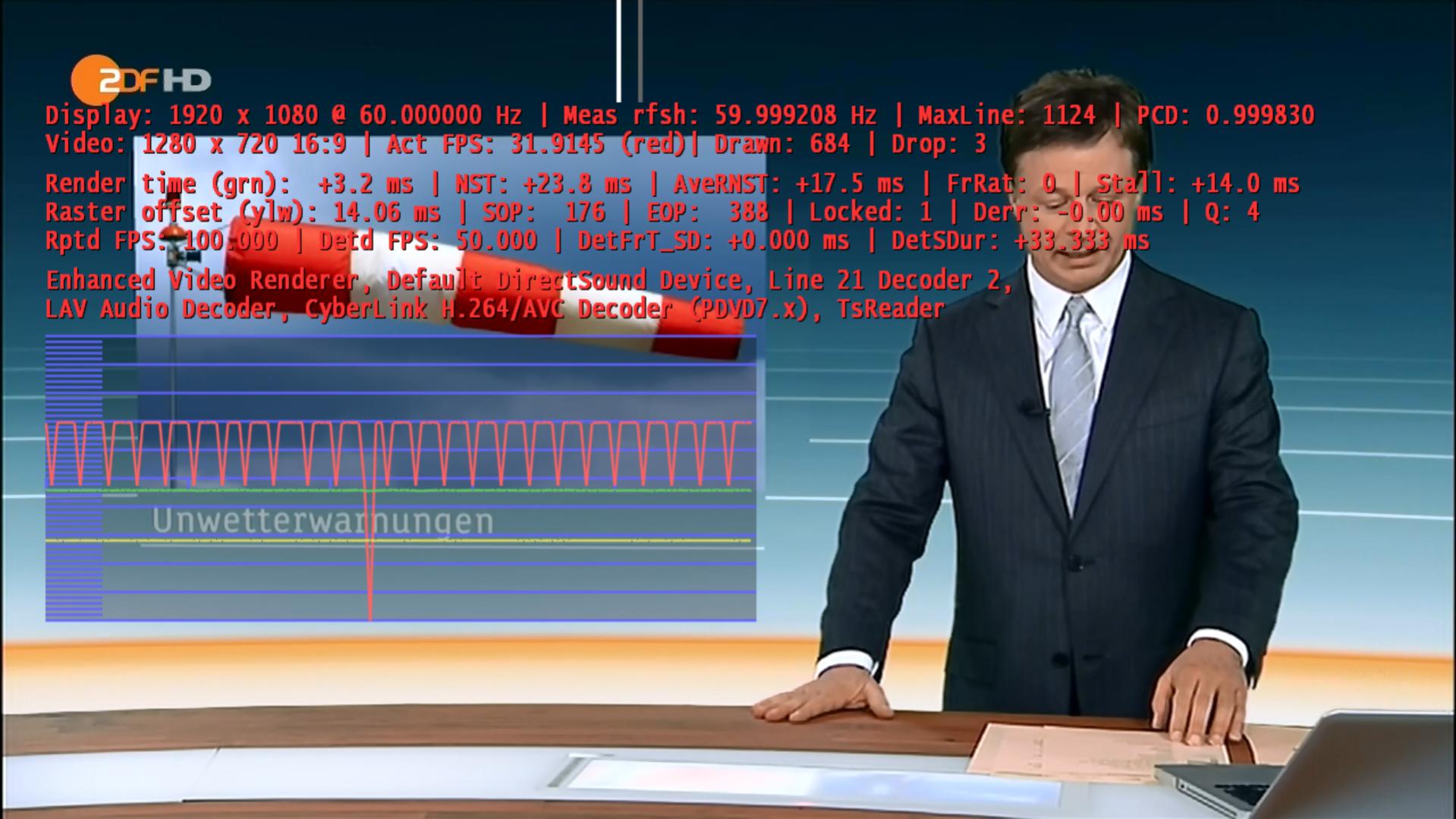
 

Attachments

  • screen1.jpg
    screen1.jpg
    194.2 KB

georgius

Retired Team Member
  • Premium Supporter
  • October 31, 2010
    1,376
    654
    Bratislava
    Home Country
    Slovakia Slovakia
    Hi,

    I looked in your logs and I don't see MPIPTVSource.log and TsWriter.log files. Are you sure that you have correctly placed IPTV source filter and its configuration file? Can you (for sure) close MP, stop TvService, clean all logs and test again (please, only one channel, because some logs are rewritten when changing channels)?

    From TsReader.log file it seems that in stream are discontinuities which is cause of stuttering, but without MPIPTVSource.log or TsWritter.log I cannot say where is problem.
     

    Moxx

    Portal Member
    December 22, 2011
    9
    0
    43
    AW: Cannot get Dvb-IP Channels to work properly..

    Thanks for your help!
    I've checked my Server with that tool, but everything seems good (no problems within 2mins of testing) ... buhuhuhuu :(
    I will never find out what the problem is..

    Btw: Is there any good tool out there to check the Network-Connection? Maybe something with my Router/WLAN-Accesspoint/dLAN or LanCards setup is wrong..
     

    mm1352000

    Retired Team Member
  • Premium Supporter
  • September 1, 2008
    21,544
    8,236
    Home Country
    New Zealand New Zealand
    Hi again Mox

    According to the TsReader logs there are continuity errors. That indicates stream corruption which could possibly be caused by the network connection - we would need the TV Server logs (not included in your zip file) to be able to trace the corruption back any further.

    One point for you to consider: HD file streaming is different to TV viewing as the underlying file access mechanism can alway re-request data chunks if any are corrupted in transit over the network. You wouldn't even notice this happening unless the network connection was very bad. The same is not true for multi-seat TV. In that case you're using RTSP streaming which uses UDP packets for the audio and video data. UDP is an unreliable protocol, meaning that packets sent by the server are not guaranteed to be received by the client. The client can't re-request corrupted packets. For that reason I would say that the comparison between HD file and TV streaming in your first post is not really fair...

    mm

    I'm not 100% sure
     

    Moxx

    Portal Member
    December 22, 2011
    9
    0
    43
    AW: Cannot get Dvb-IP Channels to work properly..

    Hi there!
    And thank you again for taking your time und helping me :)

    Ok here is a new bunch of log files, this time client + server side.

    I tuned in to a SD-Channel (all perfect), then changed to the same Channel in HD-format.
    As far as i see there are 4 blocks of continuity errors matching the 4 times i experienced stutterings.

    at first i would say this is caused by a "bad signal" (in this case bad internet connection), but when using the VLC-Player i get a perfect stream, tested my connection several times with different "speed-check-sites", all perfect..

    What could be important: Server-side is use 2 different GigabitLan Cards, 1 for the connection to my home network, and one connected to the TV-LAN-Port of my DSL-Router/Modem provided by my ISP.

    I then routed ("route add 233.51.0.0 mask 255.255.0.0 192.168.0.14 if 14") the TV-Channels through the "Tv-Lan-Card".
    (Result is route table print: 233.51.0.0 255.255.0.0 Auf Verbindung 192.168.0.14 Metric 21 )
    ( Same problems, but with a little different time between the stutterings, remain when not using the route)

    Another thing that could be useful: On every start of MediaPortal, it seems that the program hangs for about 30-40 secs on the "Loading window plugins" screen.

    So i hope this information helps,
    and again thank you for your help!!

    mox
     

    Moxx

    Portal Member
    December 22, 2011
    9
    0
    43
    AW: Cannot get Dvb-IP Channels to work properly..

    Hm i think i am getting closer..

    I tried this:

    - Installing MediaPortal as SingleSeat on my Workstation PC, without any routing -> Works !
    - Unsing my Workstation as TV-Server , watching HD with my HTPC -> Works!

    So the problem is definitly my Server...
    WHS 2011, with Mediaportal installed on it, 2 LAN Cards (Artheros AR8121-family for LAN, D-Link DGE-528T for TV) .. but according to DPC Latency Checker everything should work out fine..

    Any suggestions here?

    Greets,
    Mo

    Ok, i couuuuld have thought of this long before...

    Changing the Timeshift & Record folders to a non-Server-Folder has improved the whole thing...

    There are still some minor problems, but the main stuttering has gone.

    Maybe i should consider a different server setup... Win7 64 as "Main Server" with a virtual WHS 2011 (for all the Media/Backup Stuff etc.) could be a better idea i think?
     

    georgius

    Retired Team Member
  • Premium Supporter
  • October 31, 2010
    1,376
    654
    Bratislava
    Home Country
    Slovakia Slovakia
    Hi Moxx,

    probably my fault. You're using RTP protocol and IPTV filter logs every packet which comes, which can cause stuttering. Please, try attached version of IPTV filter and let us know if it helps (if not than attach new logs).

    Edit: removed attachement
     

    Users who are viewing this thread

    Top Bottom