
Can't play live2-0.ts.tsbuffer (1 Viewer)

pete0

MP Donator
  • Premium Supporter
  • May 6, 2008
    27
    0
    Home Country
    Germany Germany
    Hello,

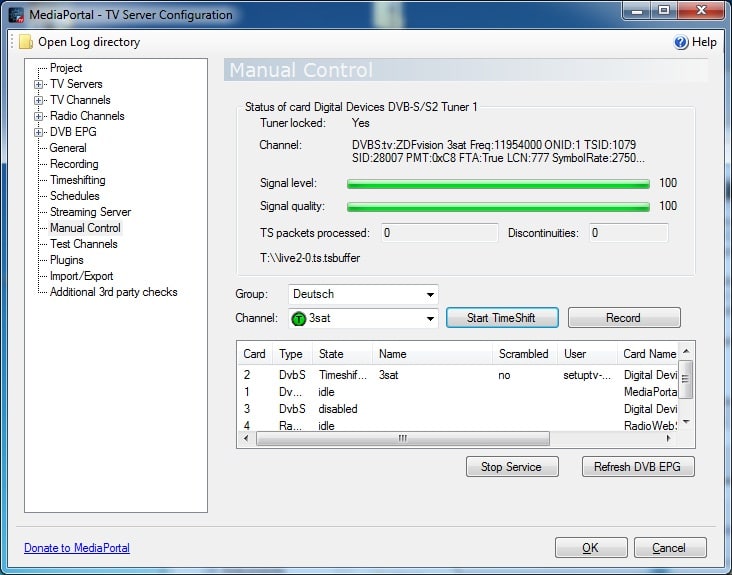
    I have just tested if timeshift is working, by using Manual Control in TV Server Configuration. As you can see in the attached hardcopy the timeshiftbuffer is, as configured, T:\live2-0.ts.tsbuffer. The "funny" thing is, that I dont't see this file on T:\\, but I see a timeshift file T.tsbuffer and T.tsbuffer1.ts in the installation directoty of the MediaPortal TV Server. Playing this file with media player I see the content of the tuned TV channel. Is this because timeshifting using Manual Control is different from timshifting with the MP client?

    Unfortunately creating logs with the watchdog is not working because of the mentioned unicode error.
     

    Attachments

    • ManualControl.jpg
      ManualControl.jpg
      117.9 KB

    pete0

    MP Donator
  • Premium Supporter
  • May 6, 2008
    27
    0
    Home Country
    Germany Germany
    Hello mm,

    tried again your MediaPortal.xml, but this time I entered also the path to the timshift file in the xml. :oops:

    Now I see in the MP logfile the expected timeshift path (as configured in TV Server Configuration), but live tv is still not working.

    MediaPortal.log

    2011-08-13 14:31:24.062237 [Info.][MPMain(1)]: tv home init:BR Nord
    2011-08-13 14:31:24.085238 [Info.][MPMain(1)]: TVHome.ViewChannelAndCheck(): View channel=BR Nord
    2011-08-13 14:31:35.974918 [Info.][MPMain(1)]: succeeded Succeeded TvControl.VirtualCard
    2011-08-13 14:31:35.994920 [Info.][MPMain(1)]: tvhome:startplay
    2011-08-13 14:31:36.014921 [Info.][MPMain(1)]: tvhome:file:T:\Timeshift\live1-0.ts.tsbuffer
    2011-08-13 14:31:36.033922 [Warn.][MPMain(1)]: tvhome:startplay. Phase 1 - 49 ms - Done method initialization
    2011-08-13 14:31:36.066924 [Info.][MPMain(1)]: tvhome:startplay:T:\Timeshift\live1-0.ts.tsbuffer - using rtsp mode:False
    2011-08-13 14:31:36.067924 [Info.][MPMain(1)]: tvhome:startplay: waiting for TS file T:\Timeshift\live1-0.ts.tsbuffer
    2011-08-13 14:31:36.079924 [Info.][MPMain(1)]: tvhome:startplay: waiting for TS file T:\Timeshift\live1-0.ts.tsbuffer
    2011-08-13 14:31:36.091925 [Info.][MPMain(1)]: tvhome:startplay: waiting for TS file T:\Timeshift\live1-0.ts.tsbuffer

    tv.log:

    2011-08-13 14:31:34.389828 [(13)]: Controller: delete timeshift files T:\Timeshift\live1-0.ts
    2011-08-13 14:31:34.435830 [(13)]: card: StartTimeShifting 1 T:\Timeshift\live1-0.ts
    2011-08-13 14:31:34.440831 [(13)]: card: CAM enabled : False
    2011-08-13 14:31:34.449831 [(13)]: subch:0 SetTimeShiftFileName:T:\Timeshift\live1-0.ts
    2011-08-13 14:31:34.451831 [(13)]: Set video / audio observer
    2011-08-13 14:31:34.457832 [(13)]: subch:0 SetTimeShiftFileName fill in pids
    2011-08-13 14:31:34.470832 [(13)]: subch:0-0 tswriter StartTimeshifting...
    2011-08-13 14:31:34.496834 [(3)]: PID seen - type = Video
    2011-08-13 14:31:34.505834 [(3)]: audioVideoEventHandler Video
    2011-08-13 14:31:34.514835 [(3)]: PID seen - type = Audio
    2011-08-13 14:31:34.516835 [(3)]: audioVideoEventHandler Audio
    2011-08-13 14:31:34.521835 [(13)]: card: WaitForTimeShiftFile - waiting _eventAudio & _eventVideo
    2011-08-13 14:31:34.523835 [(13)]: card: WaitForTimeShiftFile - video and audio are seen after 0,0030001 seconds
    2011-08-13 14:31:35.526893 [(13)]: TimeshiftingEPG: channel BR Nord is not configured for grabbing epg
    2011-08-13 14:31:35.528893 [(13)]: user:htcp card:1 sub:0 add stream:T:\Timeshift\live1-0.ts.tsbuffer
    2011-08-13 14:31:35.531893 [(13)]: Controller: streaming: file not found:T:\Timeshift\live1-0.ts.tsbuffer
    2011-08-13 14:31:35.533893 [(13)]: Controller: StartTimeShifting started on card:1 to T:\Timeshift\live1-0.ts.tsbuffer

    In the TsWriter logfile I found this entries:

    13-08-2011 14:31:34.453 Recorder: TIMESHIFT SetVideoAudioObserver observer ok
    13-08-2011 14:31:34.454 Recorder: TIMESHIFT set filename:T
    13-08-2011 14:31:34.460 Recorder: TIMESHIFT paused=yes
    13-08-2011 14:31:34.461 Recorder: TIMESHIFT Received from TvService: pmt pid:0x108 serviceId: 0x6dce pmtlength:56
    13-08-2011 14:31:34.462 Recorder: TIMESHIFT Old pids cleared
    13-08-2011 14:31:34.463 Recorder: TIMESHIFT got pmt - tableid: 0x2 section_length: 56 sid: 0x6dce
    13-08-2011 14:31:34.464 Recorder: TIMESHIFT PMT parsed - Pid 0x108 ServiceId 0x6dce stream count: 3
    13-08-2011 14:31:34.465 Recorder: TIMESHIFT pcr pid:0x100
    13-08-2011 14:31:34.466 Recorder: TIMESHIFT SetPcrPid clear old PIDs
    13-08-2011 14:31:34.466 Recorder: TIMESHIFT add video stream pid: 0x100 fake pid: 0x30 stream type: 0x1b logical type: 0x1b descriptor length: 6
    13-08-2011 14:31:34.467 Recorder: TIMESHIFT add audio stream pid: 0x101 fake pid: 0x40 stream type: 0x3 logical type: 0x3 descriptor length: 12
    13-08-2011 14:31:34.468 Recorder: TIMESHIFT add teletext stream pid: 0x103 fake pid: 0x60 stream type: 0x6 logical type: 0x56 descriptor length: 10
    13-08-2011 14:31:34.468 Recorder: TIMESHIFT paused=no
    13-08-2011 14:31:34.473 Recorder: TIMESHIFT Start 'T.tsbuffer'
    13-08-2011 14:31:34.492 Recorder: TIMESHIFT start of video detected
    13-08-2011 14:31:34.506 Recorder: TIMESHIFT clear TS packet queue
    13-08-2011 14:31:34.506 Recorder: TIMESHIFT Info : Next broadcaster program clock reference rollover : 0 days 01:33:51 0
    13-08-2011 14:31:34.512 Recorder: TIMESHIFT start of audio detected
    13-08-2011 14:31:35.519 ChannelLinkageScanner: set callback
    13-08-2011 14:31:35.521 ChannelLinkageScanner: start
    13-08-2011 14:31:36.962 ChannelLinkageScanner: reset
    13-08-2011 14:31:36.991 Recorder: TIMESHIFT Stop 'T.tsbuffer'
    13-08-2011 14:31:36.995 Recorder: TIMESHIFT Reset

    The problem is, that the timeshift file is not written to the configured directory (T:\Timeshift), instead it is written to the installation directory of MediaPortal TV Server, and also with the wrong name. The name is always (only!) the drive letter which I entered in the Tv server configuration. Could this be a parsing/codepage error of the entry in the Tv server configuration?

    This weird timeshift thing is only showing up when I intall a self compiled svn (MSBuild, Win7 64bit), with an original MP 1.2.0 beta there are no problems with timeshift. I have tried to use tswriter.ax from MP1.2.0 beta installation, but without any success. I tried this also on a PC running Windows XP, but same result.

    Maybe an admin should shift this thread to the 1.2.0 beta section?

    Regards
    pete0
     

    Attachments

    • Logfiles.zip
      9.7 KB

    mm1352000

    Retired Team Member
  • Premium Supporter
  • September 1, 2008
    21,544
    8,236
    Home Country
    New Zealand New Zealand
    Hi again pete0

    tried again your MediaPortal.xml, but this time I entered also the path to the timshift file in the xml.
    In my MediaPortal.xml those values are blank (well, a newline) - exactly as I provided them to you. The timeshift path *should* come from the DB - the timeshiftingFolder column in the Card table. The relevant code is here (in TVUtil - part of the TvPlugin solution):

    Code:
              if (TVHome.TimeshiftingPath().Length > 0)
              {
                //use user defined timeshifting folder as either UNC or network drive
                fileName = Path.GetFileName(TVHome.Card.TimeShiftFileName);
                fileName = TVHome.TimeshiftingPath() + "\\" + fileName;
              }
              else // use automatic UNC path
              {
                fileName = TVHome.Card.TimeShiftFileName.Replace(":", "");
                fileName = "\\\\" + RemoteControl.HostName + "\\" + fileName;
              }

    Despite the fact that the logging has come out okay now, can you please check what the DB says. In my case, the path is:

    J:\Raw Recordings\Television\Terrestrial

    Regarding the logs: that is *bizarre*. Have you rebuilt the TsWriter filter or TV Server code?

    Could this be a parsing/codepage error of the entry in the Tv server configuration?

    Certainly I guess so. The relevant code in TsWriter is in DiskRecorder.cpp:

    Code:
    void CDiskRecorder::SetFileNameW(wchar_t* pwszFileName)
    {
    	CEnterCriticalSection enter(m_section);
    	try
    	{
    		m_iPacketCounter=0;
    		m_iPmtPid=-1;
    		m_pcrPid=-1;
    		m_vecPids.clear();
    		m_AudioOrVideoSeen=false ;
    		m_bStartPcrFound=false;
    		m_bDetermineNewStartPcr=false;
    		wcscpy(m_wszFileName,pwszFileName);
    		if (m_recordingMode==RecordingMode::TimeShift)
    			wcscat(m_wszFileName, L".tsbuffer");
    		WriteLog(L"set filename:%s", m_wszFileName);
    	}
    	catch(...)
    	{
    		WriteLog(L"SetFilename exception");
    	}
    }

    There is very little there that could go wrong except encoding conversion stuff... which I don't understand too well. What is the native language configured for your operating system?

    mm
     

    pete0

    MP Donator
  • Premium Supporter
  • May 6, 2008
    27
    0
    Home Country
    Germany Germany
    Hello mm,

    Despite the fact that the logging has come out okay now, can you please check what the DB says.

    DB says for all cards: T:\Timeshift

    Certainly I guess so. The relevant code in TsWriter is in DiskRecorder.cpp:

    Code:
    void CDiskRecorder::SetFileNameW(wchar_t* pwszFileName)
    {
    	CEnterCriticalSection enter(m_section);
    	try
    	{
                    [B]WriteLog("set filename 1.parameter pszFileName :%s",pszFileName);[/B]		
                    m_iPacketCounter=0;
    		m_iPmtPid=-1;
    		m_pcrPid=-1;
    		m_vecPids.clear();
    		m_AudioOrVideoSeen=false ;
    		m_bStartPcrFound=false;
    		m_bDetermineNewStartPcr=false;
    		wcscpy(m_wszFileName,pwszFileName);
    		if (m_recordingMode==RecordingMode::TimeShift)
    			wcscat(m_wszFileName, L".tsbuffer");
    		WriteLog(L"set filename:%s", m_wszFileName);
    	}
    	catch(...)
    	{
    		WriteLog(L"SetFilename exception");
    	}
    }

    I have inserted a command (bold line) to write the filename (pwszFileName) to the TsWriter log. This shows that the filename is already wrong as the following entry in the logfile shows.

    18-08-2011 19:15:08.480 Recorder: TIMESHIFT set filename 1.parameter pszFileName :T

    Have you rebuilt the TsWriter filter or TV Server code?

    Before this change in TsWriter I had not recompiled any of the DirectShowFilters. As I use MSBUILD with MSBUILD_Rebuild_Release_TVServer_Client.bat to build the svn, I guess TV Server code was rebuild.

    Because I am more a software developer for embedded systems than for windows I do not have enough experience to debug with Visual Studio, do you have any idea where in the sources I hve to look to get the link between the value from the database and value Tswriter is using?

    Regards
    Peter

    By the way, I am using an German installation of Windows 7 64Bit Professional
     

    Vasilich

    Portal Pro
    August 30, 2009
    3,392
    1,173
    Germany, Mayence
    Home Country
    Russian Federation Russian Federation
    The code you inserted has one error. There should be
    Code:
    WriteLog([COLOR="Red"]L[/COLOR]"set filename 1.parameter pszFileName :%s",pszFileName);
    because pszFilename is wchar at this point
     

    mm1352000

    Retired Team Member
  • Premium Supporter
  • September 1, 2008
    21,544
    8,236
    Home Country
    New Zealand New Zealand
    Hi Vasilich

    Thanks for dropping in! :D
    Any clues about what might be going on - you probably know more about this than me. ;)

    mm
     

    Vasilich

    Portal Pro
    August 30, 2009
    3,392
    1,173
    Germany, Mayence
    Home Country
    Russian Federation Russian Federation
    well, i just see in code DiskRecorder.cpp line 199
    Code:
    		WriteLog(L"set filename:%s", m_wszFileName);
    this was changed first in 1.2a afaik, and before 1.2 it could be ANSI, thus taking only the first letter of complete path.
    so for me it looks like pete0 mixed tswriter v1.1.3 with the rest of current SVN.
    Pete0, can you check the versions of tswriter.ax, tsreader.ax and code from what revision have you test with?
     

    pete0

    MP Donator
  • Premium Supporter
  • May 6, 2008
    27
    0
    Home Country
    Germany Germany
    Hi Vasilich,

    I used svn-1.1.7.28138

    tswriter.ax = Revision 24669 (not the version recomended for svn 28138, right?)
    tsreader.ax = Revision 24644

    As far as I understand, the checked out version of the *.ax files are used for creation of the installer with MSBUILD_Rebuild_Release_MediaPortal.bat, so that there is no need to recompile the filters. Am I right, or was this my stupid mistake which causes problem? :oops:

    The code which I inserted in my last reply was a 1:1 copy taken from mms reply, so this was not the code in which I inserted the WriteLog command.

    But i have update today to svn 1.1.7.28140 and to my big suprise the problem is gone, after checking I saw, that there are new versions of tswriter.ax and tsreader.ax.

    So is this the recomended procedure if I want to create an installer for the newest svn?

    1. SVN update
    2. VS_Rebuild_Release_DirectShowFilters.bat, at least once after svn update
    3. MSBUILD_Rebuild_Release_TVServer_Client.bat
    4. MSBUILD_Rebuild_Release_MediaPortal.bat
     

    mm1352000

    Retired Team Member
  • Premium Supporter
  • September 1, 2008
    21,544
    8,236
    Home Country
    New Zealand New Zealand
    Hi again pete0

    Those ax files were definitely out of date.

    As far as I understand, the checked out version of the *.ax files are used for creation of the installer with MSBUILD_Rebuild_Release_MediaPortal.bat, so that there is no need to recompile the filters.
    I would have thought that was the case. I don't build installers though - I just copy files across so I've never needed to use MSBUILD. Perhaps when you did the SVN updates in the past you somehow didn't update the DirectShowFilters folder?

    Anyhow I'm just glad to hear that you have MP working nicely. :D

    mm
     

    pete0

    MP Donator
  • Premium Supporter
  • May 6, 2008
    27
    0
    Home Country
    Germany Germany
    Hello mm, hello Vasilich,

    many thanks for your support! :D


    Perhaps when you did the SVN updates in the past you somehow didn't update the DirectShowFilters folder?


    Maybe it's a good idea for me to get more familiar with SVN. :D
     

    Users who are viewing this thread

    Top Bottom