
Cant stream TV to client (1 Viewer)

eetaylog

Portal Pro
March 6, 2007
874
41
44
South London
Home Country
England England
Ive been trying for ages to get TV streaming to my client pc, but havent had any luck so far, can someone give me some pointers please.

I have MP1.0.1 plus TV server set up on a machine in my living room (XP Pro SP3) and MP1.0.1 plus TV client set up on a PC in a bedroom over a wired/wireless LAN.

Ive opened up ports 1433 and 1434 for MS SQL but for some reason my client PC still cant see the TV database. Ive even tried turning off my firewall on both machines but still no luck.

I then tried running MPTvClient to see if i could manage to get a connection that way, but still no luck. Whats interesting though is that the UDP MS SQL connection (port 1434) seems to connect, while the TCP connection doesnt:
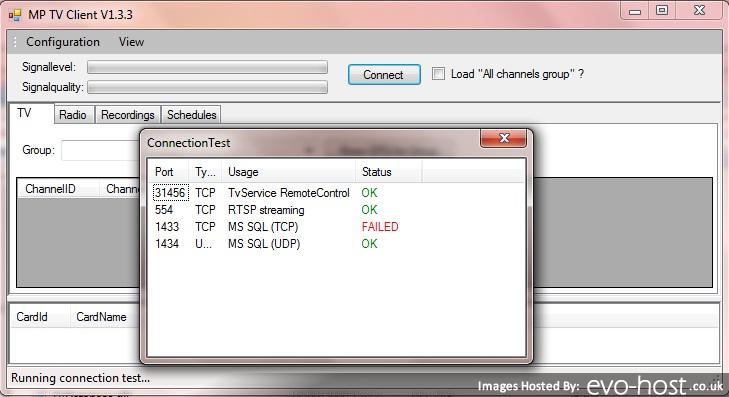
23024.jpg


Ideas anyone?

MediaPortal Version: MP1.0.1
MediaPortal Skin: BleazleWide
Windows Version: XP + SP3
CPU Type: AMD AM2 X2 4600+
HDD: 2xSamsung F1 1Tb
Memory: Corsair 2Gb
Motherboard: Gigabyte nForce 430 Micro ATX
Video Card: ATI Sapphire 4670
Video Card Driver:
Sound Card: On board 7.1
Sound Card AC3: -
Sound Card Driver:
1. TV Card: Hauppauge Nova-T500
1. TV Card Type: DVB-T
h.264 Video Codec: DivX7
HTPC Case: Antec Fusion
Cooling: Scythe Mini Ninja
Power Supply: Antec 430W
Remote: Hauppauge
TV: Samsung 42" Plasma
TV - HTPC Connection: DVI-HDMI
 

philhend

Portal Member
August 15, 2007
10
1
I had a similar problem.

Check the gentle.config and make sure the providers where correct at the bottom of this config file.

I use mySQL but the RC upgrade uncommented providers for both mySQL and SQLServer - SQLserver wasnt even installed and every time i tried to go to the my TV I got the error re ports. Commented out the SQLServer provider that I didnt have installed and it was fixed...

Not sure if u are using mySQL or SQLSERVER...

Phil
 

eetaylog

Portal Pro
March 6, 2007
874
41
44
South London
Home Country
England England
A quick update on this, my client can again no longer connnect to the tv server for some reason :mad:

It worked for around 1 week but randomly one evening when connecting to my server, the connection failed (on both server pc and client pc). I think this was due to a corrupt tv database file, so i ended up reinstalling MSSQL and TV server on the server pc. After this my client no longer connects, though im not sure why because i copied and pasted my existing gentle.config file into the new setup, and i havent changed any firewall settings on either machine :confused:

Am i the only one whos having such massive problems using MP to stream TV to a client? Ive been trying on and off for around a year to get it right. Im considering switching to MySQL.

Ive attached my MP log files btw, basically it hangs on booting up (it hangs when it reaches 'loading window plugins'). Im assuming the TV client plugin is causing the hang because MP runs fine when i uninstall the TV plugin.

Thanks for any help:

2010-03-07 20:22:07.227528 [Info.][MPMain]: Main: MediaPortal v1.0.1.22244 is starting up on Windows Vista
2010-03-07 20:22:07.227528 [Info.][MPMain]: Main: Using Directories:
2010-03-07 20:22:07.227528 [Info.][MPMain]: Base - C:\Program Files\Team MediaPortal\MediaPortal
2010-03-07 20:22:07.227528 [Info.][MPMain]: Log - C:\ProgramData\Team MediaPortal\MediaPortal\Log
2010-03-07 20:22:07.227528 [Info.][MPMain]: Skin - C:\Program Files\Team MediaPortal\MediaPortal\Skin
2010-03-07 20:22:07.227528 [Info.][MPMain]: Language - C:\Program Files\Team MediaPortal\MediaPortal\Language
2010-03-07 20:22:07.227528 [Info.][MPMain]: Database - C:\ProgramData\Team MediaPortal\MediaPortal\Database
2010-03-07 20:22:07.227528 [Info.][MPMain]: Plugins - C:\Program Files\Team MediaPortal\MediaPortal\Plugins
2010-03-07 20:22:07.227528 [Info.][MPMain]: Thumbs - C:\ProgramData\Team MediaPortal\MediaPortal\Thumbs
2010-03-07 20:22:07.227528 [Info.][MPMain]: Cache - C:\ProgramData\Team MediaPortal\MediaPortal\Cache
2010-03-07 20:22:07.227528 [Info.][MPMain]: Weather - C:\Program Files\Team MediaPortal\MediaPortal\Weather
2010-03-07 20:22:07.227528 [Info.][MPMain]: CustomInputDevice - C:\ProgramData\Team MediaPortal\MediaPortal\InputDeviceMappings
2010-03-07 20:22:07.227528 [Info.][MPMain]: Config - C:\ProgramData\Team MediaPortal\MediaPortal
2010-03-07 20:22:07.227528 [Info.][MPMain]: CustomInputDefault - C:\Program Files\Team MediaPortal\MediaPortal\InputDeviceMappings\defaults
2010-03-07 20:22:07.227528 [Info.][MPMain]: BurnerSupport - C:\Program Files\Team MediaPortal\MediaPortal\Burner
2010-03-07 20:22:07.227528 [Info.][MPMain]: Installer - C:\ProgramData\Team MediaPortal\MediaPortal\Installer
2010-03-07 20:22:07.227528 [Info.][MPMain]: Main: Assembly creation time: 10/04/2009 21:15:14 (UTC)
2010-03-07 20:22:07.227528 [Info.][MPMain]: Main: Set current directory to: C:\Program Files\Team MediaPortal\MediaPortal
2010-03-07 20:22:07.243128 [Info.][MPMain]: Main: Windows Media Player version 12.0.7600.16415 installed
2010-03-07 20:22:07.306528 [Info.][MPMain]: Main: Checking for running MediaPortal instance
2010-03-07 20:22:07.307528 [Info.][MPMain]: Main: Deleting old log\capture.log
2010-03-07 20:22:07.311529 [Info.][MPMain]: Main: Checking skin version
2010-03-07 20:22:07.333530 [Info.][SplashScreen]: Version: Application 1.0.1.0
2010-03-07 20:22:07.559543 [Info.][MPMain]: Load key mapping from C:\ProgramData\Team MediaPortal\MediaPortal\keymap.xml
2010-03-07 20:22:07.568543 [Info.][MPMain]: Main: Init playlist player
2010-03-07 20:22:07.569543 [Info.][MPMain]: Main: Init players
2010-03-07 20:22:07.595545 [Info.][MPMain]: Thumbs: MediaPortal is using average thumbnails
2010-03-07 20:22:07.694550 [Info.][MPMain]: D3D: Starting fullscreen
2010-03-07 20:22:07.696551 [Info.][MPMain]: D3D: Client size: 1366x768 - Screen: 1366x768
2010-03-07 20:22:07.701551 [Info.][MPMain]: d3dapp: Graphic adapter 'ATI Mobility Radeon HD 4300 Series' is using driver version '8.14.10.678'
2010-03-07 20:22:07.702551 [Info.][MPMain]: d3dapp: Pixel shaders supported: 512 (Version: 3.0), Vertex shaders supported: 32 (Version: 3.0)
2010-03-07 20:22:07.705551 [Info.][MPMain]: Creating DirectX9 Ex device
2010-03-07 20:22:07.754554 [Info.][MPMain]: TexturePacker:Dispose()
2010-03-07 20:22:07.755554 [Info.][MPMain]: Load key mapping from C:\ProgramData\Team MediaPortal\MediaPortal\keymap.xml
2010-03-07 20:22:07.804557 [Info.][MPMain]: Loading localized Strings - Path: C:\Program Files\Team MediaPortal\MediaPortal\Language Culture: en Language: English Prefix: False
2010-03-07 20:22:07.814557 [Info.][MPMain]: Loading strings file: strings_en.xml
2010-03-07 20:22:08.040570 [Info.][MPMain]: fonts.Dispose()
2010-03-07 20:22:08.043570 [Info.][MPMain]: Load fonts from C:\Program Files\Team MediaPortal\MediaPortal\Skin\BleazleWide V7.1.0\fonts.xml
2010-03-07 20:22:08.053571 [Info.][MPMain]: fonts.InitializeDeviceObjects()
2010-03-07 20:22:08.104574 [Info.][MPMain]: Main: Loading BleazleWide V7.1.0 skin
2010-03-07 20:22:08.106574 [Info.][MPMain]: LoadWindowPlugins()
2010-03-07 20:22:08.109574 [Info.][MPMain]: Load plugins from : C:\Program Files\Team MediaPortal\MediaPortal\Plugins\windows\WindowPlugins.dll
2010-03-07 20:22:08.113574 [Info.][MPMain]: File Version : 1.0.1.22244
2010-03-07 20:22:08.258583 [Info.][MPMain]: MusicDatabase: Opening database
2010-03-07 20:22:08.260583 [Info.][MPMain]: using sqlite 3.6.6.1
2010-03-07 20:22:08.261583 [Info.][MPMain]: MusicDatabase: Database opened
2010-03-07 20:22:08.285584 [Info.][MPMain]: Loading references from C:\Program Files\Team MediaPortal\MediaPortal\Skin\BleazleWide V7.1.0\references.xml
2010-03-07 20:22:08.287584 [Info.][MPMain]: original skin size:1280x720
2010-03-07 20:22:08.398591 [Info.][MPMain]: xml:C:\Program Files\Team MediaPortal\MediaPortal\Skin\BleazleWide V7.1.0\topbar.xml image id:1 width:0 height:0 gfx:empty.png
2010-03-07 20:22:08.462594 [Info.][MPMain]: TvGuide StartImportXML: Initialize
2010-03-07 20:22:08.468595 [Info.][MPMain]: opening tvdatabase
2010-03-07 20:22:08.477595 [Info.][MPMain]: tvdatabase opened
2010-03-07 20:22:08.492596 [Info.][MPMain]: GUITVCropManager: Started
2010-03-07 20:22:08.521598 [Info.][MPMain]: xml:C:\Program Files\Team MediaPortal\MediaPortal\Skin\BleazleWide V7.1.0\tvOSD.xml image id:350 width:0 height:0 gfx:-
2010-03-07 20:22:08.574601 [Info.][MPMain]: xml:C:\Program Files\Team MediaPortal\MediaPortal\Skin\BleazleWide V7.1.0\videoOSD.xml image id:350 width:0 height:0 gfx:-
2010-03-07 20:22:08.617603 [Info.][MPMain]: Load plugins from : C:\Program Files\Team MediaPortal\MediaPortal\Plugins\windows\Dialogs.dll
2010-03-07 20:22:08.618603 [Info.][MPMain]: File Version : 1.0.1.22244
2010-03-07 20:22:08.638604 [Info.][MPMain]: Load plugins from : C:\Program Files\Team MediaPortal\MediaPortal\Plugins\windows\grabber.dll
2010-03-07 20:22:08.641605 [Info.][MPMain]: File Version : 0.0.0.0
2010-03-07 20:22:08.641605 [Info.][MPMain]: Load plugins from : C:\Program Files\Team MediaPortal\MediaPortal\Plugins\windows\MesFilms.dll
2010-03-07 20:22:08.644605 [Info.][MPMain]: File Version : 4.8.0.0
2010-03-07 20:22:08.658606 [Info.][MPMain]: Load plugins from : C:\Program Files\Team MediaPortal\MediaPortal\Plugins\windows\MP-TVSeries.dll
2010-03-07 20:22:08.662606 [Info.][MPMain]: File Version : 2.3.3517.1
2010-03-07 20:22:08.964623 [Info.][MPMain]: Load plugins from : C:\Program Files\Team MediaPortal\MediaPortal\Plugins\windows\TvPlugin.dll
2010-03-07 20:22:08.967623 [Info.][MPMain]: File Version : 1.0.1.22244
2010-03-07 20:22:08.990625 [Info.][MPMain]: StartImportXML: Initialize
2010-03-07 20:22:08.990625 [Info.][TvClient-Radio: HeartBeat transmitter thread]: Remote control:master server :server
2010-03-07 20:22:08.990625 [Info.][MPMain]: RadioGuide:OnAdded
2010-03-07 20:22:09.324644 [Info.][TvClient-Radio: HeartBeat transmitter thread]: ChannelNavigator::Reload()
2010-03-07 20:22:09.380647 [Info.][TvClient-Radio: HeartBeat transmitter thread]: get channels from database
2010-03-07 20:22:11.605774 [Info.][FilterChecker]: FilterChecker: Found TsReader.ax from 22/03/2009 located at C:\Program Files\Team MediaPortal\MediaPortal\TsReader.ax
2010-03-07 20:22:13.344874 [Info.][FilterChecker]: FilterChecker: Found quartz.dll from 19/12/2009 located at C:\Windows\system32\quartz.dll
2010-03-07 20:22:13.345874 [Info.][FilterChecker]: FilterChecker: Version of installed quartz.dll: 6.6.7600.16385
 

eetaylog

Portal Pro
March 6, 2007
874
41
44
South London
Home Country
England England
All sorted (again!). I had to enable TCP/IP in MSSQL after reinstalling it. Not really sure why this option isnt enabled as default?
 

Users who are viewing this thread

Top Bottom