Core Reloaded 1.0 (1 Viewer)

Which version of Core do you like best?

  • Core Reloaded

    Votes: 72 85.7%
  • Core "1"

    Votes: 12 14.3%

  • Total voters
    84

djohansson

Portal Pro
October 16, 2006
78
29
Stockholm
Home Country
Sweden Sweden
I'm not sure if this applies to anyone else, but all the fan art I've downloaded from the community has a different layout than the one used for this skin. ="http://jossan.visse.nu/~spuck/FanArtVote/index.php?filelist"

So, the skin isn't compatible with fan art. I really like everything else though. Thanks for making the skin

I know about this but I still wanted to make the layout with the lists on the left. To me it makes the skin more coherent...

As you see in the screenshots I use fanart as well, just mirrored the images to fit the left hand side menus. I know this is the case for some other skins as well so I would really like to see fanart made for both left and right version skins!
 

quanfer

Portal Member
December 13, 2007
29
1
Wow, great support, it's like you replied before my page could refresh after posting. =D

I have another problem with the Mesfilms plugin. In list view, the zoomed thumbnail overlaps the list, and in icon views, the description overlaps the icons, and the film title overlaps the time at the top right.
 

thenoob

Portal Member
October 28, 2007
30
0
Vienna
Home Country
Austria Austria
Can I watch Tv in Fullscreen when I select the TV window like in BlueToo or must I select the "maximize" button on the top to go to fullscreen mode?

I tried to select the TV window itself, but it didn't work.

It's a fantastic skin (my standard now) but it would be cool if I could select the fullscreen window Tv by selecting the Tv window in normal mode
 

djohansson

Portal Pro
October 16, 2006
78
29
Stockholm
Home Country
Sweden Sweden
Wow, great support, it's like you replied before my page could refresh after posting. =D

I have another problem with the Mesfilms plugin. In list view, the zoomed thumbnail overlaps the list, and in icon views, the description overlaps the icons, and the film title overlaps the time at the top right.

That plugin is not supported. I only use My Videos... If someone is willing to make a skin file for that plugin please let me know. BR,

Daniel

Can I watch Tv in Fullscreen when I select the TV window like in BlueToo or must I select the "maximize" button on the top to go to fullscreen mode?

I tried to select the TV window itself, but it didn't work.

It's a fantastic skin (my standard now) but it would be cool if I could select the fullscreen window Tv by selecting the Tv window in normal mode

I only use a remote so for me it is not an issue. However, I tried to make this change last night but I never got it to work. Can someone else help us out with this?
 

emphatic

Design Group
  • Team MediaPortal
  • August 25, 2006
    3,758
    1,250
    Alingsås
    Home Country
    Sweden Sweden
    I'm really glad you've made this skin, but it's not a real 16:9 skin since it's using a 4:3 resolution. But it's anamorphic, and that's very nice for all users of 16:9 format CRT screens or people stuck with old plasmas that only have 1024x768 resolution. It would however be even better if someone could make a 1280x720 or another true widescreen resolution version of this fantasticly slick skin...

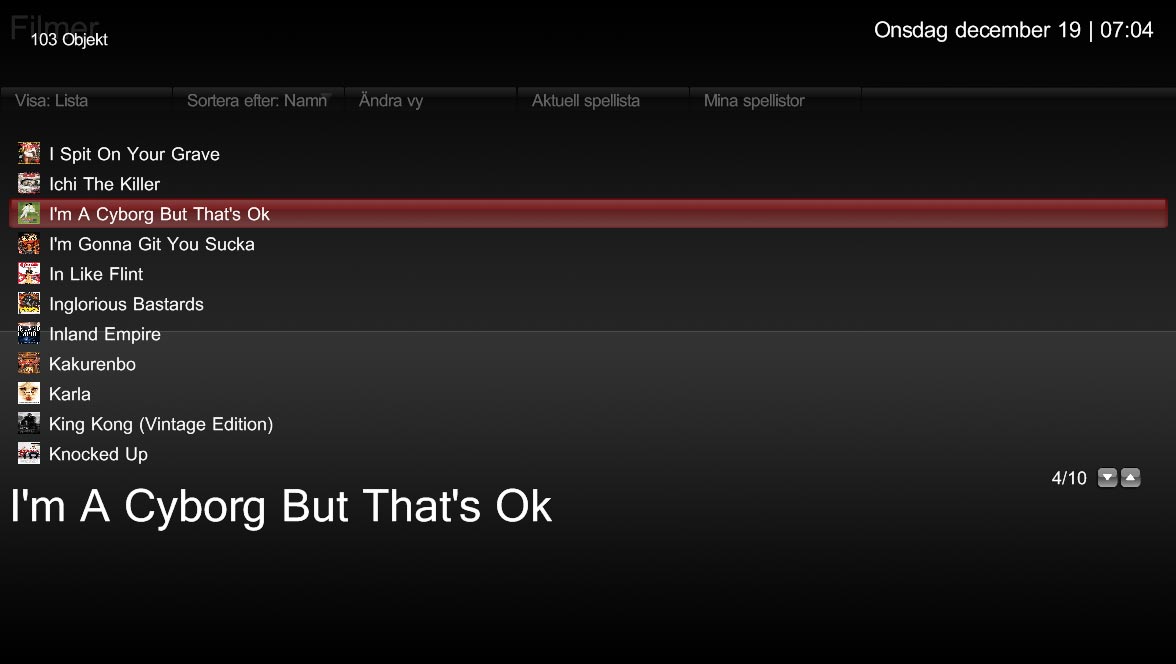
    A request is that the list view of the movies could look like in XFace or Monochrome (i.e. showing the cover at the side) because for now it looks very "naked" without anything but the list itself.

    Keep up the excellent work. I wish I had this skin when I had my old CRT Television.
    Emph
     

    djohansson

    Portal Pro
    October 16, 2006
    78
    29
    Stockholm
    Home Country
    Sweden Sweden
    I'm really glad you've made this skin, but it's not a real 16:9 skin since it's using a 4:3 resolution. But it's anamorphic, and that's very nice for all users of 16:9 format CRT screens or people stuck with old plasmas that only have 1024x768 resolution. It would however be even better if someone could make a 1280x720 or another true widescreen resolution version of this fantasticly slick skin...

    A request is that the list view of the movies could look like in XFace or Monochrome (i.e. showing the cover at the side) because for now it looks very "naked" without anything but the list itself.

    Keep up the excellent work. I wish I had this skin when I had my old CRT Television.
    Emph

    That depends, the skin resolution is not 1024x768. It's 1366x768 like most widescreen skins. As you see in the screenshots most dimensions looks wrong while on any widescreen it should look good...

    Regarding yor request I actually took the preview thumbs out on purpose. I think a listview is a listview, I prefer to use thumbnail panel or filmstrip for the media with cover art. Of course, this is only my opinion... :)
     

    emphatic

    Design Group
  • Team MediaPortal
  • August 25, 2006
    3,758
    1,250
    Alingsås
    Home Country
    Sweden Sweden
    Im confused still, you say in post #17 that "My screen resolution is 1024x768 but physical dimensions are 16:9! Looks good on my screen. Hopefully it does on yours as well...". If you look at the screenshots in the first post the dimensions are 4:3 @ 1024x768.

    Have a look at this screen for example: https://forum.team-mediaportal.com/attachment.php?attachmentid=14370&d=1197881875.jpg

    The Prison Break Fan Art is clearly condensed (pinched) which led me to understand that you let your TV set pull it out into a full 16:9 dimension, right? But the other objects aren't condensed, and that will give them a stretched look on any true 16:9 resolution. I'm not at home right now, so I'm basing this on my testing on my 720p screen @ 1280x720 (16:9) earlier tonight and your screenshots.

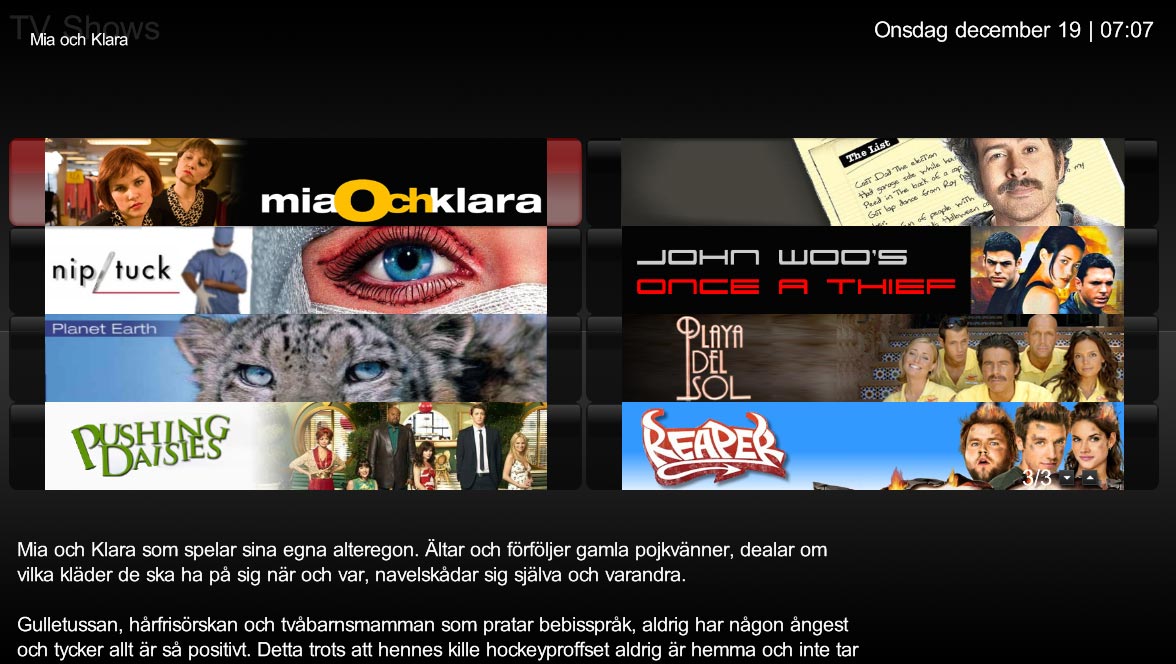
    In this screen, below, you have two series banners side by side and it looks great in 1024x768, but at a wider resolution, you get the banner centered on top of the horizontally stretched button, so it has big red boxes on the side and that doesn't do the beautiful layout justice:
    attachment.php


    I will try to do some screenshots in 720p for you so you see what I mean when I get home from work in the morning. If someone else using this skin in a true wide resolution can't do it right now that is. ;)

    Emph
     

    djohansson

    Portal Pro
    October 16, 2006
    78
    29
    Stockholm
    Home Country
    Sweden Sweden
    Maybe it doesn't look the same on true widescreen then. I am not entirely sure about how mediaportal and my tv for that matter handles the stretching of the skin. If you look into the references.xml the screen resolution is 1366x768 which I thought would work...

    I am very curious to see your screens tomorrow! If it looks weird I probably need some help to modify the skin...

    Can someone using resolution 1366x768 also post some screenshots??

    D
     

    Darre

    Portal Pro
    April 21, 2007
    925
    80
    Home Country
    Norway Norway
    If I have the time tomorrow morning Ill try.
     

    emphatic

    Design Group
  • Team MediaPortal
  • August 25, 2006
    3,758
    1,250
    Alingsås
    Home Country
    Sweden Sweden
    Here are some screenshots (I had the desktop resized when I took them so it's not 1280, but close enough for you to see the issues I've mentioned:

    TV Series:
    Look at how the buttons that's supposed to be the same size as the banners are stretched out horizontally (bigger than the banners).

    Videos (list view):
    It's just way to much free space not to put some nice covers there while browsing the list view. Right? *keeps fingers crossed*

    Hope this is helpful.
    Emph
     

    Attachments

    • core.series.jpg
      core.series.jpg
      136.8 KB
    • core.movies.list.jpg
      core.movies.list.jpg
      51.3 KB

    Users who are viewing this thread

    Top Bottom