1.37 DefaultWideHD - Reloaded (14 Viewers)

1.37

joecrow

Test Group
  • Team MediaPortal
  • August 9, 2012
    2,714
    2,053
    Home Country
    Germany Germany
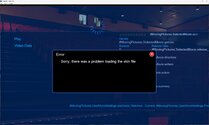
    Problem loading skin for Moving Pictures! Seems to be since the 1.37 update, working OK if I switch to the Titan skin. Uninstalled and reinstalled Moving Pictures but still the same. Also is not a problem on my HTPC which is also 1.37. Screenshot and logs attached.
    Untitled.jpg
     

    Attachments

    • MP_Logs_RANDOM_25_04_26_02_19.zip
      1.8 MB

    Anthony Vaughan

    MP Donator
  • Premium Supporter
  • June 25, 2015
    633
    333
    Home Country
    United Kingdom United Kingdom
    When watching a video, and pressing pause, the progress of viewing the program is displayed at the bottom of the screen.
    This is a like to have, but when there are subtitles embedded in the program (that are usually displayed towards the bottom of the screen) and you want to pause the video to read the subtitles, the progress bar is covering the subtitles. Would it be possible to give transparency to the progress bar so that the video behind is readable? I realize that there is no perfect solution to this because the program title field in the progress bar has to be readable.
    I wonder whether the location of the progress bar could be just below the topbar (since I can't recollect seeing subtitles at the top of the screen)?
    BTW, we really like the new look of the progress bar and menu dialogs and delete dialogs:).

    I notice that there is already some transparency - the level of transparency seems to be more obvious depending on what is on the screen.
     
    Last edited:

    CyberSimian

    Test Group
  • Team MediaPortal
  • June 10, 2013
    3,351
    2,212
    Southampton
    Home Country
    United Kingdom United Kingdom
    I can't recollect seeing subtitles at the top of the screen
    I have seen subtitles near the top of the screen :eek: . Not continuously -- most of the subtitles are near the bottom, but the broadcaster/programme-maker occasionally puts subtitles in the top half of the screen, based (I think) on screen content (i.e. when there is something important near the bottom of the screen).

    -- from CyberSimian in the UK
     

    Anthony Vaughan

    MP Donator
  • Premium Supporter
  • June 25, 2015
    633
    333
    Home Country
    United Kingdom United Kingdom
    I have seen subtitles near the top of the screen :eek: . Not continuously -- most of the subtitles are near the bottom, but the broadcaster/programme-maker occasionally puts subtitles in the top half of the screen, based (I think) on screen content (i.e. when there is something important near the bottom of the screen).

    -- from CyberSimian in the UK
    The video pause file that sets the pause bar is held in videoFullScreen.xml. I've moved the bar to just below the topbar and will give it a try to see how it affects the general look.
     

    catavolt

    Design Group Manager
  • Team MediaPortal
  • August 13, 2007
    15,074
    11,364
    Königstein (Taunus)
    Home Country
    Germany Germany
    • Thread starter
    • Moderator
    • #88
    but when there are subtitles embedded in the program
    As far as I remember you can adjust the position of the subtitles somewhere in the settings - but don´t remember where atm ;)
    On the other hand, the OSD disappears after some time (you defined in the settings), and only the pause icon remains in the middle of the screen ;)

    EDIT: You can set the subtitle position in the settings - Screen set-up - -Screen calib. :
    Press 2 times "Enter" and you see this screen:

    12-04-38.jpg ;)
     
    Last edited:

    Users who are viewing this thread

    Top Bottom