
You are using an out of date browser. It may not display this or other websites correctly.
You should upgrade or use an alternative browser.
You should upgrade or use an alternative browser.
Ongoing Diary of an HTPC Dabbler (2 Viewers)
- Thread starter dcwp
- Start date
 Canada

- Thread starter
- #13
I haven't gotten to HDDScan yet, but I have managed to get a few things done.
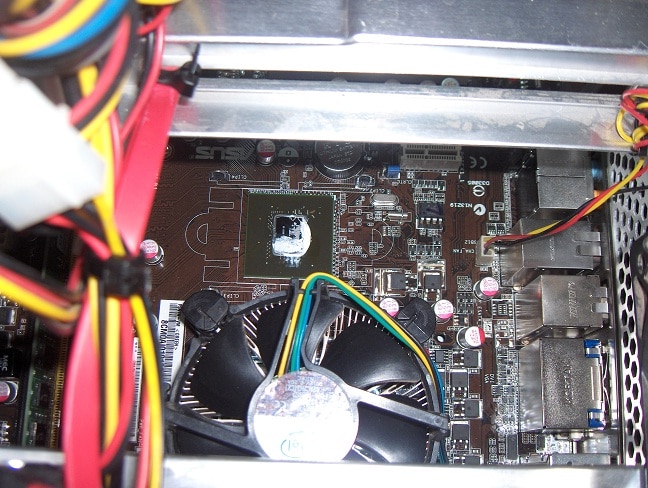
First I took off the chipset heatsink since I had heard that one of the reasons this board runs hot is poor thermal compound. As you can see in the first picture below, there was just a little smudge in a corner of the chipset. Whatever that stuff was, it was sure sticky. It took me a while but I cleaned the chipset and the bottom of the heatsink with alcohol and reset it using good silver compound. Already this seems to have gained me 5-10 degrees.
With that help, I was able to set the target GPU temp in Speedfan to 45degrees and now it runs much less frequently and less noisily. Eventually I'd like to do a little more to cool the chipset and CPU with just one quieter fan.
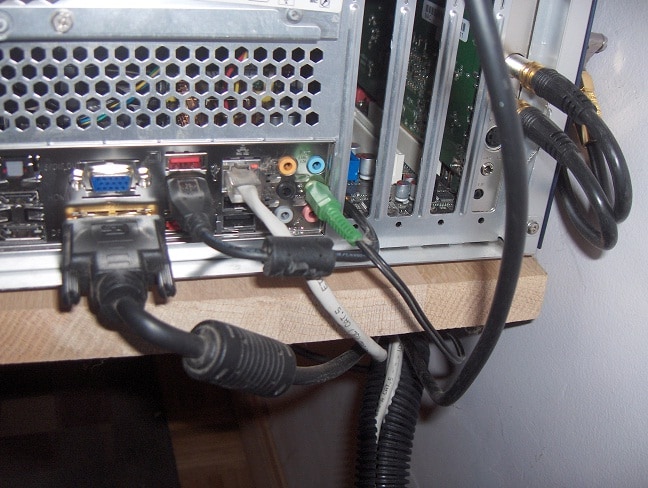
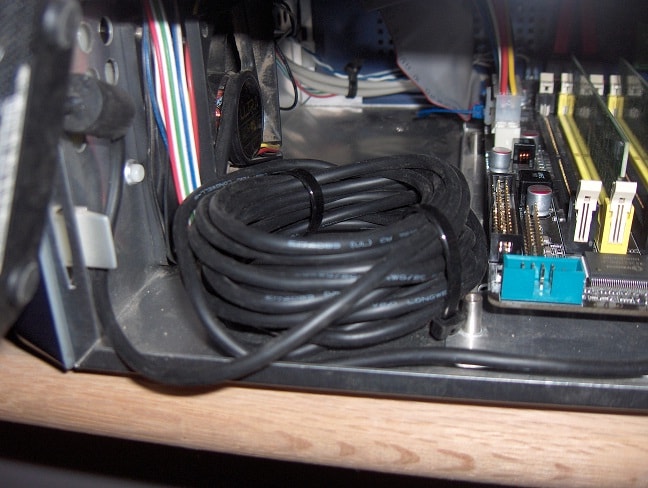
I also started experimenting with hiding my IR receiver. I still haven't gotten an internal USB port, but I talked with the guy at my local computer repair place and he said he takes them out of project boxes fairly regularly and will call next time he gets one. Nonetheless I went ahead and placed my receiver in the box. I just snaked the cable through an open expansion slot (I need to cover those open slots since I am down to only one card with this new setup). Then I coiled the mile long cable and used it as a platform to elevate the receiver so that it can see through the vent holes in the front. That fan it is sitting in front of is no longer used, so the placement worked pretty well.
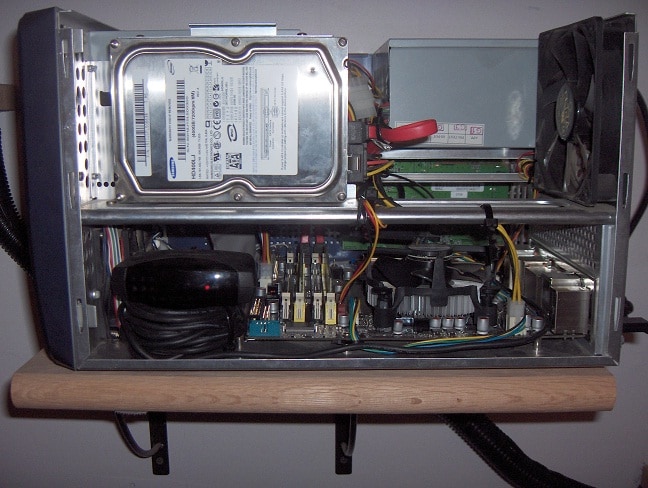
I still have some external cable management and general cleanup to do, but it's starting to look less cluttered. In the picture you can see the camera flash reflecting off the receiver through the vent hole. Normally it can't be seen and is totally hidden, but there is plenty of IR visibility and the remote works from every angle. Overall I'm very pleased with how that part turned out.
Up next: a single large Green Drive to replace the three noisy ones and maybe some quieter fans. Eventually I'd like a more efficient and quieter PSU, but that will probably have to wait a bit.
First I took off the chipset heatsink since I had heard that one of the reasons this board runs hot is poor thermal compound. As you can see in the first picture below, there was just a little smudge in a corner of the chipset. Whatever that stuff was, it was sure sticky. It took me a while but I cleaned the chipset and the bottom of the heatsink with alcohol and reset it using good silver compound. Already this seems to have gained me 5-10 degrees.
With that help, I was able to set the target GPU temp in Speedfan to 45degrees and now it runs much less frequently and less noisily. Eventually I'd like to do a little more to cool the chipset and CPU with just one quieter fan.
I also started experimenting with hiding my IR receiver. I still haven't gotten an internal USB port, but I talked with the guy at my local computer repair place and he said he takes them out of project boxes fairly regularly and will call next time he gets one. Nonetheless I went ahead and placed my receiver in the box. I just snaked the cable through an open expansion slot (I need to cover those open slots since I am down to only one card with this new setup). Then I coiled the mile long cable and used it as a platform to elevate the receiver so that it can see through the vent holes in the front. That fan it is sitting in front of is no longer used, so the placement worked pretty well.
I still have some external cable management and general cleanup to do, but it's starting to look less cluttered. In the picture you can see the camera flash reflecting off the receiver through the vent hole. Normally it can't be seen and is totally hidden, but there is plenty of IR visibility and the remote works from every angle. Overall I'm very pleased with how that part turned out.
Up next: a single large Green Drive to replace the three noisy ones and maybe some quieter fans. Eventually I'd like a more efficient and quieter PSU, but that will probably have to wait a bit.
Attachments
As you have three hard disks in the system, you should be able to concentrate all the frequent 'active' file access (system, MP database, timeshift etc) on one disk and let XP spin down the others when they are idle (the 'power options' control panel).
I recently added a 2.5" 250GB laptop hard disk to my system (very quiet and low power), moved Windows and the TV recording folder etc. over to it and let Vista spin down the other 3.5" 500GB drive after 5 minutes of idleness - much quieter overall
Tony
I recently added a 2.5" 250GB laptop hard disk to my system (very quiet and low power), moved Windows and the TV recording folder etc. over to it and let Vista spin down the other 3.5" 500GB drive after 5 minutes of idleness - much quieter overall
Tony

Shock mount the drive - i.e. give it some cushioning against the vibrations. I used some akasa Paxmate accoustic absorbtion mats to help muffle the case noise and used some of the off cuts to cushion the HDD.
There is all kinds of info here: silentpcreview.com | Everything about Silent / Quiet Computers too...
There is all kinds of info here: silentpcreview.com | Everything about Silent / Quiet Computers too...
- Thread starter
- #16
Thanks for all the input.
Consolidating the active drives is probably a good idea. On my old system, if I had recording or timeshifting on the system driver, it seemed to cause I/O problems and stuttering. That should be less of a problem now, especially if I put it all on one of the 3gbps drives (when I had the problem, it was all IDE).
Also, thanks for the idea about shock mounting. I joined SPCR a couple of weeks ago looking for just this kind of idea. In fact last night I bought a few different types of elastic band to start experimenting with a suspension system.
As for the acoustic absorption mats, I have hesitated because I'm afraid they'll also thermally insulate the system. Have you had any trouble with heat? Or have you found that the added heat is worth it for the acoustic gain?
Thanks again!
Consolidating the active drives is probably a good idea. On my old system, if I had recording or timeshifting on the system driver, it seemed to cause I/O problems and stuttering. That should be less of a problem now, especially if I put it all on one of the 3gbps drives (when I had the problem, it was all IDE).
Also, thanks for the idea about shock mounting. I joined SPCR a couple of weeks ago looking for just this kind of idea. In fact last night I bought a few different types of elastic band to start experimenting with a suspension system.
As for the acoustic absorption mats, I have hesitated because I'm afraid they'll also thermally insulate the system. Have you had any trouble with heat? Or have you found that the added heat is worth it for the acoustic gain?
Thanks again!
My case is silent
The front, base and the rear of the case are still unpadded and allow good airflow through the case.
Imagine cupping your hands together to make a ball - like two interlocking 3D 'C' shapes - that's how my case is - the C making the top and two sides in insulated.
I have NO thermal issues at all
You don't have to insulate the entire case either - leave the vents free
I have to have the case silent - the GF can hear someone dropping pins on carpet in Tokyo
The front, base and the rear of the case are still unpadded and allow good airflow through the case.
Imagine cupping your hands together to make a ball - like two interlocking 3D 'C' shapes - that's how my case is - the C making the top and two sides in insulated.
I have NO thermal issues at all
You don't have to insulate the entire case either - leave the vents free
I have to have the case silent - the GF can hear someone dropping pins on carpet in Tokyo
- Thread starter
- #18
I have to have the case silent - the GF can hear someone dropping pins on carpet in Tokyo
Sounds like you've got a good quality control tester.
I don't have such an important mission, my wife and housemate both say the computer is quiet enough and they don't understand why I'm wasting so much time on silence.Thanks for the input on acoustical insulation. I'll look into it later, once I've solved as many problems as possible at the source.
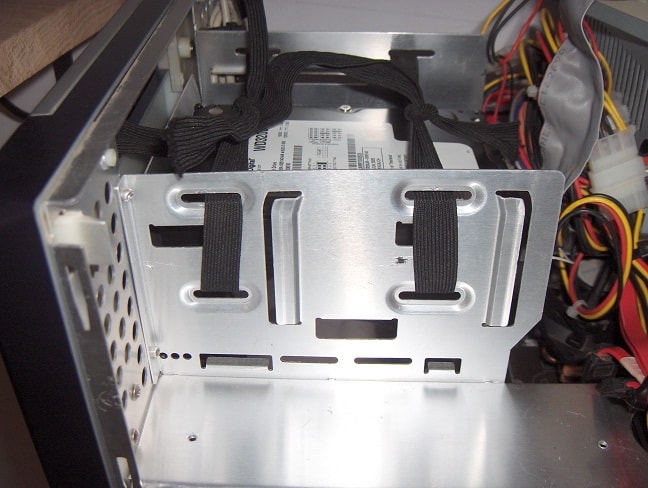
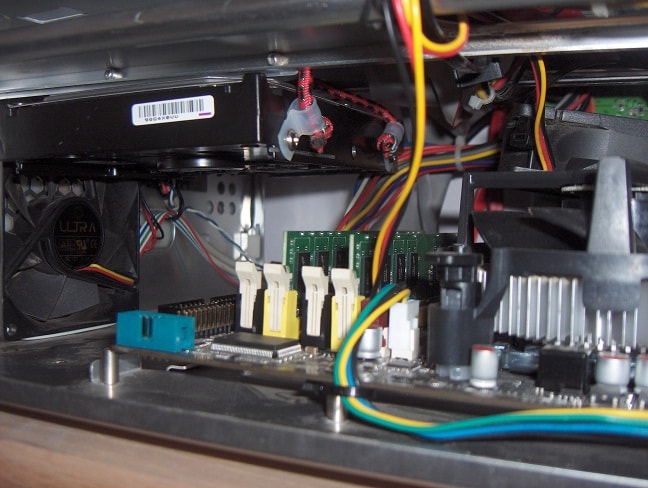
I've been experimenting with shock mounting today. It isn't pretty, but I've made a noticeable difference already. First I mounted my system drive in a couple of loops of elastic band (the kind in your underwear
). They're just looped through the 5" drive bay and tied in knots. This has greatly reduced seek noise, but that drive is making a very loud high pitch bearing noise that won't go away until it's replaced.I also took my largest storage drive and rigged up a bungee cord suspension system. That was kind of a pain. For a big case, this sucker has a lot of structural elements in the wrong places and it could use tie-off areas in others.
I finally screwed some cable clamps into the drive itself and rigged those up through whatever holes I could find. It looks like the top of the drive is touching a support in the picture, but there is about a 3mm gap there.This isn't perfect, but in all, seek noise is much lower and has a 'softer' quality now. Ultimately this is all a trial run for the switch to a larger, quieter disk. I'm trying to figure out if I can make the 500Gb Seagate I already have quiet enough to use with the new drive or if I should just switch to one. I think if i use the old drive for storage alone to minimize seek noise, it should be fine.
Attachments
Silence is golden,
Gold is expensive
lol
Gold is expensive
lol
Users who are viewing this thread
Online now: 3 (members: 0, guests: 3)