
You are using an out of date browser. It may not display this or other websites correctly.
You should upgrade or use an alternative browser.
You should upgrade or use an alternative browser.
Dreambox blasting??? (4 Viewers)
- Thread starter srt8100
- Start date
 Spain
Spain


ok, try this. It's based on Mark Koenig's MediaPortal plugin.
It's a command line tool that you can link into IR Server Suite or just about anything else...
First you need to set it up:
At a command prompt type:
DboxTuner Setup
You'll need to put in the network details of your dreambox, and tell it to download the channel list.
Then you should be able to change channel based on a channel number and not the long ID string that you usually see.
For example:
DboxTuner Zap 5
For a full list of commands type: DboxTuner
If it doesn't work or there is a feature missing then please let me know.
Now keep in mind, this is just a command line port of the DreamboxTuner plugin that other people wrote. I don't own one of these things, I don't even fully understand how it works
So even though I will try to support you guys as best I can, it's gunna be tough ... so fingers crossed this thing works first time
If it doesn't then I will certainly be able to fix obvious bugs, but I may need to turn the code back over to the original authors for anything big...
I'm sure you understand.
Good luck,
EDIT: Removed attachment, see further down the thread for new version.
It's a command line tool that you can link into IR Server Suite or just about anything else...
First you need to set it up:
At a command prompt type:
DboxTuner Setup
You'll need to put in the network details of your dreambox, and tell it to download the channel list.
Then you should be able to change channel based on a channel number and not the long ID string that you usually see.
For example:
DboxTuner Zap 5
For a full list of commands type: DboxTuner
If it doesn't work or there is a feature missing then please let me know.
Now keep in mind, this is just a command line port of the DreamboxTuner plugin that other people wrote. I don't own one of these things, I don't even fully understand how it works
So even though I will try to support you guys as best I can, it's gunna be tough ... so fingers crossed this thing works first time
If it doesn't then I will certainly be able to fix obvious bugs, but I may need to turn the code back over to the original authors for anything big...
I'm sure you understand.
Good luck,
EDIT: Removed attachment, see further down the thread for new version.
- Thread starter
- #15
Aaron many thanks for your work!!!!
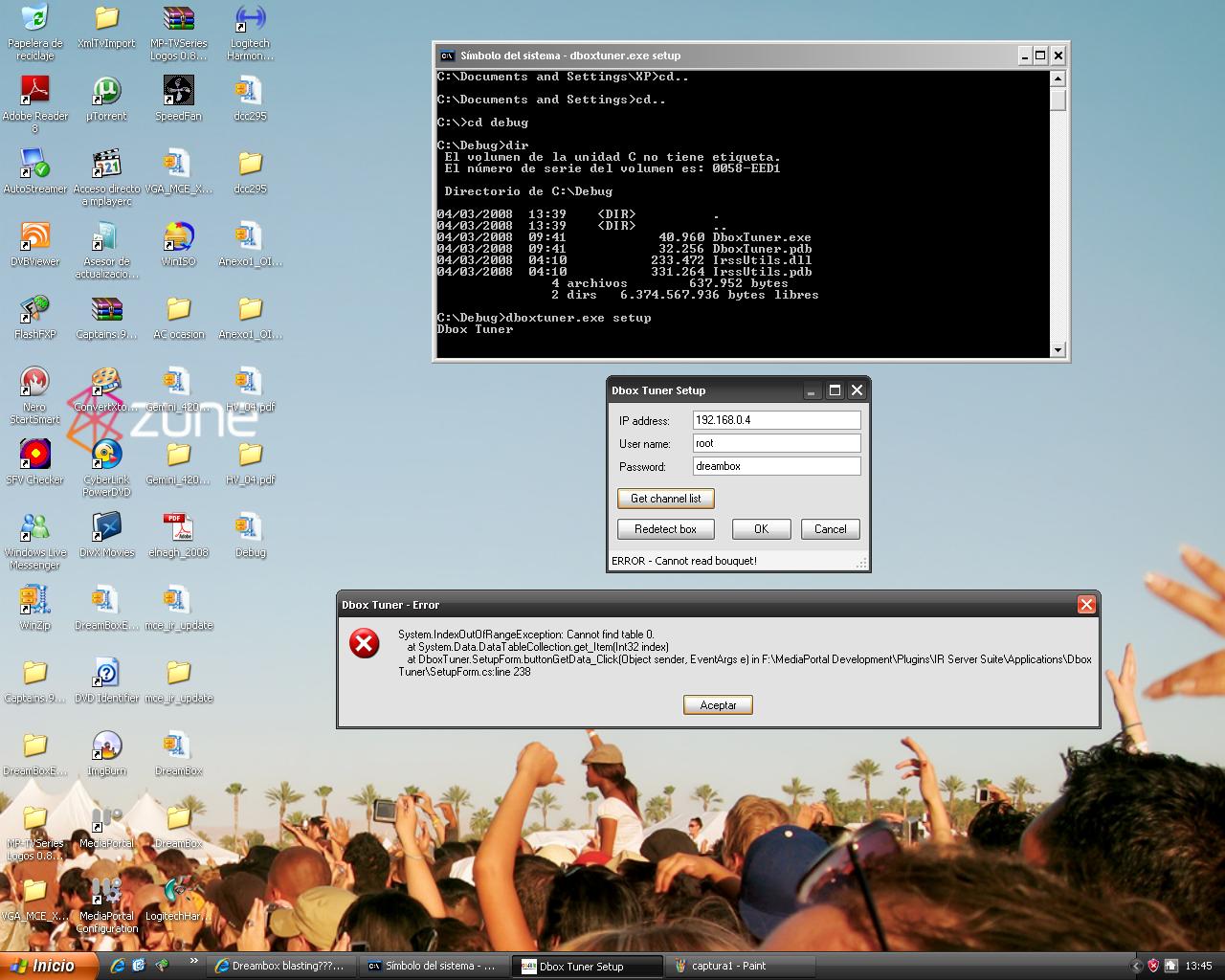
I test this aplication, but i have problems. I put files in Cbox
- At a command prompt write: C:dbox/dboxtuner.exe setup
-Appears "Dbox tuner Setup" screen with 3 option (Ip address, User name, Password)
-I write my dreambox network details and click get channel list.
-In this moment appears Detected Box type: Enigma V1.
-The next step appears Error: Cannot read bouquet!
If I click ok, the prompt screean appears Setup saved, but when i return open setup my network details don't saved.
Any idea????
I test this aplication, but i have problems. I put files in C
box- At a command prompt write: C:dbox/dboxtuner.exe setup
-Appears "Dbox tuner Setup" screen with 3 option (Ip address, User name, Password)
-I write my dreambox network details and click get channel list.
-In this moment appears Detected Box type: Enigma V1.
-The next step appears Error: Cannot read bouquet!
If I click ok, the prompt screean appears Setup saved, but when i return open setup my network details don't saved.
Any idea????
Users who are viewing this thread
Online now: 5 (members: 0, guests: 5)