
editing the TVSeriesDatabase4 (1 Viewer)

deejayadhd

Portal Member
February 22, 2010
5
0
Home Country
United States of America United States of America
1st thank you for this amazing plugin, it has picked up 90% or so of my shows, but there are a couple namely all the law and orders that it just wont scrape. so i tried editing the data base with sqlite expert. under "local series" i can see all my shows and there thetvdb codes, but for law and order they just have -99 -98 etc where the code should be so i figure i would just input the code myself. didnt work though, now law and order is just gone from the list of shows under the mp-tv configuration. is there something else i need to edit? here is a screen of what i edited, law and order used to have -99 where the code is.
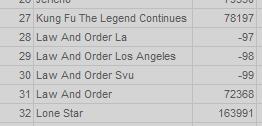
d3cd161fb0cde529d07acb9277251437.png
 

ltfearme

Community Plugin Dev
  • Premium Supporter
  • June 10, 2007
    6,767
    7,241
    Sydney
    Home Country
    Australia Australia
    Should be no reason why the import wizard wont allow you to match your series up...I would delete the entries from the DB and run the import wizard, edit anything that does not parse ...much easier I think.
     

    deejayadhd

    Portal Member
    February 22, 2010
    5
    0
    Home Country
    United States of America United States of America
    i tried re running the import wizard several times, law and order always gets matched to some show from the 70's, and the others dont match anything. i tried using the tvdb id and the show name and no luck. its just one of those shows that just wont work.

    i dont mind editing some lines in the database to get these recognized if its possible, i always back it up so theres no chance to foul it up. if anyone else had gotten law and order working here let me know.
     

    Inker

    Retired Team Member
  • Premium Supporter
  • December 6, 2004
    2,055
    318
    But you can always overwrite what it machtes them as if they are incorrect. You really shouldn't mess with the db yourself.

    Are you importing from the config or inside MP?
    If in config the second page on the wizard will allow you to manually set what it matches the show as. If its not in the drop down, enter a manual search term until it shows up. Then select it, and click approve.
    If inside MP, mark the incorrect series, hit F9 and say force online match. This will then give you a list of all matches found, allowing you to manually select the right one. If its not in that list, please open the config and do it from there (see my point above).
     

    deejayadhd

    Portal Member
    February 22, 2010
    5
    0
    Home Country
    United States of America United States of America
    wow i got it... i am using the config, i removed the "And" so it was just Law Order in tthe custom search and it picked it up... not sure why i thought to try that but glad i did. kinda weird the "And" fudged it up. and for svu and la took a few tries to come up with "law order los angeles instead of la and law order special instead of svu and those worked. maybe this will help out anyone else trying to watch some law and order :D

    thanks for the f9 trick, didnt know about that, im sure that will help me out later on.

    jake 2.0 was another show it couldnt find, took out the 2.0 and just searched for jake and it found it... so all my shows are in! guess i just needed to be a little more ambitious with my custom searches. thanx again.
     

    RoChess

    Extension Developer
  • Premium Supporter
  • March 10, 2006
    4,434
    1,897
    TheTVdB does not have a Google alike smart search system. It has to be more exactly as-is, or it will fail to match. You can however manually verify how a show is matched via the following:

    Code:
    http://www.thetvdb.com/api/GetSeries.php?seriesname=series+name

    Example (Law & Order):
    Code:
    http://www.thetvdb.com/api/GetSeries.php?seriesname=law+order

    Since the '&' sign is used, trying to locate it with 'law and order' will fail to find the correct one, unless you indeed meant to find the "Law and Order (1978)" series.
     

    deejayadhd

    Portal Member
    February 22, 2010
    5
    0
    Home Country
    United States of America United States of America
    TheTVdB does not have a Google alike smart search system. It has to be more exactly as-is, or it will fail to match. You can however manually verify how a show is matched via the following:

    Code:
    http://www.thetvdb.com/api/GetSeries.php?seriesname=series+name

    Example (Law & Order):
    Code:
    http://www.thetvdb.com/api/GetSeries.php?seriesname=law+order

    Since the '&' sign is used, trying to locate it with 'law and order' will fail to find the correct one, unless you indeed meant to find the "Law and Order (1978)" series.


    anotr good tip that will benefit people in the future, thank you.
     

    Chubler

    Portal Member
    July 14, 2009
    46
    25
    Home Country
    Australia Australia
    I had the same problem when I first did an import of my TV shows. I don't like having the ':' and '&' symbols in my directory/file names so I setup replace rules:
    Law and Order SVU ==> Law & Order: Special Victims Unit
    Law and Order CI ==> Law & Order: Criminal Intent
    Law and Order ==> Law & Order​
    This works well and automatically picks up new episodes as they appear.
     

    Users who are viewing this thread

    Top Bottom