eHome Infrared Tranceiver driver install fails - HELP... (1 Viewer)

nevertooold

New Member
February 28, 2008
2
0
Atlanta
Home Country
United States of America United States of America
I have been trying to figure this out for almost a day. I have trolled and trolled the support threads for how to get a Microsoft Media Center Keyboard and Remote to work with Media Portal / Windows XP. I have installed the latest version of Media Portal. I have read and implemented the following threads (along with some others):

MCE Keyboard - MediaPortal Wiki Documentation
https://forum.team-mediaportal.com/mce-replacement-plugin-165/mce-replacement-driver-obsolete-29024/
MEDIAPORTAL - free MediaCenter HTPC Software - Remotes

The main problem seems to be #1 - If you purchase Microsoft Media Center which I am trying to avoid, it will automatically install the drivers for the eHome Infrared Transceiver (the remote and keyboard use). I have read the instructions on how to get the eHome device to work w/o Microsoft Media Center but with no success. Every time I try to install / un-install / and install again the eHome drivers, the install always fails.

Is there a thread I am missing that shows idiot proof instructions on how to get the eHome device to install to use with Media Portal?

thanks

Andrew


TV-Server Version: N/A
MediaPortal Version: 0.2.3.0
MediaPortal Skin: N/A
Windows Version: Windows XP SP2
CPU Type: Intel Pentium 4 - 2.5GHz
HDD: 300 GB
Memory: 1 GB
Motherboard:
Motherboard Chipset:
Motherboard Bios:
Video Card:
Video Card Driver: Intel 82845G
Sound Card: ???
Sound Card AC3:
Sound Card Driver:
1. TV Card:
1. TV Card Type:
1. TV Card Driver:
2. TV Card:
2. TV Card Type:
2. TV Card Driver:
3. TV Card:
3. TV Card Type:
3. TV Card Driver:
4. TV Card:
4. TV Card Type:
4. TV Card Driver:
MPEG2 Video Codec:
MPEG2 Audio Codec:
Satelite/CableTV Provider:
HTPC Case:
Cooling:
Power Supply:
Remote:
TV:
TV - HTPC Connection:
 

Paranoid Delusion

Moderation Manager
  • Premium Supporter
  • June 13, 2005
    13,052
    2,978
    Cheshire
    Home Country
    United Kingdom United Kingdom
    The main problem seems to be #1 - If you purchase Microsoft Media Center which I am trying to avoid, it will automatically install the drivers for the eHome Infrared Transceiver (the remote and keyboard use).

    No you do not need MCE.

    I take it you are using xp home, because pro actually supports this with SP2 installed and behaves exactly as mce.

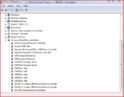
    As a thought go into Device Manager and find ehome infrared receiver, uninstall in DM and unplug receiver, wait 30 seconds, and plug usb back in, should be rediscovered with new driver.

    Capture.JPG

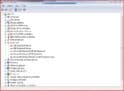
    You should now see these in DM

    Capture1.JPG

    If not look at this post

    https://forum.team-mediaportal.com/tips-tricks-124/how-mce-remote-keyboard-xp-home-4589/
     

    nevertooold

    New Member
    February 28, 2008
    2
    0
    Atlanta
    Home Country
    United States of America United States of America
    Ray,

    Thanks for the input. I tried this again just now, as well as about 10 times today and it did not work. I have XP Home installed on this computer but I do have a copy of XP Professional I will install tomorrow to see if that helps. Do you have any other ideas why the device install may fail??? As an FYI, I have tried different USB ports. Also, my eHome Infrared Transceiver is listed under "Other Devices" in Device Manager if that matters.

    Any other suggestions?

    Andrew
     

    Paranoid Delusion

    Moderation Manager
  • Premium Supporter
  • June 13, 2005
    13,052
    2,978
    Cheshire
    Home Country
    United Kingdom United Kingdom
    Hi Andrew

    Microsoft ehome infrared transceiver\mce keyboard

    Should be in these device listings

    Human Iinterface Device
    Keyboard
    Universal serial bus controllers (this is where i would update driver from)

    This is the mce remote, does yours look the same (but without the 4 colored buttons). is there a RC number on the battery compartment, as there are a lot of copies out there.

    View attachment 17783

    If it's not above, maybe you could insert a link to website showing your remote with information about it.

    Thanks
     

    scipher

    New Member
    April 14, 2008
    2
    1
    Home Country
    South Africa South Africa
    Ehome Driver update

    I also had a problem when installing the eHome Transceiver Drivers for my remote. I bought a Huappage PVR-150MCE seperatly from the Huappage MCE Remote which does not at all look like the one they show on the site. I am running Windows XP Pro SP2 and even after the install of the Rollup V2 Drivers, I could not get the transceiver to function correctly.

    What I did notice is that my remote has an RC6 sticker on the back of the battery lid, so very frustrated since I could not find something that works. I downloaded the eHome Rollup Drivers from the media portal site. I don't know exactly where in the forum I found it, then I tried to install the eHome IR Transceiver with those drivers that did not work either....so frustrated and annoyed I when to device manager and found the following bit of information under the properties of the Unknown device which was my IR transceiver I had a look ad the device ID and opened up the irbus.inf folder from the eHome Rollup drivers I found on the forum and low and behold, the device ID of my hauppage mce remote which I found from device manager was this : (USB\VID_1784&PID_0006) and I did a find through the irbus.inf file and did not find any hits. So what I did was at the bottom of the [MicrosoftHw] section in the inf file I added the following line :

    %USB\VID_045E&PID_006D.DeviceDesc%=IrBus_v2, USB\VID_1784&PID_000

    and in the [ControlFlags] section I added the following line :

    ExcludeFromSelect=USB\VID_1784&PID_0006

    after doing this I saved the file and updated my currently unknown device pointing to the directory that contained the file I just modified, and voila it installed the drivers in windows and all was good. The remote functioned under windows XP as a fully functioning MCE remote. The reason I think I struggeled so much is that my remote is a newer version of the huappage MCE remote. And since the RC6 protocol is supported in the eHome Rollup Drivers I tried to take a shot in the dark and see if I could get it working...which it luckily did as I would have been willing to go as far as to write my own driver software for the device....so some tinkering saved me lots of grey hair.

    I hope this helps someone else, and saves them the frustration I experienced. But the remote functions now fully in windows and Team Media Portal and all buttons work I am extremely happy.

    EDIT :

    Here are the drivers, for anyone who struggles to understand what to do in the post.

    View attachment 27342

    :D :D :D
     

    prupert

    Portal Member
    March 9, 2008
    40
    2
    DUDE, I dont often use smilies, but.......

    :D:D:D:D:D:D:D:D:D:D:D:D:D:D:D:D:D:D:D:D:D:D:D:D:D

    You are a totall genius.

    I had tried a million and one different solutions, but could only get my damn remote to use the four arrow keys and the OK button.

    And then I read your post...
    I had to modify the inf file to add my own VER number, even though my remote is the same as yours.

    But now it all works.

    Thanks dude
     

    Users who are viewing this thread

    Top Bottom