
You are using an out of date browser. It may not display this or other websites correctly.
You should upgrade or use an alternative browser.
You should upgrade or use an alternative browser.
Error message: Program/channel not found (1 Viewer)
- Thread starter kpatch
- Start date
- Thread starter
- #23
Let's back up a bit...
The first question is why isn't the IRSS finding the config file? It's definitely there.
Second...without diving too far into the weeds of MP, why is the IRSS needed at all. Can MP be configured to just use the TV3 plugin alone?
Can I use the IR blaster that connects to the HD PVR to blast the IR commands?
Failing that, is there another readily available IR blaster that you would recommend?
The first question is why isn't the IRSS finding the config file? It's definitely there.
Second...without diving too far into the weeds of MP, why is the IRSS needed at all. Can MP be configured to just use the TV3 plugin alone?
Can I use the IR blaster that connects to the HD PVR to blast the IR commands?
Failing that, is there another readily available IR blaster that you would recommend?
- September 1, 2008
- 21,515
- 8,256
- Home Country
-
 New Zealand
Those errors are completely gone in the latest log files, so we can forget about that I think. Sorry, should have said this earlier.The first question is why isn't the IRSS finding the config file? It's definitely there.
IRSS is needed.Second...without diving too far into the weeds of MP, why is the IRSS needed at all. Can MP be configured to just use the TV3 plugin alone?
MP tells TV Server to change channel.
TV Server tells the blaster plugin.
The TVE 3 Blaster plugin tells IRSS to send commands to the blaster.
IRSS sends the commands and the STB changes channel.
In other words, command flow is:
MP => TV Server => TVE 3 Blaster plugin => IRSS => blaster => STB.
If you take out IRSS you have no blasting back end and blasting can't work.
Right now it looks like you're successfully getting commands to the blaster. The failing link seems to be the link between the blaster and the STB, which is why I suggested your blaster port configuration might be incorrect.
I don't know.Can I use the IR blaster that connects to the HD PVR to blast the IR commands?
No. Again, I'm not an expert with blasting. Never used blasting. All that I know has been learnt from helping the occasional person such as yourself with the last few hickups.Failing that, is there another readily available IR blaster that you would recommend?
In general I think you're very close to having blasting working properly already. If you want to try a different option that is up to you, but if it were me I'd stick with what you've got.
Can you see any reaction from your STB when you attempt to change channels in MP? Numbers appearing on screen, LED on front panel blinking...???
If you have a digital camera or web cam you can check if the blaster is sending anything by pointing the blaster at the camera and attempting to change channel. Infra red shows as light on digital cameras.
This might help:
http://wiki.team-mediaportal.com/1_MEDIAPORTAL_1/17_Extensions/3_Plugins/IRSS_(IR_Server_Suite)/Set_Top_Box_Blasting#Configuring_TV3_Blaster_Plugin
If all else fails, please post screenshots of the blaster plugin config so I can take a look.
- Thread starter
- #25
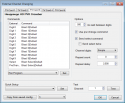
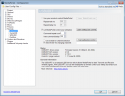
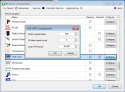
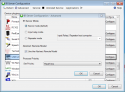
The requested screenshots are attached.
I think the break is between either TVE 3 Blaster plugin => IRSS or IRSS => blaster. As I go through the various config screens, I didn't notice anything connecting TV3 to IRSS. Is that link via COM/DCOM or whatever it's called now (I haven't written Windows code for many years).
Something else sticks in my mind...when I was first setting up MP, one reply in the forum said that configuring remote/USBUIRT would have no effect. Is it possible that having it enabled in MP, not the server, could be causing the communications breakdown?
In other words, command flow is:
MP => TV Server => TVE 3 Blaster plugin => IRSS => blaster => STB.
I think the break is between either TVE 3 Blaster plugin => IRSS or IRSS => blaster. As I go through the various config screens, I didn't notice anything connecting TV3 to IRSS. Is that link via COM/DCOM or whatever it's called now (I haven't written Windows code for many years).
Something else sticks in my mind...when I was first setting up MP, one reply in the forum said that configuring remote/USBUIRT would have no effect. Is it possible that having it enabled in MP, not the server, could be causing the communications breakdown?
Attachments
- September 1, 2008
- 21,515
- 8,256
- Home Country
-
New Zealand
ThanksThe requested screenshots are attached.

So the screenshot "mp_remote_usbuirt_config": that section does not allow you to configure blasting, only receiving. The "let MediaPortal control your set top box" option is a leftover from the days before TV Server existed, when the TV functions were directly built into MediaPortal. Please untick that option and pretend it doesn't exist. It does nothing [helpful].
The screenshot "mpserver_tV3_config_card3.png": this is where I think the problem may be, though of course I'm not 100% sure. First thing I notice is that it looks like you didn't select your STB down the bottom ("quick setup"). Is that because your STB is not in the list?
I also notice that all your commands are set as "Blast X|Default". Please could you humour me: edit each of the commands and select port "both", then restart the PC and try again.
Aside from that I can't see anything obviously wrong.
If that were the case, the "test" function in the blaster plugin wouldn't work. That function also goes through IRSS to the blaster. To be clear, the plugin itself never directly communicates with the USB UIRT (or any other hardware).I think the break is between either TVE 3 Blaster plugin => IRSS or IRSS => blaster.
I'm guessing a network port is used. That guess is purely based on this screen from the previously linked guide:As I go through the various config screens, I didn't notice anything connecting TV3 to IRSS. Is that link via COM/DCOM or whatever it's called now (I haven't written Windows code for many years).
http://wiki.team-mediaportal.com/@api/deki/files/294/=13_tv3blaster_setHost.png
So you can select the PC that IRSS is running on. Effectively my understanding is that IRSS is running in the background all the time, much like the MP TV Server service.
Yeah, as above: that option doesn't do anything useful. I don't know that it does anything bad either, but safest thing is to disable it.Something else sticks in my mind...when I was first setting up MP, one reply in the forum said that configuring remote/USBUIRT would have no effect. Is it possible that having it enabled in MP, not the server, could be causing the communications breakdown?
Did you manage to check if the blaster is actually receiving commands (using a digital camera, STB on screen display or other)?
- Thread starter
- #27
Yeah, as above: that option doesn't do anything useful. I don't know that it does anything bad either, but safest thing is to disable it.
Actually, it's very unsafe. I unchecked it and everything started working.
Now, it's on to setting up the recordings. I'm transitioning from BeyondTV, which I used for 10 years, so I have quite a few questions. Maybe I'll just post one big forum post with all my questions.
Many thanks for your patience and excellent support.
Patrick
- May 29, 2014
- 6
- 0
- 81
- Home Country
-
Canada
I'm having a similar error.
It only happens with one channel in the TV client - CITY TV in Toronto.
I've attached the logs. Hope someone can help
SPECS
Intel i5 4670K
ASUS Z87-A
Windows 8
MediaPortal 1.7 Pre-release
HDhomeRun Dual
It only happens with one channel in the TV client - CITY TV in Toronto.
I've attached the logs. Hope someone can help
SPECS
Intel i5 4670K
ASUS Z87-A
Windows 8
MediaPortal 1.7 Pre-release
HDhomeRun Dual
- September 1, 2008
- 21,515
- 8,256
- Home Country
-
New Zealand
Hello Jeffrey
I suspect the service ID is incorrect.
Please could you do a full rescan and try again after that. If it still doesn't work, please post log files again so I can double check that TV Server has the correct details for the channel.
mm
I suspect the service ID is incorrect.
Please could you do a full rescan and try again after that. If it still doesn't work, please post log files again so I can double check that TV Server has the correct details for the channel.
mm
- May 29, 2014
- 6
- 0
- 81
- Home Country
-
Canada
Did a full tv channel rescan and I noticed a second instance of the same channel CITYTV. Neither of them worked and MP crashed
Here's the second log
thanks for looking into this,
Jeff,
Here's the second log
thanks for looking into this,
Jeff,
Users who are viewing this thread
Online now: 2 (members: 0, guests: 2)