Fanart Handler Plugin v2.1.1 (and music fanart scraper) (3 Viewers)

Status
Not open for further replies.

globaldonkey

MP Donator
  • Premium Supporter
  • April 23, 2007
    755
    79
    Home Country
    Re: Fanart Handler Plugin v1.3 (and music fanart scraper)

    Hmmm, I've got no fanart since upgrading to MP1.1.0 RC1

    EDIT: Ah never mind. Bodged the install of the skin files. Re-did the skin file install and all ok again.

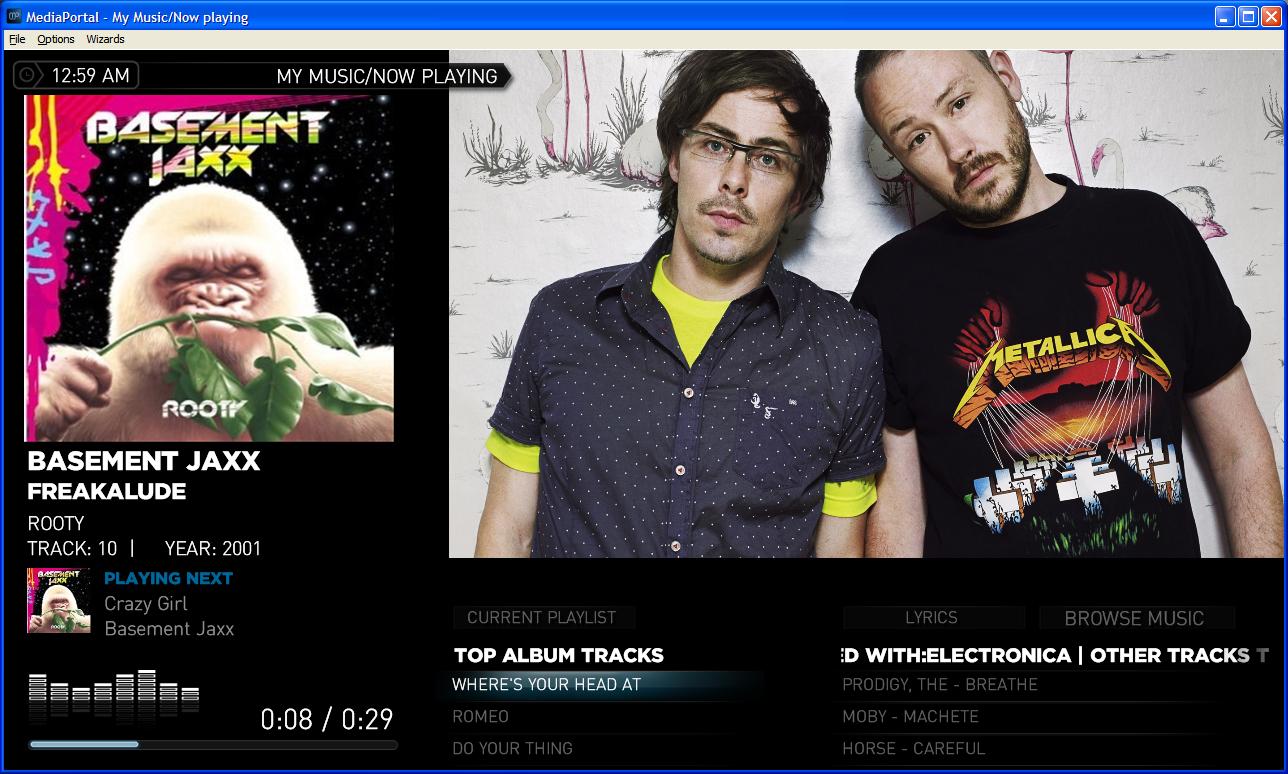
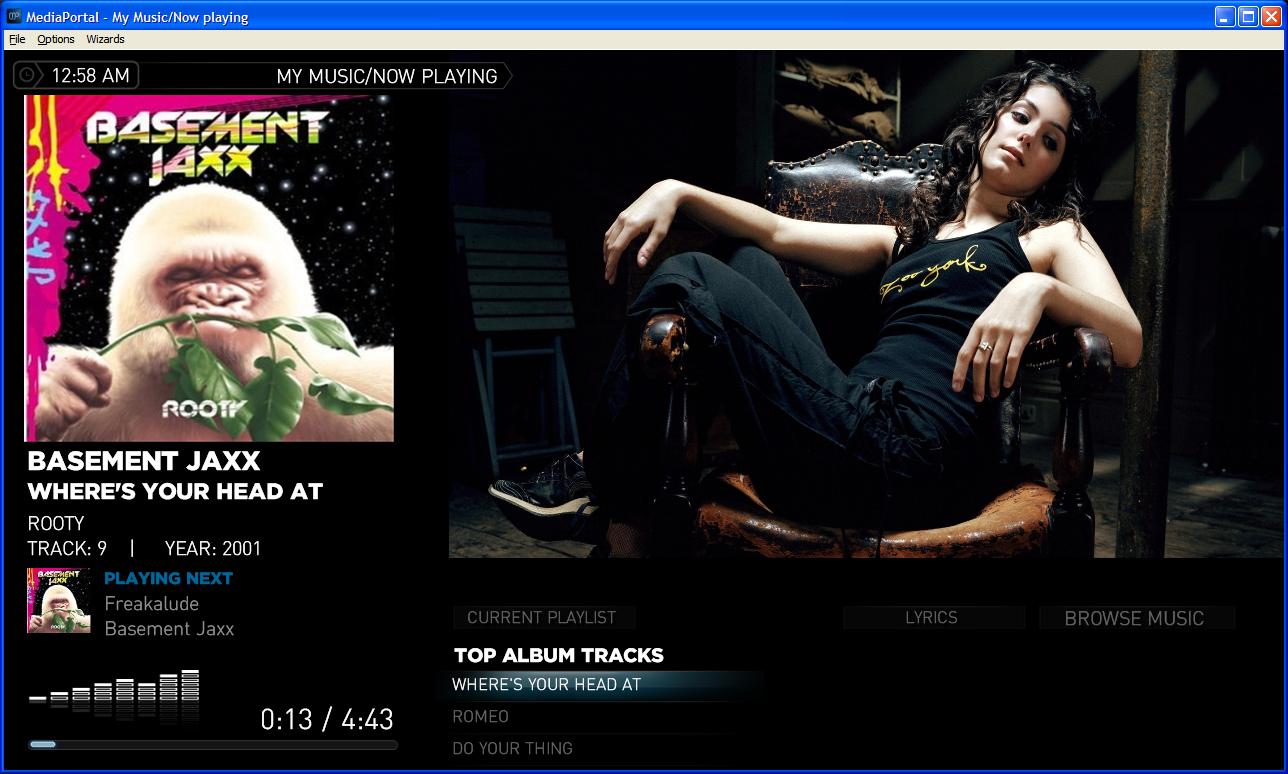
    EDIT2: OK, still some weirdness going on...... getting fanart in album and track listings for correct artist, however, when I go to now playing, I get the same image for the first song every time, no matter what artist as per first screenshot. If I then skip to another track, I get the right fanart for the artist. Only happening in Now Playing.

    EDIT3: ARRRRGGGGHHHH! Damn Windows explorer copying. Still hadn't copied all the skin files correctly. All fixed, but the girl in the left image does flash up between screens momentarily while new fanart is being displayed. This sort of thing was happening with the old install too.
     

    Attachments

    • bj1.JPG
      bj1.JPG
      129.8 KB
    • bj2.JPG
      bj2.JPG
      163.2 KB

    Rijnton

    Portal Pro
    November 20, 2009
    95
    3
    Home Country
    Netherlands Netherlands
    Re: Fanart Handler Plugin v1.3 (and music fanart scraper)

    just thinking,
    from your description, you said the images were larger that 400x400, but did not say if they were landscape, square or portrait. Do you have 'Display Only Wide Images (Aspect Ratio >= 1.3)' checked in config? The images will not display then if they are not wider than 4:3
    Chuck

    Thanks again. I don't have that checked. But after a lot of fiddling around I found out that I only have the problem with (the latest) Fanart Handler 1.3. With Fanart Handler 1.3 RC2 everything works fine.
    With 1.3, when I start MP after adding fanart manually, I see the added fanart initially (when browsing or in now playing screen), but then the scraped image shows up and the added fanart is never seen again. When I then close MP and go to configuration I don't see the added fanart either under Manage Fanart.
    I then uninstalled 1.3, deleted the database and fanart.xml, backupped the fanart and deleted it from the music folder. Installed 1.3RC2 next, put back the fanart in the music folder, added some fanart manually and started MP. Everything was fine then, the added fanart showed up and rotated nice with the scraped fanart. Closed MP and the added fanart also showed up under Manage Fanart. Added a few images again manually and these also showed up after starting MP again.
    I tried this several times with 1.3 and with 1.3RC2 (uninstallin, reinstalling, deleting database etc) and every time the same result. 1.3RC2 works fine and 1.3 not. So, although I don't know why, imo the problem lies in 1.3.
     

    cul8er

    Retired Team Member
  • Premium Supporter
  • August 31, 2006
    2,159
    2,679
    Home Country
    Sweden Sweden
    Re: Fanart Handler Plugin v1.3 (and music fanart scraper)

    Hi Rijnton,

    I think I have found the problem and hope that version 1.5 will solve this. This version will hopefully be available tomorrow if all goes to plan (release schedule).

    best regards
    cul8er
     

    chughes

    Portal Member
    February 15, 2010
    22
    1
    Home Country
    Re: Fanart Handler Plugin v1.3 (and music fanart scraper)

    I personally had issues with 1.5. After installing 1.3 RC2 it worked a treat.

    I have the newest RC MP and StreamedMP :)

    EDIT: Scratch that, 1.5 release worked fine. I missed a setting.... sorry....
     

    cul8er

    Retired Team Member
  • Premium Supporter
  • August 31, 2006
    2,159
    2,679
    Home Country
    Sweden Sweden
    Re: Fanart Handler Plugin v1.3 (and music fanart scraper)

    Hi winniwinter,

    Version 1.5 is not officially released yet as we have found a bug that needs to be fixed. I'll get back to you as soon as it is released.

    best regards
    cul8er
     

    Greenfrog

    Portal Member
    August 21, 2006
    9
    0
    QLD, Australia
    Home Country
    Australia Australia
    Re: Fanart Handler Plugin v1.3 (and music fanart scraper)

    If I'm not mistaken, any manually added fanart (not scraped from HTBackdrops) will be added to the fanart handler db after you start MP, not if you go directly to config first. If you check config after running MP you will see the names added.

    Also, I think it would be better if you put numbers separate from the artist name. Maybe, imitate the scraper by putting numbers in parentheses, it would still be easy to see manually added images because scraped images have 5 randomly selected numbers.

    example:

    ray lamontagne (01).jpg
    ray lamontagne (02).jpg


    Hi 2bit

    do you have any ideas on how you would manually add fan art for AC/DC? Obviously we cant use a file name with a forward slash in it?

    :D
     

    winniwinter

    MP Donator
  • Premium Supporter
  • January 5, 2009
    162
    3
    Freiburg
    Home Country
    Germany Germany
    Re: Fanart Handler Plugin v1.3 (and music fanart scraper)

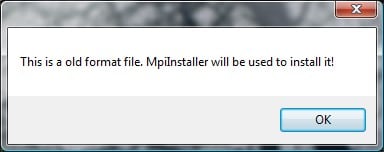
    hmm when I try to install the plugin I geht this message (see attach).
    The Plugin is definitly not in mp configuration nor in the process folder :mad:
     

    Attachments

    • install.jpg
      install.jpg
      11.1 KB
    Status
    Not open for further replies.

    Users who are viewing this thread

    Top Bottom