
You are using an out of date browser. It may not display this or other websites correctly.
You should upgrade or use an alternative browser.
You should upgrade or use an alternative browser.
For The Record - The rule-based scheduling suite (16 Viewers)
- Thread starter dvdfreak
- Start date

- June 13, 2006
- 979
- 178
- Home Country
-
 Belgium
- Thread starter
- #482
Hi again,
I did a fresh install of TV Scheduler this morning. Again I tried with the latest (1.0.10.0) bit I can not get any channels to show up in the TV3 plugin window. As soon as I revert to 1.0.8.0 I get a list of channels and they are marked as "Linked". I noticed one thing though, the version of the app is 1.0.10.0 but the TV3E plugin is labeled 1.0.9.0 in the config still... I know you released two versions on the same day so this may be a simple typo?
Seems I made a booboo somewhere when I uploaded version 1.0.10.0

Having said that it seems as the EPG data is not synced from TV3E to TVScheduler. Perhaps I misunderstood the functionality, I was under the impression that there are two choices how to get EPG data to the scheduler. Either through TVGuide.xml import (by copy the file to the xmltv directory), or by having the TV3E plugin sync the EPG data from the TV3E database to TV Scheduler. The former works fine, the latter does not.
Actually, if you first import an XMLTV guide, then make sure all channels are properly linked by their name between TVE3 and TV Scheduler, then you can also turn on DVB-EPG syncing.
But using only one or the other would work just fine too of course.
I tried to flip the "Sync TV3E EPG..." but it seems to make no difference. Is that the button to control whether to import TVguidel.xml or read the TV3E database for EPG info?
That's only the TVE3 syncing. TVGuide.xml importing is always active, just depends on whether there are files dropped in the xmltv directory.
Any ideas?
I just got back, so I'll have a look one of the coming days and try to upload a 1.0.11.0 version soon.
Having said that, here is a request for new functionality. I've been playing around with the SQL db a lot, and had to delete it a couple of times when I got duplicate channels etc. It would be very useful to be able to export the rules. This way I wouldn't have to manually recreate all the rules once the db deleted. Minor changes in channel names etc could be easily taken care of with some Search&Replace in the exported XML file. What do you think?
Yes, sounds like a worthwhile addition to the management console. Would also allow you to share rules with others.
When I go into the console most of the options work - the exception is "TV Guide" when ever I access that I get a crash. (Windows "Unhandled exception has occurred in your application...")
In the event viewer I see a .NET Runtime 2.0 error - Not sure what other information is of interest - let me know what info you need.
Just copy/paste the entire exception message into a PM to me
Must be something very specific since all the rest works for you.
- June 13, 2006
- 979
- 178
- Home Country
-
Belgium
- Thread starter
- #483
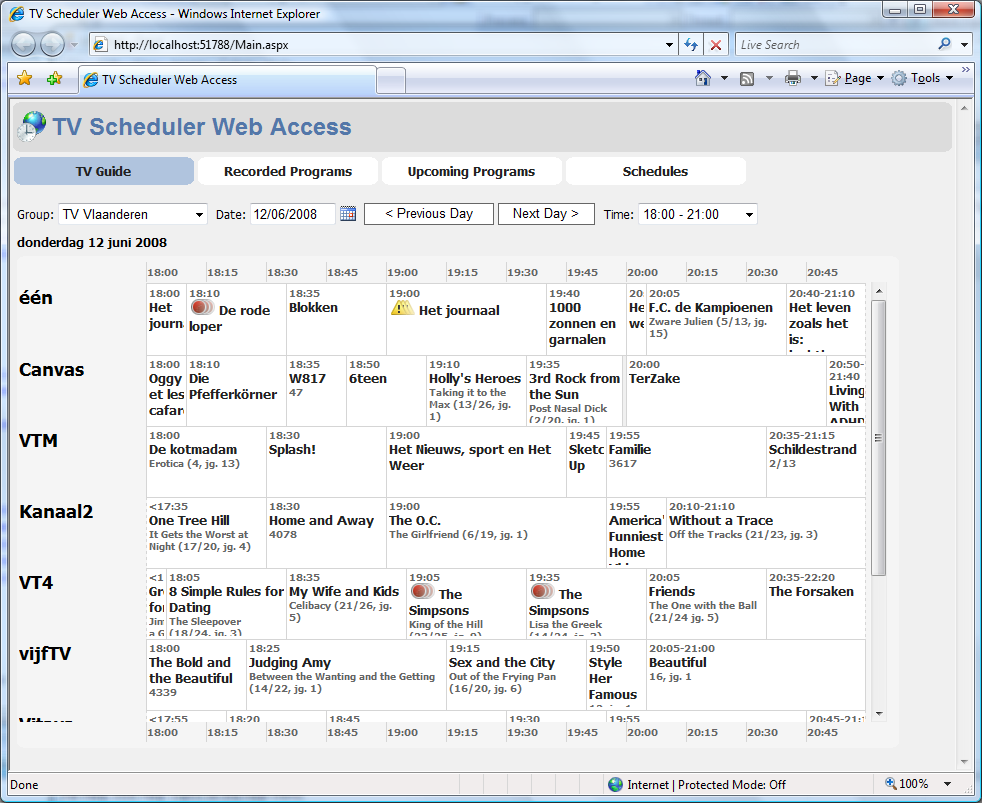
It was suggested here I aimed for a more classic EPG-look for TV Scheduler Web Access, since this gives a much better overview of what is on on what channel.
So here's a small teaser-screenshot of the work-in-progress I already started before my vacation. I hope it is to everyone's liking...
So here's a small teaser-screenshot of the work-in-progress I already started before my vacation. I hope it is to everyone's liking...
Attachments

Welcome back dvdfreak!
Hope you enjoyed your trip to southeast Asia (I believe). Thanks for your answers, as soon as I get a chance to test your 1.0.11.0 version I will try it on my trial system. Can't afford to break the livingroom system, that would kill WAF...
As always you are doing a great job to follow-up on all feedback you get in this thread. A big thanks!
/Peter
Hope you enjoyed your trip to southeast Asia (I believe). Thanks for your answers, as soon as I get a chance to test your 1.0.11.0 version I will try it on my trial system. Can't afford to break the livingroom system, that would kill WAF...
As always you are doing a great job to follow-up on all feedback you get in this thread. A big thanks!
/Peter
Hi again,
Just to make sure I got the syncing right...
I should either copy tvguide.xml to the directory for TVScheduler, OR map channels and enable TV3E syncing in the TV3E plugin, right? Not both at the same time I assume. I think this is how I ended up with multiple versions of the same channel...
Which whay is the syncing between TVScheduler and TV3E working? Can I import a TVguide.xml in TVScheduler and have the EPG propagated to TV3E through the sync? I.e. disable the xmltv import in TV3E? Or is it only the other way around, i.e. from TV3E to TVScheduler?
/Peter
Just to make sure I got the syncing right...
I should either copy tvguide.xml to the directory for TVScheduler, OR map channels and enable TV3E syncing in the TV3E plugin, right? Not both at the same time I assume. I think this is how I ended up with multiple versions of the same channel...
Which whay is the syncing between TVScheduler and TV3E working? Can I import a TVguide.xml in TVScheduler and have the EPG propagated to TV3E through the sync? I.e. disable the xmltv import in TV3E? Or is it only the other way around, i.e. from TV3E to TVScheduler?
/Peter

Hi - I just tried installing this great sounding app for the first time. I've got the service running and the console on the same PC as the server. I'm running XP Pro SP2 with the 30/12/07 build of TV Server. It's a brand new install and all patching is up to date.
When I go into the console most of the options work - the exception is "TV Guide" when ever I access that I get a crash. (Windows "Unhandled exception has occurred in your application...")
In the event viewer I see a .NET Runtime 2.0 error - Not sure what other information is of interest - let me know what info you need.
You can see in the attached log that the import of the guide works just fine
Thanks in advance for your help.
Please give some more details about the exact errormessage and the content of the eventviewer, only then we will be able to help you.
Hi Ernie-c - thanks for your post. The following is the error from the Event Viewer:
Faulting application tvscheduler.managementconsole.winui.exe, version 1.0.10.0, stamp 475e95a4, faulting module ntdll.dll, version 5.1.2600.2180, stamp 411096b4, debug? 0, fault address 0x00011c48.
I also PM'd DVD Freak the output from the 'unhandled exception' crash pop-up - I've attached here
Thanks again
Faulting application tvscheduler.managementconsole.winui.exe, version 1.0.10.0, stamp 475e95a4, faulting module ntdll.dll, version 5.1.2600.2180, stamp 411096b4, debug? 0, fault address 0x00011c48.
I also PM'd DVD Freak the output from the 'unhandled exception' crash pop-up - I've attached here
Thanks again
- June 13, 2006
- 979
- 178
- Home Country
-
Belgium
- Thread starter
- #488
System.Runtime.InteropServices.ExternalException: A generic error occurred in GDI+.
at System.Drawing.Bitmap.FromHicon(IntPtr hicon)
at System.Drawing.Icon.ToBitmap()
at TvScheduler.ManagementConsole.WinUI.Controls.Progr amContextMenuStrip.AddItem(Icon icon, String text)
The above are the last few lines from the error you sent me (read from bottom to top). So this is a very low-level GDI+ error and seems to have something to do with the icons I am using in the popup menu
Very puzzling... Maybe a bit far-fetched, but could this be a gfx-card driver problem?
I should either copy tvguide.xml to the directory for TVScheduler, OR map channels and enable TV3E syncing in the TV3E plugin, right? Not both at the same time I assume. I think this is how I ended up with multiple versions of the same channel...
That's certainly possible. If DVB-EPG syncing is turned on and the channels are not matched by their display-name, then you will get duplicate channels! To "fix" this, you can change the name of the channels created by the XMLTV import in TV Scheduler to match the duplicate channel names. Then delete the duplicates that were created by the EPG syncing. This way they should not be recreated next time the EPG is synced.
Which whay is the syncing between TVScheduler and TV3E working? Can I import a TVguide.xml in TVScheduler and have the EPG propagated to TV3E through the sync? I.e. disable the xmltv import in TV3E? Or is it only the other way around, i.e. from TV3E to TVScheduler?
The syncing is always one way:
1) EPG data is copied from TVE3 --> TV Scheduler.
2) Upcoming recordings are converted to manual schedules from TV Scheduler --> TVE3.
So if you are using a tvguide.xml, simply copy it to both TV Scheduler's XMLTV directory as to TVE3. And don't turn on the EPG syncing in my plugin.
- June 13, 2006
- 979
- 178
- Home Country
-
Belgium
- Thread starter
- #490
I have a quick question for german users:
How valuable would you find it to have a ClickFinder TV Movie importer add-on for TV Scheduler?
I was thinking about an executable version of rtv's TVE3 plugin that would import all guide data into TV Scheduler. You could then schedule this executable to run after your tvmovie data is updated.
How valuable would you find it to have a ClickFinder TV Movie importer add-on for TV Scheduler?
I was thinking about an executable version of rtv's TVE3 plugin that would import all guide data into TV Scheduler. You could then schedule this executable to run after your tvmovie data is updated.
Users who are viewing this thread
Online now: 14 (members: 0, guests: 14)