For The Record - The rule-based scheduling suite (6 Viewers)

BKCH

MP Donator
  • Premium Supporter
  • July 25, 2005
    287
    12
    Sydney
    Home Country
    hi dvdfreak - great news - the aspnet_regiis -i did the trick for me and I can now access TV Scheduler across the internet - very very happy :) I have been wanting to get this working for ages!!!

    You are dead right about it not being an issue that it doesn't work over terminal services - althought I'd suggest putting a note about that in the instructions - my train of thought was that I'd test it on the local server (via RDP) and then if that worked I'd move to testing over the network. But you are absolutely correct - it's a non-issue.

    Thanks heaps for your excellent work :)
     

    ddj147

    Portal Member
    November 17, 2006
    24
    0
    Home Country
    Australia Australia
    I can't really figure out why you would want to use remote desktop when TV Scheduler is specifically designed to be used from a remote client :) What can be easier than running the management console on any client machine you wish? :D

    Yes, I agree there is no real reason to require RDP other than as BKCH mentions later on, I was using it for testing on the HTPC first before installing the client somewhere else. It's not as easy for me to do all my configuration on the HTPC using the TV as a monitor, so I often use RDP to get a few things done on it. I was thinking I'd test it on the HTPC first before trying the client from a remote machine. That was the only reason. I don't think it's a big issue that needs to be fixed, maybe just document it so people realise.

    Web Access requires a good IIS setup, so I guess that is its weak point since IIS is not "easy stuff". First IIS needs to be set up correctly on your server, then you need to make sure it's also correctly set up for the .NET Framework ("aspnet_regiis -i" may be needed). And then the Ajax extensions need to be properly installed too.

    This sounds promising, so I'll now go off and re-install it all and give it a try. Thanks for your help !
     

    dvdfreak

    Portal Pro
    June 13, 2006
    979
    178
    Home Country
    Belgium Belgium
    ..., so I often use RDP to get a few things done on it. I was thinking I'd test it on the HTPC first before trying the client from a remote machine. That was the only reason. I don't think it's a big issue that needs to be fixed, maybe just document it so people realise.

    I still think it should be fixed though, I don't want the console to crash on it ;) But it's not a highest-priority bug, let's put it like that.
     

    ddj147

    Portal Member
    November 17, 2006
    24
    0
    Home Country
    Australia Australia
    Thanks for your help. The aspnet_regiis command did the trick and I now have Web Access working. One quick cosmetic question I have, in the TVGuide screen you have Group, Date then Previous Day button and Next Day Button. How would I go about changing the format of the date field so that it can show the day of the week ? I'd like to see Mon, Tues, Wed etc... in front of the date so when I hit the next day button, I know where I'm up to in the week.

    I'm not the most technical of people so I apologise in advance for asking something that may potentially have a simple answer.
     

    dvdfreak

    Portal Pro
    June 13, 2006
    979
    178
    Home Country
    Belgium Belgium
    Thanks for your help. The aspnet_regiis command did the trick and I now have Web Access working. One quick cosmetic question I have, in the TVGuide screen you have Group, Date then Previous Day button and Next Day Button. How would I go about changing the format of the date field so that it can show the day of the week ? I'd like to see Mon, Tues, Wed etc... in front of the date so when I hit the next day button, I know where I'm up to in the week.

    Yes, I already realized that this was a bit annoying :) So the day of the week will be displayed in the next version, together with the switch to the new EPG-style grid.

    I posted this screenshot before, as you can see I added the full date just above the grid: View attachment 15035
     

    ddj147

    Portal Member
    November 17, 2006
    24
    0
    Home Country
    Australia Australia
    Thanks for the quick response. Is the new EPG style grid going to be compulsory, or will the user be able to choose which style of EPG they prefer ? I really like both styles and have use cases for both so I'd love to have the option to choose the one displayed on a case by case basis - maybe a different tab for each style type or a button which switches between the two ?

    Another question on something I can't work out. I'd like to be able to say record program X with the name of "xxx" starting at any time between the hours of 7:00pm and 10:00pm for example. When I use the "Starting between" fields in the When section of the Web access screen, it doesn't seem to narrow down the program selection at the bottom of the screen. All other options in the "When" section do. Any ideas ?
     

    dvdfreak

    Portal Pro
    June 13, 2006
    979
    178
    Home Country
    Belgium Belgium
    Thanks for the quick response. Is the new EPG style grid going to be compulsory, or will the user be able to choose which style of EPG they prefer ? I really like both styles and have use cases for both so I'd love to have the option to choose the one displayed on a case by case basis - maybe a different tab for each style type or a button which switches between the two ?

    The EPG grid will be the new default, but when you click on a channel name (or logo) that channel will be shown in the full-day-list style that's in the current Web Access release. Hopefully that will be fine for everyone.

    Another question on something I can't work out. I'd like to be able to say record program X with the name of "xxx" starting at any time between the hours of 7:00pm and 10:00pm for example. When I use the "Starting between" fields in the When section of the Web access screen, it doesn't seem to narrow down the program selection at the bottom of the screen. All other options in the "When" section do. Any ideas ?

    Just tried this, and it works fine here for me. Can you provide more specific details? Make a screenshot perhaps?
     

    ddj147

    Portal Member
    November 17, 2006
    24
    0
    Home Country
    Australia Australia
    Just tried this, and it works fine here for me. Can you provide more specific details? Make a screenshot perhaps?

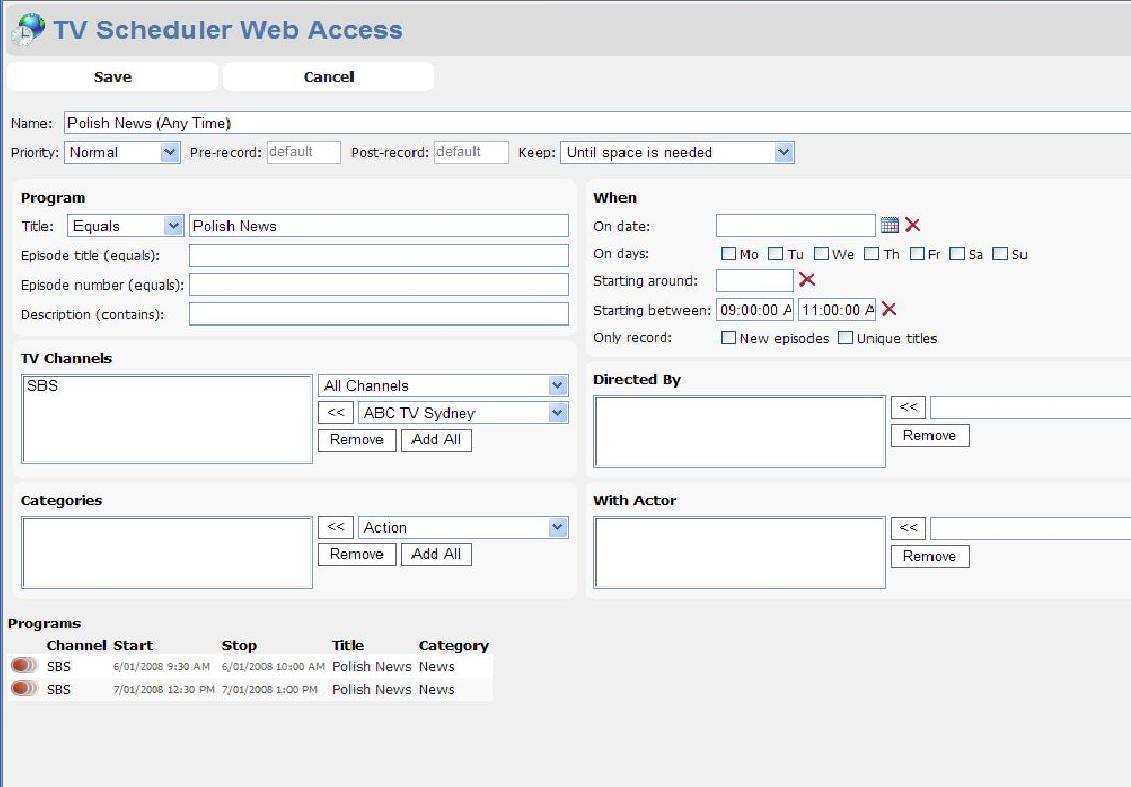
    In the attached image, I have clicked on "Polish News" and said record Any Time. Then I unticked Only record new episodes and chose between 9am - 11am. I would expect that there would be only one show listed at the bottom, the 9:30am show.

    I'm using IE 6 on a laptop client and I've tried the same on my HTPC server (using IE6) and it's the same. When I use the Management Console on the HTPC server it works fine.

    I'm using English (Australia) as a language on both, if that makes any difference.

    Anything else I can check ?
     

    Attachments

    • tvsched2.JPG
      tvsched2.JPG
      92.1 KB

    dvdfreak

    Portal Pro
    June 13, 2006
    979
    178
    Home Country
    Belgium Belgium
    In the attached image, I have clicked on "Polish News" and said record Any Time. Then I unticked Only record new episodes and chose between 9am - 11am. I would expect that there would be only one show listed at the bottom, the 9:30am show.

    Well, I did try this on my latest code-base, so perhaps I fixed this without realizing it, and so you may want to try this again when I release version 1.0.11.0.

    Another possible explanation could be your different locale settings. I'll try with English (Australia) myself.
     

    rekenaar

    Retired Team Member
  • Premium Supporter
  • December 17, 2006
    4,421
    805
    Home Country
    South Africa South Africa
    Hi

    I have just decided to try your program. Fisrt impressions are VERY GOOD. Thank you.

    My question: If I want to try the webaccess, should the iis be running on the same server as the tvserver and the tvscheduler? Or can it be installed on another PC with iis and connect to the tvscheduler over the network?
     

    Users who are viewing this thread

    Top Bottom