- May 26, 2009
- 227
- 39
- Home Country
-
 Germany
Hi,
today I installed the latest version of ffdshow-tryouts and Catalyst 11.11 (had 11.2 before) because with ffdshow DXVA decoder a few x264-encoded videos stuttered terribly while most of them worked fine. This problem was not fixed and it caused another one, I think:
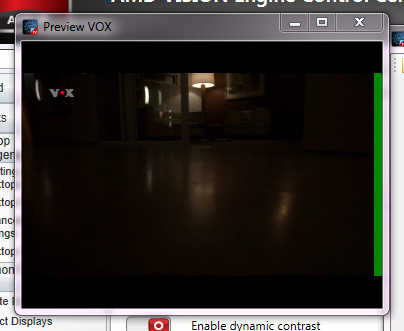
When watching SDTV within MediaPortal there is an green stripe at the right side of the screen now (see attached screenshot). This does not happen with HDTV. Also the stripe is not present in Windows Media Center and XBMC (the latter using MediaPortal TSReader). So the error only occurs within MediaPortal although XBMC uses MP TVServer, too.
Therefore it has to be a codec problem, I think, as XBMC uses its own codecs, right? So I changed the TV codecs to LAV or MPC and the stripe was still there. Any ideas?
MediaPortal Version: 1.2.1.0
MediaPortal Skin: Avalon 0.9.6.1
Windows Version: Windows 7 HP x64
CPU Type: AMD Athlon II X3 445
HDD: WD10EADS
Memory: 4 GiB Kingston ValueRAM DDR3-1333
Motherboard: Gigabyte GA-880GMA-UD2H
Video Card: Radeon HD4250 (onboard)
Video Card Driver: Catalyst 11.11
Sound Card: Realtek ALC892 (onboard)
Sound Card AC3: no AC3
Sound Card Driver: 6.0.1.6235
1. TV Card: TeVii S470
1. TV Card Type: DVB-S2
1. TV Card Driver: 5.1.4.0
MPEG2 Video Codec: ffdshow
MPEG2 Audio Codec: ffdshow
h.264 Video Codec: ffdshow DXVA
Satelite/CableTV Provider: Astra 19.2°E
HTPC Case: Lian Li PC-C37B
Cooling: Scythe Big Shuriken
Power Supply: be quiet! Straight Power E8 400W
Remote: Microsoft MCE v2
TV: Samsung UE40C6200
TV - HTPC Connection: HDMI
today I installed the latest version of ffdshow-tryouts and Catalyst 11.11 (had 11.2 before) because with ffdshow DXVA decoder a few x264-encoded videos stuttered terribly while most of them worked fine. This problem was not fixed and it caused another one, I think:
When watching SDTV within MediaPortal there is an green stripe at the right side of the screen now (see attached screenshot). This does not happen with HDTV. Also the stripe is not present in Windows Media Center and XBMC (the latter using MediaPortal TSReader). So the error only occurs within MediaPortal although XBMC uses MP TVServer, too.
Therefore it has to be a codec problem, I think, as XBMC uses its own codecs, right? So I changed the TV codecs to LAV or MPC and the stripe was still there. Any ideas?
MediaPortal Version: 1.2.1.0
MediaPortal Skin: Avalon 0.9.6.1
Windows Version: Windows 7 HP x64
CPU Type: AMD Athlon II X3 445
HDD: WD10EADS
Memory: 4 GiB Kingston ValueRAM DDR3-1333
Motherboard: Gigabyte GA-880GMA-UD2H
Video Card: Radeon HD4250 (onboard)
Video Card Driver: Catalyst 11.11
Sound Card: Realtek ALC892 (onboard)
Sound Card AC3: no AC3
Sound Card Driver: 6.0.1.6235
1. TV Card: TeVii S470
1. TV Card Type: DVB-S2
1. TV Card Driver: 5.1.4.0
MPEG2 Video Codec: ffdshow
MPEG2 Audio Codec: ffdshow
h.264 Video Codec: ffdshow DXVA
Satelite/CableTV Provider: Astra 19.2°E
HTPC Case: Lian Li PC-C37B
Cooling: Scythe Big Shuriken
Power Supply: be quiet! Straight Power E8 400W
Remote: Microsoft MCE v2
TV: Samsung UE40C6200
TV - HTPC Connection: HDMI