
Grey blacks with internal player + EVR (2 Viewers)

HomeY

Test Group
  • Team MediaPortal
  • February 23, 2008
    6,418
    4,717
    50
    ::1
    Home Country
    Netherlands Netherlands
    OK, who do i need to kiss???? WELL??? :D
    I think it was zunixnuz. THANKS!!

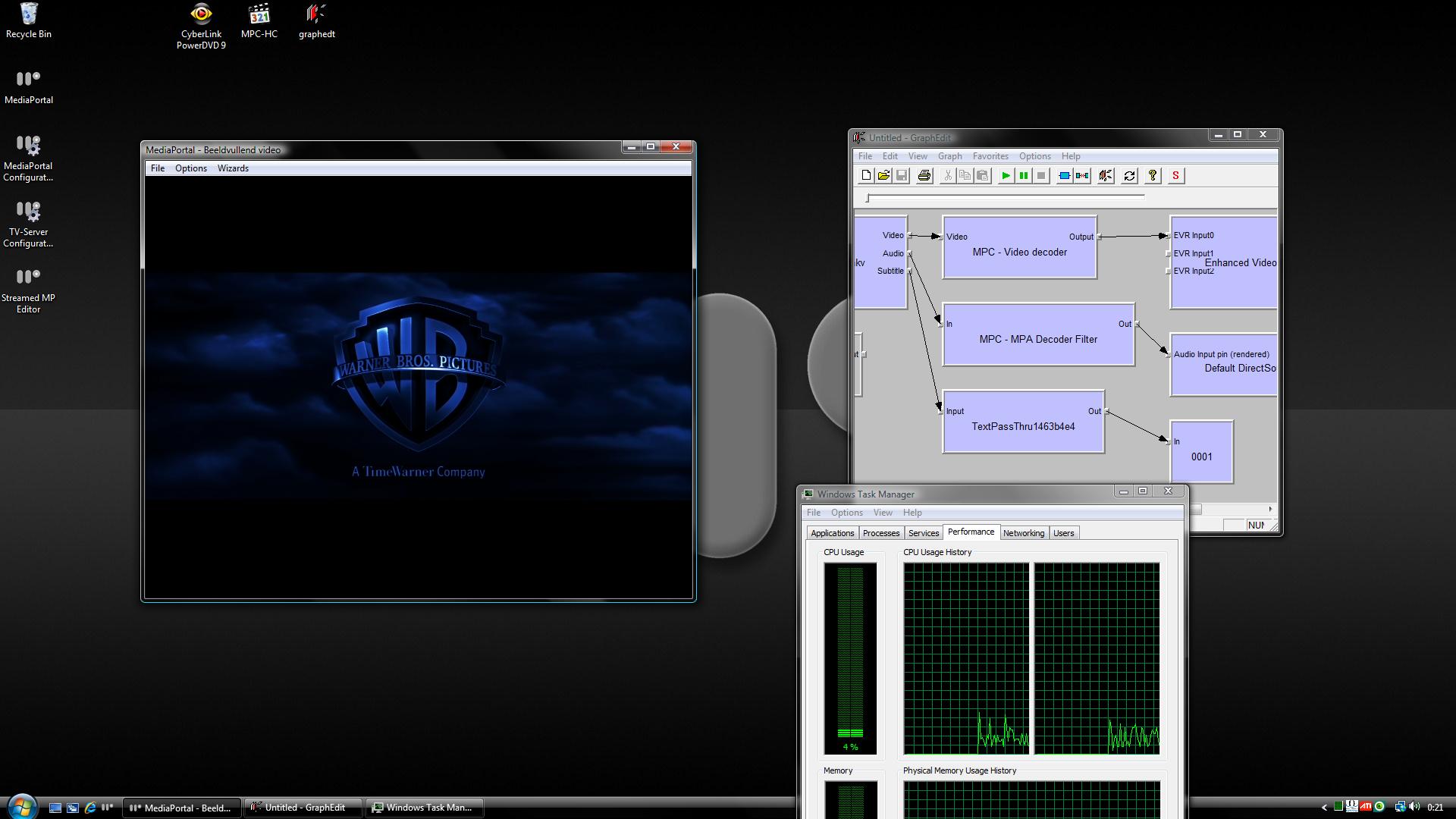
    That evr.dll did the trick. No idea what other issues i can cause but indeed this looks way way better. Video on attachment playing is "The Dark Knight" (been upscaled again from "The Grey Knight") :p

    Oh, and off course: DXVA + Subs :D

    ** EDIT **
    It's pretty amazing what that pre-SP evr.dll does to the PQ. Just watched a few mins (well, more like 20 actually :D) of The Dark Knight (BluRay) and that looks just damn fine! Perfect blacks, amazing detail and way less noise then before (Live TV also). :eek:

    Let's hope there aren't any side effects! :p
     

    Attachments

    • Blacks.jpg
      Blacks.jpg
      173.1 KB

    damaster

    Portal Pro
    November 23, 2007
    412
    35
    Home Country
    Canada Canada
    Yes I understand, but just to prove your point here some shots with MP-HC default settings.
    You see correct blacks in both Pictures. You don't need a reference video to see this.

    View attachment 42552

    View attachment 42553

    Use the AVS HD 709 test pattern. Your pictures don't show anything and it's hard to tell if there's really anything wrong with your set up!

    The test pattern shows exactly which black levels your system is displaying and is definitely more scientific.

    Here are my instructions from an earlier post, please follow this test:

    - Get AVS HD 709 1.3 test patterns MP4 version and AVCHD or PATCHED version: AVS HD 709 - Blu-ray, HD DVD, & MP4 Calibration - AVS Forum
    - We'll only be using the "Basic Settings" title, first chapter. It's the Black Clipping Pattern, a very low APL pattern for observing black-level on a digital display.
    - For this test turn your TV's brightness up all the way because we are really just trying to determine what output levels we're getting out of the HTPC. You can set it back to the calibrated level once we're done.
    - Run the MP4 version of the Black Clipping Pattern in MPC-HC, note the flashing bars you are able see.
    - Run the AVCHD/PATCHED version of the Black Clipping Pattern in PowerDVD (mount or burn the ISO first), again note the flashing bars you are able see.
    - Run the MP4 version of the Black Clipping Pattern in MediaPortal, again note the flashing bars you are able see.

    Please post here the flashing bars you were able to see in each of the scenarios above.
     

    HomeY

    Test Group
  • Team MediaPortal
  • February 23, 2008
    6,418
    4,717
    50
    ::1
    Home Country
    Netherlands Netherlands
    Use the AVS HD 709 test pattern. Your pictures don't show anything and it's hard to tell if there's really anything wrong with your set up!

    That's ABSOLUTELY the first thing i did off course :p
    MP4 file inside MediaPortal shows bars 17-25 flash with full brightness :p
     

    damaster

    Portal Pro
    November 23, 2007
    412
    35
    Home Country
    Canada Canada
    Use the AVS HD 709 test pattern. Your pictures don't show anything and it's hard to tell if there's really anything wrong with your set up!

    That's ABSOLUTELY the first thing i did off course :p
    MP4 file inside MediaPortal shows bars 17-25 flash with full brightness :p

    Good news, I'm happy for you! I was actually telling user opeters to run that test since his screenshots weren't the best evidence.
     

    neo2001

    Portal Member
    December 26, 2008
    37
    0
    Home Country
    Germany Germany
    OK, who do i need to kiss???? WELL??? :D
    I think it was zunixnuz. THANKS!!

    That evr.dll did the trick. No idea what other issues i can cause but indeed this looks way way better. Video on attachment playing is "The Dark Knight" (been upscaled again from "The Grey Knight") :p

    I can fully confirm this! :)

    Replaced the evr.dll with the pre-SP1 one and black was black again (Radeon HD 3200). The picture is much better than with the "brightness at -28"-solution in CCC (more contrast in darker areas).

    I hope that there will be a better solution in the future than replacing a system library. But for now everything works fine. :)
     

    Dr Tone

    Portal Pro
    October 29, 2008
    157
    5
    Calgary, AB
    Home Country
    Canada Canada
    I hope that there will be a better solution in the future than replacing a system library. But for now everything works fine. :)

    All this solution is leading to is no solution. If everyone installs the hack and quits investigating, who is going to solve the problem?

    1) The problem exists on both ATI cards and Nvidia Cards.
    2) Vista's original evr.dll is the only fix to the problem

    That tell's me that Microsoft changed how something worked and it isn't necessarily a bug. Since it happens with Nvidia and ATI it leaves me to believe that there isn't necessarily a video driver problem either.

    I think the only way we are going to solve this problem is if one the devs looks into it further. My biggest question: why is there a registry flag that kicks VMC in the butt and resolves the issue, starting with the 9.3 catalyst drivers?

    If we all throw in another donation to help one of the devs pick up a 4670 will someone look at it? At least give us some details to work with. Going to Microsoft/ATI/Nvidia with blacks are gray in mediaportal won't be very high on their list.

    In the mean time I'm going to find some time to boot up Windows 7 on another drive and see if the issue still exists on it or not. If it does we have real issues!
     

    HomeY

    Test Group
  • Team MediaPortal
  • February 23, 2008
    6,418
    4,717
    50
    ::1
    Home Country
    Netherlands Netherlands
    All this solution is leading to is no solution. If everyone installs the hack and quits investigating, who is going to solve the problem?

    I'm with you on this, just happy it works like it's supposed to work now but off course i wanna use an SP2 evr.dll instead of an older one. At least we're much closer then we were before with this find (and i don't need to crack open the case again to put the 2600XT back in) :D
     

    tourettes

    Retired Team Member
  • Premium Supporter
  • January 7, 2005
    17,301
    4,800
    Can someone check EVR.DLL for version number? Witch one is "working"?

    Hopefully SAF won't be starting to patch system files :p That is definitely something we don't want to see to happen.
     

    Users who are viewing this thread

    Top Bottom