Grey blacks with internal player + EVR (3 Viewers)

disaster123

MP Donator
  • Premium Supporter
  • May 14, 2008
    3,558
    434
    Home Country
    Germany Germany
    I've an original ATI Radeon DVI => HDMI dongle but cannot see the pixel format settings and tv is recognized as DVI not HDMI -any ideas?

     

    HomeY

    Test Group
  • Team MediaPortal
  • February 23, 2008
    6,418
    4,717
    50
    ::1
    Home Country
    Netherlands Netherlands
    I've an original ATI Radeon DVI => HDMI dongle but cannot see the pixel format settings and tv is recognized as DVI not HDMI -any ideas?

    Did it came with the videocard?

    I Just experienced the same thing. I used my HD2600XT dongle on the HD4670 and the display shows up as a DVI connection instead of a HDMI connection. There seem to be different types of dongles for different types of cards, so the 2600 dongles doesn't work on the 4670.

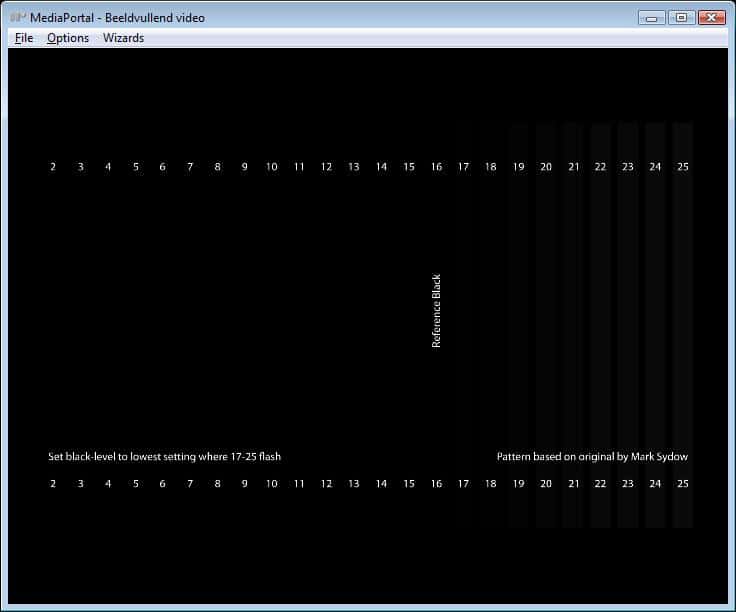
    Then without any pixelformat settings on ATI and my TV input set to Limited RGB (16-235) i'm still seeing bar 2 till 25 flash with the Black Clipping Pattern (MP4 file inside MP).

    Gonna switch the 4670 with the 2600 now and see if there's any difference.
     

    HomeY

    Test Group
  • Team MediaPortal
  • February 23, 2008
    6,418
    4,717
    50
    ::1
    Home Country
    Netherlands Netherlands
    OK, i should be kinda happy, but actually i'm not :(

    I've put the 2600XT back into the system (took me a while to get it working for some strange reason) so after the reinstall of the ATI driver (9.6) i wanted to watch the test pattern in MPC-HC, but that didn't work, codec error. After re-registrating MPCVideoDec.ax i got it working again, and in MPC-HC i can see bars 17-25 flash.

    Now inside MediaPortal: Checked Pixelformat settings (Limited RGB), checked input TV (Limited RGB), started MP, played the MP4 file, and.........


    Bars 17-25 Flash!!!!

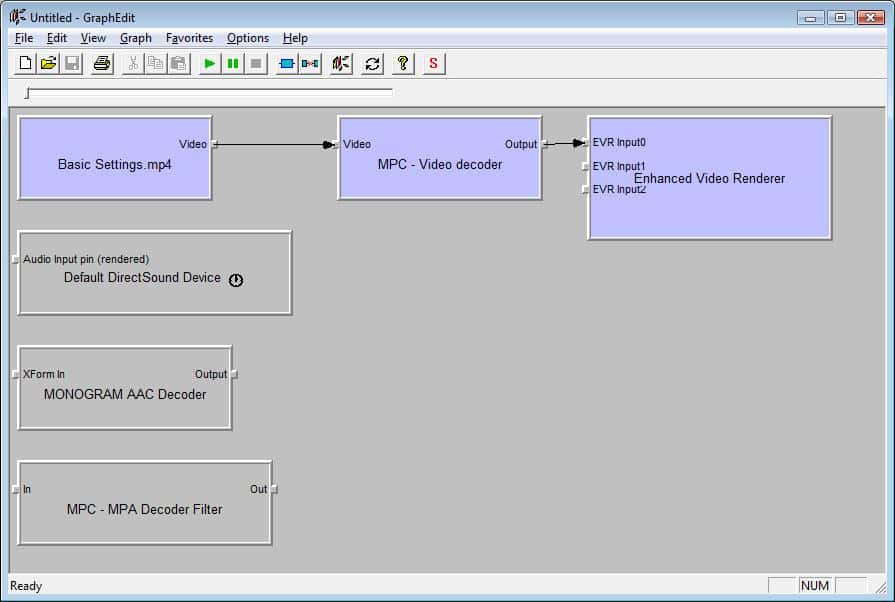
    Now i'm not quitte sure if there could have been any conflict with drivers/codecs when i had the 4670 in, but the 2600XT DOES show the correct blacklevels inside MP + EVR (see screenshots).

    So i'm starting to worry that there's something wrong with the HD4670 or it's HDMI output....
    Only 1 way to find out.... put it back in :D

    ** EDIT **
    Another quick question: what's the best way to connect a HTPC to your TV if you got a receiver in between?

    1. ATI HDMI out --> HDMI in Receiver + HDMI out Receiver --> TV HDMI in, or (EDID shows DenonAVR in ATI CCC)
    2. ATI HDMI out --> HDMI in TV + Optical out --> Optical in Receiver. (EDID shows PIONEER TV in ATI CCC)

    Since i don't have an audio issues over HDMI, i always used the first option to connect everything.
    Just curious if the EDID info could interfere anywhere here if ATI only sees my Denon AVR?
     

    Attachments

    • Black Patterns 17-25.jpg
      Black Patterns 17-25.jpg
      29.9 KB
    • Graph Correct Blacks + EVR.jpg
      Graph Correct Blacks + EVR.jpg
      54 KB

    Dr Tone

    Portal Pro
    October 29, 2008
    157
    5
    Calgary, AB
    Home Country
    Canada Canada
    So i'm starting to worry that there's something wrong with the HD4670 or it's HDMI output....
    Only 1 way to find out.... put it back in :D

    Logically you could wonder that but why do the right level show outside of media portal, if there was something functionally wrong with it, it would be wrong all the time.

    It would be nice if one of the developers chimed in here with his/her thoughts on why the new generation cards are acting this way in media portal only...

    ** EDIT **
    Another quick question: what's the best way to connect a HTPC to your TV if you got a receiver in between?

    1. ATI HDMI out --> HDMI in Receiver + HDMI out Receiver --> TV HDMI in, or (EDID shows DenonAVR in ATI CCC)
    2. ATI HDMI out --> HDMI in TV + Optical out --> Optical in Receiver. (EDID shows PIONEER TV in ATI CCC)

    Since i don't have an audio issues over HDMI, i always used the first option to connect everything.
    Just curious if the EDID info could interfere anywhere here if ATI only sees my Denon AVR?

    I'm doing multi channel flac in my mkv files so option one is the only option IMO. My EDID show Pioneer VSX-94TXH.
     

    HomeY

    Test Group
  • Team MediaPortal
  • February 23, 2008
    6,418
    4,717
    50
    ::1
    Home Country
    Netherlands Netherlands
    Logically you could wonder that but why do the right level show outside of media portal, if there was something functionally wrong with it, it would be wrong all the time.

    True, forgot that already :oops: and that's the reason why i'm putting it back again, but prolly gonna give me the same issues again since i did a clean windows + MP install to make sure this issue wasn't related to any drivers/codec conflicts.

    It would be nice if one of the developers chimed in here with his/her thoughts on why the new generation cards are acting this way in media portal only...

    It prolly has something to do with the changes on how the renderer works from 1.0.1 onwards. Only strange thing is that the problem only occurs with the 4670 and not with the 2600 (and the 3xxx serie from damaster).

    I'm doing multi channel flac in my mkv files so option one is the only option IMO. My EDID show Pioneer VSX-94TXH.

    So if the receiver shows up in ATI CCC this doesn't matter at all. Then i'll stay with the HDMI connections.
     

    Dr Tone

    Portal Pro
    October 29, 2008
    157
    5
    Calgary, AB
    Home Country
    Canada Canada
    True, forgot that already :oops: and that's the reason why i'm putting it back again, but prolly gonna give me the same issues again since i did a clean windows + MP install to make sure this issue wasn't related to any drivers/codec conflicts.


    It prolly has something to do with the changes on how the renderer works from 1.0.1 onwards. Only strange thing is that the problem only occurs with the 4670 and not with the 2600 (and the 3xxx serie from damaster).


    So if the receiver shows up in ATI CCC this doesn't matter at all. Then i'll stay with the HDMI connections.

    If you only use media portal's player, you can bandaid it like I did by backing off the brightness to -28 or so in CCC. I did it system wide not just avivo because the media portal interface is washed out for me as well. Use the test pattern to get the value just right, but I imagine it will be pretty close to -28.

    As for the receiver showing up in CCC, again remember everything works fine outside of media portal.

    I think one of us needs to log a bug to at least get a developers thoughts on this, even if it isn't an actual bug.
     

    HomeY

    Test Group
  • Team MediaPortal
  • February 23, 2008
    6,418
    4,717
    50
    ::1
    Home Country
    Netherlands Netherlands
    True, forgot that already :oops: and that's the reason why i'm putting it back again, but prolly gonna give me the same issues again since i did a clean windows + MP install to make sure this issue wasn't related to any drivers/codec conflicts.


    It prolly has something to do with the changes on how the renderer works from 1.0.1 onwards. Only strange thing is that the problem only occurs with the 4670 and not with the 2600 (and the 3xxx serie from damaster).


    So if the receiver shows up in ATI CCC this doesn't matter at all. Then i'll stay with the HDMI connections.

    If you only use media portal's player, you can bandaid it like I did by backing off the brightness to -28 or so in CCC. I did it system wide not just avivo because the media portal interface is washed out for me as well. Use the test pattern to get the value just right, but I imagine it will be pretty close to -28.

    As for the receiver showing up in CCC, again remember everything works fine outside of media portal.

    I think one of us needs to log a bug to at least get a developers thoughts on this, even if it isn't an actual bug.

    That indeed is option 1 (bring down brightness) but i've got a feeling that that will kill some detail.
    And not sure if that would also lower the brightness while watching TV (SD) since those blacklevels are correct :confused:

    2nd option is to use an external player, but then i can't control everything with the remote.

    Just tried the .dll files from damaster (i noticed i don't have the evrprop.dll in system32 at all) but that doesn't change anything, still bars 2-25 show up in MP with the 4670.

    I you wanna make a bugreport, please do :) Then i can continue and figure out what the best way is to setup the system till this issue is fixed. Very very strange issue...

    ** EDIT **

    Just burned the AVCHD patterns to a disc, and when i play those in PDVD9 (outside MP) i see more bars flash then 17-25.
    It seems to be that only the outline of the bars below 17 are visible. If i use the 2nd test pattern (with the white top/bottom) then it seems i can only see 17-25 flash.
     

    zunixnuz

    Portal Pro
    December 23, 2007
    291
    97
    Home Country
    Austria Austria
    New informations...

    I am no longer sure about the issue, that also the skin surface is washed out
    because i did a lot of tests and maybe i was i little bit confused about the different settings i have tried.
    Today i am not able to confirm this :confused:

    But i found out an other interesting point!
    I am able to reproduce the wrong black levels with MPC-HC (Media Player Classic Homecinema v1.2.908.0):
    Setting output directshow video to "EVR", "EVR Custom Pres" or "VMR9" gives always the correct black levels (also in fullscreen),
    but if i use "EVR Custom Pres" and select "Direct3D Fullscreen (remove tearing)" and open the AVS MP4 test video,
    i got the same wrong black levels as in MediaPortal!
    If i now switch back to "EVR" i also get the wrong black levels, i have to restart MPC-HC and now the black levels are correct again!
     

    Users who are viewing this thread

    Top Bottom