
GUI keeps refreshing movie list (1 Viewer)

wb228

Portal Member
November 8, 2007
20
2
Hi

I am not sure if this is a bug or something wrong with my install. If it is a bug, I will submit correctly to the issue tracker.

I am finding Moving Pictures is just what I was looking for, with more features than my videos and an easier to manage database front end.

I am using MediaPortal v1.0.2.22555 with Moving Pictures 1.0.1:1001 (I realise this is beta)

I have 457 movies in two seperate drives, all of these have been scanned and added to the database and the correct images allocated etc.

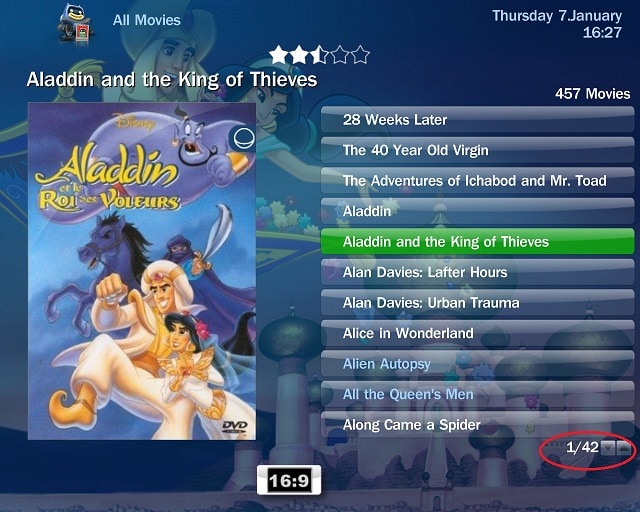
When I open Media Portal and go into Moving Picturres GUI, I select All Movies (for example), in list view it shows me 42 pages. As I scroll down to find a movie, the page numbers seem to refresh and you jump suddenly to page 9/42. This happens several times and makes it difficult to select a movie as it keeps jumping pages during the refresh, leaving you several pages from the movie you had selected last.

I have tried looking for a way to stop the GUI refreshing in this way, and cannot find a solution. I have tried setting "enable importer while in GUI" to false, for example. I am not sure why it is doing it but guess it is because of the number of movies I have and possibly the number of folders? Two main folders on different drives, with 3 subfolders within.

I have tried in other views, filmsrip, thumbnails etc and it still happens. I have tried other categories, such as a genre and it happens but is less noticable and does not affect your selection.

Hope my problem makes sense. I will try uninstalling this and installing the last stable version to see how that works on my system.

I just have no idea why it is doing this or how to stop it.

Many thanks in advance.

Wayne
 

Attachments

  • Screenshot.jpg
    Screenshot.jpg
    128.1 KB

RoChess

Extension Developer
  • Premium Supporter
  • March 10, 2006
    4,434
    1,897
    Did all your movies finish importing? Open the MovingPictures plugin and wait a moment on the first screen that opens, after a while it will show any movies that it is still trying to find a solution for.

    Or are you constantly adding new movies to your collection while scrolling the list?
     

    wb228

    Portal Member
    November 8, 2007
    20
    2
    Hi RoChess,

    Thanks for the quick reply...

    Did all your movies finish importing? Open the MovingPictures plugin and wait a moment on the first screen that opens, after a while it will show any movies that it is still trying to find a solution for.

    Mediaportal Configuration --> Plugins --> Moving Pictures

    Movie importer page shows no movies and movie manager seems to have all the movies imported correctly. So it looks like all is ok here.

    Or are you constantly adding new movies to your collection while scrolling the list?

    No - as far as I can see all the movies are already added. For some reason, it just refreshes the list of movies while I am scrolling which means that if it refreshes as I scroll down, I jump several pages don the list.

    The bottom right corner, where it says 1/42 in my image will suddenly say 1/1 and then quickly scan up to 1/42 again - while this happens, the list seems to dissapear for a split second and be repopulated.

    It is also intermittent: Sometimes, it does not happen. Sometimes it happens within the first 5 seconds, and sometimes it happens over and over making it impossible to scroll through the list.

    I installed the stable version, and could not recreate the problem. I reinstalled the new beta version with a clean install and reconfigured everything and it still happens. Even if I turn off category view, it still happens. Is it possible something is refreshing the list as I scroll? Could it be something to do with random backdrops?

    I have looked in advanced settings, but do not want to change much. Changed the following:

    "Enable importer while in GUI" from True to False
    This made no difference.

    I then changed "Allow disk monitor to watch for drive changes" from True to False
    This made no difference, so I changed it back.

    Have tried both Blue3 and Blue3Wide skins. ould install another supported skin to see if that makes a difference?

    I have also tried increasing "Artwork loading delay", "Details loading delay" and "Category random artwork refresh interval" These did not seem to make a difference to the problem so I have set them back to their default values.
     

    RoChess

    Extension Developer
  • Premium Supporter
  • March 10, 2006
    4,434
    1,897
    Your log files are not in debug mode, so they don't reveal anything useful. Please recreate them with MediaPortal in debug mode, that way more information can be obtained.

    I did see that you have a MovieCatalog plugin that is causing errors to show in the error.log, so perhaps it is conflicting. Perhaps it is using same libraries as MovingPictures plugin, but it loads an older version first, causing issues. It is always best to go back to a barebone setup with the least amount of features/extras enabled so it is easier to get to the source of the problem.

    The debug logs might for example reveal that the MovingPicture plugin is still busy obtaining all the fanarts and extra covers and when it finds a match it issues a refresh update. Or perhaps your computer specs are too slow to keep up, but it looks like you already tried that angle by adjusting some of the related options for that.
     

    wb228

    Portal Member
    November 8, 2007
    20
    2
    Probably a computer problem rather than software.

    Have deleted all the backdrops and the refresh happens once within the first five seconds then seems to be ok. Would be nice to have the backdrops, but better to have a working plugin, as this is so much better than the default my videos.

    Cheers for your help
     

    RoChess

    Extension Developer
  • Premium Supporter
  • March 10, 2006
    4,434
    1,897
    The MovingPictures plugin first gathers the textual information for a movie, then the cover and as a background process it will obtain the fanart. If you are not running the latest SVN, but the latest beta, then there is a small issue regarding storage in PNG image format, which can result in very large files. Perhaps the refresh of that information, as in when a new backdrop is successfully downloaded, causes your problems.

    You would have to run MediaPortal in debug mode and supply log files that capture your problem in as few steps as possible to reveal exactly what is going on, so the developers have something useful to work with.

    Or you can go back to the stable v0.7 release for the time being, compile the latest v1.0 SVN yourself ahead of the next release, or you can run a little script I made: https://forum.team-mediaportal.com/...rage-size-movingpictures-thumbs-folder-75750/ and see if that helps.
     

    cosmicmeadow

    Portal Member
    September 6, 2009
    17
    0
    Could be a bug in the mediainfo update function...

    Mine was trashing everytime I start up MovingPictures. I have 400 movies on a NAS and I can see the lights blinking and the network traffic way up high for at least 20 minutes. And when I play a movie, it will just hang and I have to force cancel the application via Task Bar. The other weird thing is when I open Configuration/Moving Pictures, it does the same thing, even though there are no new movies to import. And when I close Configuration, it does not really close... the process is still running and can be seen in Task Bar.

    Then I went into Advanced settings and disabled the auto "Update Mediainfo" function. This solves the problem, no more HD trashing, but this means I have to manually update for all new movies I import.

    I also have one particular movie which causes MP to hang when I do a manual "update Mediainfo".... must be a bad file, but then MP should just go into it's error routine rather than "hang"...

    <EDIT>

    It's confirmed. The problem was caused by a bad file. I removed the file and turned the auto update mediainfo back on. Now it does not trash my HD anymore nor does it hang.
     

    Sergeleon

    Portal Member
    November 18, 2009
    19
    0
    I have some problem. When I first time start MediaPortal and go to Moving Picture, the plugin is freezing and show me only this message: "Load GUI..." After I restart MP it works perfect. MP ver. 1.0.2, Moving Picture 1.0 beta.
     

    ltfearme

    Community Plugin Dev
  • Premium Supporter
  • June 10, 2007
    6,760
    7,224
    Sydney
    Home Country
    Australia Australia

    Users who are viewing this thread

    Top Bottom