
Guide Data, EPG, OTA mc2xml (1 Viewer)

Justintoxicated

Portal Member
July 4, 2010
28
0
MediaPortal Version:
MediaPortal Skin: StreamedMP
Windows Version: Windows 7
CPU Type: C2D - fill speed in later
HDD: fill this in later
Memory: 4GB G.Skill
Motherboard: Whatever junk comes with the Dell
Video Card: Nvidia 7600GT
Video Card Driver:
Sound Card: Creative Sound Blaster X-Fi XtremeGamer
Sound Card AC3:
Sound Card Driver:
1. TV Card: HDHR v1
1. TV Card Type:
1. TV Card Driver:
2. TV Card:
2. TV Card Type:
2. TV Card Driver:
3. TV Card:
3. TV Card Type:
3. TV Card Driver:
4. TV Card:
4. TV Card Type:
4. TV Card Driver:
MPEG2 Video Codec:
MPEG2 Audio Codec:
h.264 Video Codec:
Satelite/CableTV Provider:
HTPC Case: N/A
Cooling: Stock
Power Supply: Whatever junk comes with dell
Remote: Microsoft MCE (US Version)
TV: Mitsubishi WD-60638
TV - HTPC Connection: DVI


I'm trying to setup the guid for OTA in the USA, but before I get tot he problems I'm having I have a few other questions.

1) How do I stop channels I do not want from populating? I get something like 28 stations and I only want to actually watch about 8 of them that come in in english.


2) I downloaded the mc2xml.dtd and mc2xml.exe
3) I run these and enter my zip code 92026, and country code US
4) Then I rename the xmltv.xml to tvguide.xml
5) Then I launch the TV Server Configuration
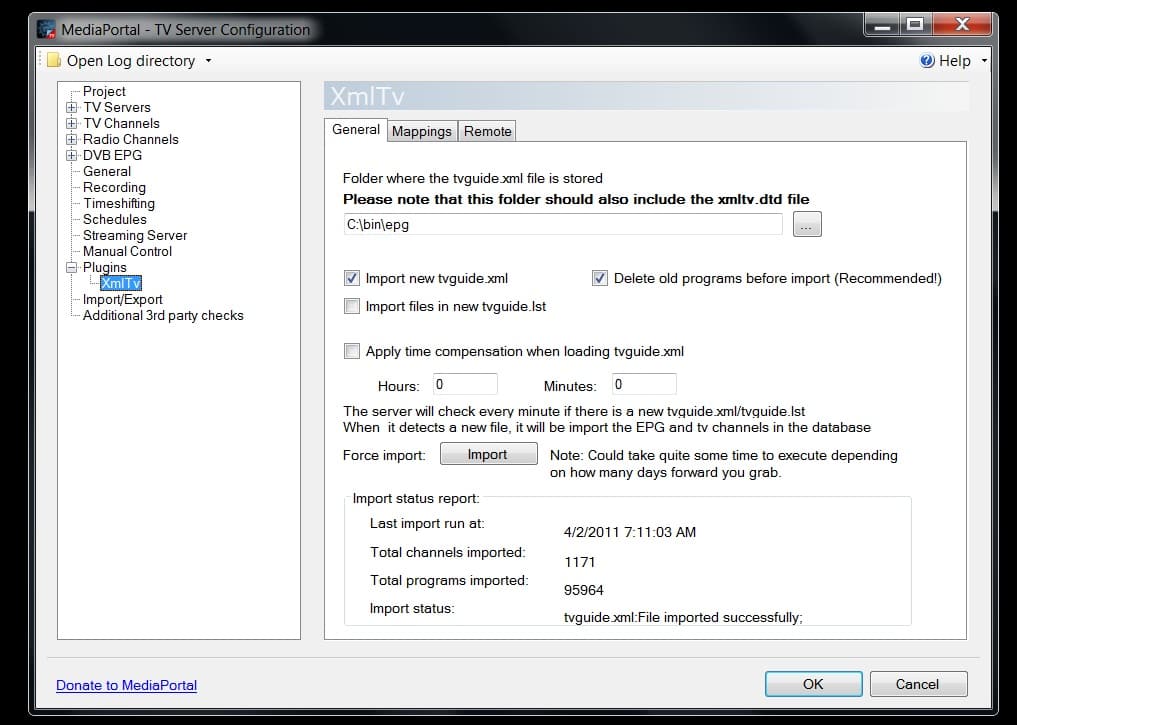
6) Then I go to the XmlTv plugin
7) Then I unselect the tvguide.lst function
8) change directory to point to tvguide.xml folder.
9) Then I select import
10) Next I go tot he mappings tab and select load/refresh
11) Then I manually Map all the stations I care about
12) On this screen i see a checkbox (visible in guide) but I cannot unselect the checkbox.
13) I select save.

Do I need to export the info ?

I launch media portal and nothing populates in the guide..........

What am I doing wrong?

mc2xml1.PNG

mc2xml2.PNG

mc2xml3.PNG

mc2xml4.PNG

mc2xml5.PNG
 

ap90033

MP Donator
  • Premium Supporter
  • March 24, 2011
    198
    10
    Home Country
    United States of America United States of America
    Get in line I have been beating my head against the wall trying to get ANY EPG to WORK. Seems as though US is not getting much love. I know for a fact it could be done and if I were an open source guru it would be done as of yesterday..

    1. MC2XML can get the info but problems abound
    2. Zap2it has GREAT Info but no one wants to pull the info there (is this not possible? I would think so)
    3. WebEPG doesnt work right for us
    4. For the record would be great and even can SKIP RERUNS but wait no will not work with Current Media Portal.
    5. Pretty much all the other Zillion other Ways of getting EPG (and man there are a lot for some dumb reason) all work with anything but US ESPECIALLY OTA.
    6. We can Pay to get what everyone else in the world gets for free from Schedules Direct.

    Aint it grand...
     

    xvffx

    Portal Pro
    August 15, 2007
    313
    53
    Home Country
    Canada Canada
    MediaPortal Version:
    What am I doing wrong?
    mc2xml4.PNG

    the path is wrong (you need just the folder name).. make sure the file name is tvguide.xml in the folder along with a .dtd file

    the import comes after you click save (after you completed the channel mapping).. this will import tv guide data into the database.

    Vff

    was that a folder name?... sorry it looked like a file name (need glasses)
     

    Attachments

    • path.jpg
      path.jpg
      170.8 KB

    ap90033

    MP Donator
  • Premium Supporter
  • March 24, 2011
    198
    10
    Home Country
    United States of America United States of America
    I figured it out or at least a way to do it. Not that hard either.
    All you do Go to Zap2it.com and create an account then go to tv listings logged in as yourself and setup the guide for your zip etc. under preferences make sure to pick 6 months (or so i was told).
    Then get a copy of Zap2xml.exe and xmltv.dtd and copy these to the XMLTV directory under Program Data/Team Media Portal/media portal tv server/xmltv
    then make a bat file to tell it what to pull and what to call it mine is like this
    zap2xml.exe -u username@email.com -p password -d 14 -o tvguide.xml -A "new live"
    (Above is an example)
    Then create a Task under task scheduler to run the Bat file daily.
    Lastly, go to TV Server Config and add plugin XMLTV and point it to the tvguide.xml file and import it.

    For this to work you of course need your tv tuners and channels already setup...
     

    Justintoxicated

    Portal Member
    July 4, 2010
    28
    0
    Thanks for the replies guy.

    That was the directory name :) I restarted the computer a few times and it did eventually start working.

    Second. Zap2it is working again? Nice. I may try this soon. (Sage TV had Zap2it functionality built in when I used it a few years ago)

    My Problem right now is that I now have my server updating the bat file every couple days. However the TV server, does not seem to notice when the tvguide.xml has been changed, so I have to close media portal and do a manual update. Anyway to avoid always having to pull the data with a manual update from a net work drive?
     

    ap90033

    MP Donator
  • Premium Supporter
  • March 24, 2011
    198
    10
    Home Country
    United States of America United States of America
    I will see if this is happening on my system. I figured out the Zap2it would be useful for others besides myself. Huh I guess a dumb non programming user can have some use here contrary to what some people around here have been saying...
     

    tigersax

    Portal Member
    March 30, 2011
    11
    2
    45
    Home Country
    United States of America United States of America
    ok here is what i have so far i see that you guys are doing the same thing i am i love zap2it and got everything downloading with zap2xml not mc2xml the only problem i have is that the epg is off by about two hours and that is it i even got logos to work and everything this is driving me nuts I love mediaportal and want to stay with it but what am i doing wrong with epg. i know i can go to the site that cost 20 dollars a year but i would rather donate that to mediaportal developers LOL. any luck let me know
     

    ap90033

    MP Donator
  • Premium Supporter
  • March 24, 2011
    198
    10
    Home Country
    United States of America United States of America
    If the time is off by two hours I believe you can use the time compensation feature in xmltv plugin... :D
     

    tigersax

    Portal Member
    March 30, 2011
    11
    2
    45
    Home Country
    United States of America United States of America
    I thought that might be what that was but was not sure i feel stupid i guess i should have tried it first and then said somthing. Oh and one quick one i figured it out on the test machine but now i am stumped on my live machine how the heck do i get channels in order and to show their name instead of number
     

    ap90033

    MP Donator
  • Premium Supporter
  • March 24, 2011
    198
    10
    Home Country
    United States of America United States of America
    No problem, on the channels thing hmnm. I have my channels setup (I think) the same way as you. I did however map the channels in XMLTV and I got logos and named them after the channel names so in the guide my ABC station has the logo etc...
    For logos, get ones you like put them in C:\ProgramData\Team MediaPortal\MediaPortal\thumbs\tv\logos and make sure they are named correctly (Make sure the are in ALL LOWERCASE) they should be named exactly like the XMLTV Plugin Tab Mappings under the column Tuning Channel. Remember no caps...
    I suspect you can rename the tuning channel to ABC etc but I have other stuff to fix and that isnt a concern for me right now.

    BTW, I am trying to get the Paid version of MC2XML (it is pretty much the same as ZAP2ITXML but is the newer version) I have heard it gets more details and I hope it will grab the Series Name and Episode Number....
     

    Users who are viewing this thread

    Top Bottom