Hauppauge WinTV Nova T 500 Standby help! (1 Viewer)

Jimbawb

Portal Pro
December 9, 2007
135
3
Home Country
United Kingdom United Kingdom
Hi PD :) No worries, ive spent most of what was going to be a relaxing evening trying to sort this out! :D I've just about given up for tonight too, its wet and miserable here like much of the uk i presume so i want to sleep :)

So far my updates:

I dont know how i managed it but i accidentally downloaded drivers 3.3 so have since upgraded to the latest 4.something. The link you sent i found earlier and used but this does not give IR drivers (at least MP doesnt report ir drivers being installed until the IR32 application is installed). I've installed these newer drivers and no longer get the ehshell message, hurrah!

Only trouble is now MP seems to go into standby suspiciously quickly, sometimes on boot it'll boot up with a black screen for about 10 secs then MP will appear. Sometimes it will boot to the desktop and MP wont actually load again and i have to login to the box and reload it. I didnt activate the "interact with desktop" so maybe this is my problem? The way i intend to "switch off" my MP is either:

1) Pressing the power button on the remote (which i mapped in the config to standby windows)
2) Pressing the button on the front of the case
3) Using the power button on MP home and selecting option 3, sleep/standby.

I assume then that all 3 of these use windows standby and bypass PVRS? I went into the PVRS plugin earlier and found a standby option there which popped up a dialogue message saying preparing for standby...

Anyway, i really appreciate the help everyone has given me so far...hopefully we can crack on with this tomorrow :)


Oh, and with regards to the IR. I would *much* prefer to use the case inbuilt IR but i've read many reports of problems for this case/hauppauge (apparently the ir in the case sends direct windows commands or something, meaning i'd have to map each button manually..effort!). So i'm currently using the ir cable that plugs into the back of the card.

Thanks!
 

Jimbawb

Portal Pro
December 9, 2007
135
3
Home Country
United Kingdom United Kingdom
Ok, i've tried reinstalling PVRS with the "interact with desktop" ticked in the install but i cant see any functionality difference. The only time i get a "preparing for standby" message is if i use the standby in the PVRS plugin.

Either way, no matter which standby option route i take, when i come out of standby MP does not load and I'm just stuck with the desktop.

If i use the PVRS standby however when I get the desktop and I press the "home" key on my remote (just to see what would happen) a WinTV IR big window pops up saying Close and Exit IR, I cant select them though. All i can do is press "home" again and it dissappears.

:(
 

Paranoid Delusion

Moderation Manager
  • Premium Supporter
  • June 13, 2005
    13,052
    2,978
    Cheshire
    Home Country
    United Kingdom United Kingdom
    Hi jimbawb

    Just setting my pc up with the hauppauge remote now, use mce normally so should have some answers in the next hour.
     

    Paranoid Delusion

    Moderation Manager
  • Premium Supporter
  • June 13, 2005
    13,052
    2,978
    Cheshire
    Home Country
    United Kingdom United Kingdom
    Here's where i'm upto.

    Reinstalled IR driver for hauppauge remote.

    Installed MP 0.2.3.0 without all the bells and whistles activated (not changed any plugins from default), using BlueTwo skin Default).

    Installed PVRScheduler 1.6.6 and configured (will post screenshots when test record concludes)

    Have done all this as i normally use TVE3 with a few plugin's enabled as well, trying to get us to sing from the same hymn sheet :)

    Had to wait for EPG to start updating (grab epg from dvb enabled in config).

    now must admit always left MP in HOME screen to shut itself down, this time used the PVRS plugin to do this, which succeeded.

    PC has resumed at 1230 with MP and is now recording, set to finish at 1300.

    once it has gone back into standby, can give you some screenshots of settings.

    Why i changed to the MCE remote, first thing that pissed me of when i just installed the hauppauge remote was i could go into standby, but not resume as this item is not powered during suspend\hibernate.

    Update shortly
     

    Jimbawb

    Portal Pro
    December 9, 2007
    135
    3
    Home Country
    United Kingdom United Kingdom
    Cool, screenshots would be very handy. Is this on a new build of xp? Would you recommend completely flushing out MP and all config for each bit of software?

    The only thing im wary about is possibly the MCE standy tool has changed some settings somewhere that has fuggered it? I'm not exactly sure *what* it does when you select "S3 standby" and it wizzes off configuring your system to allow this...

    I dont really want to have to reinstall XP, im not even sure if the activation would allow me to as i only installed it again a few weeks ago.

    It sounds like you have got further than me as its booted back into MP. I never got as far as to set any recordings, i just wanted the "off" button to be into standby, and when you resume from standby you go back into MP with the tv card working. I agree about the remote not allowing you to switch on though, quite annoying. How much are MCE remotes? As I believe my case has native support for it which could potentially fix a lot of headaches!
     

    Paranoid Delusion

    Moderation Manager
  • Premium Supporter
  • June 13, 2005
    13,052
    2,978
    Cheshire
    Home Country
    United Kingdom United Kingdom
    i just wanted the "off" button to be into standby, and when you resume from standby you go back into MP with the tv card working.

    That is not going to work, believe me i tried, but i explain later in post how to get around.

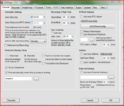
    Auto recording settings using PVRS, this is set that if i have internet explorer running pc will not go into standby, you can add any running process you like, ie a converter (divx\xvid) for your recording may be active, so the last thing you want is your pc going off (this setting is optional, untick if not desired to have other programs running uninterrupted).

    PVRS1.JPG

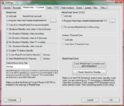
    These are now the settings i use for recordings.

    PVRS2.JPG

    Maybe i forgot the limitations of the hauppauge remote, but it is crap compared to the mce.

    Setting into standby for me manually involves, shutting down MP with the close button and then use the standby button on remote\or using the PVRS plugin with MP running, or PVRS program without MP running.

    Reactivating from standby manually, mce remote handles that bit via usb (+5vsb enabled in bios\motherboard jumper setting, hopefully this is already enabled, usually at least on usb 0\1 ports).

    Then have MPTray installed, which the "Green windows start button" uses to start MP once fully reawakened.

    As far as MCE remotes go look here, seems about the cheapest.

    This is the Philips RC6 remote and should work fine with xpsp2, and a good price.
    Beware some of the different looking MCE remotes will only work with Vista.

    Hope above has been some help, got a appointment with a Chelsea vs Spurs match shortly, come on you Blue's.
     

    Jimbawb

    Portal Pro
    December 9, 2007
    135
    3
    Home Country
    United Kingdom United Kingdom
    Hmmm, nope :( Doesn't work. I went into the PVRS plugin and selected standby, it went into standby fine.

    I then pressed the button on the front of the case to switch it back on.

    The desktop loads...but then nothing. MP doesnt load. If I press buttons on the remote nothing works apart from the "home" button which gives the picture in "remote.jpg" below. I've also attached a screenshot of my settings.

    I'm confused :confused:
     

    Paranoid Delusion

    Moderation Manager
  • Premium Supporter
  • June 13, 2005
    13,052
    2,978
    Cheshire
    Home Country
    United Kingdom United Kingdom
    I then pressed the button on the front of the case to switch it back on.

    The desktop loads...but then nothing. MP doesnt load

    It will not, hence MPTray needed (MCE remote), restart not activated by pvrs so those settings are not used.

    PVRS will just guarantee your EPG recordings will work fine with MP and the T500.
     

    Users who are viewing this thread

    Top Bottom