[confirm] HD high CPU usage (1 Viewer)

jameson_uk

Retired Team Member
  • Premium Supporter
  • January 27, 2005
    7,257
    2,533
    Birmingham
    Home Country
    United Kingdom United Kingdom
    These are all from recordings. Graphstudio wont connect to PDVD.
    One with TVservice stopped other in idle.
    PDVD 10 also shows high usage.
    MP and Graphstudio wont play WMC recording

    Sorry obviously not making myself clear.

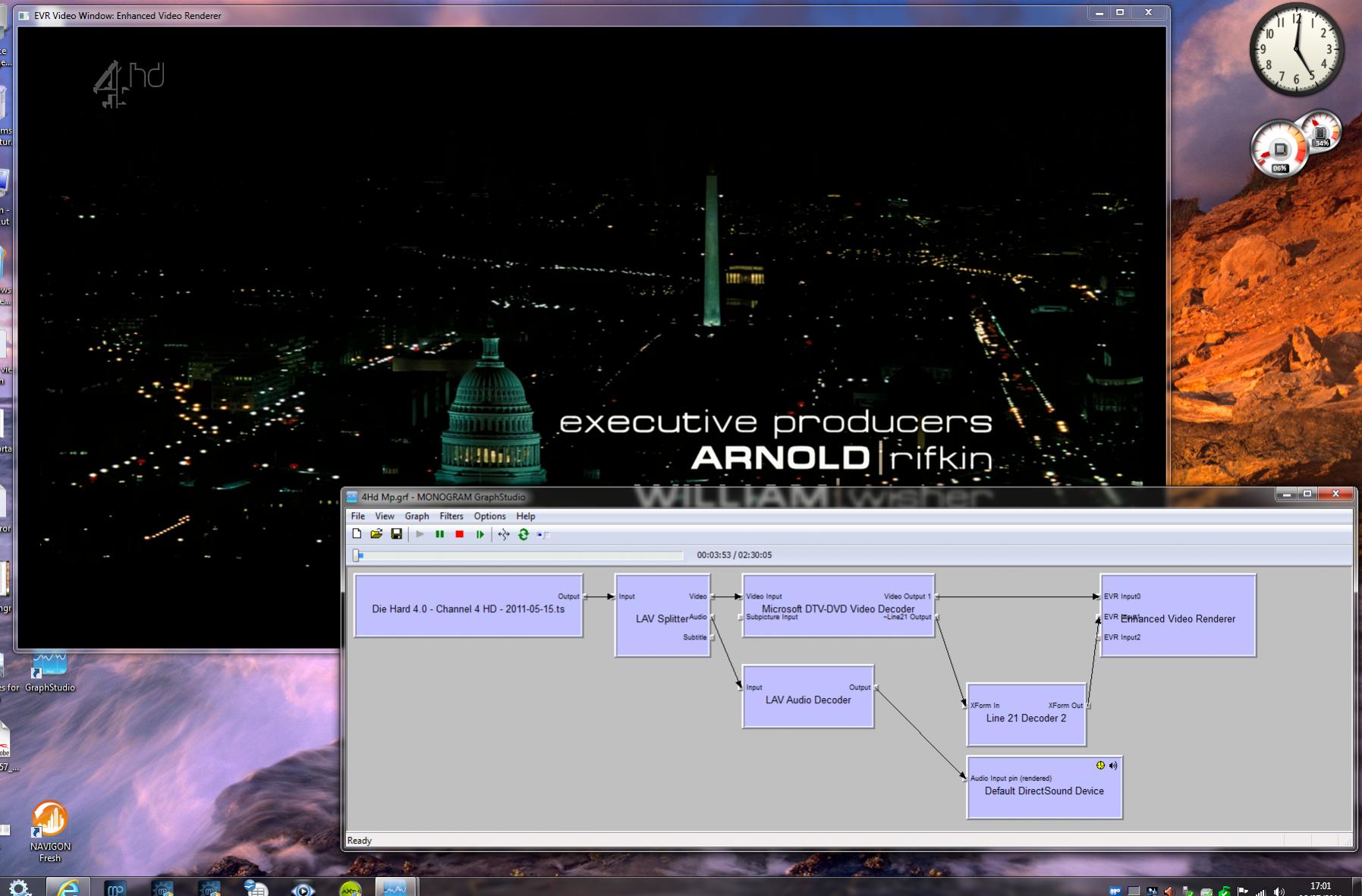
    Only need graphstudio open and from the file menu chose render media file. Use the file browser to point at a 4HD recording from MP. This should build a graph. Then press play within graphstudio and see what happens then.
     

    Nigel_K

    Portal Pro
    August 25, 2007
    82
    1
    Bath
    Home Country
    United Kingdom United Kingdom
    If I do that graphstudio selects ffdshow dxva decoder and playback is blocky. If I try to change decoder it crashes graphstudio.
    So I inserted the media file into the graph and auto inserted the required components.

    I hope that is what you want.
     

    Attachments

    • MP 4Hd GS.jpg
      MP 4Hd GS.jpg
      196.4 KB

    Nigel_K

    Portal Pro
    August 25, 2007
    82
    1
    Bath
    Home Country
    United Kingdom United Kingdom
    PD tried that thanks to yourself & hoborg.

    Did not have stutter, so that is better.

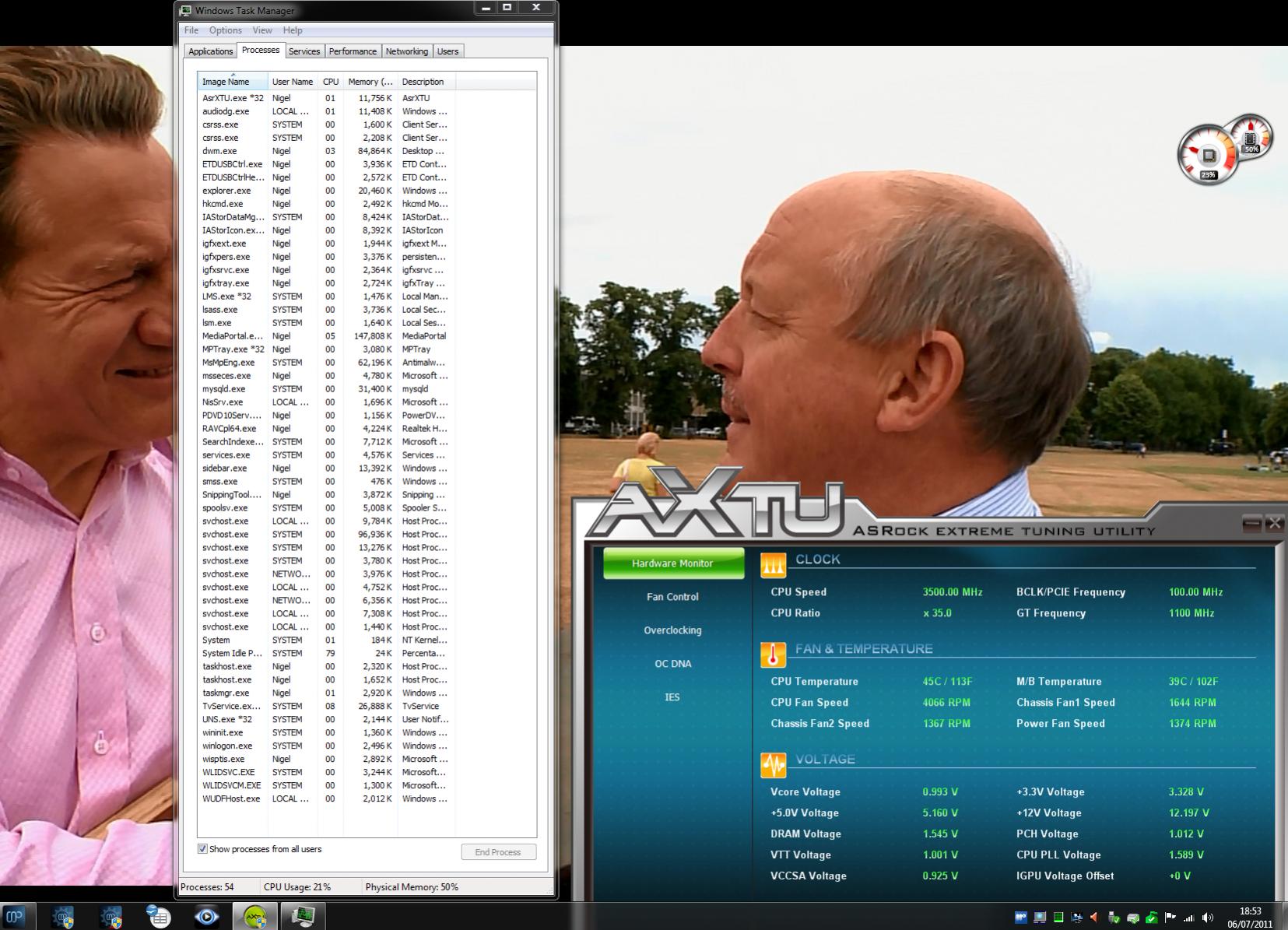
    Still have the cpu usage problem though, starts ok at 10% ish then steadily climbs as shown.

    I monitored signal strength and quality in tv server periodically throughout 75-77.
     

    Attachments

    • BBC HD DVD11.jpg
      BBC HD DVD11.jpg
      254.9 KB

    jameson_uk

    Retired Team Member
  • Premium Supporter
  • January 27, 2005
    7,257
    2,533
    Birmingham
    Home Country
    United Kingdom United Kingdom
    If I do that graphstudio selects ffdshow dxva decoder and playback is blocky. If I try to change decoder it crashes graphstudio.
    So I inserted the media file into the graph and auto inserted the required components.

    I hope that is what you want.

    What was CPU usage like ?

    Also the only thing that needs to change here is using the MP TS Reader filter as the source rather than the LAV Splitter. Then we can see if it is the MP GUI slowing down your video
     

    mm1352000

    Retired Team Member
  • Premium Supporter
  • September 1, 2008
    21,544
    8,236
    Home Country
    New Zealand New Zealand
    PD tried that thanks to yourself & hoborg.

    Did not have stutter, so that is better.

    Still have the cpu usage problem though, starts ok at 10% ish then steadily climbs as shown.

    I monitored signal strength and quality in tv server periodically throughout 75-77.

    Well if you look at the breakdown of usage in task manager:

    5% = MP (similar to MC???)
    8% = TV Server (could it be collecting EPG - perhaps you could check what is happening in the logs)
    6% = other Windows processes (dwm = desktop window manager, audiodg = ???, taskmgr = task manager window, system)
    1% = your monitoring software
    --------------------
    Total = 20% (close enough to the 21% shown by task manager, but not equal to the 23% shown by your desktop monitor)

    In summary, I think you need to forget about MediaPortal and look more closely at what TV Server is doing.
    - EPG collecting?
    - plugins?
    - ???

    mm
     

    Nigel_K

    Portal Pro
    August 25, 2007
    82
    1
    Bath
    Home Country
    United Kingdom United Kingdom
    PD tried that thanks to yourself & hoborg.

    Did not have stutter, so that is better.

    Still have the cpu usage problem though, starts ok at 10% ish then steadily climbs as shown.

    I monitored signal strength and quality in tv server periodically throughout 75-77.

    Well if you look at the breakdown of usage in task manager:

    5% = MP (similar to MC???)
    8% = TV Server (could it be collecting EPG - perhaps you could check what is happening in the logs)
    6% = other Windows processes (dwm = desktop window manager, audiodg = ???, taskmgr = task manager window, system)
    1% = your monitoring software
    --------------------
    Total = 20% (close enough to the 21% shown by task manager, but not equal to the 23% shown by your desktop monitor)

    In summary, I think you need to forget about MediaPortal and look more closely at what TV Server is doing.
    - EPG collecting?
    - plugins?
    - ???

    mm

    Total = 20% (close enough to the 21% shown by task manager, but not equal to the 23% shown by your desktop monitor
    That is just due to different update rates.

    Tested with EPG grabbing disabled and enabled, no appreciable difference.
    I don't use any plugins.

    I used resource monitor for much of yesterday, no matter which codecs I tried or could get to work (jameson_uk suggestios) the cpu usage remained fairly constant, the clock multiplier goes to max. When running WMC clock stays at x16 with low cpu usage.

    The real problem for a media centre is the fan noise.

    To get around this I've set the max cpu state to 40% in Power Options, this is now limiting the multiplier to x20.
    I'm not seeing any noticable reduction in quality or performance. CPU usage shows higher due to clock lower limit, more importantly temp only rises to 47 on HD channels, thus keeping fan speeds down.
     

    Nigel_K

    Portal Pro
    August 25, 2007
    82
    1
    Bath
    Home Country
    United Kingdom United Kingdom
    Have changed mobo to MSI Z68MA-ED55, problem is gone without any messing about with settings, video quaity is also much improved, good board except it isn't detecting the BGT3450 at the moment.
    So thanks but it appears the Asrock board was the problem.:D
     

    Users who are viewing this thread

    Top Bottom