HDHomeRun Prime Tuner Locked (1 Viewer)

A Happy Cloud

Portal Member
December 24, 2013
31
6
32
Home Country
United States of America United States of America
Well after doing significant testing myself, I have reached precisely the same conclusion that ChairmanMao has reached in this post.
Some more information:

I did three experiments:
  • doing a scheduled recording with Windows Firewall on
  • watching live TV with Windows Firewall on
  • watching live TV with Windows Firewall off
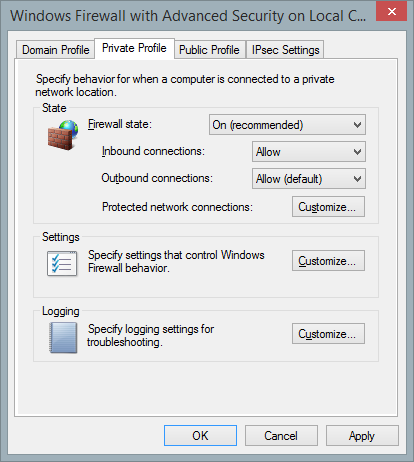
In addition to whatever the MP install routine does on its own, Windows Firewall was configured using the command line commands listed in the wiki for configuring it (i.e., I ran all the listed commands after doing a standard install). My hardware setup uses an HDHomeRun Prime as a capture device. I verified that Windows Firewall, after all I did, imposes no port or protocol constraints on TVService.exe for outbound connections. For inbound connections, there are no constraints on either UDP or TCP connections (I presume this means other protocols are constrained).
  • Watching live TV with Windows Firewall turned ON results in a tuner getting locked. You have to power cycle the Prime to clear it.
  • Watching live TV with Windows Firewall turned OFF does not lock a tuner. When you're done watching the live stream, the tuner is properly released.
  • Doing a scheduled recording with Windows Firewall turned ON does not lock a tuner. When the recording is finished, the tuner is properly released.
This shows that the firewall configuration is an issue. But it also shows that it doesn't have to be an issue, and that apparently tuner release is handled differently when doing a scheduled recording as compared to watching a live TV stream.

If I get some time I'll install wireshark and see if I can grab & upload some network activity logs.

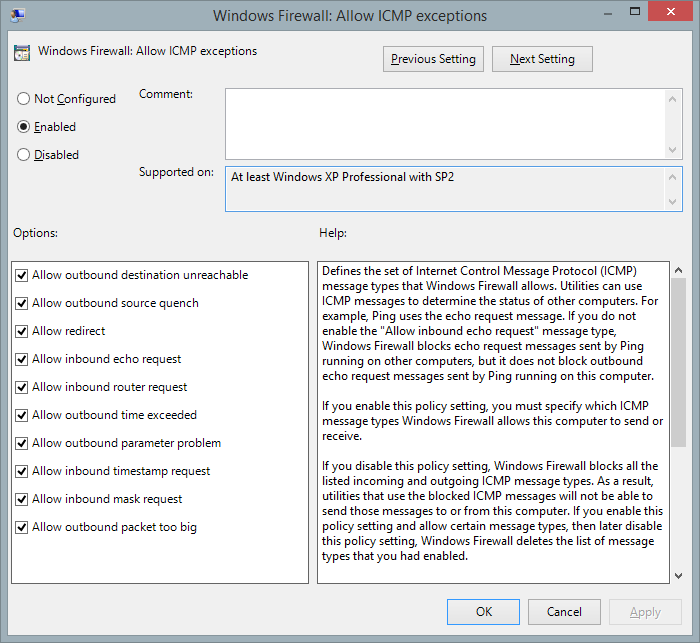
However for the third bullet, the tuner is only released when another recording is scheduled to record in my case. My firewall is configured to allow the passage of ICMP packets as seen here. Its weird because I tried using another PVR software, NPVR, and it seems to have no problems releasing any tuners at all. Assuming MediaPortal is using the same API, I don't see how the implementation could be that different.
2Fnb4Aw.png
 

mm1352000

Retired Team Member
  • Premium Supporter
  • September 1, 2008
    21,544
    8,236
    Home Country
    New Zealand New Zealand
    Hello again A Happy Cloud

    The ICMP firewall configuration looks good to me. Are you able to share how you get to that screen?

    However for the third bullet, the tuner is only released when another recording is scheduled to record in my case. My firewall is configured to allow the passage of ICMP packets as seen here. Its weird because I tried using another PVR software, NPVR, and it seems to have no problems releasing any tuners at all. Assuming MediaPortal is using the same API, I don't see how the implementation could be that different.
    That's just the thing - MediaPortal is not using the same API as N-PVR or HDHR QuickTV. We use the OCUR/DRI interface which is a generic interface for supporting CableCARD tuners. In theory it allows us to support all CableCARD tuners in the same way. N-PVR and HDHR QuickTV use libhdhomerun which (as I understand it) is a Silicondust proprietary interface. My understanding is that libhdhomerun supports Silicondust and Hauppauage CableCARD tuners, but not Ceton tuners (hence the requirement for SageDCT if you want to use a Ceton tuner with N-PVR).

    Unfortunately I am not at all familiar with libhdhomerun so I'm not able to speculate whether the difference in API is responsible for the difference in behaviour. I've sent off some questions to Silicondust about this. Hopefully I'll be able to share the response sometime next week.

    At this point I stand by my previous comment: there is no difference in the way we're releasing or not releasing tuners for timeshifting and recording. In order to investigate the difference that you're seeing I'd need:
    1. TV Server log files.
    2. Wireshark captures.
    3. Specific details about which timeshift and record sessions did or did not release tuners.
    I'm not trying to fob the issue off or make it difficult to get traction. It is just that this is an extremely technical issue, and the more information that we can get our hands on, the more chance we have of figuring out what is actually going on. I note I'm working in New Zealand with occasional remote access to one Ceton InfiniTV 4... when I can get internet access at home.

    Thanks for your persistence. :)
    mm
     

    mm1352000

    Retired Team Member
  • Premium Supporter
  • September 1, 2008
    21,544
    8,236
    Home Country
    New Zealand New Zealand
    Okay, scratch that.
    I received a very fast reply from Silicondust. We'd discussed this issue previously and discovered a configuration tweak which I had completely forgotten about.
    1. Open TV Server configuration.
    2. Click "open log directory" in the top left corner.
    3. Go up one level.
    4. Open MPIPTVSource.ini in any text editor (notepad, wordpad etc.).
    5. Find the RtspTeardownRequestTimeout parameter and set the value to 1000 ms (default is 100 ms).
    6. Save and close.
    7. Restart the TV service.
    Hopefully this should solve the problem without the need to mess around with ICMP settings in firewalls. I'm embarrassed and sorry for forgetting about this.

    mm
     

    A Happy Cloud

    Portal Member
    December 24, 2013
    31
    6
    32
    Home Country
    United States of America United States of America
    Okay, scratch that.
    I received a very fast reply from Silicondust. We'd discussed this issue previously and discovered a configuration tweak which I had completely forgotten about.
    1. Open TV Server configuration.
    2. Click "open log directory" in the top left corner.
    3. Go up one level.
    4. Open MPIPTVSource.ini in any text editor (notepad, wordpad etc.).
    5. Find the RtspTeardownRequestTimeout parameter and set the value to 1000 ms (default is 100 ms).
    6. Save and close.
    7. Restart the TV service.
    Hopefully this should solve the problem without the need to mess around with ICMP settings in firewalls. I'm embarrassed and sorry for forgetting about this.
    mm

    First off, incase your still interested as to how I got to those settings from my previous post, I did this. I went to Run -> typed in "gpedit.msc" without the quotes of course. I think it may only work on versions of Windows that are Professional or higher but Microsoft may have changed it up. Afterwards under Computer Configuration, I expanded Administrative Templates and then Network. After that, I expanded Network Connections and then Windows Firewall. From there I went into both the Domain and Standard Profile and clicked on Windows Firewall: Allow ICMP exceptions. From there you should be prompted with the Window I posted above and I simply checked everything. Of course, that didn't seem to fix anything.

    Alright, so I modified the parameter as you suggested however it appears to have had no effect. In fact, I don't think the issue is so much with the timeout rather than how the packet is delivered. In my previous tests, I would cancel a recording or have one finish recording and the tuner wouldn't be freed. I would wait 5 minutes and it still wouldn't be freed. I could go into the Advanced Properties of Windows Firewall and set everything on the Domain, Private, and Public profile to allow and it still wouldn't be freed. However, the moment I change the firewall state to off, the tuner is immediately freed. So this leads me to believe that this is either purely a firewall configuration issue or that perhaps somehow the way the packet is encapsulated that the firewall doesn't allow it to pass through.

    As for the Argus log, I was led to believe this portion of the log showed the request for the tuner to be released.
    Code:
    [2014-02-06 23:43:28,969] [Log  ] [Record  ] [INFO ] - card: StopRecording card=3, user=ArgusTV78
    [2014-02-06 23:43:28,971] [Log  ] [Record  ] [INFO ] - basesubchannel.StopRecording 0
    [2014-02-06 23:43:28,972] [Log  ] [Record  ] [INFO ] - tvdvbchannel.OnStopRecording subch=0, subch index=0
    [2014-02-06 23:43:28,974] [Log  ] [Record  ] [INFO ] - tvdvbchannel.OnStopRecording subch:0-0 tswriter StopRecording...
    [2014-02-06 23:43:28,976] [Log  ] [Record  ] [INFO ] - tvcard:FreeSubChannel: subchannels count 1 subch#0
    [2014-02-06 23:43:28,978] [Log  ] [Record  ] [INFO ] - DVB subch:0 Decompose()
    [2014-02-06 23:43:28,980] [Log  ] [Record  ] [INFO ] - FreeSubChannel CA: freeing sub channel : 0
    [2014-02-06 23:43:28,982] [Log  ] [Record  ] [INFO ] - tvcard:FreeSubChannel : no subchannels present, pausing graph
    [2014-02-06 23:43:28,995] [Log  ] [Record  ] [INFO ] - dvb:StopGraph called
    [2014-02-06 23:43:28,997] [Log  ] [Record  ] [INFO ] - tvcard:FreeAllSubChannels
    [2014-02-06 23:43:28,999] [Log  ] [Record  ] [INFO ] - dvb:StopGraph
    Maybe I misinterpreted it but Argus was just 1 of 3 test cases. My test case with the MediaPortal client and XBMC reached the same result as Argus. I'll try to post detailed logs for each test case this weekend when I can be sure everything is in a controlled environment.
    If I have time, I'll try to post a wireshark log and perhaps even a video displaying my findings. Also I'll reference the firewall settings I discussed with a picture below. By the way, thanks for all the help you've provided so far. You've definitely gone more than out of your way to help us resolve this issue. I definitely realize the extremely technical nature of this issue and that the solution may not be so trivial.

    SDY5Tii.png


    Edit: Just realized the portion of the log I posted above was from a more recent log using Argus. It's almost the same as what was in the previous log. I've just attached it for reference.

    Edit 2: Oh, and here's the corresponding Argus log.
     
    Last edited:

    mm1352000

    Retired Team Member
  • Premium Supporter
  • September 1, 2008
    21,544
    8,236
    Home Country
    New Zealand New Zealand
    First off, incase your still interested...
    Thanks! :)

    Alright, so I modified the parameter as you suggested however it appears to have had no effect.
    ...and to be 100% sure, you also restarted the MediaPortal TV service after doing that, right? (The setting change most likely won't take effect until you do that.)

    It does not hurt to increase the setting. You could try 5000 or even 10000 (10 seconds).

    In fact, I don't think the issue is so much with the timeout rather than how the packet is delivered. In my previous tests, I would cancel a recording or have one finish recording and the tuner wouldn't be freed. I would wait 5 minutes and it still wouldn't be freed. I could go into the Advanced Properties of Windows Firewall and set everything on the Domain, Private, and Public profile to allow and it still wouldn't be freed. However, the moment I change the firewall state to off, the tuner is immediately freed. So this leads me to believe that this is either purely a firewall configuration issue or that perhaps somehow the way the packet is encapsulated that the firewall doesn't allow it to pass through.
    Okay.
    Jason from Silicondust told me tuner locking and unlocking does depend on the API:
    • libhdhomerun gives complete control over when you lock and unlock the tuners. You can arbitrarily lock or unlock the tuner at any time.
    • When using DRI/RTSP, the tuner is automatically locked when you tune (CAS service SetChannel action) and unlocked when the RTSP TEARDOWN is received.
    • The ICMP unlock is a backup for cases where the application doesn't directly control the tuner (eg. UDP streaming to VLC).
    TV Server should not be relying on the ICMP unlock. In your example: if a recording finishes, the tuner should be freed immediately. Anything less than that indicates non-optimal operation.

    Normally changing firewall or other settings after a tuner is locked shouldn't make any difference because TV Server does not periodically attempt to unlock. The only attempt TV Server intentionally makes to unlock is when the tuner goes idle (ie. when the recording finishes).

    My guess is that your tuner is unlocking when you take the firewall down because the tuner suddenly realises that it is streaming into a black hole. Nobody is listening on the other end of the stream. It unlocks via the ICMP method. Note again that ICMP is not the preferred way for TV Server to be unlocking tuners.

    As for the Argus log, I was led to believe this portion of the log showed the request for the tuner to be released.
    Code:
    [2014-02-06 23:43:28,969] [Log  ] [Record  ] [INFO ] - card: StopRecording card=3, user=ArgusTV78
    [2014-02-06 23:43:28,971] [Log  ] [Record  ] [INFO ] - basesubchannel.StopRecording 0
    [2014-02-06 23:43:28,972] [Log  ] [Record  ] [INFO ] - tvdvbchannel.OnStopRecording subch=0, subch index=0
    [2014-02-06 23:43:28,974] [Log  ] [Record  ] [INFO ] - tvdvbchannel.OnStopRecording subch:0-0 tswriter StopRecording...
    [2014-02-06 23:43:28,976] [Log  ] [Record  ] [INFO ] - tvcard:FreeSubChannel: subchannels count 1 subch#0
    [2014-02-06 23:43:28,978] [Log  ] [Record  ] [INFO ] - DVB subch:0 Decompose()
    [2014-02-06 23:43:28,980] [Log  ] [Record  ] [INFO ] - FreeSubChannel CA: freeing sub channel : 0
    [2014-02-06 23:43:28,982] [Log  ] [Record  ] [INFO ] - tvcard:FreeSubChannel : no subchannels present, pausing graph
    [2014-02-06 23:43:28,995] [Log  ] [Record  ] [INFO ] - dvb:StopGraph called
    [2014-02-06 23:43:28,997] [Log  ] [Record  ] [INFO ] - tvcard:FreeAllSubChannels
    [2014-02-06 23:43:28,999] [Log  ] [Record  ] [INFO ] - dvb:StopGraph
    Maybe I misinterpreted it but Argus was just 1 of 3 test cases. My test case with the MediaPortal client and XBMC reached the same result as Argus. I'll try to post detailed logs for each test case this weekend when I can be sure everything is in a controlled environment.
    I think you're a little mixed up here.
    The log section you've posted is from MediaPortal's TV Server main log file, not from Argus... but you're right that the tuner should be unlocked when you see that section.
    Based on the "user=ArgusTV78" section, I think MediaPortal and XBMC are both going through ARGUS which is in turn in controlling the tuners via MediaPortal's TV Server. In other words, I don't think it would matter whether you use MediaPortal or XBMC.

    If I have time, I'll try to post a wireshark log and perhaps even a video displaying my findings.
    That would be great. :)

    By the way, thanks for all the help you've provided so far. You've definitely gone more than out of your way to help us resolve this issue. I definitely realize the extremely technical nature of this issue and that the solution may not be so trivial.
    Happy to help. :)

    mm
     

    A Happy Cloud

    Portal Member
    December 24, 2013
    31
    6
    32
    Home Country
    United States of America United States of America
    Alright, so I modified the parameter as you suggested however it appears to have had no effect.
    ...and to be 100% sure, you also restarted the MediaPortal TV service after doing that, right? (The setting change most likely won't take effect until you do that.)

    It does not hurt to increase the setting. You could try 5000 or even 10000 (10 seconds).

    Yup, at first I restarted the service using Manual Control in the TV-Server Configuration but that didn't seem to work. Then I decided to restart my computer to be completely sure the service restarted. That also didn't work. I just tried it with 5000 and 10000 ms and it doesn't seem to make a difference.

    • When using DRI/RTSP, the tuner is automatically locked when you tune (CAS service SetChannel action) and unlocked when the RTSP TEARDOWN is received.
    • The ICMP unlock is a backup for cases where the application doesn't directly control the tuner (eg. UDP streaming to VLC).

    If the ICMP unlock is used as a backup, it is clear that for some reason, the HDHR Prime is not receiving the RTSP TEARDOWN. Because your right, whenever I disable my firewall and my tuner is free, looking at my Wireshark logs from previous tests indicates that an ICMP packet of length 590 with error code 3 is almost immediately sent with Destination Unreachable. Of course, I will show you this with actual logs this weekend.

    I think you're a little mixed up here.
    The log section you've posted is from MediaPortal's TV Server main log file, not from Argus... but you're right that the tuner should be unlocked when you see that section.
    Based on the "user=ArgusTV78" section, I think MediaPortal and XBMC are both going through ARGUS which is in turn in controlling the tuners via MediaPortal's TV Server. In other words, I don't think it would matter whether you use MediaPortal or XBMC.

    Yeah, I had updated my last post with the only log I could find from Argus other than the GuideImporter. Doesn't really provide much insight as far as I could tell which is why I only really use the MediaPortal log. When I was testing with XBMC, I was using the TVServer plugin which I would hope doesn't go through Argus. If that's the case, I will have to do the testing with Argus uninstalled.
     
    Last edited:

    mm1352000

    Retired Team Member
  • Premium Supporter
  • September 1, 2008
    21,544
    8,236
    Home Country
    New Zealand New Zealand
    Yup, at first I restarted the service using Manual Control in the TV-Server Configuration but that didn't seem to work. Then I decided to restart my computer to be completely sure the service restarted. That also didn't work. I just tried it with 5000 and 10000 ms and it doesn't seem to make a difference.
    Okay, thanks for confirming.

    If the ICMP unlock is used as a backup, it is clear that for some reason, the HDHR Prime is not receiving the RTSP TEARDOWN. Because your right, whenever I disable my firewall and my tuner is free, looking at my Wireshark logs from previous tests indicates that an ICMP packet of length 590 with error code 3 is almost immediately sent with Destination Unreachable.
    Agreed.

    Of course, I will show you this with actual logs this weekend.
    Thanks. (y)
    I note that the concurrent wireshark trace, TVService.log and MPIPTVSource.log files will be the critical files that I'll be looking for. The TV service log file will show whether TV Server was told to release the tuner; the other two will show whether the release (RTSP TEARDOWN) was actually sent.

    mm
     

    A Happy Cloud

    Portal Member
    December 24, 2013
    31
    6
    32
    Home Country
    United States of America United States of America
    Well here are the trace/log files for test case 1. This was done using a clean install of Windows 8.1 x64, all Windows Updates, and Windows Firewall updated to allow inbound and outbound ICMP packets. The wireshark log I've attached is from a short test I ran reproducing the issue. The size of the wirshark log from the extensive test was far to big to attach here. If you do however need it, feel free to request it and I will upload it to another host. If you look at the logs, the firewall was turned off at approximately the same time the ICMP packet of length 590 was sent. Keep in mind, after I turned off the tv in the MediaPortal client, I waited at least 10 seconds before turning off the firewall. If you look at the wireshark trace, the HDHR Prime is still sending the Transport Stream, potentially indicating that it never received the command to free the tuner. Hopefully this is enough to draw conclusions from.
     
    Last edited:

    mm1352000

    Retired Team Member
  • Premium Supporter
  • September 1, 2008
    21,544
    8,236
    Home Country
    New Zealand New Zealand
    Thanks :)

    So just looking through everything now...
    Looks like you attempted 24 tune requests (AKA channel changes) over roughly 15 minutes. Of those 24, the Wireshark trace only shows me the last one in full. Based on my analysis, I think I'd be correct to assume that the tuner is left locked after that last attempt to view WCBS (channel 2).

    If you are familiar with Wireshark, you can see exactly what I'm looking at by opening the snippet you uploaded, adding ",4444,50560-50585" to the HTTP TCP ports list in preferences (edit > preferences... > protocols > HTTP > TCP ports), and applying the filter "(ip.dst == 192.168.1.163 or ip.src == 192.168.1.163) and (http or rtsp or rtcp or icmp)". To follow along easily, you might also want to configure your columns (right click on column headers > column preferences...) to show the number, time (and/or absolute time and date), source address, destination address, protocol, source port, destination port and information fields.

    At time 2.92 (Wireshark reference time - time 0 - is when the capture started, approximately 20:52:30 your time) packet 74 I see the first request to AVTransport GetTransportInfo() which is to check if any other process might be using the tuner. We get the result back and see that the CurrentTransportState is STOPPED. Okay - so nobody else is actively using the tuner and we are good to go ahead and tune. Tuning is the CAS SetChannel() and AVTransport Play() + RTSP OPTIONS, DESCRIBE, SETUP and PLAY requests. At time ~3.06 the tuner is streaming channel 2. Excellent.

    After this you see Tuner GetTunerParameters() requests every second or so. Presumably this is because you're following things in the manual control section of TV Server configuration. These requests are TV Server grabbing the tuner signal strength and quality details. The other thing to note is the RTCP receiver report and ICMP destination unreachable responses bouncing back to 192.168.1.217 (the server) every few seconds. These are normal RTCP requests that TV Server is sending to the PRIME. Obviously the PRIME doesn't support RTCP. No problem - these can be ignored.

    At 13.90 packet 4803 we see an AVTransport Stop() request come through as TV Server is asked to release the tuner. That request is acknowledged with an HTTP 200 OK response. Immediately following that at 13.93, we see RTSP TEARDOWN (packet 4819) and RTCP goodbye (packet 4832) requests go out. We also see an ICMP destination unreachable packet (4833) bounce back to TV Server. That corresponds with the RTCP goodbye.

    At this point from TV Server's perspective the tuner should have stopped streaming and unlocked... but it looks like it hasn't. We can see this by modifying the filter to be "(ip.dst == 192.168.1.163 or ip.src == 192.168.1.163) and (http or rtsp or rtcp or rtp or icmp)". RTP is the streamed video and audio data.

    Finally, at 27.62 we see a final ICMP destination unreachable packet (10406) bounced to the PRIME, presumably at the point where you take down the firewall. Streaming stops.

    Executive summary: TV Server definitely attempts to stop and unlock the tuner, and as part of that process it definitely sends an RTSP TEARDOWN. In other words, I think tuner 3 (PRIME tuner 1319F623-0) should be unlocked.

    Obviously we're interested to know why the PRIME is not unlocked. What can we see?
    Well, when I apply the filter "(!rtp or icmp) and ip.addr == 192.168.1.163" I see all non-streaming traffic between the server PC and the PRIME.

    I see a bunch of TCP packets exchanged between ports 49588 and 65001 every second or so. As far as I can tell this is HDHR Config using libhdhomerun to monitor the tuner status. Presumably this is not keeping the tuner locked... though I guess you never know.

    To ignore the HDHR Config packets I apply the filter "(!rtp or icmp) and (!tcp or (tcp.dstport != 49588 and tcp.dstport != 65001)) and (ip.dst == 192.168.1.163 or ip.src == 192.168.1.163)".

    I don't see anything obviously interesting here aside from packet 10578... which I can't explain.

    Of note is that packets 4820 and 4837 appear to show that the PRIME acknowledges the RTSP TEARDOWN.
    Also, the RTSP TEARDOWN session ID (38300) corresponds with the session ID returned in the RTSP SETUP response (packet 38300).

    In short, I have no idea why the PRIME doesn't stop streaming unless the information I have about tuner locking and unlocking is incorrect.

    I've asked Jason from Silicondust to assist me to figure out what is going on. In the meantime, thank you for your patience and the information. Please sit tight while we investigate further...

    mm
     

    A Happy Cloud

    Portal Member
    December 24, 2013
    31
    6
    32
    Home Country
    United States of America United States of America
    Thanks :)

    So just looking through everything now...
    Looks like you attempted 24 tune requests (AKA channel changes) over roughly 15 minutes. Of those 24, the Wireshark trace only shows me the last one in full. Based on my analysis, I think I'd be correct to assume that the tuner is left locked after that last attempt to view WCBS (channel 2).

    If you are familiar with Wireshark, you can see exactly what I'm looking at by opening the snippet you uploaded, adding ",4444,50560-50585" to the HTTP TCP ports list in preferences (edit > preferences... > protocols > HTTP > TCP ports), and applying the filter "(ip.dst == 192.168.1.163 or ip.src == 192.168.1.163) and (http or rtsp or rtcp or icmp)". To follow along easily, you might also want to configure your columns (right click on column headers > column preferences...) to show the number, time (and/or absolute time and date), source address, destination address, protocol, source port, destination port and information fields.

    At time 2.92 (Wireshark reference time - time 0 - is when the capture started, approximately 20:52:30 your time) packet 74 I see the first request to AVTransport GetTransportInfo() which is to check if any other process might be using the tuner. We get the result back and see that the CurrentTransportState is STOPPED. Okay - so nobody else is actively using the tuner and we are good to go ahead and tune. Tuning is the CAS SetChannel() and AVTransport Play() + RTSP OPTIONS, DESCRIBE, SETUP and PLAY requests. At time ~3.06 the tuner is streaming channel 2. Excellent.

    After this you see Tuner GetTunerParameters() requests every second or so. Presumably this is because you're following things in the manual control section of TV Server configuration. These requests are TV Server grabbing the tuner signal strength and quality details. The other thing to note is the RTCP receiver report and ICMP destination unreachable responses bouncing back to 192.168.1.217 (the server) every few seconds. These are normal RTCP requests that TV Server is sending to the PRIME. Obviously the PRIME doesn't support RTCP. No problem - these can be ignored.

    At 13.90 packet 4803 we see an AVTransport Stop() request come through as TV Server is asked to release the tuner. That request is acknowledged with an HTTP 200 OK response. Immediately following that at 13.93, we see RTSP TEARDOWN (packet 4819) and RTCP goodbye (packet 4832) requests go out. We also see an ICMP destination unreachable packet (4833) bounce back to TV Server. That corresponds with the RTCP goodbye.

    At this point from TV Server's perspective the tuner should have stopped streaming and unlocked... but it looks like it hasn't. We can see this by modifying the filter to be "(ip.dst == 192.168.1.163 or ip.src == 192.168.1.163) and (http or rtsp or rtcp or rtp or icmp)". RTP is the streamed video and audio data.

    Finally, at 27.62 we see a final ICMP destination unreachable packet (10406) bounced to the PRIME, presumably at the point where you take down the firewall. Streaming stops.

    Executive summary: TV Server definitely attempts to stop and unlock the tuner, and as part of that process it definitely sends an RTSP TEARDOWN. In other words, I think tuner 3 (PRIME tuner 1319F623-0) should be unlocked.

    Obviously we're interested to know why the PRIME is not unlocked. What can we see?
    Well, when I apply the filter "(!rtp or icmp) and ip.addr == 192.168.1.163" I see all non-streaming traffic between the server PC and the PRIME.

    I see a bunch of TCP packets exchanged between ports 49588 and 65001 every second or so. As far as I can tell this is HDHR Config using libhdhomerun to monitor the tuner status. Presumably this is not keeping the tuner locked... though I guess you never know.

    To ignore the HDHR Config packets I apply the filter "(!rtp or icmp) and (!tcp or (tcp.dstport != 49588 and tcp.dstport != 65001)) and (ip.dst == 192.168.1.163 or ip.src == 192.168.1.163)".

    I don't see anything obviously interesting here aside from packet 10578... which I can't explain.

    Of note is that packets 4820 and 4837 appear to show that the PRIME acknowledges the RTSP TEARDOWN.
    Also, the RTSP TEARDOWN session ID (38300) corresponds with the session ID returned in the RTSP SETUP response (packet 38300).

    In short, I have no idea why the PRIME doesn't stop streaming unless the information I have about tuner locking and unlocking is incorrect.

    I've asked Jason from Silicondust to assist me to figure out what is going on. In the meantime, thank you for your patience and the information. Please sit tight while we investigate further...

    mm

    Yup, you pretty much came to the same conclusion as I have. And yeah, the trace only showed the last one since I would have to upload a ~330 MB file to show the other 23. All of your assumptions are correct. I was using TV-Server Configuration and HDHomeRun Prime configuration to monitor the tuners as I was conducting the tests. I don't believe the HDHR Config is keeping the tuner locked, at least based on my previous tests where I had no monitors running. Thanks for investigating this and I will wait patiently while Jason assists you in this matter.
     

    Users who are viewing this thread

    Top Bottom