United Kingdom
MediaPortal Version: 1.0
MediaPortal Skin: Blue 3 Wide
Windows Version: Windows XP SP3
CPU Type: Intel Core 2 Duo e6600
HDD: 3 TB
Memory: 2 GB
Motherboard: Asus P5B
Video Card: ATI Radeon X1900XT
Video Card Driver: Catalyst v8.11
Sound Card: M-Audio Rev. 5.1
Sound Card AC3: Coax Out
Sound Card Driver:
1. TV Card: Hauppauge Nova HD S2
1. TV Card Type: DVB-S
1. TV Card Driver: BDA v4.8
MPEG2 Video Codec: PDVD 8
MPEG2 Audio Codec: AC3 Filter
h.264 Video Codec: CoreAVC
Satelite/CableTV Provider:
HTPC Case: Antec 180B
Cooling:
Power Supply:
Remote: USBUIRT IR Receiver / Harmony 525
TV: Panasonic TH-42PZ70
TV - HTPC Connection: DVI > HDMI
I live in a building made up of 14 flats. We have a Sky dish installed somewhere as the previous owners had Sky. I'm trying to scan for Freesat (Astra 28.2E) channels but failing. My Signal Level is 100% but Signal Quality is always 0% and I keep getting red "no signal" errors.
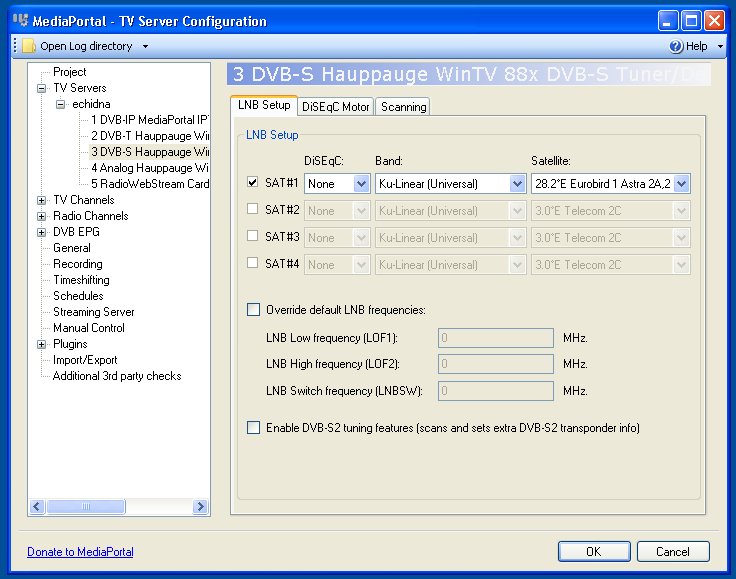
I imagine this is something to do with the LNB setup settings, I have no idea what to enter and whether it makes a difference... Anyone able to assist please?
MediaPortal Skin: Blue 3 Wide
Windows Version: Windows XP SP3
CPU Type: Intel Core 2 Duo e6600
HDD: 3 TB
Memory: 2 GB
Motherboard: Asus P5B
Video Card: ATI Radeon X1900XT
Video Card Driver: Catalyst v8.11
Sound Card: M-Audio Rev. 5.1
Sound Card AC3: Coax Out
Sound Card Driver:
1. TV Card: Hauppauge Nova HD S2
1. TV Card Type: DVB-S
1. TV Card Driver: BDA v4.8
MPEG2 Video Codec: PDVD 8
MPEG2 Audio Codec: AC3 Filter
h.264 Video Codec: CoreAVC
Satelite/CableTV Provider:
HTPC Case: Antec 180B
Cooling:
Power Supply:
Remote: USBUIRT IR Receiver / Harmony 525
TV: Panasonic TH-42PZ70
TV - HTPC Connection: DVI > HDMI
I live in a building made up of 14 flats. We have a Sky dish installed somewhere as the previous owners had Sky. I'm trying to scan for Freesat (Astra 28.2E) channels but failing. My Signal Level is 100% but Signal Quality is always 0% and I keep getting red "no signal" errors.
I imagine this is something to do with the LNB setup settings, I have no idea what to enter and whether it makes a difference... Anyone able to assist please?