
Improving DVD video playback (3 Viewers)

Valdemar

Portal Member
February 16, 2008
31
0
Home Country
United States of America United States of America
Hi,

Is there an agreed upon preferred combination of players, codecs, settings for playing standard DVD's? I'm outputting video via component to a DLP projector with 1024x768 native resolution, didn't play with codec settings, have ffdshow for DVD video set in MP config, and while the quality is acceptable it is inferior to what I can get from my couple-years old progressive Sony DVD player in terms of clarity and colors. I'm using a 690g mobo with an integrated x1250 video chip from ATI under XP Pro. Thanks.

V.
 

Valdemar

Portal Member
February 16, 2008
31
0
Home Country
United States of America United States of America
Play around with the ffdshow settings. They work wonders.

Frankly speaking I get somewhat intimidated when I look at them :) Well, they sort make sense but there are just too many. What would be the ones to look at in the order of importance?
 

NewUser

Portal Pro
January 8, 2008
91
2
Home Country
New Zealand New Zealand
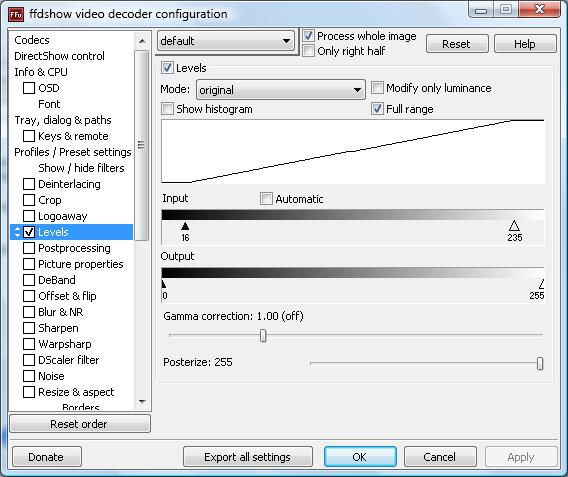
The main thing is the colorspace. For your projector do you know if it uses a TV colorspace (16-235) or Computer monitor colorspace (0-255)?

If its the later, colors will look washed out as dvds are set to the tv colorspace. You need to adjust the levels in the levels section of ffdshow to make blacks blacker than black and whites whiter than white.

Here is a screenshot of my levels setting in ffdshow. If you don't know what the other does, its best to leave them alone.

That should solve the color issue. As for clarity, you will need to dive in further into the resizing/post processing/blurring/sharpening. If you don't know what to do, messing with these settings will have a worse outcome.

But always fix the levels to get that color a stand alone dvd gives.
 

Attachments

  • levels.jpg
    levels.jpg
    54 KB

Valdemar

Portal Member
February 16, 2008
31
0
Home Country
United States of America United States of America
Thanks, these are very good starting points. Right now my problem is that ffdshow is not used for DVD playback. I did have it selected as video decoder in MP config but realized that its icon is not showing in the system tray during playback, poked around, looked at the log files and it turned out MP failed to load it and somehow defaulted to Cyberlink. I had k-lite codec pack which I then uninstalled, reinstalled latest fddshow standalone but now MP refuses to play DVDs. Windows media player can play DVDs but still no fddshow video decoder icon, only audio. So I'm up to more forum searching tomorrow as too fed up for today, hopefully will find an answer. I think the level tweak will do it as this is more of a computer projector than home theater and likely has 0-255 colorspace, but before that need to get that codec running
wall.gif
.
 

Valdemar

Portal Member
February 16, 2008
31
0
Home Country
United States of America United States of America
Looks like I finally sorted things out. Colorspace was the thing and with NU's suggestion everything is looking much more satisfying now :) I also enabled unsharp mask and the picture is very nice, as much as my cheapo projector allows anyway. Likely can make it even better with more post-processing/upscaling tricks - my next step.

Regarding MPEG-2 codecs, are there any benefits in using codecs other than MPV? I only have MPV now as I uninstalled k-lite pack. Tried ffdshow codec but it didn't work too well for me.
 

NewUser

Portal Pro
January 8, 2008
91
2
Home Country
New Zealand New Zealand
"Messing" with the postprocessing/resize/blur and sharpen is the "fun" part. I have spent 2 days on it to finally get it the way I like it.


There are guides found on the net and also the one suggested by the MP FAQ. However I have found them to be too aggressive in some cases or too subtle. Finer details are lost and on low quality videos, everyone looked to have clayfaces. Then again it depends on your taste, how far you sit and how big is the screen and the quality of the video file. No one guide can fully cover all conditions. Its best to start with the MP FAQ as linked above and go on from there. Adjusting and seeing the difference, write down on paper. Bascially a trial and error test. (thats how I found out how to do the color correction)

Good luck and have fun.

As for MPEG-2, MPV is fine. You can put FFDShow to postprocess after if you wish.
 

Valdemar

Portal Member
February 16, 2008
31
0
Home Country
United States of America United States of America
One thing that is still not quite clear to me is why my standalone DVD player had good colors on the same projector, do set-top players usually output in 0-255 colorspace?
 

Users who are viewing this thread

Top Bottom